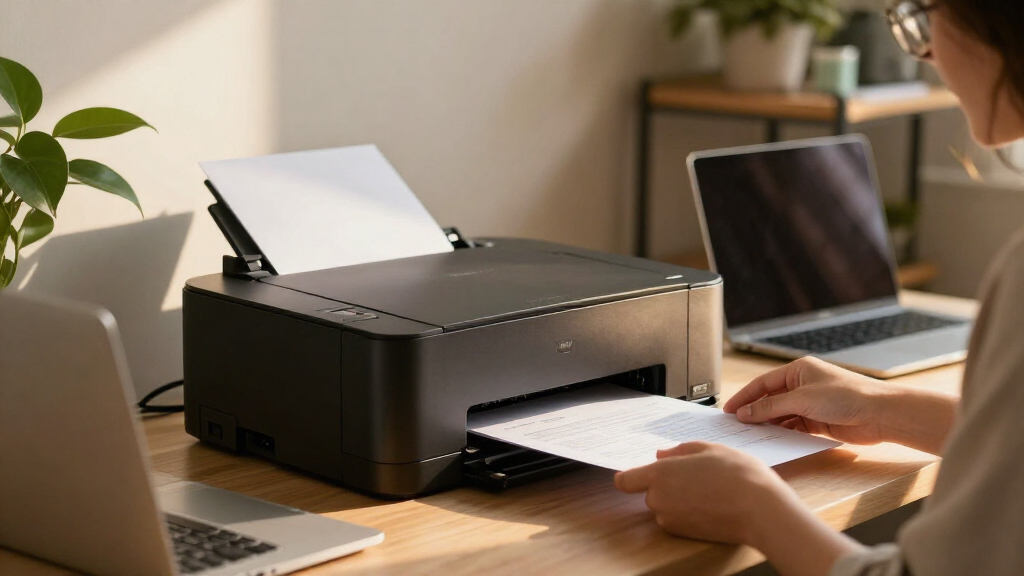

The Brother HL-L2460DW is my best overall pick among compact laser printers for home offices, balancing a small footprint with wireless printing and automatic two-sided output. For a color option, the Brother HL-L3280CDW adds duplex printing and mobile features, while the HP LaserJet M140w is a space-saving choice if you also need to scan and copy. The main tradeoffs are monochrome simplicity versus color versatility, and a smaller printer footprint versus the extra space and upkeep of an all-in-one. Read on for how all 12 models compare and which one best fits your desk, workload, and document needs.

Get business pricing on your home office setup
- Business-only prices and quantity discounts
- Tax-exempt purchasing
- Multiple users, one account, clear invoices
Complete the kit


Key Takeaways
- The Brother HL-L2460DW leads as the most balanced everyday pick: it combines wireless printing, automatic duplexing, and a compact monochrome design without adding scanning hardware.
- Color models serve a different need, not just a nicer feature set: the Xerox C240 and Brother HL-L3280CDW suit home offices that regularly print color charts, graphics, or client-facing pages, but take more space than basic monochrome printers.
- All-in-one features can save desk space elsewhere: the HP LaserJet MFP M140w, Brother DCP-L2640DW, and Brother MFC-L2820DW add scanning and copying, making them more useful for paper-heavy tasks than print-only models.
- Automatic duplexing separates practical daily picks from simpler compact models: it cuts manual page handling for frequent two-sided jobs, while printers such as the Canon imageCLASS LBP6030w prioritize a more basic print setup.
- The smallest printer is not automatically the best home-office fit: the HP LaserJet M110w favors a minimal footprint, while models with duplexing, scanning, or broader connectivity may be easier to live with as needs grow.
| Xerox C240 Wireless Color Laser Printer |  | Best for Color and Specialty Media | Printer type: Laser | Functions: Print only | Output: Color | VIEW LATEST PRICE | See Our Full Breakdown |
| Canon imageCLASS LBP122dw Wireless Monochrome Duplex Laser Printer |  | Best Compact Pick for Fast Monochrome Printing | Printer type: Laser | Output: Monochrome | Functions: Print only | VIEW LATEST PRICE | See Our Full Breakdown |
| HP LaserJet MFP M140w Wireless Monochrome Printer |  | Best for Home-Office Scanning and Copying | Printer type: Laser | Output: Monochrome | Functions: Print, scan, copy | VIEW LATEST PRICE | See Our Full Breakdown |
| Brother HL-L2460DW Compact Wireless Monochrome Laser Printer |  | Best for Busy Home Offices | Print type: Monochrome laser | Print speed: Up to 36 pages per minute | Connectivity: Dual-band Wi-Fi, Ethernet, USB 2.0 | VIEW LATEST PRICE | See Our Full Breakdown |
| Brother HL-L2405W Wireless Compact Monochrome Laser Printer |  | Best for Simple Wireless Printing | Print type: Monochrome laser | Print speed: Up to 30 pages per minute, one-sided | Connectivity: Dual-band Wi-Fi, USB 2.0 | VIEW LATEST PRICE | See Our Full Breakdown |
| HP LaserJet M207dw Monochrome Laser Printer with Automatic Duplex Printing |  | Best for Fast Duplex Printing | Printer type: Monochrome laser, print only | Print speed: Up to 28 pages per minute | Resolution: 600 x 600 dpi | VIEW LATEST PRICE | See Our Full Breakdown |
| Brother HL-L3280CDW Wireless Color Laser Printer with Duplex and Mobile Printing | 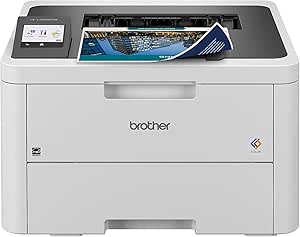 | Best for Compact Color Printing | Printer type: Color laser | Print speed: Up to 27 pages per minute | Duplex printing: Automatic | VIEW LATEST PRICE | See Our Full Breakdown |
| HP LaserJet M110w Monochrome Laser Printer |  | Best for the Smallest Workspaces | Printer type: Monochrome laser | Print speed: Up to 21 pages per minute | Resolution: 600 x 600 dpi | VIEW LATEST PRICE | See Our Full Breakdown |
| Brother DCP-L2640DW Wireless Monochrome Multifunction Laser Printer |  | Best Multifunction Pick | Functions: Print, scan, copy | Printer type: Monochrome laser | Print speed: Up to 36 pages per minute | VIEW LATEST PRICE | See Our Full Breakdown |
| Canon imageCLASS LBP6030w Wireless Monochrome Laser Printer |  | Best for Simple, Space-Saving Printing | Printer type: Monochrome laser | Functions: Print only | Print speed: Up to 19 pages per minute | VIEW LATEST PRICE | See Our Full Breakdown |
| Canon Color imageCLASS LBP646Cdw Wireless Color Laser Printer |  | Best for Compact Color Printing | Printer type: Color laser | Functions: Print only | Print speed: Up to 26 pages per minute | VIEW LATEST PRICE | See Our Full Breakdown |
| Brother MFC-L2820DW Wireless Monochrome All-in-One Laser Printer | 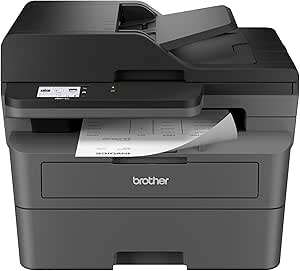 | Best Compact Monochrome All-in-One | Print technology: Monochrome laser | Functions: Print, copy, scan, fax | Print speed: Up to 36 pages per minute | VIEW LATEST PRICE | See Our Full Breakdown |
| compact laser printers for home office | Print speed | Connectivity | Printer type | Functions |
|---|---|---|---|---|
| Xerox C240 Wireless Color Lase | Up to 26 pages per minute | Dual-band Wi-Fi, Apple AirPrint, Mopria | Laser | Print only |
| Canon imageCLASS LBP122dw Wire | Up to 30 pages per minute | Wi-Fi, USB, Ethernet | Laser | Print only |
| HP LaserJet MFP M140w Wireless | Up to 21 pages per minute | USB 2.0, wireless | Laser | Print, scan, copy |
| Brother HL-L2460DW Compact Wir | Up to 36 pages per minute | Dual-band Wi-Fi, Ethernet, USB 2.0 | — | — |
| Brother HL-L2405W Wireless Com | Up to 30 pages per minute, one-sided | Dual-band Wi-Fi, USB 2.0 | — | — |
| HP LaserJet M207dw Monochrome | Up to 28 pages per minute | Dual-band Wi-Fi, Ethernet, USB 2.0 | Monochrome laser, print only | — |
| Brother HL-L3280CDW Wireless C | Up to 27 pages per minute | Dual-band wireless, Ethernet | Color laser | — |
| HP LaserJet M110w Monochrome L | Up to 21 pages per minute | USB, wireless | Monochrome laser | — |
| Brother DCP-L2640DW Wireless M | Up to 36 pages per minute | Dual-band wireless, Ethernet, USB 2.0 | Monochrome laser | Print, scan, copy |
| Canon imageCLASS LBP6030w Wire | Up to 19 pages per minute | Wi-Fi, USB 2.0 | Monochrome laser | Print only |
| Canon Color imageCLASS LBP646C | Up to 26 pages per minute | Wi-Fi, USB, Ethernet | Color laser | Print only |
| Brother MFC-L2820DW Wireless M | Up to 36 pages per minute | Dual-band Wi-Fi (2.4 GHz/5 GHz), Ethernet, USB 2.0 | — | Print, copy, scan, fax |
More Details on Our Top Picks
Xerox C240 Wireless Color Laser Printer
The Xerox C240 is the clearest fit here for a home office that needs color without giving up brisk document printing: it reaches 26 pages per minute in both color and black and white, and handles labels, envelopes, and card stock. That range makes it more adaptable for occasional mailers or handouts than the monochrome Brother HL-L2460DW. Dual-band Wi-Fi, AirPrint, Mopria, and a touch screen offer several ways to print and manage jobs, while automatic duplexing can cut paper use.
The tradeoff is its footprint and weight: at 35.9 pounds, it is much less convenient to move than the 12.4-pound Canon imageCLASS LBP122dw. It also prints only, so scanning and copying require separate equipment, and the listed standard-yield toner suits lighter workloads better than sustained high-volume color printing.
Pros:- Prints color and monochrome pages at up to 26 pages per minute.
- Supports dual-band Wi-Fi, Apple AirPrint, and Mopria.
- Automatic duplexing helps reduce paper use.
- Handles envelopes, labels, card stock, and glossy photo paper.
Cons:- Print-only design lacks scanning and copying.
- At 35.9 pounds, it is heavy for a compact home-office setup.
- Standard-yield toner is described as better suited to lighter use.
Best for: Home-office users who regularly print color documents, labels, envelopes, or card stock and have a dedicated spot for a heavier printer.
Not ideal for: People with limited desk or shelf space, buyers who need scanning and copying, or offices that mostly print high volumes of black-and-white pages.
- Printer type:Laser
- Functions:Print only
- Output:Color
- Print speed:Up to 26 pages per minute
- Print resolution:Up to 2400 x 600 dpi
- Connectivity:Dual-band Wi-Fi, Apple AirPrint, Mopria
- Dimensions:15.7 x 16.2 x 9.6 inches (D x W x H)
- Weight:35.9 pounds
Our verdict“Choose the Xerox C240 if color and varied media matter more to your home office than a lightweight footprint or all-in-one functions.”
Canon imageCLASS LBP122dw Wireless Monochrome Duplex Laser Printer
The Canon imageCLASS LBP122dw suits a home office that wants quick, no-frills black-and-white output in a relatively light package. Its rated speed of up to 30 pages per minute is well ahead of the HP LaserJet MFP M140w’s 21 pages per minute, making it a better fit for frequent document batches. Automatic duplex printing is built in, and Wi-Fi, USB, and Ethernet give it more connection choices than the Brother HL-L2405W, which lists Wi-Fi and USB.
That speed comes with a narrow job description: the Canon is print-only and monochrome, while the HP can also scan and copy. Its 150-sheet tray is also smaller than the 250-sheet trays on both Brother models, so regular printing means more frequent refills. At 12.4 pounds, though, it is easier to reposition than the much heavier color Xerox C240.
Pros:- Prints at up to 30 pages per minute.
- Automatic duplex printing comes built in.
- Wi-Fi, USB, and Ethernet support flexible placement and connection.
- At 12.4 pounds, it is lighter than the Xerox C240.
Cons:- Print-only design does not scan or copy.
- Monochrome output cannot produce color documents.
- The 150-sheet tray is smaller than the Brother HL-L2460DW and HL-L2405W trays.
Best for: Home-office users who print frequent black-and-white reports or forms, want automatic two-sided printing, and need wired or wireless connection options.
Not ideal for: Buyers who need color, scanning, or copying, or those who want a larger paper tray to support longer print runs.
- Printer type:Laser
- Output:Monochrome
- Functions:Print only
- Print speed:Up to 30 pages per minute
- Resolution:600 x 600 dpi
- Duplex printing:Automatic
- Connectivity:Wi-Fi, USB, Ethernet
- Paper capacity:150 sheets
- Weight:12.4 pounds
Our verdict“Pick the Canon LBP122dw for fast, duplex black-and-white printing with multiple connection choices, but skip it if you need color or an all-in-one.”
HP LaserJet MFP M140w Wireless Monochrome Printer
The HP LaserJet MFP M140w earns its place by combining printing, scanning, and copying in a compact 11.9-pound body. For a home office that handles signed forms, receipts, or paper documents, the flatbed scanner adds functions the print-only Canon imageCLASS LBP122dw and Brother HL-L2405W cannot provide. Wireless printing supports computers, tablets, and phones, and the printer can copy both sides of an ID card onto one sheet.
Its main compromise is pace: at up to 21 pages per minute, it is slower than the Canon LBP122dw and both Brother printers in this group. The 99-sheet capacity also means more refills than the Brother HL-L2460DW or HL-L2405W, each listed with a 250-sheet tray. It prints only in black and white, and it works only with cartridges using original HP chips or circuitry, which limits cartridge choice.
Pros:- Combines printing, flatbed scanning, and copying.
- Compact 11.9-pound design suits a small desk.
- Wireless printing supports phones, tablets, and computers.
- Can copy both sides of an ID card onto one sheet.
Cons:- Print speed of up to 21 pages per minute is lower than the Canon LBP122dw and Brother models here.
- The 99-sheet capacity is smaller than the 150- and 250-sheet alternatives.
- Cartridges must use original HP chips or circuitry.
Best for: Remote workers and sole proprietors who need a small printer for black-and-white documents plus occasional scanning and copying.
Not ideal for: Users with frequent large print runs, color needs, or a preference for broader cartridge compatibility.
- Printer type:Laser
- Output:Monochrome
- Functions:Print, scan, copy
- Print speed:Up to 21 pages per minute
- Print resolution:600 x 600 dpi
- Connectivity:USB 2.0, wireless
- Scanner type:Flatbed
- Paper capacity:99 sheets
- Dimensions:10.4 x 14.2 x 7.8 inches
Our verdict“Choose the HP M140w if scanning and copying matter more than print speed, tray capacity, or color output.”
Brother HL-L2460DW Compact Wireless Monochrome Laser Printer
The Brother HL-L2460DW is the strongest match in this group for a home office that prints often and wants fewer interruptions. Its 36-page-per-minute rating is the fastest listed here, while the 250-sheet tray holds 100 more sheets than the Canon imageCLASS LBP122dw. Automatic duplexing can reduce paper use on longer documents, and dual-band Wi-Fi, Ethernet, and USB provide more placement flexibility than the wireless-and-USB-only HL-L2405W.
This capacity and speed come with a monochrome-only, print-only design, so the HP LaserJet MFP M140w is a better choice if scanning and copying are routine. The manual feed slot supports envelopes and specialty paper, but it can require individual handling rather than making these jobs as hands-off as regular tray printing. Its compact label does not change the practical limitation: plan for a desk or shelf with a reliable wired or wireless connection nearby.
Pros:- Fastest rated print speed in this group at up to 36 pages per minute.
- 250-sheet tray reduces refill frequency compared with the Canon LBP122dw.
- Automatic duplex printing helps save paper on longer documents.
- Dual-band Wi-Fi, Ethernet, and USB cover a range of network setups.
Cons:- Prints only in black and white and does not scan or copy.
- Specialty media uses a manual feed slot that may require one-sheet-at-a-time handling.
Best for: Home-office users who print substantial volumes of black-and-white documents and value speed, duplexing, and fewer paper refills.
Not ideal for: People who need color, scanning, or copying, or who want specialty media to feed automatically from the main tray.
- Print type:Monochrome laser
- Print speed:Up to 36 pages per minute
- Connectivity:Dual-band Wi-Fi, Ethernet, USB 2.0
- Paper tray capacity:250 sheets
- Duplex printing:Automatic
- Mobile printing:Brother Mobile Connect app
- Compatible toner:Brother Genuine TN830 or TN830XL
- Warranty:1-year limited warranty
Our verdict“Choose the HL-L2460DW for a busy monochrome home office that prioritizes speed and tray capacity over color or multifunction features.”
Brother HL-L2405W Wireless Compact Monochrome Laser Printer
The Brother HL-L2405W keeps the home-office setup straightforward: it prints black-and-white pages at up to 30 pages per minute, connects by dual-band Wi-Fi or USB, and has a 250-sheet tray. That capacity matches the faster HL-L2460DW and is substantially larger than the Canon imageCLASS LBP122dw’s 150-sheet tray, so frequent users need not refill as often. The Brother Mobile Connect app adds a mobile-printing option, while a manual feed slot accommodates envelopes and specialty media.
The decisive distinction from the HL-L2460DW is one-sided printing: this model does not list automatic duplexing, so two-sided documents require manual handling. It also lacks Ethernet, which may matter in a wired office setup. Like the Canon and Xerox print-only models, it cannot scan or copy; unlike the Xerox, it cannot print color. Choose it for simple document output, not for the most flexible workflow.
Pros:- 250-sheet tray reduces paper refills compared with the Canon LBP122dw.
- Dual-band Wi-Fi and USB 2.0 provide wireless and direct connections.
- Prints at up to 30 pages per minute.
- Manual feed slot supports envelopes and specialty paper.
Cons:- One-sided printing lacks the automatic duplexing offered by the HL-L2460DW and Canon LBP122dw.
- No Ethernet connection is listed.
- Monochrome print-only design lacks color, scanning, and copying.
Best for: Home-office users who want a large paper tray and wireless black-and-white printing but do not need automatic two-sided output or Ethernet.
Not ideal for: People who regularly print double-sided documents, need color or scanning, or rely on a wired Ethernet connection.
- Print type:Monochrome laser
- Print speed:Up to 30 pages per minute, one-sided
- Connectivity:Dual-band Wi-Fi, USB 2.0
- Paper tray capacity:250 sheets
- Mobile printing:Brother Mobile Connect app
- Compatible toner:Brother TN830 or TN830XL
- Compatible drum unit:DR830
- Warranty:1-year limited warranty
Our verdict“Pick the HL-L2405W if you want a large tray and straightforward wireless monochrome printing, but choose the HL-L2460DW for automatic duplexing or Ethernet.”
HP LaserJet M207dw Monochrome Laser Printer with Automatic Duplex Printing
The HP LaserJet M207dw suits a home office that prints frequent batches of black-and-white documents and wants pages handled with little fuss. Its 28-page-per-minute speed and automatic duplexing make it a stronger fit for reports and paperwork than the slower Canon imageCLASS LBP6030w, which lacks automatic two-sided printing. At 12.4 pounds and roughly 11 by 14 inches across, it remains manageable on a desk, while Wi-Fi, Ethernet, and USB give you options for different setups.
The tradeoff is a narrow job description: this is a print-only monochrome model, with no scanning or copying and no color output. Choose the Brother DCP-L2640DW instead if you need an all-in-one with an automatic document feeder. I’d pick the M207dw when fast, duplex black-and-white printing matters more than multifunction flexibility.
Pros:- Automatic duplex printing cuts down on manual page handling for longer documents.
- Up to 28 pages per minute is faster than the Canon imageCLASS LBP6030w.
- Wi-Fi, Ethernet, and USB support varied home-office connections.
- Compact 12.4-pound design is easier to place than larger multifunction models.
Cons:- Print-only design has no scanner or copier.
- Black-and-white output cannot handle color charts or graphics.
Best for: Home-office users who regularly print multi-page black-and-white documents and want automatic duplexing plus wired and wireless network choices.
Not ideal for: People who need color, scanning, or copying; the M207dw only prints in black and white.
- Printer type:Monochrome laser, print only
- Print speed:Up to 28 pages per minute
- Resolution:600 x 600 dpi
- Duplex printing:Automatic
- Connectivity:Dual-band Wi-Fi, Ethernet, USB 2.0
- First-page print time:7 seconds
- Dimensions:11 x 13.98 x 8.07 inches
- Weight:12.4 pounds
Our verdict“Choose the M207dw if you want a compact, fast monochrome printer with automatic duplexing, and skip it if you need scanning or color.”
Brother HL-L3280CDW Wireless Color Laser Printer with Duplex and Mobile Printing
The Brother HL-L3280CDW is the color pick for a home office that needs more than black text but still wants a direct-printing workflow. It supports automatic duplexing, handles media such as labels and card stock, and offers a 2.7-inch touchscreen alongside dual-band wireless and Ethernet. That makes it more versatile for color handouts and occasional specialty-paper jobs than the monochrome HP LaserJet M207dw.
Its main compromise is physical: at 33.9 pounds and 15.7 inches in each listed dimension, it takes more desk and moving effort than the lighter monochrome options here. It also remains a printer, not a scanner or copier, so the Brother DCP-L2640DW is a better match for document capture. I’d choose this model for color output and media flexibility, not for the smallest footprint.
Pros:- Color laser output supports charts and documents that monochrome models cannot reproduce.
- Automatic duplexing helps reduce manual handling and paper use.
- Touchscreen, dual-band Wi-Fi, and Ethernet offer flexible operation and connection choices.
- Supports card stock, envelopes, labels, and glossy photo paper.
Cons:- At 33.9 pounds, it is substantially heavier than the compact monochrome printers in this group.
- Print-only functionality omits scanning and copying.
- Mobile printing depends on an app and wireless connection, while cloud printing requires internet access and an account.
Best for: Home-based consultants and small teams printing color presentations, labels, or handouts who have room for a heavier desktop printer.
Not ideal for: Buyers with very limited desk space or anyone who needs scanning and copying in the same device.
- Printer type:Color laser
- Print speed:Up to 27 pages per minute
- Duplex printing:Automatic
- Connectivity:Dual-band wireless, Ethernet
- Display:2.7-inch touchscreen
- Dimensions:15.7 x 10.8 x 15.7 inches (D x W x H)
- Weight:33.9 pounds
- Supported media:Card stock, envelopes, glossy photo paper, labels, plain paper
Our verdict“Pick the HL-L3280CDW when color and specialty-media support justify its larger, heavier footprint.”
HP LaserJet M110w Monochrome Laser Printer
For a desk where every inch matters, the HP LaserJet M110w is the lightest pick in this batch at 9 pounds. Wireless printing through the HP Smart app, AirPrint, Android, and Chromebook support makes it practical for a small home office shared by laptops and mobile devices. Its 150-sheet capacity also gives it more paper reserve than a bare-minimum personal printer, while the Canon imageCLASS LBP6030w is a similarly compact print-only alternative with a stated 150-sheet capacity.
The M110w is slower than the HP LaserJet M207dw, reaching up to 21 pages per minute, and its cartridge policy restricts use to original HP cartridges with HP chips or circuitry. It prints only in black and white, so the Brother HL-L3280CDW is the better fit for color work. I’d favor this HP when low weight and a small workspace matter more than speed or cartridge flexibility.
Pros:- At 9 pounds, it is the lightest printer in this batch.
- Wireless and mobile-printing support suits mixed laptop, phone, and tablet use.
- 150-sheet maximum capacity reduces frequent paper refills.
- Supports labels, envelopes, card stock, and plain paper.
Cons:- Its 21-page-per-minute speed trails the HP LaserJet M207dw and Brother DCP-L2640DW.
- Cartridge compatibility is limited to original HP cartridges with HP chips or circuitry.
- Monochrome print-only design cannot provide color, scanning, or copying.
Best for: One- or two-person home offices with limited desk space that mainly print routine black-and-white documents from computers and phones.
Not ideal for: Frequent high-volume users seeking faster output, color printing, or freedom to use cartridges without HP chips or circuitry.
- Printer type:Monochrome laser
- Print speed:Up to 21 pages per minute
- Resolution:600 x 600 dpi
- Connectivity:USB, wireless
- Mobile printing:HP Smart app, AirPrint, Android, Chromebook
- Maximum sheet capacity:150 sheets
- Weight:9 pounds
- Maximum media size:8.5 x 14 inches
Our verdict“Choose the M110w for a lightweight, space-conscious monochrome setup, but look elsewhere for faster throughput or cartridge flexibility.”
Brother DCP-L2640DW Wireless Monochrome Multifunction Laser Printer
The Brother DCP-L2640DW earns its place for home offices that handle paperwork from start to finish: it prints, scans, and copies, with a 50-page automatic document feeder for multi-page jobs. Its 250-sheet tray also holds more paper than the 150-sheet capacities listed for the HP LaserJet M110w and Canon imageCLASS LBP6030w, so it suits busier document routines with fewer interruptions. Up to 36 pages per minute makes it the fastest printer in this group on the supplied specifications.
That added capability comes with more complexity than a simple print-only unit, and it is still black-and-white only. The Brother HL-L3280CDW makes more sense if color matters, but it does not replace this model’s scan-and-copy role. This is my pick for a compact home office that needs an everyday document hub rather than just a printer.
Pros:- Combines printing, scanning, and copying in one device.
- 50-page automatic document feeder supports multi-page scan and copy jobs.
- 250-sheet tray holds more paper than the 150-sheet trays listed for several alternatives.
- Up to 36 pages per minute is the fastest listed print speed in this batch.
Cons:- Monochrome output cannot reproduce color charts or graphics.
- Compatible toner is limited to Brother TN830 or TN830XL.
- More functions and a document feeder may be unnecessary for users who only need basic printing.
Best for: Self-employed professionals and small home offices that regularly print, scan, and copy multi-page monochrome documents.
Not ideal for: Buyers who need color output or only print occasional pages and would rather avoid paying for multifunction hardware.
- Functions:Print, scan, copy
- Printer type:Monochrome laser
- Print speed:Up to 36 pages per minute
- Scan speed:Up to 23.6 ipm black / 7.9 ipm color
- Automatic document feeder:50 pages
- Paper tray capacity:250 sheets
- Connectivity:Dual-band wireless, Ethernet, USB 2.0
- Duplex printing:Automatic
Our verdict“Choose the DCP-L2640DW if scanning and copying are regular home-office tasks, and choose a simpler model if you only print.”
Canon imageCLASS LBP6030w Wireless Monochrome Laser Printer
The Canon imageCLASS LBP6030w is a straightforward choice for a home office that wants a small wireless printer and little else. Its listed footprint is 9.8 x 14.3 x 7.8 inches, with an 11-pound weight, making it easy to fit on a shelf or side table. Wi-Fi and USB cover basic device connections, and the 150-sheet input capacity matches the HP LaserJet M110w. Compared with the M110w, Canon lists a lower maximum speed of 19 pages per minute, while the HP LaserJet M207dw adds automatic duplexing and faster output.
That simplicity is also the limitation: this Canon is print-only, monochrome, and has no automatic duplexing listed. Its toner yield is specified at 1,600 pages, which gives buyers a concrete cartridge-yield figure to compare when planning routine printing. I’d choose it for occasional, uncomplicated black-and-white jobs, not for high-volume or two-sided workflows.
Pros:- Compact listed dimensions suit shelves and small work surfaces.
- Wi-Fi and USB support wireless or direct wired connections.
- 150-sheet paper capacity accommodates routine home-office use.
- Specified Canon Genuine Toner 125 yield is 1,600 pages.
Cons:- Up to 19 pages per minute is slower than the HP LaserJet M207dw and Brother DCP-L2640DW.
- No automatic duplex printing is listed, so two-sided jobs require manual handling.
- Print-only monochrome design has no scanning, copying, or color output.
Best for: Home-office users who need a small wireless printer for occasional black-and-white documents and value a simple print-only setup.
Not ideal for: People who print frequent long documents, need automatic duplexing, or want scanning, copying, or color.
- Printer type:Monochrome laser
- Functions:Print only
- Print speed:Up to 19 pages per minute
- First-page print time:8 seconds
- Paper capacity:150 sheets
- Connectivity:Wi-Fi, USB 2.0
- Dimensions:9.8 x 14.3 x 7.8 inches
- Weight:11 pounds
- Toner yield:1,600 pages (Canon Genuine Toner 125)
Our verdict“Pick the LBP6030w for basic, space-conscious monochrome printing, but choose the M207dw for faster output and automatic two-sided pages.”
Canon Color imageCLASS LBP646Cdw Wireless Color Laser Printer
The Canon Color imageCLASS LBP646Cdw suits a home office that needs color output without stepping up to a larger multifunction machine. Its 16.5-by-16.8-inch footprint and 250-sheet cassette give it a relatively tidy setup for regular printing, while speeds of up to 26 pages per minute keep longer documents moving. Automatic duplexing saves paper, and Wi-Fi, Ethernet, USB, and mobile printing cover different desk and household setups.
Compared with the monochrome Brother HL-L2460DW, this Canon adds color and legal-size media support, but gives up the lower-complexity black-and-white focus. It is still print-only: there is no scanner or copier, and the multipurpose tray holds just one sheet, which makes switching media less convenient. I’d choose it for color documents and occasional legal-size jobs, not for a home office that needs one device to handle scanning and copying.
Pros:- Color and monochrome printing at up to 26 pages per minute
- Automatic two-sided printing helps reduce paper use
- Wi-Fi, USB, Ethernet, and mobile printing support flexible setup
- Legal-size printing and a 250-sheet cassette suit varied office documents
Cons:- Print-only design lacks scanning, copying, and faxing
- The multipurpose tray holds only one sheet, limiting quick media changes
- At 27.6 pounds, it is not especially easy to move between workspaces
Best for: Home-office users who regularly print color documents, need legal-size support, and have separate scanning or copying arrangements.
Not ideal for: Buyers who need scanning, copying, or faxing in the same device, or who frequently switch paper types and want a larger multipurpose tray.
- Printer type:Color laser
- Functions:Print only
- Print speed:Up to 26 pages per minute
- Duplex printing:Automatic
- Paper capacity:250-sheet cassette and 1-sheet multipurpose tray
- Maximum media size:Legal (8.5 x 14 inches)
- Connectivity:Wi-Fi, USB, Ethernet
- Dimensions:16.5 x 16.8 x 10.5 inches (D x W x H)
Our verdict“Choose the LBP646Cdw if compact color and legal-size printing matter more than built-in scanning or copying.”
Brother MFC-L2820DW Wireless Monochrome All-in-One Laser Printer
The Brother MFC-L2820DW is the more capable choice for a home office that handles paperwork, not just print jobs. It combines printing, copying, scanning, and faxing in one unit, and its 50-page automatic document feeder can process a stack of pages without feeding them individually. Automatic duplex printing and a 250-sheet tray also make routine document work easier to manage. At up to 36 pages per minute, it is faster on black-and-white printing than the color-capable Canon LBP646Cdw.
The tradeoff is clear: this Brother prints only in monochrome, so it cannot replace the Canon when color documents matter. Its feeder and touchscreen add usefulness, but buyers seeking a simpler, print-only machine may prefer a model such as the Brother HL-L2460DW. I’d favor the MFC-L2820DW when scanning and copying are frequent tasks; the fax function is a bonus for offices that still need it, rather than a reason for every buyer to choose this larger-feature set.
Pros:- Print, copy, scan, and fax functions combine in one machine
- 50-page automatic document feeder supports multi-page scanning and copying
- Print speeds reach up to 36 pages per minute, with automatic duplexing
- Dual-band Wi-Fi, Ethernet, and USB provide flexible connection options
Cons:- Monochrome printing cannot handle color documents
- Multifunction features may be unnecessary for buyers who only need printing
- Toner is limited to Brother TN830 or TN830XL cartridges
Best for: Home-office workers who regularly scan or copy multi-page paperwork and want fast black-and-white printing in one device.
Not ideal for: Users who need color printing, or buyers who want a basic print-only machine without multifunction features.
- Print technology:Monochrome laser
- Functions:Print, copy, scan, fax
- Print speed:Up to 36 pages per minute
- Scan speed:Up to 23.6 ipm black / 7.9 ipm color
- Paper tray capacity:250 sheets
- Automatic document feeder:50 pages
- Display:2.7-inch touchscreen
- Connectivity:Dual-band Wi-Fi (2.4 GHz/5 GHz), Ethernet, USB 2.0
Our verdict“Pick the MFC-L2820DW if document handling and fast monochrome output outweigh the need for color printing.”
How We Picked
I ranked these printers for real home-office fit, weighing footprint alongside the features that affect everyday work. I compared print-only models with all-in-ones, monochrome options with color machines, and basic wireless setups with models that add automatic duplexing or mobile printing. A compact printer should fit a desk, but it should also match the work it needs to handle.
Usefulness outweighed feature count alone. The ranking favors a strong balance of space-conscious design, convenient paper handling, and practical capabilities for common office tasks. Models with scanning and copying earn a place for buyers who need those functions, while simpler printers can rank well when they keep routine printing straightforward. Color models are positioned for buyers who need color regularly, rather than treated as automatic upgrades. Since no single configuration suits every desk, each pick has a distinct role and a clear tradeoff.
| compact laser printers for home office | Printer type | Functions |
|---|---|---|
| Xerox C240 Wireless Color Lase | Laser | Print only |
| Canon imageCLASS LBP122dw Wire | Laser | Print only |
| HP LaserJet MFP M140w Wireless | Laser | Print, scan, copy |
| Brother HL-L2460DW Compact Wir | — | — |
| Brother HL-L2405W Wireless Com | — | — |
| HP LaserJet M207dw Monochrome | Monochrome laser, print only | — |
| Brother HL-L3280CDW Wireless C | Color laser | — |
| HP LaserJet M110w Monochrome L | Monochrome laser | — |
| Brother DCP-L2640DW Wireless M | Monochrome laser | Print, scan, copy |
| Canon imageCLASS LBP6030w Wire | Monochrome laser | Print only |
| Canon Color imageCLASS LBP646C | Color laser | Print only |
| Brother MFC-L2820DW Wireless M | — | Print, copy, scan, fax |
Factors to Consider When Choosing Compact Laser Printers For Home Offices
Before choosing a printer, match its features to the work you actually do and the space you can give it. Desk footprint is only one part of compactness: paper access, cables, and room for scanning can change where a machine fits. These broader tradeoffs can help narrow the shortlist before you focus on individual models.
Measure the Working Space, Not Just the Printer
Check the printer’s dimensions against the space it needs when loaded and in use. A rear paper tray, open output area, or scanner lid may need extra clearance that a bare footprint does not show. Measure the spot with the power and network cables in place, especially if the printer must sit on a narrow shelf. Also think about how often you will refill paper; a tray that is awkward to reach can turn a compact placement into a daily nuisance. Choose for accessible desk space, not simply the smallest listed dimensions. If you plan to scan books or thick documents, leave room to open the lid fully.
Choose Monochrome or Color Based on Your Documents
For contracts, invoices, drafts, and shipping documents, a monochrome laser printer may cover nearly all home-office needs. Color is more useful when your work includes charts, annotated pages, presentations, or graphics where color carries meaning. Buying a color model for occasional personal pages can add complexity without improving routine black-and-white work. On the other hand, frequent color jobs sent to a separate service or another household printer can disrupt a workflow. Count recurring color tasks, not hypothetical ones, before choosing. If color is essential, also confirm that the printer’s size and paper handling work in your intended spot.
Decide Whether You Need a Scanner and Copier
A multifunction printer can replace separate desk equipment and handle signed forms, receipts, or pages that arrive only on paper. That convenience comes with a larger machine and more functions to manage than a print-only model. If you already scan with a phone or rarely copy documents, an all-in-one may occupy space without earning its place. Think about whether you need to scan single pages occasionally or process paperwork often; the latter makes dedicated scanning hardware more valuable. Buy multifunctionality for a real workflow, not just because it is available. Also check whether the scanning process fits how you file or share documents.
Treat Automatic Duplexing as a Workflow Feature
Automatic duplex printing is most useful when two-sided documents are part of your regular work, such as reports, drafts, or longer reference material. It saves the manual effort of turning and reinserting pages, but may not matter for short notes or one-sided forms. A common mistake is to assume that every printer described as duplex-capable handles both sides automatically; check the specific printing method. Consider how often you print multi-page jobs rather than choosing by the feature label alone. Duplex output can also affect the pace of a job, so prioritize convenience over speed when paper use matters more than turnaround. If you rarely print, a simpler model may be the better fit.
Match Connectivity to the People and Devices You Use
Wireless printing can keep a home-office printer off a crowded desk and make it available to more than one computer. Mobile printing is helpful when you often send documents from a phone or tablet, but it is less valuable if nearly all jobs come from one computer. Before buying, check that the printer’s supported connection methods fit your home network and the devices you rely on. A wireless setup can also depend on network settings, so a simple connection option may be preferable for a one-user office. Prioritize the devices you print from every week, not features you may never use. For a shared workspace, ease of reconnecting and sending jobs can matter more than a long feature list.
Plan for Paper Handling and Ongoing Upkeep
A compact printer still needs a practical paper routine: check how its input and output areas work with your usual paper size and volume. If you print batches, frequent refills can be more disruptive than a slightly larger footprint. Consumable choices also affect long-term convenience, so look up the toner and drum arrangement and replacement process before committing. Keep the printer’s expected workload in mind; a model suited to occasional forms may feel limiting if several people print throughout the day. Compare maintenance and paper habits alongside the machine’s purchase features. A printer that is easy to reload and care for can be a better home-office fit than one that is merely smaller.
Frequently Asked Questions
Is a compact monochrome laser printer enough for a home office?
It is often enough if most of your work consists of text documents, forms, invoices, or drafts. Monochrome keeps the setup focused on everyday pages, while a separate service or existing device can handle occasional color work. Think about whether color conveys information in your charts or client documents; if it does, a color model may save time and hassle. Also check whether you need scanning or copying, since a print-only machine will not replace those tools. Start with your routine documents, then add color or multifunction features only when they solve a recurring need.
Should I choose a print-only printer or an all-in-one for a small desk?
Choose a print-only model if you already have a reliable way to scan and copy, or if those tasks are rare. An all-in-one can reduce the number of separate devices, but the printer itself may take up more room and needs clearance for its scanner lid. A phone can handle simple capture tasks, though it may be less convenient for batches or pages that need consistent framing. Consider where scanned files go and how often paper documents enter your workflow. The best space saver is the setup that replaces equipment you actually use, not necessarily the printer with the fewest functions.
When is automatic two-sided printing worth prioritizing?
It is worth prioritizing if you regularly print multi-page documents and want to avoid manually turning pages. Duplexing can reduce paper use and make longer reports easier to manage, but it adds little convenience when most jobs are single-page forms or short notes. Check whether the printer handles both sides automatically rather than requiring manual refeeding. Also weigh the feature against the space or functions you might give up to get it. Frequent multi-page printing is the clearest reason to choose it; occasional printing alone may not justify making it a deciding factor.
Will a color laser printer fit a compact home-office setup?
It can, but color models in this lineup generally make more sense when color output is a regular part of your work. Their added versatility may come with a larger footprint than a basic monochrome printer, so measure the actual desk area and allow for paper access. If you only print a few color pages a year, a smaller monochrome model may be easier to place and maintain. For recurring presentations, charts, or graphics, the convenience of on-demand color can outweigh the extra space. Choose color for repeated work needs, not as a precaution against a rare job.
What should I check before replacing an older home-office printer?
List the tasks your current printer handles, including wireless printing, scanning, copying, and two-sided output, before shopping. Then measure the available space with the paper tray open and note which devices send print jobs. Check the replacement’s paper handling and consumable arrangement as well as its headline features, since these affect daily upkeep. If the old printer’s main problem is its footprint, a print-only model may be a better replacement than another all-in-one. Preserve the features you use and drop the ones you do not to avoid paying desk space and attention to unnecessary functions.
Conclusion
For most home offices, I recommend the Brother HL-L2460DW as the best overall for its balanced compact monochrome setup and automatic duplexing. The Brother HL-L2405W is my best value-style pick for buyers who want straightforward wireless monochrome printing without prioritizing an all-in-one, while the Brother HL-L3280CDW is the best premium choice for regular color work and added printing flexibility. Beginners who want a basic, space-conscious printer can start with the HP LaserJet M110w; those who need scanning and copying should look instead at the HP LaserJet MFP M140w or Brother’s multifunction options. For a color-first desk, compare the Xerox C240 with the Brother HL-L3280CDW; for a simple monochrome setup, compare the Canon LBP122dw and Brother HL-L2460DW. Choose by workload first, then footprint: the right fit is the printer whose features match your everyday tasks without crowding your workspace.