

Mechanical keyboards for home offices vary most in typing sound, desk footprint, and connection options. I’d name the Logitech MX Mechanical the best overall fit for a work-focused desk, while the Cherry KC 200 MX stands out for quieter wired typing and the AULA F99 for flexible wireless connectivity. The tradeoff is that compact layouts save space but can make familiar keys harder to reach, while louder switches may be satisfying to type on but disruptive in shared rooms or calls. Build, maintenance, and whether you need a numpad also matter more than decorative lighting for many office setups. Read on for how all 13 options compare and which one best suits your workday.

Get business pricing on your home office setup
- Business-only prices and quantity discounts
- Tax-exempt purchasing
- Multiple users, one account, clear invoices
Complete the kit


Key Takeaways
- The Logitech MX Mechanical is the most work-oriented pick: its tactile-quiet positioning and wireless design suit a desk where typing comfort matters more than gaming effects.
- The Cherry KC 200 MX prioritizes quieter wired work: silent red switches make it a stronger fit for calls and shared rooms than the blue-switch AULA F2088.
- Wireless options differ in more than convenience: the AULA F99 and RK Royal Kludge S98 add tri-mode or wireless flexibility, while the MX Mechanical favors a polished office-first feature set.
- Layout choice shapes daily usability: the full-size Logitech G413 SE and Keychron C2 retain a familiar number pad, while 75% and 96% options reclaim desk space with varying key compromises.
- Gaming-oriented extras are not automatic office advantages: RGB, knobs, and displays can be useful, but quiet switches, reliable connectivity, and a layout that fits your tasks matter more for routine work.
| AULA F99 Tri-Mode Wireless Mechanical Keyboard | 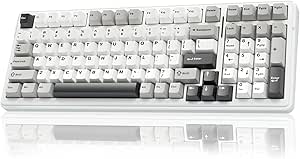 | Best Overall for Multi-Device Home Offices | Layout: 99 keys, 96% compact | Connectivity: Bluetooth 5.0, 2.4 GHz wireless, USB-C wired | Multi-device support: Up to five devices | VIEW LATEST PRICE | See Our Full Breakdown |
| RK Royal Kludge R98 Pro Wired Mechanical Keyboard |  | Best Wired Value for a Numpad | Model: R98 Pro | Layout: 98 keys | Connectivity: USB-C wired | VIEW LATEST PRICE | See Our Full Breakdown |
| Logitech G413 SE Full-Size Mechanical Gaming Keyboard |  | Best Full-Size Wired Office Workhorse | Layout: Full-size QWERTY, 108 keys | Switches: Tactile mechanical | Connectivity: Wired USB 2.0 | VIEW LATEST PRICE | See Our Full Breakdown |
| AULA F75 75% Wireless Mechanical Keyboard, White and Brown |  | Best Compact Wireless Pick | Layout: 75%, 81 keys | Connectivity: Bluetooth 5.0, 2.4 GHz wireless, USB-C wired | Multi-device support: Up to five devices | VIEW LATEST PRICE | See Our Full Breakdown |
| RK Royal Kludge S98 Wireless Mechanical Keyboard with Smart Display and Knob |  | Best for On-Keyboard Controls | Layout: QWERTY, 98 keys | Connectivity: Bluetooth 5.0, 2.4 GHz wireless, USB-C | Switches: Linear; hot-swappable 3-pin and 5-pin | VIEW LATEST PRICE | See Our Full Breakdown |
| Keychron C2 Full-Size Wired Mechanical Keyboard with Brown Switches, Retro Color, Non-Backlit |  | Best for Mac and Windows Compatibility | Layout: Full-size QWERTY, 104 keys | Switch type: Tactile Brown | Connection: Wired USB-C | VIEW LATEST PRICE | See Our Full Breakdown |
| AULA F2088 Wired Mechanical Gaming Keyboard with Blue Switches |  | Best for Clicky Typing and Desk Controls | Layout: QWERTY, 104 keys | Switch type: Blue, clicky | Connectivity: USB wired | VIEW LATEST PRICE | See Our Full Breakdown |
| Redragon K745 PRO Wireless 108-Key Gasket-Mounted RGB Gaming Keyboard |  | Best for a Cushioned, Quieter Feel | Layout: QWERTY, 108 keys | Switch type: Custom linear mechanical | Connectivity: USB-C, Bluetooth, 2.4 GHz wireless | VIEW LATEST PRICE | See Our Full Breakdown |
| AULA S99 Wireless 99-Key Membrane Keyboard with RGB Backlighting |  | Best Compact Layout with a Number Pad | Layout and key count: 96%; 99 keys | Switch type: Membrane | Connectivity: Bluetooth 5.0, 2.4 GHz wireless, USB-C wired | VIEW LATEST PRICE | See Our Full Breakdown |
| Cherry KC 200 MX Wired Mechanical Keyboard with MX2A Silent Red Switches |  | Best for Quiet Mechanical Typing | Layout: American QWERTY, 104 keys | Switch type: CHERRY MX2A Silent Red, linear | Connectivity: USB-A wired | VIEW LATEST PRICE | See Our Full Breakdown |
| AULA S99 99-Key Wireless Gaming Keyboard with RGB Backlighting |  | Best for Multi-Device Number Crunching | Layout: 96% QWERTY with numeric keypad | Key count: 99 | Key type: Clicky membrane | VIEW LATEST PRICE | See Our Full Breakdown |
| SOLAKAKA KI99 Pro 96% Wireless Mechanical Keyboard with Silent Switches |  | Best Quiet Mechanical Value | Layout: 96% QWERTY | Number of keys: 96 | Switch type: Linear, silent | VIEW LATEST PRICE | See Our Full Breakdown |
| Logitech MX Mechanical Wireless Illuminated Keyboard, Tactile Quiet, Graphite |  | Best Premium Low-Profile Office Pick | Layout: Full-size QWERTY | Number of keys: 104 | Switch type: Tactile Quiet | VIEW LATEST PRICE | See Our Full Breakdown |
| mechanical keyboards for home office | Layout | Connectivity | Backlighting | Switch type |
|---|---|---|---|---|
| AULA F99 Tri-Mode Wireless Mec | 99 keys, 96% compact | Bluetooth 5.0, 2.4 GHz wireless, USB-C wired | — | — |
| RK Royal Kludge R98 Pro Wired | 98 keys | USB-C wired | RGB with 20+ modes | — |
| Logitech G413 SE Full-Size Mec | Full-size QWERTY, 108 keys | Wired USB 2.0 | Single-color white LED | — |
| AULA F75 75% Wireless Mechanic | 75%, 81 keys | Bluetooth 5.0, 2.4 GHz wireless, USB-C wired | RGB, 16 effects | — |
| RK Royal Kludge S98 Wireless M | QWERTY, 98 keys | Bluetooth 5.0, 2.4 GHz wireless, USB-C | RGB | — |
| Keychron C2 Full-Size Wired Me | Full-size QWERTY, 104 keys | — | None | Tactile Brown |
| AULA F2088 Wired Mechanical Ga | QWERTY, 104 keys | USB wired | Rainbow LED with 19 effects and 3 customizable presets | Blue, clicky |
| Redragon K745 PRO Wireless 108 | QWERTY, 108 keys | USB-C, Bluetooth, 2.4 GHz wireless | RGB | Custom linear mechanical |
| AULA S99 Wireless 99-Key Membr | — | Bluetooth 5.0, 2.4 GHz wireless, USB-C wired | RGB | Membrane |
| Cherry KC 200 MX Wired Mechani | American QWERTY, 104 keys | USB-A wired | — | CHERRY MX2A Silent Red, linear |
| AULA S99 99-Key Wireless Gamin | 96% QWERTY with numeric keypad | Bluetooth 5.0, 2.4 GHz wireless, USB-C wired | RGB | — |
| SOLAKAKA KI99 Pro 96% Wireless | 96% QWERTY | Bluetooth 5.0, 2.4 GHz wireless, USB-C | — | Linear, silent |
| Logitech MX Mechanical Wireles | Full-size QWERTY | Bluetooth Low Energy or Logi Bolt USB receiver | Single color; proximity activated and automatically adjusted | Tactile Quiet |
More Details on Our Top Picks
AULA F99 Tri-Mode Wireless Mechanical Keyboard
The AULA F99 is my strongest all-around pick for a home office where one keyboard needs to serve a work computer and other devices. Its Bluetooth, 2.4 GHz, and USB-C connections support up to five paired devices, while the 96% layout keeps arrow keys and a number area without taking the full footprint of a standard board. Compared with the AULA F75, the F99 preserves a numpad, a practical advantage for spreadsheets, but takes up more desk space. Its gasket structure and five layers of filling aim to soften keystrokes and reduce case noise; the hot-swappable switches also leave room to change the feel later. The tradeoff is that RGB and macro customization rely on a driver, and the larger layout is not for compact desks.
Pros:- Bluetooth, 2.4 GHz, and USB-C connections support up to five devices
- 96% layout retains arrow keys and a number area while using less space than a full-size board
- Hot-swappable sockets accept 3-pin and 5-pin switches
- Gasket structure, five sound-dampening layers, and double-shot PBT keycaps suit regular typing
Cons:- The 96% layout still occupies more desk space than the 75% AULA F75
- RGB effects and macro customization require the driver
- Linear switches may not suit typists who prefer tactile feedback
Best for: Home-office workers who switch among several computers and regularly use a numpad for spreadsheets or data entry.
Not ideal for: Minimalist desk users who want the smallest footprint, or buyers who want lighting and macro controls without installing a driver.
- Layout:99 keys, 96% compact
- Connectivity:Bluetooth 5.0, 2.4 GHz wireless, USB-C wired
- Multi-device support:Up to five devices
- Switches:Pre-lubed linear; hot-swappable 3-pin and 5-pin
- Lighting:RGB, 16 effects
- Construction:Gasket structure with five layers of filling
- Keycaps:Double-shot PBT
- Battery:8000 mAh rechargeable
Our verdict“Choose the F99 if you want a versatile wireless office keyboard with a numpad and multi-device switching, and can spare the space for its 96% layout.”
RK Royal Kludge R98 Pro Wired Mechanical Keyboard
The RK Royal Kludge R98 Pro makes the most sense if you want a compact board with a number pad and do not need wireless connectivity. Its 98-key layout keeps the arrow keys and numpad close at hand, while the gasket mount and five layers of sound-absorbing foam are designed to take some sharpness out of typing noise. Compared with the wireless AULA F99, this model gives up multi-device convenience but keeps the setup simple with a single USB-C cable. Pre-lubed linear switches, double-shot PBT keycaps, and hot-swap support make it adaptable, and the detachable aluminum knob offers quick volume control. The main limitation is its wired-only connection; customization through the online driver is specified for Windows and Mac, which may restrict some office setups.
Pros:- 98-key layout retains the number pad and arrow keys in a compact arrangement
- Gasket mount and five sound-absorbing layers are designed to moderate typing noise
- Hot-swappable sockets accept 3-pin and 5-pin switches
- Detachable aluminum volume knob and double-shot PBT keycaps add useful office controls and durability
Cons:- USB-C wired connection only
- Online driver customization is specified for Windows and macOS
- Linear switches may not provide the tactile cue some office typists prefer
Best for: Desk-based workers who use a numpad, prefer a wired connection, and want switch customization without soldering.
Not ideal for: People who move between devices or need a cordless desk, and users who depend on keyboard-driver customization outside Windows or macOS.
- Model:R98 Pro
- Layout:98 keys
- Connectivity:USB-C wired
- Switches:Pre-lubed linear; hot-swappable 3-pin and 5-pin
- Keycaps:Double-shot PBT, MDA profile
- Mount:Gasket mount with five layers of sound-absorbing foam
- Backlighting:RGB with 20+ modes
- Volume control:Detachable aluminum knob
Our verdict“Pick the R98 Pro if a compact numpad and wired reliability matter more than wireless flexibility.”
Logitech G413 SE Full-Size Mechanical Gaming Keyboard
The Logitech G413 SE suits a home office that benefits from a familiar full-size layout and does not need wireless features or extensive customization. Its 108 keys and dedicated number pad make number-heavy tasks straightforward, while the brushed aluminum-magnesium alloy top case gives the board a rigid feel. Unlike the RK Royal Kludge R98 Pro, it uses a full-size layout rather than compressing the numpad into a smaller footprint, so it is easier to approach as a conventional keyboard but asks for more desk room. Tactile switches provide a clearer physical response than the linear switches in the AULA F99. The compromises are its wired-only USB connection and single-color white lighting; it also lacks the hot-swap flexibility offered by several other picks here.
Pros:- Full-size 108-key layout includes a dedicated number pad
- Tactile mechanical switches provide physical feedback while typing
- Brushed aluminum-magnesium alloy top case offers a rigid upper surface
- PBT keycaps and 12 function-key shortcuts support everyday use
Cons:- Full-size footprint takes more desk space than the RK Royal Kludge R98 Pro
- USB 2.0 wired connection only
- Backlighting is white only, and the switches are not specified as hot-swappable
Best for: Home-office users who want a conventional full-size layout, tactile switches, and a sturdy wired keyboard for a fixed desk.
Not ideal for: People with limited desk space, wireless-device switching needs, or a preference for customizable RGB lighting and hot-swappable switches.
- Layout:Full-size QWERTY, 108 keys
- Switches:Tactile mechanical
- Connectivity:Wired USB 2.0
- Key rollover:6-key anti-ghosting
- Keycaps:PBT
- Backlighting:Single-color white LED
- Top case:Brushed aluminum-magnesium alloy
- Media controls:12 FN keys
- Compatibility:Windows and macOS
Our verdict“Choose the G413 SE if you want a durable-feeling, full-size wired board with tactile keys and can spare the desk space.”
AULA F75 75% Wireless Mechanical Keyboard, White and Brown
The AULA F75 is the space-saving choice here for a home office that still needs dedicated arrow keys. Its 75% layout cuts down on the footprint of the numpad-equipped F99 and R98 Pro, while Bluetooth, 2.4 GHz, and USB-C support let it move between wireless and wired setups. It can connect to up to five devices, so it is well suited to a desk shared between a work computer and personal devices. Pre-lubricated linear switches, stabilizers, and five layers of sound-dampening construction are aimed at a smoother, less hollow typing sound than a bare plastic board might deliver. The tradeoff is that there is no number pad, and the plastic enclosure is less substantial than the Logitech G413 SE’s metal-alloy top case. Full key programming also requires the driver.
Pros:- 75% layout retains dedicated arrow keys while using less space than the AULA F99
- Bluetooth, 2.4 GHz, and USB-C connectivity support up to five devices
- Hot-swappable sockets accept 3-pin and 5-pin switches
- Five-layer sound-dampening construction and pre-lubricated switches target a smoother typing feel
Cons:- No dedicated number pad
- Plastic enclosure has a less substantial material feel than the Logitech G413 SE’s alloy top case
- Full key programming requires the F75 driver
Best for: Home-office users with limited desk space who want arrow keys, wireless device switching, and the option to plug in by USB-C.
Not ideal for: Spreadsheet-heavy workers who rely on a numpad, or buyers seeking a metal enclosure or driver-free key programming.
- Layout:75%, 81 keys
- Connectivity:Bluetooth 5.0, 2.4 GHz wireless, USB-C wired
- Multi-device support:Up to five devices
- Switches:Pre-lubricated linear; hot-swappable 3-pin or 5-pin
- Backlighting:RGB, 16 effects
- Battery:4000 mAh rechargeable
- Additional controls:Multifunction knob, programmable keys, Windows key lock
- Enclosure:Plastic
Our verdict“Choose the F75 if you want a compact, multi-device wireless board with arrow keys and can work without a numpad.”
RK Royal Kludge S98 Wireless Mechanical Keyboard with Smart Display and Knob
The RK Royal Kludge S98 is the pick for anyone who wants status information and quick controls on the keyboard itself. Its customizable display and rotary knob can show details such as connection mode and battery status, while the knob handles tasks including volume and lighting adjustments. Like the AULA F99, the S98 combines a compact numpad layout with Bluetooth, 2.4 GHz, and USB-C connections; the display makes it more control-focused, whereas the F99 highlights multi-device support and an 8000 mAh battery. Hot-swappable sockets and layered dampening leave room to tailor the typing feel and sound. Its listed operating-system compatibility is limited to Windows, however, and linear switches will not suit everyone. The display and extra controls may also be unnecessary for a simpler office setup.
Pros:- Customizable display can show connection mode, layout, date, and battery status
- Rotary knob provides direct volume and keyboard-setting controls
- Bluetooth, 2.4 GHz, and USB-C connections support varied desk setups
- Hot-swappable 3-pin and 5-pin switches, layered dampening, and double-shot PBT keycaps support customization and regular use
Cons:- Listed operating-system compatibility is limited to Windows
- Linear switches may not suit typists who prefer tactile feedback
- Display and extra controls add complexity that some office users may not need
Best for: Windows-based home-office users who want a compact numpad layout, wireless options, and visible connection or battery information.
Not ideal for: Mac or Linux users relying on listed compatibility, typists who prefer tactile switches, or buyers who want a simple keyboard without display controls.
- Layout:QWERTY, 98 keys
- Connectivity:Bluetooth 5.0, 2.4 GHz wireless, USB-C
- Switches:Linear; hot-swappable 3-pin and 5-pin
- Backlighting:RGB
- Keycaps:Double-shot PBT
- Controls:Customizable display and rotary knob
- Power:Rechargeable battery
- Compatibility:Windows
- Weight:3 pounds
Our verdict“Choose the S98 if you work on Windows and value at-a-glance keyboard status and a dedicated control knob alongside a compact numpad.”
Keychron C2 Full-Size Wired Mechanical Keyboard with Brown Switches, Retro Color, Non-Backlit
The Keychron C2 is a straightforward full-size choice for a home office where a number pad and familiar key layout matter more than wireless convenience. Its tactile Brown switches provide a discernible bump without the deliberate click of the AULA F2088’s blue switches, making the C2 a more restrained fit for shared rooms. The included Mac and Windows keycaps also make it easier to match the legends to your computer. Compared with the Cherry KC 200 MX, the C2 has broader stated OS compatibility and a USB-C connection, while the Cherry emphasizes quieter linear switches. The tradeoff is a plain, non-backlit design and a wired-only connection; this is a functional desk keyboard, not a flexible or illuminated setup.
Pros:- Full-size 104-key layout includes a number pad and function keys.
- Brown switches provide tactile feedback without the F2088’s clicky switch sound.
- Includes Mac and Windows keycaps for adapting the keyboard to either system.
- Two adjustable feet positions and a braided USB-C cable support a practical desk setup.
Cons:- Wired-only connectivity limits placement flexibility.
- No backlighting, which can make legends harder to see in a dim workspace.
- Not water resistant.
Best for: Home-office users who switch between macOS and Windows, want a number pad, and prefer tactile feedback without clicky switches.
Not ideal for: People who need wireless placement, work in dim lighting and want backlighting, or want quieter linear keystrokes.
- Layout:Full-size QWERTY, 104 keys
- Switch type:Tactile Brown
- Connection:Wired USB-C
- Backlighting:None
- Compatibility:macOS and Windows
- Keycap and enclosure material:ABS
- Dimensions and weight:17.1 × 5.1 × 1.5 in; 1.5 kg
- Adjustable feet:Two angles: 6° and 9°
Our verdict“Choose the C2 if you want a full-size, tactile wired keyboard that accommodates both Mac and Windows setups and can forgo backlighting.”
AULA F2088 Wired Mechanical Gaming Keyboard with Blue Switches
The AULA F2088 suits a home office where an audible, clicky typing feel and easy media controls are part of the appeal. Its blue switches offer more pronounced sound and feedback than the Keychron C2’s Brown switches, so the F2088 is the more expressive pick for a private room, but a less considerate one in a shared space or on calls. The media and lighting knob keeps common adjustments within reach, while the magnetic wrist rest adds support without being permanently attached. Rainbow lighting and an aluminum panel give it a more gaming-oriented presence than the understated Cherry KC 200 MX. That brings useful customization, but the backlighting is single-color support rather than individually selectable colors, and USB wiring keeps the keyboard tied to the desk.
Pros:- Clicky blue switches provide clear tactile and audible feedback.
- Dedicated knob and keys control media and backlighting.
- Removable magnetic wrist rest provides support and can be taken off when not needed.
- Aluminum alloy panel and anti-ghosting support a sturdy, responsive setup.
Cons:- Clicky switches can be distracting to nearby coworkers or during calls.
- USB wired connection restricts placement flexibility.
- Not water resistant, and the lighting supports a single color.
Best for: Home-office users in private workspaces who like crisp, audible keystrokes, use media controls often, and want a removable wrist rest.
Not ideal for: People in shared rooms or frequent video calls who need quiet typing, or anyone seeking wireless connectivity or water protection.
- Layout:QWERTY, 104 keys
- Switch type:Blue, clicky
- Connectivity:USB wired
- Backlighting:Rainbow LED with 19 effects and 3 customizable presets
- Panel material:Aluminum alloy
- Wrist rest:Removable, magnetic
- Dimensions:17.13 × 4.84 × 1.5 in
- Operating system compatibility:ChromeOS, Linux, macOS, Windows
Our verdict“Pick the F2088 for a private office where clicky feedback, a wrist rest, and quick media controls matter more than quiet typing.”
Redragon K745 PRO Wireless 108-Key Gasket-Mounted RGB Gaming Keyboard
The Redragon K745 PRO is the strongest fit here for someone who wants a full-size board without being tethered to one spot. Its USB-C, Bluetooth, and 2.4 GHz options cover a fixed desktop setup as well as switching among compatible devices, unlike the wired Keychron C2 and Cherry KC 200 MX. Linear switches, a gasket mount, and five layers of noise dampening point toward a softer, less sharp typing sound than the clicky AULA F2088, though they do not make it silent. The translucent PBT keycaps let RGB lighting show through and should better resist a greasy-looking shine than ABS caps. The compromises are a plastic enclosure and water resistance with no protection rating supplied, so I would not treat it as spill-proof.
Pros:- USB-C, Bluetooth, and 2.4 GHz connectivity support wired and wireless setups.
- Gasket mounting and five-layer dampening create a cushioned feel and help soften typing noise.
- Translucent PBT keycaps let RGB lighting show through and resist a greasy shine.
- Four dedicated shortcut keys and software support for hotkeys, lighting, and macros.
Cons:- Plastic enclosure lacks the metal construction of the AULA F2088 and Cherry KC 200 MX.
- Water resistance is listed without a protection rating, leaving spill protection unclear.
Best for: Home-office users who move between a desktop and other devices and want a cushioned linear typing feel with RGB lighting.
Not ideal for: Buyers who prioritize a metal enclosure, need a verified spill-protection rating, or want a compact keyboard without a number pad.
- Layout:QWERTY, 108 keys
- Switch type:Custom linear mechanical
- Connectivity:USB-C, Bluetooth, 2.4 GHz wireless
- Mounting and dampening:Gasket-mounted; 5 noise-dampening layers
- Keycap material:Translucent PBT
- Backlighting:RGB
- Enclosure and weight:Plastic; 0.88 kg
- Water resistance:Water resistant; protection rating not specified
Our verdict“Choose the K745 PRO if you want full-size functionality with flexible connections and a cushioned, dampened feel, and are comfortable with a plastic case.”
AULA S99 Wireless 99-Key Membrane Keyboard with RGB Backlighting
The AULA S99 saves desk space while retaining a numeric keypad, making its 96% layout more practical for spreadsheet-heavy work than a smaller tenkeyless board. It also offers Bluetooth, 2.4 GHz, and USB-C, a mix the wired Keychron C2 cannot match. However, this is listed as a membrane keyboard, not a mechanical one; shoppers seeking the distinct switch feel of the Cherry KC 200 MX or Redragon K745 PRO should skip it. The rotary knob, programmable keys, and foldable stand add useful controls and angle adjustment, but they do not change that core switch difference. The listing also says it does not support hot-swapping, which fits the membrane description but limits switch customization. I would treat it as a compact, feature-rich alternative rather than a mechanical pick.
Pros:- 96% layout keeps a numeric keypad while using a more compact footprint than a full-size board.
- Bluetooth, 2.4 GHz wireless, and USB-C wired modes support different desk setups.
- Full-key macro programming, three shortcut keys, and a dual-mode rotary knob add control options.
- Foldable two-stage stand allows typing-angle adjustment.
Cons:- Uses membrane switches, so it does not deliver the mechanical switch feel of the other keyboards here.
- Does not support hot-swapping, limiting switch customization.
- The product description is inconsistent about calling it membrane and mechanical.
Best for: Home-office users who need a number pad in a tighter footprint, want multiple connection modes, and are comfortable with membrane typing.
Not ideal for: Buyers specifically seeking mechanical switches, hot-swappable switches, or a clearly documented mechanical typing feel.
- Layout and key count:96%; 99 keys
- Switch type:Membrane
- Connectivity:Bluetooth 5.0, 2.4 GHz wireless, USB-C wired
- Backlighting:RGB
- Programmable controls:Full-key macro programming; 3 shortcut keys (M1/M2/M3)
- Compatible operating systems:Windows, Mac, Android, iOS
- Power:Rechargeable battery
- Stand and water resistance:Foldable two-stage stand; water resistant
Our verdict“Choose the S99 if compact number-pad access and flexible connectivity matter more to you than mechanical switches.”
Cherry KC 200 MX Wired Mechanical Keyboard with MX2A Silent Red Switches
The Cherry KC 200 MX is the clearest choice in this group for a home office where keyboard noise needs to stay restrained. Its MX2A Silent Red linear switches avoid the clicky sound of the AULA F2088 and the tactile bump of the Keychron C2, favoring smooth keystrokes over pronounced feedback. An aluminum plate, metal enclosure, and abrasion-resistant keycaps make it a more restrained, work-focused alternative to the Redragon K745 PRO’s RGB-lit plastic build. Dedicated calculator and volume controls also suit everyday desk tasks without relying on software. Its main limitation is compatibility: the listed requirement is Windows 10 or later, while the C2 explicitly supports both Windows and macOS. The USB-A connection also means a wired desk setup, not a flexible multi-device one.
Pros:- Silent Red linear switches avoid the deliberate click of the AULA F2088.
- Aluminum plate and metal enclosure provide a sturdy, work-focused construction.
- Full N-key rollover and anti-ghosting support simultaneous key presses.
- Calculator and volume controls offer quick access to common desktop functions.
Cons:- Wired USB-A connection limits placement and device-switching flexibility.
- Listed compatibility is limited to Windows 10 or later.
- Linear switches lack the tactile bump of the Keychron C2’s Brown switches.
Best for: Windows 10-or-later users in shared home offices who want a full-size mechanical keyboard with quieter linear switches and straightforward desk controls.
Not ideal for: Mac users, people who need wireless connectivity, or typists who prefer tactile bumps or clicky feedback.
- Layout:American QWERTY, 104 keys
- Switch type:CHERRY MX2A Silent Red, linear
- Connectivity:USB-A wired
- Plate and enclosure:Aluminum plate; metal enclosure
- Compatibility:Windows 10 or later
- Key features:Full N-key rollover, anti-ghosting, calculator and volume controls
- Dimensions:16.93 × 4.76 × 1.54 in
- Warranty:1 year
Our verdict“Choose the KC 200 MX for quieter full-size mechanical typing at a Windows desk, but pick another option if you need wireless or Mac compatibility.”
AULA S99 99-Key Wireless Gaming Keyboard with RGB Backlighting
The AULA S99 is a space-saving choice for a home office that still needs a numeric keypad. Its 96% layout keeps the number pad while trimming some of the footprint of a conventional full-size board. Bluetooth, 2.4 GHz wireless, and USB-C wired connections, plus switching among as many as five devices, make it more flexible than the wired Keychron C2. The knob, macro controls, RGB lighting, and two-stage kickstand add options for tailoring a desk setup.
There is an important catch: despite the mechanical-keyboard roundup, this model uses clicky membrane keys, not mechanical switches. That makes it a poor match for buyers specifically seeking mechanical feel. Its listed OS support is limited to Windows versions, and its 2000 mAh battery may be less appealing for frequent wireless use than the larger-capacity SOLAKAKA KI99 Pro.
Pros:- Keeps a numeric keypad in a more compact 96% layout.
- Offers Bluetooth, 2.4 GHz wireless, and USB-C wired connectivity.
- Supports switching among up to five connected devices.
- Includes a multifunction knob, macro controls, and an adjustable kickstand.
Cons:- Uses clicky membrane keys rather than mechanical switches.
- Listed compatibility is limited to Windows XP, 7, 8, and 10.
- The 2000 mAh battery is smaller than the SOLAKAKA KI99 Pro’s 10,000 mAh capacity.
Best for: Windows-based home-office users who need a number pad, want to switch among several devices, and are comfortable with membrane keys.
Not ideal for: Buyers set on mechanical switches or people who need clearly listed macOS or Linux compatibility.
- Layout:96% QWERTY with numeric keypad
- Key count:99
- Key type:Clicky membrane
- Connectivity:Bluetooth 5.0, 2.4 GHz wireless, USB-C wired
- Device connections:Up to 5
- Battery:Rechargeable, 2000 mAh
- Backlighting:RGB
- Dimensions:17.4 × 7.2 × 2 in
Our verdict“Choose the S99 for a compact, multi-device Windows desk with a number pad, but skip it if mechanical switches are a requirement.”
SOLAKAKA KI99 Pro 96% Wireless Mechanical Keyboard with Silent Switches
For shared rooms or calls throughout the workday, the SOLAKAKA KI99 Pro puts quieter typing ahead of flashy sound. Its silent linear switches, gasket structure, and five noise-reducing layers are designed to soften keystrokes—an office-friendly contrast with the louder, clicky character of the AULA S99, which is also membrane rather than mechanical. The 96% layout retains a compact footprint, and Bluetooth, 2.4 GHz, and USB-C give it useful flexibility across desk and mobile devices.
The 10,000 mAh battery, hot-swappable switches, and PBT keycaps add practical longevity and personalization options. Compared with the more polished, low-profile Logitech MX Mechanical, the KI99 Pro offers more switch-modification scope, but its plastic enclosure and 96-key layout may feel less refined or take some adjustment. Its quiet switches also trade the pronounced feedback some typists prefer for a smoother, less distracting press.
Pros:- Silent linear switches and layered construction are designed to reduce typing noise.
- 10,000 mAh battery and three connection modes suit extended, flexible desk use.
- Hot-swappable 3-pin and 5-pin switch support allows later customization.
- PBT keycaps are designed to resist wear and fading.
Cons:- The 96% layout may require adjustment for users accustomed to a full-size board.
- Plastic enclosure may feel less substantial than a premium alternative.
- Silent linear switches may not satisfy typists who want stronger tactile feedback.
Best for: Remote workers sharing a room or taking frequent calls who want a quiet mechanical board, wireless flexibility, and the option to change switches.
Not ideal for: Typists who need a full-size layout immediately, prefer pronounced tactile feedback, or prioritize a premium-feeling enclosure.
- Layout:96% QWERTY
- Number of keys:96
- Switch type:Linear, silent
- Connectivity:Bluetooth 5.0, 2.4 GHz wireless, USB-C
- Battery:10,000 mAh
- Hot-swappable:Yes; supports 3-pin and 5-pin switches
- Keycaps:PBT
- Operating systems:Windows, macOS
Our verdict“Pick the KI99 Pro if quiet mechanical typing and switch customization matter more than a full-size layout or a premium enclosure.”
Logitech MX Mechanical Wireless Illuminated Keyboard, Tactile Quiet, Graphite
The Logitech MX Mechanical is the most office-focused choice here for buyers who want a familiar full-size arrangement without a tall, bulky typing surface. Its low-profile tactile quiet switches provide feedback while aiming to keep noise restrained, a different balance from the SOLAKAKA KI99 Pro’s silent linear switches. The 104-key layout preserves the number pad, while pairing with up to three devices makes it easier to move between a work computer and personal devices.
Smart backlighting activates as hands approach and adjusts to ambient light, reducing the need to leave illumination on constantly. Its broad operating-system support also contrasts with the AULA S99’s listed Windows-only compatibility. The tradeoffs are less switch tinkering than the hot-swappable KI99 Pro and a single-color light setup rather than customizable RGB. Buyers relying on Bluetooth at a FileVault-enabled macOS startup may need the Logi Bolt receiver instead.
Pros:- Low-profile tactile quiet switches balance typing feedback with a quieter office sound.
- Full-size 104-key layout includes a numeric keypad.
- Pairs with up to three devices and supports Bluetooth Low Energy or Logi Bolt.
- Smart backlighting responds to nearby hands and ambient light.
Cons:- Single-color backlighting offers less visual customization than the RGB SOLAKAKA KI99 Pro.
- Logi Options+ customization software is limited to Windows and macOS.
- Bluetooth may prevent password entry at macOS startup with FileVault enabled; a Logi Bolt receiver is suggested as a workaround.
Best for: Professionals who want a low-profile, full-size mechanical keyboard for a multi-device desk and value quiet tactile feedback over switch customization.
Not ideal for: Buyers seeking hot-swappable switches, RGB lighting, or Bluetooth password entry at FileVault-enabled macOS startup without a receiver.
- Layout:Full-size QWERTY
- Number of keys:104
- Switch type:Tactile Quiet
- Connectivity:Bluetooth Low Energy or Logi Bolt USB receiver
- Multi-device pairing:Up to 3 devices
- Backlighting:Single color; proximity activated and automatically adjusted
- Battery life:Up to 15 days with backlighting; up to 10 months with backlighting off
- Charging:USB-C
- Operating systems:Windows, macOS, Linux, Chrome OS, iOS, iPadOS, Android
Our verdict“Choose the MX Mechanical for a quiet, low-profile full-size office setup, especially if smart lighting and multi-device pairing matter more than RGB or switch swapping.”

How We Picked
I ranked these keyboards for daily home-office use, not gaming performance alone. The main factors were switch noise and feel, layout practicality, connection choices, build and maintenance needs, and whether standout features serve a workday. I gave more weight to quiet, comfortable typing and useful flexibility than to lighting effects or gaming-focused styling.
The order reflects how readily each model suits a broad range of office setups, then how well it serves a narrower preference. The Logitech MX Mechanical leads for its office-focused quiet tactile positioning; the Cherry KC 200 MX earns a distinct place for silent wired typing, while compact wireless choices rank well for space-conscious desks. Louder blue-switch models and gaming-heavy designs are lower because their strengths can be less welcome during calls or focused work. The AULA S99 membrane model is included as a close alternative, but it is not a mechanical keyboard.
Factors to Consider When Choosing Mechanical Keyboards For Home Offices
The right office keyboard is less about the longest feature list and more about the routine it needs to support. I’d start with how sound, layout, and connection needs interact at your desk, then weigh extras against the work you actually do.
Choose Switches for Your Room, Not Just Your Fingers
Switch feel is personal, but sound affects other people as well as the typist. Silent or quiet tactile switches can suit calls and shared rooms, while clicky blue switches create a more pronounced sound that may carry through a home. “Mechanical” does not mean every board sounds the same: case construction, keycaps, and desk surface can change the result. If possible, listen to a sound sample of the exact switch variant rather than relying on a broad switch label. A common mistake is choosing a switch by feel alone, then finding its sound distracting during meetings. For mixed-use homes, a quieter switch is usually the safer starting point; clicky feedback makes more sense when the room is yours to control.
Match the Layout to Your Actual Work
A full-size board keeps the number pad and familiar key positions, which can help with spreadsheets, bookkeeping, and frequent data entry. A 75% layout saves desk width but relocates or compresses keys, so shortcuts may take adjustment. A 96% layout aims to retain many full-size functions in a tighter footprint, though the key spacing and navigation cluster may feel unfamiliar. Before buying compact, check whether you regularly use the numpad, function row, or dedicated navigation keys. A frequent mistake is buying by percentage alone without checking a layout image against your current keyboard. The best space-saving board is one that leaves room for your mouse without slowing down the tasks you do every day.
Decide Whether Wireless Is Worth the Extra Complexity
Wireless connectivity reduces cable clutter and makes it easier to move a keyboard between devices or clear a desk. Wired models avoid battery upkeep and keep the setup straightforward, which can be preferable at a fixed workstation. Multi-mode wireless can offer more pairing choices, but it also adds another setting to understand and a battery that needs attention. Check which connection methods the exact model supports and whether your work computer allows Bluetooth or wireless receivers. Do not assume a wireless label means simple switching between devices; confirm the pairing process and any operating-system compatibility details. Pay extra for wireless when you will use its flexibility, not just because it sounds more modern.
Treat Noise as Part of Your Call Setup
A keyboard can feel quiet to its typist yet still register strongly on a microphone, especially when the mic sits close to the desk. Switch noise, typing force, and microphone position all affect how much typing enters a call. If you take frequent meetings, check whether your conferencing software has noise suppression and test the keyboard near your usual mic placement. A desk mat may soften some impact noise, but it will not turn a clicky switch into a silent one. The common mistake is to buy a loud board and expect software filters to remove every keystroke. For shared spaces or frequent calls, choosing quieter switches at the outset is the more dependable path.
Pay for Useful Features, Not Desk Decoration
Backlighting helps when you work in dim conditions, while a knob or display can be handy if it directly supports your routine. RGB effects do not improve typing comfort, and extra controls can add clutter if you rarely use them. Also check the practical details that affect upkeep: whether keycaps can be removed, how the board connects, and whether its software is needed for basic functions. Removable keycaps can make cleaning easier, but check the manufacturer’s care guidance before using liquids or tools. A higher-priced feature set earns its place when it reduces friction every day, such as simplifying device switching or improving visibility. Skip extras that only look useful on a spec sheet.
Check the Return and Compatibility Details Before Buying
Layouts and switch names can hide meaningful differences between variants, so verify the exact configuration before placing an order. Confirm the key layout, switch type, connection options, operating-system support, and whether the included receiver or cable suits your computer. A keyboard that is easy to maintain should still be cleaned according to its maker’s instructions; water resistance should never be assumed. If you are unsure about switch feel, a return window can matter more than a minor feature difference. Read the return terms and check whether the specific version is eligible before opening or modifying it. This simple check can prevent the mismatch most likely to frustrate an office buyer: a board that feels or connects differently from what they expected.
Frequently Asked Questions
Which of these keyboards is the quietest choice for video calls?
The Cherry KC 200 MX is the clearest wired choice here because it uses MX2A Silent Red switches, while the Logitech MX Mechanical is positioned around tactile-quiet typing. Actual microphone pickup depends on switch sound, typing force, desk surface, and mic placement, so neither is a guarantee of silent calls. The AULA F2088’s blue switches are a poor match if minimizing audible keystrokes is your main goal. If calls are frequent, test your chosen keyboard with your microphone before relying on it in meetings. A headset mic placed away from the keyboard can also help.
Should I choose a compact keyboard or keep a full-size layout for office work?
Choose full-size if you regularly enter numbers or depend on familiar navigation and function keys; the Logitech G413 SE and Keychron C2 preserve that conventional layout. A 75% or 96% model can leave more room for a mouse, but you may need to adapt to compressed or relocated keys. The right choice depends on your actual tasks, not the percentage printed in a product name. Before buying, compare a layout diagram with your current board and check whether the numpad is essential. If you only use it occasionally, a compact board may be a reasonable desk-space tradeoff.
Is a wireless keyboard a better choice for a home office?
Wireless is helpful when you switch between devices, move your keyboard, or want fewer cables across the desk. A wired model can be the simpler choice for a fixed workstation because it avoids battery charging and wireless pairing steps. The AULA F99 offers tri-mode connectivity, while other wireless options in this roundup serve different layout and feature preferences. Check the exact model’s connection methods and your employer’s computer restrictions before choosing. Wireless is worth prioritizing when you will use its flexibility, not merely as a default upgrade.
Are gaming keyboards a sensible choice for a home office?
They can be, particularly when their layout, connection, and switch feel suit your work; office use does not rule out gaming-oriented boards. The tradeoff is that features such as bright RGB or clicky switches may add little to work and can make a shared room less comfortable. The AULA F2088’s blue switches, for example, are less suited to quiet calls than the Cherry KC 200 MX’s silent switches. Compare the features you will use daily rather than choosing by gaming branding. A gaming model makes sense when it fits your typing needs as well as your leisure setup.
Is the AULA S99 membrane model a mechanical keyboard?
No. The AULA S99 Wireless 99-Key Membrane Keyboard uses a membrane design, so it does not provide the mechanical switch construction that defines the other mechanical options here. It can still be a relevant alternative if you are open to a different typing feel and want to compare it with the mechanical models. The product list also includes a second AULA S99 listing described as a wireless gaming keyboard, so check the exact version and specifications before ordering. If mechanical switches are a firm requirement, choose one of the explicitly mechanical models instead. The membrane option is included as a category-adjacent comparison, not as a mechanical pick.
Conclusion
For the broadest work-focused fit, I’d choose the Logitech MX Mechanical as best overall, particularly for someone who wants wireless convenience and quiet tactile typing. The Cherry KC 200 MX is my best choice for quieter, straightforward wired work, while the AULA F99 is a strong value-oriented pick for buyers who want tri-mode flexibility and a compact 96% style layout. For a premium office-first experience, the Logitech MX Mechanical is also the standout; for beginners who want a familiar full-size wired setup, the Keychron C2 is an approachable starting point. Choose the AULA F75 when desk space is the priority, the RK Royal Kludge S98 if its display and knob fit your workflow, and avoid the blue-switch AULA F2088 if quiet calls are a daily concern. If mechanical switches are non-negotiable, skip the membrane AULA S99 and select one of the mechanical models.