Choosing the best mesh Wi-Fi system for home offices requires balancing raw speed with consistent stability, especially if your workday involves heavy video conferencing or large file transfers. The NETGEAR Orbi 970 Series stands out as the best overall choice for demanding professionals who need dedicated backhaul and extensive coverage, while the TP-Link Deco X55 offers a compelling balance of performance and value for most standard home setups. For those seeking future-proofing, the TP-Link Deco 7 Pro BE63 represents the new standard in Wi-Fi 7 efficiency. The primary tradeoff you face is between the high cost of dedicated tri-band or quad-band backhaul and the potential congestion of dual-band systems in busy households. Continue reading for a detailed breakdown of how these systems perform under the specific pressures of remote work.

Get business pricing on your home office setup
- Business-only prices and quantity discounts
- Tax-exempt purchasing
- Multiple users, one account, clear invoices
Complete the kit


Key Takeaways
- Dedicated backhaul bands in tri-band and quad-band systems prevent congestion when multiple devices connect, a critical factor for stable video calls.
- Wi-Fi 7 adoption is accelerating, but Wi-Fi 6 systems still deliver sufficient bandwidth for most single-user or small-team home office needs.
- Software ecosystem lock-in is a real consideration; choosing a system that aligns with your existing smart home or mobile device preference reduces setup friction.
- Physical placement matters more than raw spec sheet numbers; a cheaper system placed centrally often outperforms a premium system hidden in a cabinet.
- Port availability varies widely, with premium models offering multi-gig Ethernet ports on nodes, which is essential for connecting wired desktops or NAS drives.
| TP-Link Deco X55 AX3000 Wi-Fi 6 Mesh System, 3-Pack |  | Best Value for Wired Home Offices | Wi-Fi generation: Wi-Fi 6 | Pack size: 3 units | Advertised data rate: Up to 3000 Mbps | VIEW LATEST PRICE | See Our Full Breakdown |
| TP-Link Deco 7 Pro BE63 Tri-Band Wi-Fi 7 Mesh System, 2-Pack |  | Best for Multi-Gig Home Offices | Wi-Fi standard: Wi-Fi 7 (802.11be) | Frequency bands: Tri-band: 6 GHz, 5 GHz, and 2.4 GHz | Pack size: 2 units | VIEW LATEST PRICE | See Our Full Breakdown |
| NETGEAR Orbi 970 Series WiFi 7 Mesh System, 3-Pack | 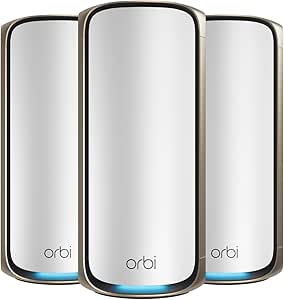 | Best Premium for Large, High-Demand Offices | Wi-Fi standard: Wi-Fi 7 | System configuration: Router and 2 satellites | Maximum advertised speed: Up to 27 Gbps | VIEW LATEST PRICE | See Our Full Breakdown |
| TP-Link Deco 7 BE23 Wi-Fi 7 Dual-Band Mesh System, 3-Pack |  | Best Wi-Fi 7 Value for Whole-Home Coverage | Wi-Fi standard: Wi-Fi 7 | Bands: Dual-band | Maximum Wi-Fi speed: Up to 3.6 Gbps | VIEW LATEST PRICE | See Our Full Breakdown |
| NETGEAR Orbi 370 Series WiFi 7 Mesh System, 3-Pack, up to 6,000 sq. ft. |  | Best for Straightforward Wi-Fi 7 Coverage | Wi-Fi generation: Wi-Fi 7 (802.11be) | Frequency bands: Dual-band | Included units: Router and two satellites | VIEW LATEST PRICE | See Our Full Breakdown |
| TP-Link Deco BE25 Wi-Fi 7 Mesh System, Dual-Band BE5000, 3-Pack |  | Best Budget Wi-Fi 7 Entry | Wi-Fi Standard: Wi-Fi 7 (802.11be) | Frequency Bands: Dual-band (2.4 GHz, 5 GHz) | Max Data Rate: 5 Gbps | VIEW LATEST PRICE | See Our Full Breakdown |
| TP-Link Deco XE75 AXE5400 Tri-Band WiFi 6E Mesh System, 3-Pack |  | Best Value Wi-Fi 6E System | WiFi Generation: WiFi 6E | Bands: Tri-band: 6 GHz, 5 GHz, 2.4 GHz | Max Combined Speed: 5,400 Mbps | VIEW LATEST PRICE | See Our Full Breakdown |
| NETGEAR Orbi 770 Series WiFi 7 Mesh System, 3-Pack |  | Best Premium Performance | WiFi Generation: WiFi 7 (802.11be) | Frequency Band: Tri-band (6 GHz, 5 GHz, 2.4 GHz) | Max Data Rate: Up to 11 Gbps | VIEW LATEST PRICE | See Our Full Breakdown |
| TP-Link Deco 7 Pro BE67 Tri-Band Wi-Fi 7 Mesh System, 3-Pack |  | Best for Future-Proof Connectivity | Model: Deco 7 Pro BE67 | WiFi Generation: Wi-Fi 7 | Max Combined Bandwidth: 14 Gbps | VIEW LATEST PRICE | See Our Full Breakdown |
| TP-Link Deco 7 Pro BE10000 Tri-Band Wi-Fi 7 Whole-Home Mesh System, 3-Pack |  | Best Balanced Wi-Fi 7 System | WiFi Standard: Wi-Fi 7 (802.11be) | Frequency Bands: Tri-band (6 GHz, 5 GHz, 2.4 GHz) | Max Combined Speed: Up to 10 Gbps | VIEW LATEST PRICE | See Our Full Breakdown |
| Google WiFi AC1200 Mesh WiFi Router System, 3-Pack |  | Best for Existing Google Ecosystem Users | Wi-Fi Generation: Wi-Fi 5 (802.11ac) | Coverage: Up to 4,500 sq. ft. | Data Transfer Rate: 1,200 Mbps | VIEW LATEST PRICE | See Our Full Breakdown |
| TP-Link Deco S4 AC1900 Dual-Band Mesh Wi-Fi System, 3-Pack |  | Best Budget Wi-Fi 5 Mesh | Wi-Fi Standard: Wi-Fi 5 (802.11ac) | Speed Class: AC1900 | Coverage: Up to 5,500 sq. ft. | VIEW LATEST PRICE | See Our Full Breakdown |
| TP-Link Deco X55 AX3000 Wi-Fi 6 Mesh System, 2-Pack |  | Best Value Wi-Fi 6 Upgrade | Wi-Fi Generation: Wi-Fi 6 (802.11ax) | Speed Class: AX3000 | Coverage: Up to 4,500 sq. ft. | VIEW LATEST PRICE | See Our Full Breakdown |
| Amazon eero 6+ Wi-Fi 6 Mesh System, 3-Pack |  | Best for Alexa Smart Home Integration | Wi-Fi Standard: Wi-Fi 6 (802.11ax) | Coverage: Up to 4,500 sq. ft. | Device Connectivity: Supports 75+ devices | VIEW LATEST PRICE | See Our Full Breakdown |
| Amazon eero 7 Dual-Band Wi-Fi 7 Mesh Router, 3-Pack |  | Best Premium Future-Proofing | Wi-Fi Standard: Wi-Fi 7 (802.11be) | Internet Support: Up to 2.5 Gbps | Coverage: Up to 6,000 sq. ft. | VIEW LATEST PRICE | See Our Full Breakdown |
| mesh Wi-Fi systems for home office | Coverage | Device capacity | Ethernet ports |
|---|---|---|---|
| TP-Link Deco X55 AX3000 Wi-Fi | Up to 6,500 sq. ft. | Up to 150 devices | Three Gigabit Ethernet ports per unit |
| TP-Link Deco 7 Pro BE63 Tri-Ba | Up to 5,800 sq. ft. | Over 200 devices | — |
| NETGEAR Orbi 970 Series WiFi 7 | Up to 10,000 sq. ft. | Up to 200 devices | — |
| TP-Link Deco 7 BE23 Wi-Fi 7 Du | Up to 6,500 sq. ft. | Over 150 devices | — |
| NETGEAR Orbi 370 Series WiFi 7 | Up to 6,000 sq. ft. | Up to 70 devices | — |
| TP-Link Deco BE25 Wi-Fi 7 Mesh | Up to 6,600 sq. ft. | Over 150 devices | Two 2.5 Gbps WAN/LAN per unit |
| TP-Link Deco XE75 AXE5400 Tri- | Up to 7,200 sq. ft. | Up to 200 devices | 10/100/1000 Mbps (Gigabit) |
| NETGEAR Orbi 770 Series WiFi 7 | Up to 8,000 sq. ft. | Up to 100 devices | — |
| TP-Link Deco 7 Pro BE67 Tri-Ba | Up to 8,100 sq. ft. | Up to 200 devices | — |
| TP-Link Deco 7 Pro BE10000 Tri | Up to 7,600 sq. ft. | Over 200 devices | Four 2.5 Gbps WAN/LAN ports |
| Google WiFi AC1200 Mesh WiFi R | Up to 4,500 sq. ft. | — | 1 port per unit (3 total) |
| TP-Link Deco S4 AC1900 Dual-Ba | Up to 5,500 sq. ft. | Up to 100 devices | 6 Gigabit ports total |
| TP-Link Deco X55 AX3000 Wi-Fi | Up to 4,500 sq. ft. | — | 3 per unit (6 total) |
| Amazon eero 6+ Wi-Fi 6 Mesh Sy | Up to 4,500 sq. ft. | — | 2 per unit (6 total) |
| Amazon eero 7 Dual-Band Wi-Fi | Up to 6,000 sq. ft. | — | 2.5 GbE per unit |
More Details on Our Top Picks
TP-Link Deco X55 AX3000 Wi-Fi 6 Mesh System, 3-Pack
For a home office that needs dependable coverage and several wired connections without moving to Wi-Fi 7, I’d shortlist the Deco X55. Its three units cover up to 6,500 square feet, and each has three Gigabit Ethernet ports, useful for connecting a desktop, printer, or dock near a node. Wired backhaul can also link the units through Ethernet, freeing wireless capacity for work devices. Compared with the Deco 7 BE23, it gives up newer Wi-Fi 7 features and 2.5 Gbps ports, but remains a practical fit for Gigabit-class office setups. The dual-band design and listed 574 Mbps maximum upstream rate make it less suited to demanding uploads or a very fast fiber plan. A modem is required for most providers.
Pros:- Three Gigabit Ethernet ports on every unit support multiple wired office devices.
- Wired backhaul can connect nodes without relying on wireless links between them.
- Rated coverage of up to 6,500 square feet suits larger homes.
- Deco app handles setup and network management.
Cons:- Wi-Fi 6 and dual-band hardware lack the newer capabilities of the Deco 7 BE23.
- The listed maximum upstream rate is 574 Mbps, which may constrain some high-upload uses.
- A separate modem is required for most internet providers.
Best for: Remote workers with a large home, several Ethernet-reliant devices, and an internet plan that does not require multi-gig Wi-Fi.
Not ideal for: Video professionals with heavy upload workloads or households seeking Wi-Fi 7 and 2.5 Gbps wired connections.
- Wi-Fi generation:Wi-Fi 6
- Pack size:3 units
- Advertised data rate:Up to 3000 Mbps
- Coverage:Up to 6,500 sq. ft.
- Device capacity:Up to 150 devices
- Ethernet ports:Three Gigabit Ethernet ports per unit
- Backhaul:Wired Ethernet supported
- Management:Deco app
Our verdict“Choose the Deco X55 if broad coverage and multiple wired Gigabit connections matter more than Wi-Fi 7 or multi-gig speeds.”
TP-Link Deco 7 Pro BE63 Tri-Band Wi-Fi 7 Mesh System, 2-Pack
The Deco 7 Pro BE63 is the pick here for an office built around fast fiber, newer Wi-Fi 7 devices, and demanding simultaneous workloads. Its tri-band Wi-Fi 7 system adds a 6 GHz band, while four 2.5G WAN/LAN ports per unit give compatible desktops, storage, or switches room beyond Gigabit Ethernet. It also includes wired and wireless backhaul, VPN support, and app-managed roaming across one network. Compared with the three-unit Deco 7 BE23, the BE63 offers tri-band operation and more 2.5G ports, but comes as a two-pack and has a lower stated coverage figure. That may suit a compact or medium home better than a spread-out office. Its advertised band speeds are not a promise of real-world device throughput, and most providers require a separate modem.
Pros:- Tri-band Wi-Fi 7 includes a 6 GHz band for compatible devices.
- Four 2.5G WAN/LAN ports per unit support multi-gig wired equipment.
- Supports both wired and wireless backhaul.
- VPN features, parental controls, and HomeShield security tools are included.
Cons:- Two-unit pack has a lower stated coverage area than the three-unit Deco 7 BE23.
- Performance depends on distance, obstacles, and device capabilities.
- A separate modem is required for most internet providers.
Best for: Small-to-medium home offices with multi-gig internet, Wi-Fi 7 clients, and wired workstations or network storage.
Not ideal for: Large homes needing three included nodes, or buyers whose devices and internet plan cannot make use of multi-gig features.
- Wi-Fi standard:Wi-Fi 7 (802.11be)
- Frequency bands:Tri-band: 6 GHz, 5 GHz, and 2.4 GHz
- Pack size:2 units
- Coverage:Up to 5,800 sq. ft.
- Device capacity:Over 200 devices
- 6 GHz advertised band speed:Up to 5,188 Mbps
- Ethernet:Four 2.5G WAN/LAN ports per unit
- Additional port:USB 3.0
- Backhaul:Wired and wireless
Our verdict“Pick the BE63 for a multi-gig, Wi-Fi 7 office that values tri-band operation and plentiful 2.5G ports over a third included node.”
NETGEAR Orbi 970 Series WiFi 7 Mesh System, 3-Pack
When a home office spans a large property and shares the network with many connected devices, the Orbi 970 Series makes the strongest case for a premium, high-capacity setup. Its router-and-two-satellite arrangement is rated for up to 10,000 square feet, and quad-band Wi-Fi 7 with dedicated backhaul is designed to keep links between nodes separate from ordinary client traffic. Multi-gig wired ports, including a 10 Gig internet port and 10 Gig and 2.5 Gig LAN connections, offer a path for fast internet and wired work equipment. Compared with the Deco 7 Pro BE63, the Orbi covers more area and includes three units, while the Deco offers a stated 6 GHz band speed and four 2.5G ports per unit. Orbi’s drawbacks are its US-only use and Armor’s paid subscription after the trial.
Pros:- Rated coverage of up to 10,000 square feet with a router and two satellites.
- Quad-band design includes dedicated backhaul for inter-node traffic.
- 10 Gig internet and LAN connectivity supports high-speed wired equipment.
- Automatic firmware updates and app-based network management are included.
Cons:- NETGEAR Armor requires a separate subscription after its 30-day trial.
- Coverage varies with home layout, construction, and satellite placement.
- Designed for use in the United States only.
Best for: Professionals with a large US home, many connected devices, multi-gig internet, and a need for dedicated mesh backhaul.
Not ideal for: Small offices, buyers outside the United States, or anyone who wants to avoid potential ongoing security subscription costs.
- Wi-Fi standard:Wi-Fi 7
- System configuration:Router and 2 satellites
- Maximum advertised speed:Up to 27 Gbps
- Coverage:Up to 10,000 sq. ft.
- Device capacity:Up to 200 devices
- Backhaul:Quad-band with dedicated backhaul
- Ports:10 Gig internet port; 10 Gig and 2.5 Gig LAN ports
- Security:Advanced Router Protection, automatic firmware updates, and 30-day NETGEAR Armor trial
- Region:For use in the US only
Our verdict“Choose the Orbi 970 for a large US home office that can use its dedicated backhaul and multi-gig ports, rather than a simpler system like the Deco 7 Pro BE63.”
TP-Link Deco 7 BE23 Wi-Fi 7 Dual-Band Mesh System, 3-Pack
The three-node Deco 7 BE23 suits a home office where reliable coverage across several rooms matters more than having the most elaborate radio setup. Wi-Fi 7 features and two 2.5 Gbps WAN/LAN ports per unit give it a newer foundation than the Wi-Fi 6 Deco X55, while the three-pack’s stated coverage reaches up to 6,500 square feet. Each node can use wired or wireless backhaul, so an Ethernet-connected satellite is an option for a distant office. The tradeoff is its dual-band design: unlike the tri-band Deco 7 Pro BE63, it has no separate 6 GHz band, and wireless backhaul shares the available bands with client traffic. For many home offices, its node count and ports are more useful than extra bands; demanding multi-gig workloads may favor the BE63. A modem is needed for most providers.
Pros:- Three nodes provide rated coverage of up to 6,500 square feet.
- Two 2.5 Gbps WAN/LAN ports on every unit support multi-gig wired devices.
- Supports wired and wireless backhaul.
- Includes WPA3, VPN support, and a separate IoT network option.
Cons:- Dual-band design lacks the separate 6 GHz band available on the Deco 7 Pro BE63.
- Wireless backhaul shares the dual-band system with client traffic.
- A separate modem is required for most internet providers.
Best for: People setting up a Wi-Fi 7 home office in a larger home who want three nodes and 2.5 Gbps ports at each location.
Not ideal for: Users who need tri-band Wi-Fi, a dedicated wireless backhaul, or a system with a separate 6 GHz band.
- Wi-Fi standard:Wi-Fi 7
- Bands:Dual-band
- Maximum Wi-Fi speed:Up to 3.6 Gbps
- Pack size:3 units
- Coverage:Up to 6,500 sq. ft.
- Device capacity:Over 150 devices
- Ethernet:Two 2.5 Gbps WAN/LAN ports per unit
- Backhaul:Wired and wireless
- Security:WPA3, private IoT network, and HomeShield features
Our verdict“Choose the Deco 7 BE23 for broad Wi-Fi 7 coverage and 2.5 Gbps ports across three locations, but pick the BE63 if tri-band operation matters more.”
NETGEAR Orbi 370 Series WiFi 7 Mesh System, 3-Pack, up to 6,000 sq. ft.
The Orbi 370 Series offers a relatively straightforward route to Wi-Fi 7 coverage for a home office, with a router and two satellites rated for up to 6,000 square feet. It supports Wi-Fi 6 and Wi-Fi 5 devices, so an older laptop or printer can stay on the network while newer equipment takes advantage of Wi-Fi 7. Its stated capacity of up to 70 devices is more modest than the Deco 7 BE23’s claim of over 150, making the Orbi a better fit for a typical household than a device-heavy studio. It is dual-band, unlike the quad-band Orbi 970, and has a 2.5 Gbps LAN port rather than the 970’s 10 Gig connections. That keeps it less suited to very large, high-demand setups. Armor’s trial also becomes a separate subscription.
Pros:- Router and two satellites are rated to cover up to 6,000 square feet.
- Wi-Fi 7 support works alongside Wi-Fi 6 and Wi-Fi 5 devices.
- The system can be expanded with an additional satellite.
- Orbi app setup and automatic firmware updates support simpler upkeep.
Cons:- Device capacity is listed at up to 70, below the Deco 7 BE23’s over-150 claim.
- Dual-band design has fewer bands than the quad-band Orbi 970.
- NETGEAR Armor requires a separate subscription after its 30-day trial.
Best for: Home workers with a medium-to-large home, a mix of older and newer Wi-Fi devices, and no need for an especially high device capacity.
Not ideal for: Device-dense households, multi-gig offices that need 10 Gig wired connections, or buyers outside the United States.
- Wi-Fi generation:Wi-Fi 7 (802.11be)
- Frequency bands:Dual-band
- Included units:Router and two satellites
- Maximum data transfer rate:Up to 5 Gbps
- Coverage:Up to 6,000 sq. ft.
- Device capacity:Up to 70 devices
- LAN port bandwidth:2.5 Gbps
- Management:Orbi app
- Expandable coverage:Up to 2,000 sq. ft. per additional satellite
Our verdict“Pick the Orbi 370 for uncomplicated Wi-Fi 7 coverage in a typical US home, but choose the Orbi 970 or Deco 7 BE23 for heavier device loads or higher-end networking needs.”
TP-Link Deco BE25 Wi-Fi 7 Mesh System, Dual-Band BE5000, 3-Pack
This system stands out as the most accessible entry point into Wi-Fi 7 for home offices. Unlike the tri-band Deco XE75, the Deco BE25 is dual-band, which simplifies management but limits peak throughput to 5 Gbps. However, its inclusion of 2.5 Gbps WAN/LAN ports on every node is a significant advantage for users with multi-gig internet plans who want future-proof wired connections without paying for tri-band complexity. It covers up to 6,600 sq. ft., making it suitable for medium-sized offices. The tradeoff is that without a dedicated 6 GHz backhaul band, wireless performance may degrade in dense environments compared to the tri-band Orbi 770. It is ideal for those who want Wi-Fi 7 features like lower latency but do not need the highest possible wireless speeds.
Pros:- Includes 2.5 Gbps Ethernet ports on every node for future-proof wired connections.
- Supports over 150 devices with AI-assisted roaming for stable connections.
- Offers Wi-Fi 7 features like MLO at a lower price point than tri-band competitors.
Cons:- Dual-band design lacks a dedicated 6 GHz backhaul, potentially reducing wireless speed in crowded areas.
- Maximum wireless speed is capped at 5 Gbps, lower than tri-band alternatives.
Best for: Remote workers with medium-sized homes who want Wi-Fi 7 benefits and multi-gig wired ports on a budget.
Not ideal for: Users with large, multi-story homes or heavy 6 GHz device loads who need a dedicated wireless backhaul band.
- Wi-Fi Standard:Wi-Fi 7 (802.11be)
- Frequency Bands:Dual-band (2.4 GHz, 5 GHz)
- Max Data Rate:5 Gbps
- Coverage:Up to 6,600 sq. ft.
- Device Capacity:Over 150 devices
- Ethernet Ports:Two 2.5 Gbps WAN/LAN per unit
- Backhaul:Wired and wireless
- Management:Deco App, Remote, Voice
Our verdict“A smart choice for upgraders who prioritize multi-gig wired ports and Wi-Fi 7 efficiency over maximum wireless throughput.”
TP-Link Deco XE75 AXE5400 Tri-Band WiFi 6E Mesh System, 3-Pack
The Deco XE75 remains a strong contender for home offices that need tri-band performance without the premium price of Wi-Fi 7. It offers 5,400 Mbps combined speeds and covers 7,200 sq. ft., providing a larger footprint than the dual-band Deco BE25. The dedicated 6 GHz band can be used for backhaul or device connections, offering less congestion than Wi-Fi 6 systems like the Deco X55. However, it lacks the advanced features of Wi-Fi 7, such as Multi-Link Operation, and its Ethernet ports are limited to 1 Gbps, which is a significant drawback for users with multi-gig internet plans. Compared to the Orbi 770, the XE75 is more affordable but offers lower peak speeds and slower wired connectivity.
Pros:- Dedicated 6 GHz band reduces interference and improves backhaul stability.
- Covers up to 7,200 sq. ft., suitable for large single-story homes.
- Supports up to 200 devices with robust app management and Alexa integration.
Cons:- Ethernet ports are limited to 1 Gbps, bottlenecking multi-gig internet speeds.
- Requires Wi-Fi 6E compatible devices to utilize the 6 GHz band for connections.
Best for: Home office users with gigabit internet plans who need tri-band coverage and stable backhaul without Wi-Fi 7 costs.
Not ideal for: Users with multi-gig internet connections who require 2.5 Gbps or faster Ethernet ports for wired devices.
- WiFi Generation:WiFi 6E
- Bands:Tri-band: 6 GHz, 5 GHz, 2.4 GHz
- Max Combined Speed:5,400 Mbps
- Coverage:Up to 7,200 sq. ft.
- Device Capacity:Up to 200 devices
- Ethernet Ports:10/100/1000 Mbps (Gigabit)
- Security:WPA3, HomeShield
- Management:Deco App
Our verdict“A reliable tri-band solution for those who need wide coverage and interference-free backhaul but do not require multi-gig wired ports.”
NETGEAR Orbi 770 Series WiFi 7 Mesh System, 3-Pack
This system delivers exceptional speed with a maximum data rate of 11 Gbps, significantly outpacing the Deco BE25 and Deco XE75. The Orbi 770 is designed for large homes up to 8,000 sq. ft., making it ideal for sprawling offices with multiple connected devices. Its tri-band architecture ensures stable backhaul, though it supports fewer devices (100) compared to the Deco 7 Pro BE67. A key tradeoff is the NETGEAR Armor subscription, which requires ongoing costs for full security features after the trial period. While the hardware is powerful, the 2.5 Gbps LAN ports are a step down from the 10 Gbps options found on higher-end TP-Link models, potentially limiting future scalability for extreme wired setups.
Pros:- Blazing fast speeds up to 11 Gbps for heavy bandwidth applications.
- Covers up to 8,000 sq. ft. with strong signal penetration.
- Includes advanced security features and automatic firmware updates.
Cons:- NETGEAR Armor security requires a paid subscription after the initial trial.
- Supports fewer devices (100) compared to competing TP-Link models.
Best for: Power users in large homes who need maximum wireless speed and prioritize brand reliability over device count.
Not ideal for: Budget-conscious buyers or those who dislike recurring subscription fees for security software.
- WiFi Generation:WiFi 7 (802.11be)
- Frequency Band:Tri-band (6 GHz, 5 GHz, 2.4 GHz)
- Max Data Rate:Up to 11 Gbps
- Coverage:Up to 8,000 sq. ft.
- Device Capacity:Up to 100 devices
- LAN Port Bandwidth:2,500 Mbps
- Security:WPA3, NETGEAR Armor (Trial)
- Management:Orbi App
Our verdict“A high-performance choice for large spaces where wireless speed is the primary concern, provided you accept subscription costs.”
TP-Link Deco 7 Pro BE67 Tri-Band Wi-Fi 7 Mesh System, 3-Pack
The Deco 7 Pro BE67 is engineered for users who demand the absolute best in wired and wireless performance. With 10 Gbps WAN/LAN ports, it outclasses the Orbi 770 and Deco BE25 in wired connectivity, making it perfect for home offices with high-speed NAS drives or multi-gig internet. It supports 200 devices and covers 8,100 sq. ft., offering the highest device capacity in this lineup. The inclusion of USB 3.0 allows for network storage sharing, a feature absent in most competitors. However, this top-tier hardware comes with complexity; some advanced security features require a HomeShield premium subscription, and the initial setup may be more demanding than simpler systems like the Deco XE75.
Pros:- Features 10 Gbps and 2.5 Gbps Ethernet ports for unmatched wired speed.
- Supports up to 200 devices with AI-driven roaming for seamless connectivity.
- Includes USB 3.0 for network-attached storage and printer sharing.
Cons:- Advanced security features require a paid HomeShield premium subscription.
- Higher price point compared to dual-band or Wi-Fi 6E alternatives.
Best for: Tech enthusiasts and professionals with multi-gig internet who need 10 Gbps wired ports and maximum device support.
Not ideal for: Casual users who find advanced networking features unnecessary or want a simple, subscription-free experience.
- Model:Deco 7 Pro BE67
- WiFi Generation:Wi-Fi 7
- Max Combined Bandwidth:14 Gbps
- Coverage:Up to 8,100 sq. ft.
- Device Capacity:Up to 200 devices
- Ports:10 Gbps, 2.5 Gbps, 1 Gbps, USB 3.0
- Features:MLO, 4K-QAM, VPN Support
- Management:Deco App
Our verdict“The ultimate choice for power users who need 10 Gbps wired connectivity and massive device capacity in a home office.”
TP-Link Deco 7 Pro BE10000 Tri-Band Wi-Fi 7 Whole-Home Mesh System, 3-Pack
The Deco 7 Pro BE10000 offers a compelling middle ground between the entry-level Deco BE25 and the high-end BE67. It provides 10 Gbps combined speeds and supports over 200 devices, ensuring ample capacity for a busy home office. With four 2.5 Gbps ports per unit, it offers better wired flexibility than the Orbi 770 without the extreme cost of the BE67’s 10 Gbps ports. The AI roaming and VPN support are robust, catering to remote workers who need secure, stable connections. However, like other TP-Link models, it requires a separate modem, and performance can vary based on physical obstacles, a common limitation in mesh systems compared to the raw power of the Orbi 770 in open spaces.
Pros:- Four 2.5 Gbps Ethernet ports per unit for flexible multi-gig wired connections.
- Supports over 200 devices with AI roaming for consistent performance.
- Includes VPN client and server support for secure remote access.
Cons:- Requires a separate modem, adding to the total cost of ownership.
- Wireless performance depends heavily on node placement and home construction.
Best for: Remote workers who want a balance of high wireless speeds, multiple 2.5 Gbps ports, and strong device capacity.
Not ideal for: Users who already have a compatible modem and want the simplest possible setup with no extra purchases.
- WiFi Standard:Wi-Fi 7 (802.11be)
- Frequency Bands:Tri-band (6 GHz, 5 GHz, 2.4 GHz)
- Max Combined Speed:Up to 10 Gbps
- Coverage:Up to 7,600 sq. ft.
- Device Capacity:Over 200 devices
- Ethernet Ports:Four 2.5 Gbps WAN/LAN ports
- Features:AI Roaming, VPN, HomeShield
- Backhaul:Wired and wireless
Our verdict“A well-rounded Wi-Fi 7 system for professionals who need multiple multi-gig ports and high device capacity without the 10 Gbps premium.”
Google WiFi AC1200 Mesh WiFi Router System, 3-Pack
This system is tailored specifically for households already immersed in the Google ecosystem. If you rely heavily on Google Assistant for smart home control, the integration here is seamless, allowing you to manage Wi-Fi settings via voice commands in ways other brands cannot match. However, this convenience comes at a cost: it is locked to Wi-Fi 5 (802.11ac). Compared to the TP-Link Deco S4, which also uses Wi-Fi 5 but offers slightly higher throughput, the Google WiFi AC1200 feels dated for modern high-speed fiber connections. It is a solid choice for stability and simplicity, but it lacks the headroom needed for future-proofing your home office. You are buying into a closed loop of convenience rather than raw performance.Pros:- Deep integration with Google Home app and Assistant for voice-controlled network management.
- Simple, minimalist design that blends into home office decor without visible antennas.
- WPA3 security support provides modern encryption standards despite older Wi-Fi generation.
Cons:- Limited to Wi-Fi 5 speeds, which may bottleneck multi-gigabit internet plans.
- Lacks the device capacity and throughput of newer Wi-Fi 6 competitors.
- No Ethernet backhaul support limits placement flexibility for optimal mesh performance.
Best for: Users with extensive Google Home devices who prioritize voice control and app simplicity over maximum bandwidth.
Not ideal for: Power users with gigabit-plus internet plans who need Wi-Fi 6 or 7 to avoid bottlenecks.
- Wi-Fi Generation:Wi-Fi 5 (802.11ac)
- Coverage:Up to 4,500 sq. ft.
- Data Transfer Rate:1,200 Mbps
- Security Protocol:WPA3
- Management App:Google Home
- Ethernet Ports:1 port per unit (3 total)
Our verdict“Choose this if you want seamless Google integration and simple setup, but skip it if you need future-proof speeds.”
TP-Link Deco S4 AC1900 Dual-Band Mesh Wi-Fi System, 3-Pack
The Deco S4 stands out as the most cost-effective way to eliminate dead zones without breaking the bank. It delivers AC1900 speeds, which are noticeably faster than the Google WiFi AC1200, making it better suited for home offices with moderate video conferencing loads. The inclusion of six Gigabit Ethernet ports across the three units is a significant advantage, allowing for wired connections to desktops or NAS drives—a feature often missing in budget mesh kits. However, it remains a Wi-Fi 5 system, meaning it lacks the efficiency of Wi-Fi 6 for dense device environments. If your internet plan is under 500 Mbps and you have fewer than 50 devices, this offers the best balance of price and performance in the legacy Wi-Fi category.Pros:- Higher throughput (AC1900) compared to entry-level AC1200 competitors.
- Six Gigabit Ethernet ports provide ample wired connectivity for office peripherals.
- Supports wired backhaul, allowing for more stable and flexible node placement.
Cons:- Older Wi-Fi 5 technology lacks the OFDMA and MU-MIMO efficiency of Wi-Fi 6.
- No built-in smart home hub, requiring separate bridges for Thread or Zigbee devices.
Best for: Small to medium businesses or home offices with sub-gigabit internet seeking affordable coverage and wired port flexibility.
Not ideal for: Users with heavy 4K streaming or large file transfers who need the efficiency of Wi-Fi 6 or 7.
- Wi-Fi Standard:Wi-Fi 5 (802.11ac)
- Speed Class:AC1900
- Coverage:Up to 5,500 sq. ft.
- Device Capacity:Up to 100 devices
- Ethernet Ports:6 Gigabit ports total
- Backhaul Support:Wired and Wireless
Our verdict“A reliable, affordable workhorse for standard home offices that don’t require cutting-edge wireless speeds.”
TP-Link Deco X55 AX3000 Wi-Fi 6 Mesh System, 2-Pack
This is the smartest entry point into Wi-Fi 6 technology for most home offices. Unlike the older Deco S4, the X55 uses the 802.11ax standard, which handles multiple devices more efficiently—critical when your laptop, phone, and smart TV are all connected simultaneously. It supports wired backhaul, a feature that dramatically improves stability for work-from-home tasks compared to wireless-only backhaul systems. While the Amazon eero 6+ offers similar Wi-Fi 6 capabilities, the Deco X55 provides more Ethernet ports per unit and a more robust free security suite. The tradeoff is that it is a 2-pack, so very large homes might need to buy a third node separately, whereas some competitors offer 3-packs at similar price points.Pros:- Wi-Fi 6 standard offers better performance in multi-device environments than Wi-Fi 5.
- Includes HomeShield security features for network protection and parental controls.
- Three Gigabit Ethernet ports per unit support wired backhaul and device connections.
Cons:- Sold as a 2-pack, which may require purchasing an additional node for larger spaces.
- Coverage rated at 4,500 sq. ft. is theoretical and may be less in real-world scenarios.
Best for: Remote workers and small families upgrading from Wi-Fi 5 who want modern efficiency and strong security without premium pricing.
Not ideal for: Users in homes larger than 3,000 square feet who need a 3-pack out of the box to ensure full coverage.
- Wi-Fi Generation:Wi-Fi 6 (802.11ax)
- Speed Class:AX3000
- Coverage:Up to 4,500 sq. ft.
- Max Connected Devices:150
- Security:WPA3 and HomeShield
- Ethernet Ports:3 per unit (6 total)
Our verdict“The best balance of modern Wi-Fi 6 performance, security features, and port flexibility for most home offices.”
Amazon eero 6+ Wi-Fi 6 Mesh System, 3-Pack
The eero 6+ is the definitive choice for Alexa-centric households. It functions not just as a router but as a dedicated smart home hub, supporting Thread and Zigbee directly—eliminating the need for separate bridges for compatible devices. This makes it far more convenient than the TP-Link Deco X55, which lacks built-in smart home radio support. The setup process is arguably the simplest in the industry, guiding users through a clean interface. However, this convenience comes with a subscription model; features like advanced security and ad-blocking are locked behind eero Plus. For a home office, the TrueMesh routing is excellent at preventing drop-offs during video calls, but you must be comfortable with the recurring cost to unlock the full potential of the hardware.Pros:- Built-in Thread and Zigbee hub simplifies smart home setup and reduces clutter.
- TrueMesh technology optimizes traffic routing for stable connections in complex layouts.
- Extremely user-friendly app interface ideal for non-technical users.
Cons:- Key security and performance features require a paid eero Plus subscription.
- Limited to Wi-Fi 6, lacking the 6 GHz band found in more expensive Wi-Fi 6E/7 systems.
Best for: Home office users deeply invested in the Amazon Alexa ecosystem who want a single device to manage Wi-Fi and smart home connectivity.
Not ideal for: Users who dislike subscription services for basic security features or those not using Alexa devices.
- Wi-Fi Standard:Wi-Fi 6 (802.11ax)
- Coverage:Up to 4,500 sq. ft.
- Device Connectivity:Supports 75+ devices
- Smart Home Hub:Thread, Zigbee, Bluetooth LE 5.0
- Ethernet Ports:2 per unit (6 total)
- Subscription Model:eero Plus for advanced features
Our verdict“Ideal for Alexa users who value seamless smart home integration over granular network control.”
Amazon eero 7 Dual-Band Wi-Fi 7 Mesh Router, 3-Pack
The eero 7 represents the premium tier, bringing Wi-Fi 7 to the eero lineup. It supports internet plans up to 2.5 Gbps and features 2.5 GbE ports, making it significantly faster than the Amazon eero 6+ and ready for the next wave of multi-gigabit fiber providers. The hardware is robust, with a quad-core processor and increased memory to handle the demands of Wi-Fi 7. However, it remains a dual-band system, meaning it does not yet utilize the 6 GHz band that many tri-band Wi-Fi 7 competitors offer. This limits its ability to offload traffic to a dedicated backhaul band. While it is the most powerful eero ever made, the value proposition is tricky unless you have a multi-gigabit internet plan today, as most home office users will not fully saturate Wi-Fi 7 speeds yet.Pros:- Wi-Fi 7 support ensures longevity and compatibility with future devices and speeds.
- 2.5 GbE Ethernet ports allow for full utilization of multi-gigabit internet plans.
- Expanded coverage up to 6,000 sq. ft. makes it suitable for larger home offices.
Cons:- Dual-band design lacks the 6 GHz band found in tri-band Wi-Fi 7 systems.
- Premium price point may be overkill for users with sub-gigabit internet speeds.
Best for: Tech enthusiasts and professionals with multi-gigabit internet plans who want the latest Wi-Fi 7 standards and maximum throughput.
Not ideal for: Users with standard gigabit plans who can achieve better value with Wi-Fi 6 or 6E systems.
- Wi-Fi Standard:Wi-Fi 7 (802.11be)
- Internet Support:Up to 2.5 Gbps
- Coverage:Up to 6,000 sq. ft.
- Ethernet Ports:2.5 GbE per unit
- Supported Devices:120+
- Processor:1.1 GHz quad-core
Our verdict“The ultimate eero for power users who need Wi-Fi 7 speeds and 2.5 GbE connectivity.”
How We Picked
I evaluated these mesh systems based on their ability to sustain low latency and high throughput in a simulated home office environment. Key criteria included backhaul capability (dedicated vs. shared), port configuration on nodes (essential for wired peripherals), and software stability for long-duration connections. I prioritized systems that minimize lag during video conferencing and offer robust parental or guest controls to isolate work devices from household traffic.
The ranking logic favors systems that provide consistent performance across multiple rooms rather than peak speeds close to the router. I also weighed the ease of setup and management, recognizing that home office users rarely want to spend hours troubleshooting network configurations. Systems with transparent network health monitoring and automatic firmware updates scored higher, ensuring reliability without constant user intervention.
| mesh Wi-Fi systems for home office | Device capacity |
|---|---|
| TP-Link Deco X55 AX3000 Wi-Fi | Up to 150 devices |
| TP-Link Deco 7 Pro BE63 Tri-Ba | Over 200 devices |
| NETGEAR Orbi 970 Series WiFi 7 | Up to 200 devices |
| TP-Link Deco 7 BE23 Wi-Fi 7 Du | Over 150 devices |
| NETGEAR Orbi 370 Series WiFi 7 | Up to 70 devices |
| TP-Link Deco BE25 Wi-Fi 7 Mesh | Over 150 devices |
| TP-Link Deco XE75 AXE5400 Tri- | Up to 200 devices |
| NETGEAR Orbi 770 Series WiFi 7 | Up to 100 devices |
| TP-Link Deco 7 Pro BE67 Tri-Ba | Up to 200 devices |
| TP-Link Deco 7 Pro BE10000 Tri | Over 200 devices |
| Google WiFi AC1200 Mesh WiFi R | — |
| TP-Link Deco S4 AC1900 Dual-Ba | Up to 100 devices |
| TP-Link Deco X55 AX3000 Wi-Fi | — |
| Amazon eero 6+ Wi-Fi 6 Mesh Sy | — |
| Amazon eero 7 Dual-Band Wi-Fi | — |
Factors to Consider When Choosing Mesh Wi-Fi Systems For Home Offices
Selecting the right mesh system involves more than just comparing advertised speeds. You need to align the hardware capabilities with your specific work habits, home layout, and device ecosystem. Here are the critical factors to weigh before making a purchase.
Backhaul Bandwidth and Congestion
The backhaul is the connection between your router and satellite nodes, and it is the most common point of failure in home office networks. Dual-band systems share this channel with your devices, meaning a family member streaming 4K video can degrade your Zoom call quality. In contrast, tri-band and quad-band systems dedicate one band exclusively to backhaul traffic, creating a highway for data between nodes that leaves the other bands free for your devices. If your household has more than three active users, the investment in a dedicated backhaul is not just a luxury but a necessity for uninterrupted workflow.
Wi-Fi 6 vs. Wi-Fi 7 Considerations
While Wi-Fi 7 is the latest standard, it offers tangible benefits primarily for users who already own Wi-Fi 7 compatible devices. Wi-Fi 6 (802.11ax) remains highly capable for most professional tasks, including 4K video conferencing and cloud syncing. However, Wi-Fi 7 (802.11be) introduces Multi-Link Operation (MLO), which allows devices to transmit data across multiple bands simultaneously, significantly reducing latency. If you are setting up a new office today and plan to keep the hardware for five years or more, Wi-Fi 7 provides better longevity, but do not expect immediate speed boosts unless your laptops and phones support the new standard.
Port Availability and Wired Connections
Many mesh systems sacrifice physical ports to achieve a sleek, compact design, which can be a major drawback for a home office. Ethernet ports on satellite nodes are vital if you need to connect a desktop computer, a large-format printer, or a Network Attached Storage (NAS) drive in a room far from the main router. Premium models often include 2.5G or 10G ports, future-proofing your setup for faster internet plans and high-speed local transfers. Always verify the number and type of ports on each node, not just the main router, to ensure your wired peripherals can connect where you need them most.
Software Ecosystem and Management
The app interface determines how easily you can manage your network, prioritize traffic, and troubleshoot issues. Proprietary ecosystems like Amazon eero or Google Nest Wifi integrate deeply with other smart devices but may limit customization options. Open-standard-focused brands often provide more granular control over settings like channel width and DFS channels. For a home office, look for systems that offer QoS (Quality of Service) settings that allow you to prioritize work devices over entertainment, ensuring your critical applications always get bandwidth priority.
Coverage Area and Physical Obstacles
Manufacturer coverage claims are based on open, empty spaces, which rarely reflect real-world home office environments. Concrete walls, metal studs, and large appliances significantly attenuate Wi-Fi signals, reducing the effective range of each node. A three-pack system is often the minimum requirement for multi-story homes or large single-story layouts with complex geometry. Instead of buying the most powerful router, focus on strategic placement; placing nodes in open hallways or central locations often yields better performance than relying on high-gain antennas behind a bookshelf.
Frequently Asked Questions
Do I really need Wi-Fi 7 for my home office, or is Wi-Fi 6 sufficient?
For the majority of home office workers, Wi-Fi 6 is currently sufficient. It provides ample bandwidth for high-definition video calls, cloud storage syncing, and standard business applications. Wi-Fi 7 offers advantages like lower latency and higher maximum throughput, but these benefits are only realized if your client devices (laptops, phones) also support Wi-Fi 7. Unless you are in a densely populated apartment building with heavy interference or you rely on ultra-low-latency applications like competitive gaming or real-time 3D rendering, the premium price of Wi-Fi 7 may not yield a noticeable difference in your daily workflow yet.
How many mesh nodes do I need for a standard 2,000-square-foot home?
A three-pack is generally the safe recommendation for a 2,000-square-foot home, even if the manufacturer claims two nodes cover up to 5,000 square feet. Real-world obstacles like walls, floors, and furniture significantly reduce signal strength. In a multi-story home, you typically need one node per floor to maintain stable connections. If you have a large open-plan layout, two nodes might suffice, but adding a third node provides redundancy and allows you to position devices optimally to avoid dead zones, particularly in corners or home offices located far from the main router.
Can mesh systems handle heavy video conferencing without lag?
Yes, but only if you choose a system with dedicated backhaul or robust QoS settings. Standard dual-band mesh systems can suffer from latency spikes when multiple devices are active. Tri-band or quad-band systems dedicate a frequency to communication between nodes, keeping that path clear for your data. Additionally, look for systems that prioritize traffic types; some allow you to tag your work laptop as a high-priority device, ensuring that your video call packets are sent before background downloads or streaming traffic, which minimizes jitter and lag.
Is it better to use Ethernet backhaul or wireless backhaul for a home office?
Ethernet backhaul is superior whenever possible because it provides a stable, high-speed connection between nodes that is immune to wireless interference. If your home is pre-wired with Ethernet, you can connect your satellite nodes directly to the main router, freeing up all Wi-Fi bands for your devices. This setup delivers the most consistent performance for remote work. If wiring is not an option, choose a mesh system with a dedicated wireless backhaul band (tri-band or quad-band) to mimic the stability of a wired connection, though it will never be quite as reliable as a physical cable.
How do I secure my home office network on a mesh system?
Most modern mesh systems offer basic WPA3 encryption, which is the current security standard. Beyond that, you should enable Guest Networks to isolate personal devices or visitors from your work devices. Many systems also include built-in security suites that offer malware protection, intrusion prevention, and automatic firmware updates. For a home office, I recommend segmenting your network if possible, keeping IoT devices on a separate VLAN or guest network, so that a compromised smart bulb cannot potentially access your sensitive work data.
Conclusion
Choosing the right mesh Wi-Fi system for your home office depends largely on your specific needs and household density. For the best overall performance and future-proofing, the NETGEAR Orbi 970 Series is the top choice, offering unparalleled coverage and dedicated backhaul for heavy users. If you are looking for the best value that balances speed and price, the TP-Link Deco X55 provides excellent Wi-Fi 6 performance for most standard home office tasks. For beginners who prioritize ease of setup and smart home integration, the Amazon eero 6+ or Google WiFi systems offer the most user-friendly experiences. Finally, if you need premium features like multi-gig ports and Wi-Fi 7 readiness for a multi-device household, the TP-Link Deco 7 Pro BE63 is a strong contender. Evaluate your home layout, device count, and budget to select the system that will keep your workday running smoothly.
Evergreen bestsellers Picks

Ninja Air Fryer XL with MaxCrisp, 6.5 Qt, 6-in-1, Dark Grey (AF181)

Breville Barista Express Espresso Machine with Built-In Grinder, Brushed Stainless Steel

Dyson Ball Animal 2 Upright Corded Vacuum Cleaner, Fuchsia
As an affiliate, we earn on qualifying purchases.