TL;DR

Get business pricing on your home office setup
- Business-only prices and quantity discounts
- Tax-exempt purchasing
- Multiple users, one account, clear invoices
An ergonomic office chair supports your body through adjustability, fit, and movement. It’s not about the fanciest features but about how well it matches your body and work habits, helping you stay comfortable and healthy over hours of sitting.
If you spend hours at a desk, a good ergonomic office chair isn’t a luxury—it’s a necessity. But what makes a chair truly ergonomic? It’s not just about style or price. The best chair adapts to your body, supports your natural curves, and encourages movement. Yet, most people settle for a chair that’s either too stiff, too deep, or simply not suited for their size. Today, I’ll walk you through what to look for, how to test for comfort, and how to set up your workspace for real ergonomic benefit. Because a chair that fits your body and work style can make a world of difference.
Forget the hype about fancy features. Instead, focus on adjustability, fit, and how it works with everything else around you. Ready to find your perfect match? Let’s get started.
Prioritize adjustable features—seat height, lumbar support, armrests—over fancy extras.
Test chairs in real sitting conditions before committing; fit is personal.
Support movement and posture variation—your body needs to shift, stretch, and change position.
Set up your workspace to complement your chair—monitor at eye level, close keyboard/mouse, and feet supported.
Material choices matter: breathable mesh, plush fabric, or easy-to-clean leather each suit different needs.
Why Adjustability Is Your Best Friend in a Chair
Adjustability isn’t just a perk—it’s the core of ergonomic support. The right chair should let you fine-tune height, lumbar support, armrests, and recline to fit your unique body. Think about a desk worker named Lisa, who’s 5’4″ but often finds chairs too tall or too deep, causing her lower back to ache after a few hours. When she switches to a chair with adjustable seat height and depth, her discomfort melts away.
Important adjustments include:
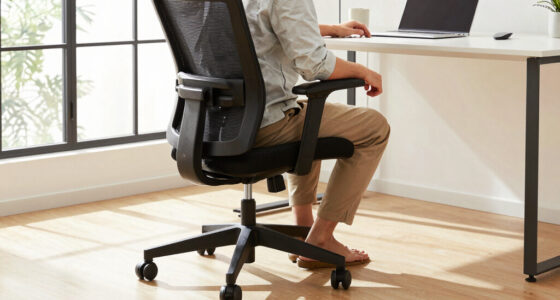
- Seat height: Feet flat on the ground, knees at roughly 90°, and thighs supported. This ensures proper circulation, prevents numbness, and reduces strain on your hips and lower back.
- Seat depth: Two to three fingers of space between the seat edge and the backs of your knees. Proper depth prevents pressure behind the knees, which can impede circulation and cause discomfort over time.
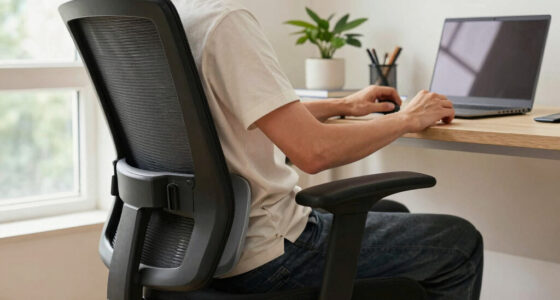
- Lumbar support: Fits the natural curve of your lower back without pinching or creating pressure points. Proper lumbar support maintains the spine’s natural S-curve, reducing strain and preventing long-term issues like herniated discs.
- Backrest recline: Dynamic recline reduces static pressure on your spine, allowing muscles to relax and reducing fatigue during prolonged sitting.
- Armrests: Adjustable height and width support relaxed shoulders and elbows, preventing tension that can radiate into neck and upper back.
- Tilt tension: Controls how much resistance when reclining, enabling you to find a comfortable, supported position without feeling like you’re fighting the chair.
As an affiliate, we earn on qualifying purchases.
Your Body Is Unique — Find a Chair That Fits You
Each body is different, and understanding these differences is crucial to choosing an ergonomic chair that truly supports you. For example, taller individuals often require higher seats and deeper cushions to accommodate longer legs, while shorter users benefit from lower seats and narrower support to prevent overextension or discomfort. If you choose a one-size-fits-all chair, you risk misalignment—leading to pressure points, restricted movement, or postural fatigue.
This means testing chairs before buying—if possible—or selecting models with flexible, adjustable features. For instance, adjustable seat depth allows you to customize support for your hips and thighs, promoting better circulation and reducing pressure. Likewise, adjustable armrests can accommodate different shoulder widths, preventing tension. Consider the tradeoffs: a chair that’s too narrow may pinch your hips, while one that’s too wide can cause instability. The key is to find a seat that contours to your body’s unique shape, distributing weight evenly and supporting natural movement. Remember, comfort isn’t just about padding; it’s about how well the seat aligns with your body’s specific dimensions and movement preferences, ultimately reducing fatigue and preventing musculoskeletal issues over time.
lumbar support ergonomic desk chair
As an affiliate, we earn on qualifying purchases.
As an affiliate, we earn on qualifying purchases.
Move, Shift, Rebalance: Why Flexibility Matters
Support for movement isn’t just a convenience—it’s a health necessity. Sitting in static positions for extended periods can lead to muscle stiffness, reduced circulation, and increased spinal pressure, all of which contribute to discomfort and long-term health issues. Think about Jake, a software developer who recognizes the importance of variation. He takes short walks every 30 minutes and adjusts his chair’s recline periodically during coding sessions. These small changes activate different muscle groups, improve blood flow, and prevent fatigue.
Chairs with synchronized tilt mechanisms, flexible backrests, and automatic tension adjustment are designed to facilitate these micro-movements. They allow you to lean back, tilt, or shift your weight effortlessly, encouraging you to change positions naturally. The implication is that a static posture, even in a well-designed chair, is inherently unhealthy. Incorporating movement into your routine—whether through micro-adjustments or brief breaks—mitigates the risks of prolonged sitting. Your chair should be a dynamic tool that supports your body’s natural rhythm, helping you maintain comfort, reduce strain, and promote circulation throughout the day, which ultimately enhances focus and productivity.
mesh ergonomic office chair with adjustable armrests
As an affiliate, we earn on qualifying purchases.
As an affiliate, we earn on qualifying purchases.
Your Chair Must Play Nice With Your Entire Workspace
A chair alone won’t do the trick. It must work with your desk, keyboard, monitor, and accessories to create an ergonomically sound environment. For example, Sarah’s initial setup had her monitor too low, causing her to lean forward and strain her neck and shoulders. By raising her monitor to eye level and positioning her keyboard closer, she maintained a more neutral posture, reducing tension and fatigue.
Proper workspace integration involves:
- Positioning the monitor at eye level, about an arm’s length away, to prevent neck strain.
- Keeping the keyboard and mouse close enough so that elbows stay near your sides, which helps maintain relaxed shoulders and reduces upper limb fatigue.
- Using a footrest if your chair is high but your feet don’t reach the ground, ensuring proper leg support and circulation.
- Avoiding reaching or leaning forward for frequently used items, which can cause shoulder and back tension.
- Considering external peripherals when working on a laptop to align your posture more comfortably.
As an affiliate, we earn on qualifying purchases.
Support That Feels Good—No Pressure Points Allowed
Effective support balances weight distribution and minimizes pressure points. When a chair presses into your hips, thighs, or under the sit bones, it can cause numbness, discomfort, and even circulation issues. For example, Tom found relief by choosing a seat with a waterfall edge, which reduces pressure behind the knees and encourages healthy blood flow. But the critical factor isn’t just the feature—it’s how well the entire seat and support system work together to accommodate your body’s contours.
Look for:
- Seats with a waterfall or beveled edge that reduces pressure on the thighs and improves circulation.
- Proper lumbar support that cushions your lower back without pinching or causing hotspots, which can lead to soreness or improper spinal alignment.
- Armrests that support your forearms evenly without pressing into your elbows or shoulders, preventing tension buildup.
Conclusion
Choosing an ergonomic office chair isn’t about finding the most complex or expensive model. It’s about finding one that fits your body, supports movement, and integrates smoothly with your workspace. When you prioritize adjustability and comfort, you create a foundation for long-term health and productivity.
Remember, your chair is part of a bigger picture. A well-set-up workstation and regular movement are just as important. Invest in your comfort today—your body will thank you tomorrow.
Fall Picks
fall essentials
As an affiliate, we earn on qualifying purchases.