Shopping for smart home office accessories usually comes down to a practical choice: add a few useful devices, or build a connected setup that coordinates the room. Essential accessories might include a smart plug, an adjustable desk lamp, and a headset or webcam chosen for the work itself. A connected setup adds compatible lighting, sensors, climate controls, and a hub or voice assistant so devices can respond to schedules and commands together.

Get business pricing on your home office setup
- Business-only prices and quantity discounts
- Tax-exempt purchasing
- Multiple users, one account, clear invoices

Govee RGBIC Smart Table Lamp 2
- ✔ Brightness: Up to 500 lumens
- ✔ White color temperature: 2700K–6500K
- ✔ Light source: LED
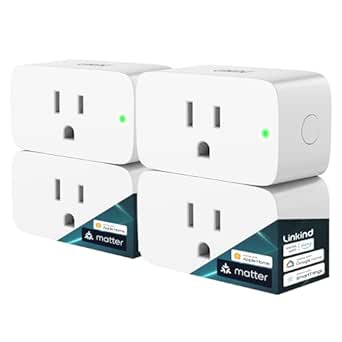
Linkind Matter Smart Plug, 4-Pack
- ✔ Pack size: 4 plugs
- ✔ Model: LC09003256
- ✔ Plug type: Type A

INCHOR Silicone Cable Organizer Clips, Black, 2-Pack
- ✔ Pack size: 2 clips
- ✔ Material: Flexible silicone
- ✔ Color: Black
The biggest difference is coordination, not intelligence in any single gadget. A smart plug can switch a desk lamp on at a set time; a broader system can turn on the lights, adjust the temperature, and start a workday scene with one routine. That convenience costs more, depends on compatibility, and can take time to configure. Choose essentials if you want targeted improvements with little setup. Choose the connected approach if you work from the same room regularly and will use its automation often.
At a Glance
| Criteria | Essential smart office accessories | A fully connected smart office setup | Winner |
|---|---|---|---|
| Upfront cost | Lower; add devices only where they help | Higher; may require several devices and a hub | A |
| Daily convenience | Useful individual controls, with devices managed separately | Routines can coordinate multiple devices | B |
| Setup effort | Usually simple; often one app per device | More planning, pairing, and troubleshooting | A |
| Compatibility | Broad choice, though features vary by brand | Works best when devices share standards or a platform | A |
| Comfort and focus | Can improve a specific need, such as lighting or calls | Can coordinate lighting and climate around work routines | Depends |
| Room to expand | Easy to add a few items, but coordination may stay limited | Designed to grow into a more unified system | B |
| Best fit | Occasional or budget-conscious home office users | Regular users who value automation and consistent controls | Depends |
Govee RGBIC Smart Table Lamp 2
The Govee RGBIC Smart Table Lamp 2 earns our top spot because it can change the feel and function of a desk without relying on a separate bulb or smart switch. Its 2700K–6500K adjustable white light covers warm and cooler tones, while output reaches 500 lumens. That gives us more control over the room’s lighting than the Linkind plug offers on its own, though it is still a tabletop lamp rather than a complete room-lighting solution.Color effects, more than 64 preset scenes, and music synchronization make it more customizable than a conventional task lamp. App and touch controls also give us a fallback when voice control is inconvenient. The tradeoff is that some of these extras may be more useful for breaks or ambient lighting than focused desk work, and the lamp requires a corded connection. It supports Matter and several smart home platforms, putting it alongside the Linkind plug for ecosystem flexibility, but it adds lighting rather than switching power to other equipment.We should also account for its setup details. Pat-to-wake requires enabling Bedtime Switch in the app, and that gesture only turns the lamp on. For a home office, the lamp makes the most sense when adjustable white light and a personalized atmosphere are priorities; buyers who need a restrained, narrowly focused task light may prefer a simpler fixture.
Pros:
- Adjustable white light spans 2700K to 6500K.
- App and touch controls provide convenient ways to adjust settings.
- Matter compatibility supports integration with several smart home platforms.
- Preset scenes and color effects make it adaptable for work breaks and ambient use.
Cons:
- Requires a corded electrical connection and a place on the desk or nearby surface.
- Pat-to-wake needs Bedtime Switch enabled in the app and only turns the lamp on.
- Not water resistant.
Best for: Home office users who want adjustable warm and cool white light, app or touch control, and optional color scenes from one tabletop lamp.
Not ideal for: Buyers seeking a cordless lamp, a water-resistant light, or a dedicated task lamp with a narrow beam and minimal effects.
Bottom line: Choose the Govee if desk lighting is the upgrade you will notice most, and its cord, app setup, and extra effects fit your workspace.
“Choose the Govee if desk lighting is the upgrade you will notice most, and its cord, app setup, and extra effects fit your workspace.”
Linkind Matter Smart Plug, 4-Pack
When our office problem is remembering to switch equipment on or off, the Linkind Matter Smart Plug is the more relevant pick. A four-pack lets us connect several compatible devices, then use schedules, timers, voice commands, or remote access to manage them. Compared with the Govee lamp, it does not improve the quality of the light; it makes existing plug-in equipment easier to control.Matter support is useful for buyers who already use Apple Home, Alexa, Google Home, or SmartThings, but compatibility does not eliminate setup dependencies. The listed platforms generally need a compatible hub, while the AiDot app can be used without one. The plugs also need 2.4 GHz Wi-Fi and IPv6, so buyers should confirm their network and hub arrangement before choosing them. That extra planning makes this a more capable but less immediate upgrade than the INCHOR clips.Its compact plug-in format and safety features—including overload and short-circuit protection—suit ordinary desk setups, and local LAN operation can preserve control when the internet is unavailable. Still, this is not a universal desk power solution: each connected device must be suitable for the plug’s 15 A, 1800 W capacity, and automation depends on compatible devices and a properly configured system. Choose it when scheduling power across multiple desk devices is worth that setup work.
Pros:
- Four plugs can automate multiple compatible devices around a home office.
- Matter support spans several major smart home platforms.
- Schedules, timers, remote access, and voice control provide flexible operation.
- Fire-resistant materials and overload and short-circuit protection are included.
Cons:
- Most listed platforms require a compatible hub.
- Requires 2.4 GHz Wi-Fi and IPv6.
- Useful only for devices suitable for its 15 A, 1800 W capacity.
Best for: People with several compatible desk devices and an existing smart home hub who want scheduled or voice-controlled power.
Not ideal for: Buyers who want a plug-and-play accessory without network checks, or those whose chosen ecosystem lacks a compatible hub.
Bottom line: Pick Linkind when you want to automate several compatible devices and already have—or are prepared to configure—the required hub and network.
“Pick Linkind when you want to automate several compatible devices and already have—or are prepared to configure—the required hub and network.”
INCHOR Silicone Cable Organizer Clips, Black, 2-Pack
The INCHOR clips are the least connected option in this roundup, and that is their particular advantage: they address loose cables with no app, hub, or network setup. Flexible silicone holds charging, USB, network, or power cords near the desk edge, which can make a frequently used lead easier to find and reduce tangling. Compared with Linkind’s smart plugs, these clips organize the cable itself rather than controlling the device at its outlet.Installation uses self-adhesive backing, so we can place the clips on a smooth, clean, dry surface without drilling. The surface and adhesive details matter: the backing needs several hours to set, and a textured, dusty, or damp area can undermine the fit. Their 6 mm maximum cable diameter is another firm limit. Buyers with thick braided leads or multiple oversized cords should look to a larger cable-management system instead.These clips are a narrower office upgrade than the Govee lamp or Linkind plug, but they need no power and can also hold small items such as pens or toothbrushes. That versatility does not change their basic role: they keep a few suitable cords accessible, rather than concealing or routing a full bundle. We recommend them when one or two wandering cables are the annoyance and a quick physical fix is enough.
Pros:
- Flexible silicone makes cables easy to insert and remove.
- Self-adhesive installation avoids holes and screws.
- Works without power, apps, hubs, or wireless setup.
- Can hold small items such as pens or toothbrushes as well as cables.
Cons:
- Fits cables only up to 0.26 inches (6 mm) in diameter.
- Adhesive needs a clean, smooth, dry surface and several hours to set.
- A two-piece set is limited for extensive cable management.
Best for: Desk users who want to keep a small number of thin charging or USB cables easy to reach on a smooth surface.
Not ideal for: People managing thick cables, large bundles, rough desk finishes, or a full under-desk cable-routing setup.
Bottom line: Choose the INCHOR clips when a couple of thin, frequently used cables need a simple home on a smooth desk surface.
“Choose the INCHOR clips when a couple of thin, frequently used cables need a simple home on a smooth desk surface.”
As an Amazon Associate we earn from qualifying purchases.
Key Differences
Essential accessories are the stronger starting point for most people. They let you spend on a concrete problem: a lamp that is easier to adjust, a smart plug that cuts standby power, or a webcam that improves meetings. You avoid paying for sensors and automation that might go unused. The tradeoff is that each device may have its own controls, and adding more does not automatically create a coherent workspace.
A connected setup earns its higher cost through repetition. If you work in the same room every weekday, linked routines can reduce small chores: a schedule can bring up task lighting, and a single command can switch the office into meeting mode. But the benefit depends on reliable compatibility and careful placement. A collection of devices that cannot communicate may cost more while still leaving you with several apps and manual steps.
Neither approach automatically improves ergonomics or concentration. Smart controls can make a good lamp or climate device easier to use, but they cannot replace an appropriate chair, screen height, or work breaks. Prioritize the physical accessory that addresses your biggest discomfort, then add automation only where it removes a repeated annoyance.
Detailed Comparison
Upfront cost (Essential smart office accessories wins — major)
Essential accessories win by a major margin for buyers who need only one or two improvements. You can buy a single useful device and stop there. A connected setup usually asks for several compatible products, and sometimes a hub, before its routines feel worthwhile. The practical difference is lower risk: essentials let you learn what helps before committing to a system.
Daily convenience (A fully connected smart office setup wins — moderate)
The connected setup wins by a moderate margin when routines genuinely match your schedule. One scene can manage several devices, while essentials tend to require separate switches or apps. For someone who works at a desk every day, fewer repeated adjustments can add up; for occasional use, the automation may save little time.
Setup and maintenance (Essential smart office accessories wins — moderate)
Essentials win by a moderate margin. A standalone accessory is typically easier to install and understand, while a coordinated system introduces pairing, permissions, platform choices, and occasional troubleshooting. The cost in practice is time and attention: connected control pays back only if the routines remain reliable enough to use.
Compatibility and choice (Essential smart office accessories wins — minor)
Essentials win by a minor margin because each purchase can be judged on its own features rather than on fit with a larger ecosystem. Connected devices can work smoothly together, but buyers need to check platform support and available integrations before purchasing. This matters most when mixing brands or planning to expand over time.
Comfort and focus (moderate difference)
This is a genuine tie because the result depends on which discomfort or distraction you are solving. Either approach can provide better task lighting or convenient control of a compatible fan or thermostat. A connected system can coordinate the room, but it does not make an unsuitable chair or poor screen position comfortable. Buy for the specific need first.
Expansion over time (A fully connected smart office setup wins — moderate)
The connected setup wins by a moderate margin if you expect to keep adding devices and want them controlled together. A shared platform can turn later additions into parts of the same routine. Essentials still allow gradual buying, but without a compatibility plan, expansion can create a patchwork of apps and controls.
Value for typical use (major difference)
Essentials are better value for most home office users because they address common needs without requiring a system-wide investment. The connected option becomes better value for someone who uses several devices throughout the workday and will rely on automation consistently. The deciding factor is repeated use, not the number of features listed on a box.
Essential smart office accessories: Pros and Cons
Pros:
- Lower starting cost
- Simple to buy and set up one device at a time
- More freedom to choose products by individual features
- Good for addressing a specific comfort or workflow problem
Cons:
- Devices may need separate apps or controls
- Limited coordination between accessories
- Adding products without a plan can create a fragmented setup
A fully connected smart office setup: Pros and Cons
Pros:
- Can coordinate lighting, power, and climate in routines
- Convenient for repeatable workday and meeting scenes
- A shared platform can make future expansion more coherent
Cons:
- Higher initial investment
- Requires compatibility research and more setup
- Automation may add little value if work hours or workspace change often
Who Should Choose What
Choose Essential smart office accessories if:
- You want to improve one specific issue, such as desk lighting or call quality.
- You work at home only part of the week or use several rooms.
- You want to keep spending low and evaluate accessories one at a time.
- You prefer straightforward controls over routines and voice commands.
Choose A fully connected smart office setup if:
- You work in the same home office most days and use several smart devices.
- You would use scheduled lighting or a one-command meeting scene regularly.
- You are comfortable choosing a platform and checking device compatibility.
- You value coordinated controls enough to justify setup time and added cost.
Skip both if: Your main problem is physical discomfort that requires an ergonomic chair, desk, monitor position, or professional advice; smart controls alone will not fix it.
Value for Money
For most buyers, the better value is a small set of essential accessories chosen to solve real problems. Paying more for a connected setup is worthwhile when you will use multi-device routines repeatedly, such as starting the same workday in the same room or preparing the lighting for frequent video calls. If you only want a lamp or a way to control one device remotely, a larger system adds cost without much practical return. Before buying connected products, confirm they work with the platform you already use or intend to keep.
Final Verdict
Start with essential smart office accessories unless you already know you want coordinated routines. A focused purchase is the clearer recommendation for occasional home workers, budget-conscious buyers, and anyone still figuring out what their workspace lacks. Choose a connected setup if you work from that office most days, have multiple compatible devices, and will use automation often enough to offset the cost and setup. The deciding factor is whether coordination will remove repeated daily steps; if not, spend on the individual accessory that solves your biggest problem.
Frequently Asked Questions
Are smart home office accessories worth buying?
They can be, when a device solves a recurring problem such as awkward lighting controls or switching equipment on a schedule. Begin with the need you can name, rather than buying devices because they are labeled smart.
Is a connected office setup worth the extra cost?
It is most likely to pay off for someone who works in one office regularly and will use linked routines. If you need one or two standalone accessories, the extra cost and setup are harder to justify.
Do I need a hub for a smart office?
Not always. Some devices connect directly through Wi-Fi or another supported method, while others need a hub for their features or for a particular platform. Check the requirements for each device and the routines you want before buying.
Which accessories should I buy first?
Start with the item tied to your most frequent frustration. That may be an adjustable desk lamp, a smart plug for a specific device, or a better webcam or headset for meetings. Add coordinated controls only after you know what you want to automate.