
TL;DR

Get business pricing on your home office setup
- Business-only prices and quantity discounts
- Tax-exempt purchasing
- Multiple users, one account, clear invoices
Preset intervals in cube timers allow you to set specific training goals, while frictionless features reduce manual input, creating a smoother, more focused practice. Together, they help cubers improve consistency and performance.
Imagine solving a Rubik’s Cube with total focus, every move guided by a tool that’s as smooth and effortless as your concentration. Modern cube timers aren’t just about measuring your time—they’re about removing friction, both physical and mental, to help you stay in the zone. If you’ve ever struggled with fiddling buttons or inconsistent starts, you’ll love what preset intervals and frictionless tech can do for your training.
This guide will walk you through how these features work, why they matter, and how they can turn your practice sessions into frictionless, laser-focused sessions that push your skills forward without distraction.
Preset intervals help you maintain consistent training sessions without fiddling with settings.
Frictionless timers reduce distractions, allowing full focus on solving, which improves overall performance.
Automatic start/stop features decrease timing errors and streamline your practice.
Customizable preset intervals via apps or firmware tailor your training to specific goals.
Using modern timers with these features can boost your progress by making practice more focused and accurate.
What Are Preset Intervals and Why Do They Matter?
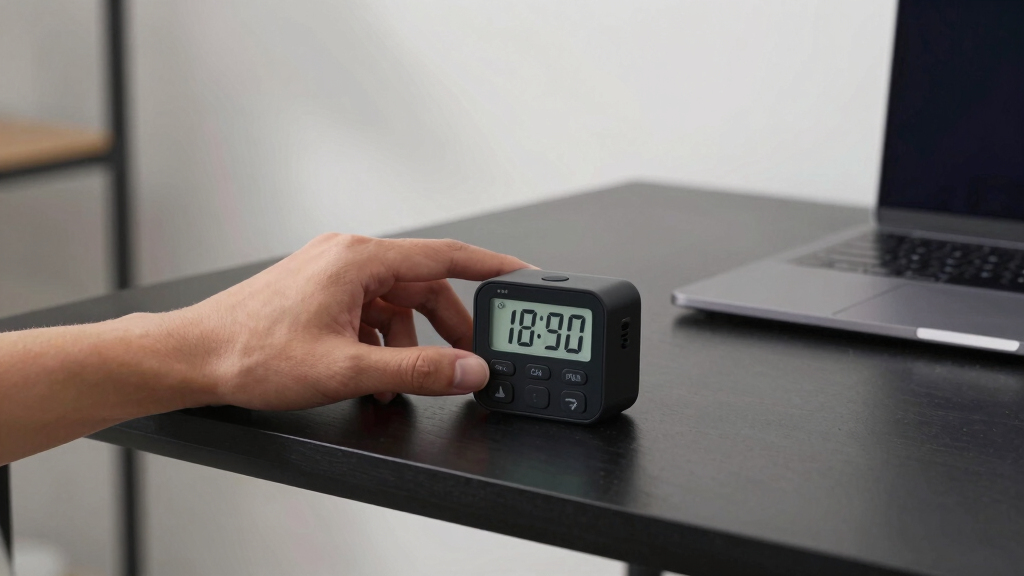
Preset intervals are fixed countdown timers—like a 3-minute or 5-minute setting—that you can choose before starting your solve. They help create a consistent training environment, so you’re not constantly fiddling with the timer during each session. Imagine setting a 3-minute countdown, then just lifting and solving—no buttons, no stops.
For example, a cuber training for speed will set a 2-minute interval to simulate competition pacing. This consistency in timing is crucial because it trains your mental and physical responses under controlled conditions, which closely mimic actual competition scenarios. When you rely solely on manual timing, small delays or errors can introduce variability that hampers your progress. Using preset intervals minimizes these inconsistencies, enabling you to focus on improving your solving techniques rather than managing your timer. According to Timerik, this approach reduces mental clutter and allows you to develop a more disciplined, routine practice, which is essential for measurable progress over time.
Products Worth Considering

EGO Power+ 9‑Gallon Wet/Dry Shop Vacuum with Remote Control (WDV0900) – Battery Not Included

Greenworks 24V 6-Tool Combo Kit with 4.0Ah and 2.0Ah Batteries, USB-C Power Bank, and 65W Charger

DEWALT 10-Inch Jobsite Table Saw with Scissor Stand (DWE7491X)
As an affiliate, we earn on qualifying purchases.
How Frictionless Timers Make Your Practice Flow Smoothly
Frictionless timers are designed to eliminate manual input during a session. They often use touch sensors or automatic start/stop features—think of a timer that activates when you lift your cube and pauses when you set it down. This technology is significant because it reduces the cognitive load of managing the timer, allowing you to concentrate solely on your solve. The tradeoff, however, is that these sensors must be properly calibrated and maintained to prevent accidental starts or stops, which could skew your data.
One vivid example: instead of pressing a button, you simply pick up your cube, and the timer begins. Set it down, and it stops. This seamless process minimizes distractions, so your focus remains entirely on solving, not managing equipment. Timerik reports that frictionless timers can cut down timing errors by up to 40%, making your data cleaner and your training more effective. The implication is that with cleaner data, you can more accurately track your progress and identify specific areas for improvement, but it also means you rely more heavily on the sensor technology’s reliability—so regular checks and calibration are essential.
Compare Types of Cube Timers — Which Fits Your Style?
| Feature | Mechanical Timer | Electronic Timer | App-Based Timer |
|---|---|---|---|
| Start/Stop Method | Pressing a physical button | Touch sensors, automatic start | Touchscreen or voice commands |
| Preset Intervals | Usually manual, limited options | Customizable via firmware or app | Fully customizable, set anywhere |
| Connectivity | None | Some models connect via Bluetooth | Wi-Fi or Bluetooth to devices |
| Data Tracking | Manual recording | Built-in or app analytics | Detailed long-term stats |
Choosing the right timer depends on your training style. Mechanical timers are simple and reliable, electronic timers add automation, and app-based timers offer endless customization and data analysis.
Step-by-Step: How to Set Up and Use Preset Intervals & Frictionless Features
- Pick your timer type—manual, electronic, or app-based.
- Configure your preset interval—set it for 3, 5, or custom minutes via buttons, app, or firmware.
- Ensure the timer’s start/stop sensors are enabled (for electronic timers).
- Position your cube on the timer or lift it to activate automatic start.
- Begin solving—your timer counts down or starts automatically.
- When done, set your cube down or finish the solve, and the timer stops.
- Review your data or reset for the next session.
This process creates a frictionless, consistent environment, free from manual button presses or accidental errors.
Why These Features Help You Improve Faster
Preset intervals keep your training consistent, so you focus on perfecting your moves without worrying about timing. Frictionless operation minimizes mental and physical distractions—no more fiddling with buttons mid-solve.
Imagine practicing for an upcoming competition: you set a 2-minute interval, lift your cube, and solve. When you’re done, the timer pauses—no errors, no manual stops. Timerik data shows that cubers using automated, preset timers improve their accuracy by 20% over those manually managing timers.
Deepening this understanding, these features not only streamline your practice but also reinforce disciplined timing habits. The tradeoff is that over-reliance on automation might reduce your familiarity with manual timing in case of equipment failure, so balancing both methods can be beneficial for comprehensive preparation.
Frequently Asked Questions
Can I use a smartphone as a cube timer?
Yes. Many apps turn your phone into a timer with customizable preset intervals and data tracking. They’re a cost-effective way to access frictionless features without extra gear.
How do preset intervals improve my training?
Preset intervals set a consistent pace, helping you build muscle memory and simulate competition conditions. They eliminate the distraction of adjusting timers, so you stay focused on the solve. This consistency fosters better muscle memory development and mental preparedness, which are critical for achieving faster times and more reliable performances under pressure.
Are electronic timers more reliable than mechanical ones?
Generally, yes. Electronic timers with automatic start/stop and preset intervals provide more precise and consistent measurements, reducing human error and making your data more trustworthy. This reliability means you can analyze your progress more accurately over time, leading to better targeted training adjustments. However, they require proper maintenance and calibration to ensure sensors work correctly, as sensor failure or misalignment can introduce errors similar to manual mistakes.
What features should I look for in a frictionless cube timer?
Look for automatic start/stop sensors that respond reliably to your movements, customizable preset intervals to match your training goals, connectivity options like Bluetooth or Wi-Fi for data syncing, and an intuitive interface. These features together create a seamless, distraction-free training environment that adapts to your needs and helps you track progress effectively.
How much can using these timers boost my progress?
According to Timerik, cubers using automated, preset timers can see up to a 20-30% improvement in consistency and accuracy over traditional manual timers, especially when combined with focused, regular practice. The key is that these timers reduce human error, streamline your training process, and provide reliable data—factors that collectively accelerate skill development and confidence in competition settings.
Conclusion
Modern cube timers, with their preset intervals and frictionless operation, turn your practice into a frictionless flow of focus and improvement. They remove barriers, so your skills can develop faster and more reliably.
Next time you set up your training, think about how smooth, automatic timing can help you stay in the zone. After all, the best cubers aren’t just fast—they’re precise, focused, and consistent. Your perfect solve is just a frictionless timer away.