
TL;DR

Get business pricing on your home office setup
- Business-only prices and quantity discounts
- Tax-exempt purchasing
- Multiple users, one account, clear invoices
Under-desk storage ideas can turn cluttered desks into organized havens. Modular drawers, cable trays, and wall-mounted organizers free up surface space, boosting focus and comfort. Choosing adaptable, durable options makes a real difference.
Imagine sitting at your desk, the surface buried under papers, chargers, and random gadgets. Clutter drags down your focus, wastes your time hunting for essentials, and even affects your posture. The good news? With the right under-desk storage, you can keep your surface clear and your mind sharp.
This guide will walk you through practical ideas that turn under-utilized space into your best organizational ally. Whether you work in a tiny corner or a spacious home office, these solutions help you work smarter, not harder.
Measure your space accurately before choosing storage solutions.
Modular drawers, cable trays, and wall organizers are the most effective types.
DIY options can be budget-friendly and highly customizable.
Avoid overload and blockages to keep your workspace safe and functional.
Durable materials like metal and quality plastic last longer and look better.
Under-Desk Storage Ideas That Keep Surfaces Clear
Turn overlooked space into an organizational ally. The right mix of modular drawers, cable trays and hanging organizers keeps essentials within reach, reduces visual noise and protects the room your body needs to work comfortably.
The four storage types that actually work
Start with what needs to move off the surface. Small daily tools belong in a drawer, cables in a tray, heavy supplies in a cabinet and quick-grab accessories on a hanging organizer.
Sliding drawers
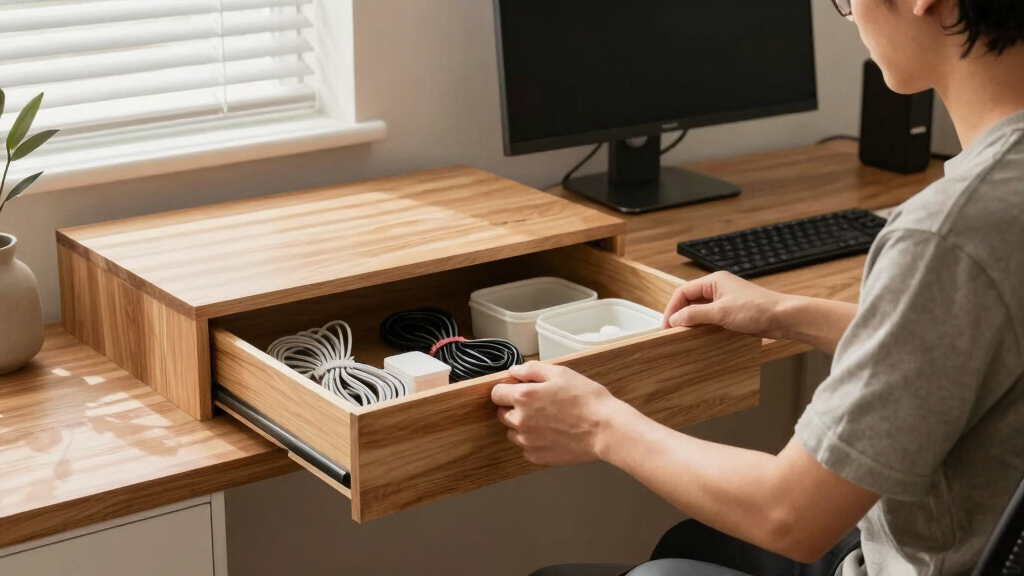
Pens, notes, adapters and chargers stay hidden but remain available in one pull.
Best when: depth is shallow and access is frequent.Under-desk cabinets
Files and heavier office supplies gain secure, structured storage close to the workstation.
Best when: the desktop is wide and legroom is generous.Hanging organizers
Headphones, controllers and light accessories occupy vertical space instead of the desktop.
Best when: flexibility matters more than load capacity.Cable trays
Power strips, adapters and excess cord length move away from feet and visible surfaces.
Best when: several powered devices share the desk.Match the solution to the job
No single option wins every category. A compact workstation often benefits from two small, specialized pieces instead of one bulky unit.
| Storage type | Surface clearing | Easy access | Heavy loads | Legroom impact | Installation |
|---|---|---|---|---|---|
| Sliding drawer | ✓ Excellent | ✓ Excellent | ~ Moderate | ~ Check depth | Clamp or screws |
| Under-desk cabinet | ✓ Excellent | ~ Good | ✓ Strong | ✗ Highest impact | More complex |
| Hanging organizer | ~ Good | ✓ Excellent | ✗ Light only | ✓ Low impact | Hook, clamp or drill |
| Cable tray | ✓ Excellent | ~ Planned access | ~ Moderate | ✓ Low impact | Clamp or screws |
Pick a fit that supports your body and workflow
A storage unit is only useful if it clears chair arms, knees, cables and desk mechanisms. Measure the whole movement zone—not merely the empty space you can see.
Map width, depth and height
Record the usable area under, behind and beside the desktop.
Protect the movement zone
Test knee clearance, chair travel and sit-stand desk motion.
Rank items by frequency
Give daily tools the fastest access; move occasional items farther away.
Choose the mounting method
Clamps offer flexibility; screws provide stability for heavier loads.
Plan for change
Prefer modular or adjustable pieces that can evolve with your setup.
Relative fit by priority
A qualitative planning view based on the strengths of each storage category.
Design cue: preserve the center knee zone and distribute storage toward the rear edge or outer sides.
Low-cost ideas with a tailored fit
DIY storage can outperform off-the-shelf products when dimensions are unusual. Keep loads light, use suitable fasteners and avoid placing improvised pieces near heat or moving hardware.
Repurposed spice rack
Mount a shallow rack beneath the rear edge to corral adapters and neatly looped cables.
Magnetic tool strip
Use it for metal clips, small tools and accessories—away from sensitive electronics.
Mounted mini bins
Small lightweight bins create dedicated homes for sticky notes, pens and charging leads.
Hook-and-loop cable rail
Reusable straps secure excess cable length while keeping every connection serviceable.
The clear-surface chain
A clear desk should never create a hidden hazard
Overloading, blocked ventilation and inaccessible cords can undo the benefits of storage. Stability and airflow belong in the plan from the beginning.
Avoid these mistakes
- Exceeding the unit or fastener weight limit.
- Blocking charger vents, computer airflow or desk motors.
- Placing drawers where knees or chair arms collide.
- Hiding cable connections so deeply that they cannot be inspected.
- Filling storage with rarely used items that belong elsewhere.
Safe installation sequence
- Clear the workspace and confirm all dimensions.
- Select clamps for flexibility or screws for firm support.
- Follow the product instructions and use tools safely.
- Level and tighten the unit before loading it.
- Add items gradually, placing heavier objects over strong mounting points.
Durable, slim and visually crisp. Ideal for trays, frames and higher-load applications.
Lightweight, affordable and easy to clean. Best for compact drawers and removable bins.
Warm and substantial. Match thickness, finish and mounting hardware to the intended load.
Clear the surface. Keep the essentials close.
Measure accurately, combine specialized storage types and leave generous room for movement, airflow and future changes.
Why Under-Desk Storage Is Your Secret Weapon for a Clutter-Free Workspace
Under-desk storage isn’t just about hiding clutter. It’s about creating a workspace where everything you need is within arm’s reach, yet out of sight. When you clear your surface, you reduce visual noise and mental distraction.
For example, a remote worker once shared how installing a sliding drawer beneath her desk transformed her mornings. She now finds her essentials—pens, notepads, chargers—organized and readily accessible, making her workflow smoother and less stressful.
Research from productivity studies shows that a tidy workspace can boost focus by up to 20%. When your desk stays clear, your brain doesn’t waste energy processing visual chaos. This not only enhances your efficiency but also reduces mental fatigue, allowing you to concentrate longer and more effectively. The tradeoff is that investing in well-designed storage can require upfront effort and cost, but the long-term gains in productivity and comfort far outweigh these initial investments.
Products Worth Considering

DEWALT 18-Inch Scroll Saw with Variable Speed
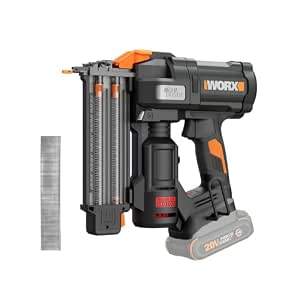
WORX 20V Brushless Cordless 18-Gauge Brad Nailer (WX838L.9)

EGO Power+ 9‑Gallon Wet/Dry Shop Vacuum with Remote Control (WDV0900) – Battery Not Included
As an affiliate, we earn on qualifying purchases.
Top 4 Types of Under-Desk Storage That Actually Work
| Type | Best For | Pros | Cons |
|---|---|---|---|
| Sliding drawers | Small items, stationery, chargers | Easy access, customizable | Can be bulky and may limit legroom if not properly sized |
| Under-desk cabinets | Office supplies, files | Secure, spacious, good for heavier items | Installation can be complex and may require permanent mounting |
| Wall-mounted organizers | Cables, headphones, quick grab items | Space-saving, versatile, keeps surface clear | Limited weight capacity, might require drilling |
| Cable trays | Cables, power strips | Reduces cable mess, improves safety, keeps cords organized | Fixed position, may need planning for cable routing |
Choosing the right type depends on your space and needs. For example, a desktop with lots of electronic gear benefits from cable trays and small drawers, while a minimalist setup might only need a wall-mounted organizer. Understanding the tradeoffs—like installation effort versus accessibility or capacity versus space—helps you select options that truly enhance your workspace without introducing new clutter or inconvenience.
How to Pick Under-Desk Storage That Fits Your Space and Style
- Measure your available space carefully—under your desk, behind, and around. Knowing exact dimensions prevents purchasing solutions that are either too big or too small, saving you time and effort in trial and error.
- Decide what items you need to store most often—pens, files, electronics—and prioritize easy access to these. This focus ensures your storage enhances efficiency rather than just adding clutter.
- Choose materials that match your style—metal for a sleek, modern look; wood for warmth and a natural feel; plastic for affordability and lightweight convenience. Material choice impacts durability, maintenance, and aesthetic harmony.
- Think about installation—do you prefer something that clamps on easily or needs screws for a more permanent setup? Clamping options are more flexible and less damaging, but screws may offer greater stability for heavier items.
- Prioritize flexibility—can the solution grow or shrink with your needs? Modular or adjustable options allow you to adapt your workspace over time without replacing entire units.
For example, a student with a small desk opted for a compact, clamp-on drawer that slides neatly underneath, keeping her surface clear for studying and her supplies within easy reach. Recognizing that flexibility and ease of installation can make a significant difference in daily usability helps you choose solutions that truly support your workflow.
Creative DIY Under-Desk Storage Ideas That Cost Less and Work Better
If you’re handy, DIY solutions can be a game-changer. For instance, repurposing a small spice rack as a cable organizer or attaching a magnetic strip under your desk to hold metal tools or clips can free up surface space and keep essentials within arm’s reach.
Another idea: attach small plastic bins to the underside of your desk for pens, sticky notes, and chargers. You can paint or decorate them to match your workspace aesthetics, making your setup both functional and personalized.
DIY projects aren’t just budget-friendly—they allow you to customize storage to fit your exact needs and style, which can be more satisfying and effective than off-the-shelf solutions. The tradeoff is that DIY solutions may require time and some basic skills, but the tailored fit often results in better organization and a more cohesive look.
Avoid These Common Mistakes When Setting Up Under-Desk Storage
Overloading your under-desk storage can backfire. Heavy items strain the mounting points and can cause damage or instability over time. Additionally, blocking airflow or cables can lead to overheating or connectivity issues, which might damage your equipment or reduce performance.
For example, a user once installed a large cabinet that blocked ventilation, leading to overheating of her laptop charger. She had to move it and reassess her setup, realizing that proper airflow is crucial for electronic longevity.
Always check weight limits, keep cables visible and accessible, and avoid cluttering your under-desk space with items you rarely use. Balancing accessibility with safety is key to maintaining an efficient workspace.
Simple Steps to Install Under-Desk Storage Safely and Securely
- Clear your workspace and measure the space where you want the storage. Accurate measurements prevent mismatched or unstable setups.
- Choose the appropriate mounting hardware—clamps for easy removal and reconfiguration, screws for a more permanent, stable fixture.
- Follow the manufacturer’s instructions carefully—use PPE and power tools safely to avoid accidents or damage.
- Secure the unit tightly, checking stability before adding items. This prevents accidents or damage caused by loose fittings.
- Organize your essentials, making sure heavy items are supported properly to prevent tipping or strain on mounting points.
For example, when installing a wall-mounted shelf, a remote worker used a level and a drill, ensuring it was perfectly aligned and sturdy enough for her books and chargers. Proper installation not only ensures safety but also prolongs the lifespan of your storage solutions.
Materials That Last and Look Good: Picking Durable Under-Desk Storage
Materials matter because they determine the longevity and appearance of your storage solutions. Metal and high-quality plastic resist wear and tear better than cheap wood or thin plastic, which can warp or break over time. Metal drawers with powder coating resist scratching and corrosion, maintaining a sleek look longer. Wooden units add warmth and a natural feel, but they require proper treatment for moisture and may be more susceptible to damage from humidity or impacts.
For example, a home office setup with a steel sliding drawer has stayed rust-free and shiny for over a year, even in a humid climate. Choosing the right material based on your environment ensures your storage remains functional and attractive over time, reducing the need for replacements and repairs.
Think about your environment—if you have a lot of humidity or rough handling, select durable, maintenance-friendly materials. This foresight can save you money and frustration in the long run.
How Good Storage Can Improve Your Work Ergonomics
Proper under-desk storage places your essentials within easy reach, which is vital for maintaining good ergonomics. When frequently accessed items like chargers, notebooks, or tools are stored close to your body’s natural position, you avoid unnecessary leaning, twisting, or reaching. This minimizes strain on your neck, shoulders, and back, reducing fatigue and the risk of repetitive strain injuries.
For instance, a graphic designer keeps her tablets and styluses in a shallow tray right beneath her monitor. This setup allows her to grab her tools quickly without stretching or standing, maintaining a better posture throughout her workday. Over time, such ergonomic improvements can significantly reduce discomfort and increase productivity. The tradeoff is that organizing for ergonomics requires thoughtful placement—prioritizing items based on frequency of use and ease of access—to truly reap the benefits.
In essence, strategic under-desk storage isn’t just about tidiness; it’s a crucial ergonomic upgrade that supports your health and efficiency over the long term.
Frequently Asked Questions
What are the best under-desk storage ideas for small spaces?
Opt for wall-mounted organizers and clamp-on drawers that don’t take up precious surface or floor space. Use vertical space efficiently by stacking or attaching small bins underneath your desk surface.
How do I choose the right under-desk storage for my needs?
Identify what you need to store most—files, gadgets, cables—and measure your available space. Consider durability, ease of installation, and whether you prefer a DIY or ready-made solution.
Are there stylish options that don’t look bulky?
Yes, sleek metal or minimalist wall-mounted units blend seamlessly into modern decor. Choose neutral colors and slim profiles to keep the look clean and unobtrusive.
How can I organize cables and electronic accessories under my desk?
Cable trays, clips, and magnetic strips help hide and manage cords. Use zip ties or Velcro straps to bundle cables neatly and avoid tangling.
What materials are most durable for under-desk storage?
Steel, high-grade plastic, or treated wood tend to withstand wear and tear better than cheap particleboard or thin plastic. Choose materials suited to your environment and usage frequency.
Conclusion
Clear surfaces aren’t just about looks—they’re about feeling in control of your workspace. The right under-desk storage turns chaos into calm, giving you quick access and peace of mind.
Start small—measure, pick, and install. Before you know it, your desk will be a sleek, efficient zone where everything has its place. What’s stopping you from decluttering today?