TL;DR

Get your home office setup delivered free — and shop member deals
- Fast, free delivery on millions of items
- Access to Prime Big Deal Days deals on October 6–7
- Prime Video, Amazon Music and more included
A minimalist desk setup with just one monitor and one notebook minimizes distractions, boosts focus, and promotes calm. Regular decluttering keeps your workspace simple and efficient.
Ever notice how a cluttered desk makes your mind feel just as chaotic? The truth is, a minimalist setup—just one monitor, one notebook, and zero excess—can clear your head. It’s about more than looks; it’s a proven way to sharpen focus and cut out distractions.
If you’re tired of juggling too many gadgets or feeling overwhelmed by your workspace, this guide is for you. You’ll learn how to craft an environment that’s sleek, intentional, and designed for actual productivity—not just aesthetic appeal.
Stick to one monitor and one notebook to keep your workspace simple and focused.
Prioritize quality over quantity—choose sleek, ergonomic tools that inspire you.
Regularly declutter and organize to maintain a calm, productive environment.
Use digital tools to reduce physical clutter and streamline your workflow.
A minimalist desk isn’t a one-time setup; it’s a daily practice of intentionality.
Why a Minimalist Desk Can Change How You Work
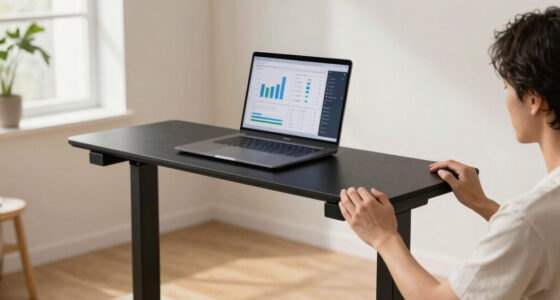
A minimalist desk isn’t just about aesthetics. It’s about creating a zone where your mind can settle. When your workspace only has what you need, distractions fade away. Imagine working on a sturdy, clean surface with a single monitor glowing softly and a notebook ready for quick notes. That’s the power of simplicity.
This setup boosts focus because your brain isn’t constantly scanning for what’s out of place. It reduces mental fatigue, making work feel smoother. Plus, a clutter-free desk is easier to clean and maintain, saving you time and frustration in the long run.
Furthermore, a minimalist environment can help you develop better work habits. When unnecessary items are removed, you’re more likely to focus on your tasks without temptation or distraction. It also creates a sense of calm, which can reduce anxiety and promote mental clarity. However, it requires discipline to resist the urge to accumulate unnecessary items, and the benefits are most significant when this mindset is maintained consistently.
As an affiliate, we earn on qualifying purchases.
How to Pick the Right Monitor and Notebook for Your Minimalist Desk
Choosing the right monitor and notebook is key. For your monitor, go for a high-resolution, matte finish screen with a slim profile. Think about a size that fits your workspace—around 24 to 27 inches—big enough for clear visuals but not overwhelming.
For the notebook, pick one with a smooth cover, a comfortable size, and paper that feels good under your pen. A simple black or neutral color keeps the look clean. The goal: tools that are functional and beautiful enough to want to keep out, not hidden in a drawer.
Investing in quality here matters because these are your primary tools. A high-quality monitor reduces eye strain and can improve your posture over long work sessions, while a well-chosen notebook encourages regular use and helps you capture ideas efficiently. While minimalism emphasizes simplicity, selecting the right tools involves balancing aesthetic appeal with ergonomic support and durability to ensure ongoing satisfaction and productivity.
As an affiliate, we earn on qualifying purchases.
The One-Item Rule: Keeping Only What You Need
Limit yourself to one monitor and one notebook. No extra gadgets, no clutter. This rule helps you focus on what truly matters—your work and your thoughts.
For example, if you’re a writer, your notebook captures ideas. If you’re a designer, your monitor displays your projects. Keep only the essentials on your desk. It’s like trimming a garden—remove the weeds to let your best tools thrive.
While this rule simplifies your environment, it also challenges you to prioritize quality over quantity. You’ll need to choose tools that serve multiple purposes or are versatile enough to support various tasks. This tradeoff means you might need to invest in more adaptable equipment, but the payoff is a workspace that consistently promotes clarity and focus.
Adopting this habit over time fosters a mindset of intentionality, encouraging you to evaluate what truly adds value to your work and what can be eliminated, leading to a more efficient and peaceful workspace.
As an affiliate, we earn on qualifying purchases.
Organizing Your Minimalist Desk for Daily Success
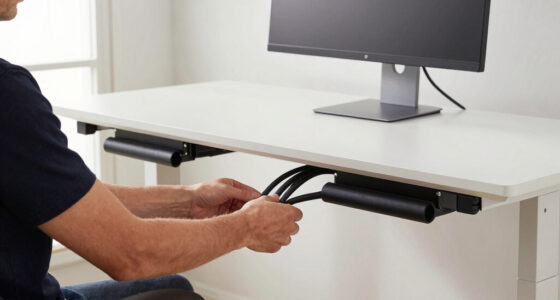
Organization is about more than tidying up once. It’s about creating habits. Use a simple tray or a sleek cable organizer to keep cords out of sight. Your keyboard, mouse, and monitor should sit at comfortable heights—your eyes level with the top of the monitor.
Place your notebook in a dedicated spot so it’s always within reach. Keep a small tray for essential supplies—pens, sticky notes, or a charging cable. When everything has a place, your workspace stays calm and inviting.
For example, start each morning by spending five minutes tidying. It’s a small habit that keeps clutter from creeping back and keeps your mind clear. Developing these routines ensures that your workspace remains a sanctuary of focus, reducing the mental load associated with disorder.
As an affiliate, we earn on qualifying purchases.
The Benefits of Going Digital and Going Paperless
In a minimalist setup, digital tools complement your physical space. Use cloud storage and note apps to replace piles of paper. It’s not just about reducing paper clutter; it’s about quick access and less mess.
Imagine jotting down ideas in a sleek app on your tablet instead of a stack of sticky notes. Digital tools also enable better organization—tags, folders, and search functions make retrieving information faster and more efficient. This can lead to increased productivity, as you spend less time searching and more time creating. Additionally, going paperless reduces environmental impact and storage needs, aligning your workspace with sustainable practices. The transition may require an initial setup period, but the long-term benefits include a cleaner, more streamlined workflow that enhances your focus and reduces clutter.
Ultimately, integrating digital tools into your minimalist setup fosters a seamless, clutter-free environment where everything you need is just a click away, supporting sustained productivity and mental clarity.
Maintaining Your Minimalist Desk Without Losing Sight
Minimalism isn’t a one-time setup; it’s a continuous practice. Every week, spend a few minutes reviewing what’s on your desk. Remove items that no longer serve your workflow.
For example, if you notice a pile of used sticky notes or a forgotten cable, take a moment to clear it out. Keep only what you actively use—your monitor, notebook, and perhaps a pen.
This ongoing effort prevents clutter from creeping back and keeps your workspace a place of calm and focus. Regularly reassessing your setup helps you identify unnecessary items that may have accumulated over time, allowing you to make adjustments that reinforce your minimalist principles and keep your environment aligned with your productivity goals.
Compare a Minimalist Desk vs. a Cluttered Desk
| Feature | Minimalist Desk | Cluttered Desk |
|---|---|---|
| Visual Clarity | Clean, open space with only essentials | Overloaded with gadgets, papers, and accessories |
| Focus | High—less distractions | Low—constant interruptions |
| Stress Level | Lower—calm environment | Higher—feeling overwhelmed |
| Maintenance | Simple, quick | Time-consuming, frustrating |
Frequently Asked Questions
How do I start transitioning to a minimalist desk setup?
Begin by removing everything that isn’t essential. Keep only your monitor, notebook, and a few key accessories. Then, invest in quality, sleek items that fit your workflow—less is more.
What are the best ergonomic practices for a minimalist desk?
Ensure your monitor is at eye level, your keyboard and mouse are positioned comfortably, and your chair supports good posture. Even with minimal items, comfort boosts focus and health.
How can I maintain a minimalist workspace over time?
Set a weekly review to remove clutter, tidy your desk daily, and stick to your one-in-one-out rule. Consistency keeps your space calm and functional.
Are minimalist setups suitable for all types of work?
Yes, but adapt the essentials to your needs. Creative work might require a sketchpad or tablet, but keep it simple and purposeful.
What are some recommended products for a minimalist desk?
Look for high-quality monitors, sleek notebooks, cable organizers, and natural-material accessories that blend function and style without cluttering your space.
Conclusion
Choosing a minimalist setup with one monitor and a single notebook isn’t just about looks. It’s about reclaiming your focus and reducing stress. Keep your workspace intentional—only what you need, always in its place.
Imagine sitting at a desk that invites clarity rather than chaos. That’s the real power of a simple, clutter-free environment. Your best work happens here, in the calm.
Halloween Picks
halloween
As an affiliate, we earn on qualifying purchases.