
For most dedicated movie rooms, I’d start with the Epson Home Cinema 3800: its 3LCD design and 4K PRO-UHD processing make it the strongest fit for a detailed, full-screen home theater. The ViewSonic LS740HD is a better match when high brightness and a laser light source matter more, while the Epson Home Cinema 1100 offers a simpler 1080p route from an established home-theater line. The main tradeoffs are image detail versus brightness, built-in streaming versus a separate source, and a fixed installation versus portable convenience. Many compact smart models simplify setup, but their feature lists alone do not establish how they perform in a dark, large-screen theater. Read on for the full breakdown of all 15 options and which buyer each one suits.

Get business pricing on your home office setup
- Business-only prices and quantity discounts
- Tax-exempt purchasing
- Multiple users, one account, clear invoices
Complete the kit


Key Takeaways
- The Epson Home Cinema 3800 leads for a traditional theater setup because its 3LCD imaging and 4K PRO-UHD processing target detailed, large-screen viewing rather than portability.
- The ViewSonic LS740HD prioritizes brightness and laser operation, making it a different choice from the Epson 3800 even though both suit planned installations.
- The Epson Home Cinema 1100 and Home Cinema 980 keep the focus on 1080p home viewing; buyers who do not need 4K should compare these before paying for higher-resolution processing.
- Smart features are spread across several compact and outdoor models, including Roku TV, Google TV, and built-in-app designs, but streaming convenience does not replace checking placement and room light.
- Bright-room use, outdoor portability, and a dedicated dark theater are separate jobs; the ViewSonic brightness-oriented models and portable smart projectors serve different needs, not interchangeable versions of one setup.
| Smart Outdoor Projector with 4K Support, WiFi & Bluetooth, Dual Speakers, Auto Focus, Compatible with YouTube & Prime Video |  | Best for Built-In Streaming | Native resolution: 1080p | 4K support: Yes; display resolution remains native 1080p | Brightness: 600 ANSI lumens | VIEW LATEST PRICE | See Our Full Breakdown |
| Aurzen Roku TV D1R Smart Portable Outdoor Projector with WiFi and Bluetooth |  | Best for Roku Simplicity | Resolution: 1080p Full HD | Screen size: 60–150 inches | Speakers: Dual 5W | VIEW LATEST PRICE | See Our Full Breakdown |
| HAPPRUN Native 1080P Bluetooth Projector |  | Best Budget-Friendly Basic Setup | Native resolution: 1920 × 1080 | Display type: LCD | Brightness: 300 ANSI lumens | VIEW LATEST PRICE | See Our Full Breakdown |
| ViewSonic LS740HD 1080P Laser Projector, 5500 Lumens, Full HD Home Theater |  | Best for Bright Rooms | Resolution: 1920 × 1080p | Brightness: 5,500 ANSI lumens | Light source: Laser phosphor | VIEW LATEST PRICE | See Our Full Breakdown |
| ViewSonic PX700HDH 1080p Projector with 3700 Lumens and Dual HDMI |  | Best for Flexible 1080p Home Theater | Resolution: 1920 × 1080p | Brightness: 3,700 ANSI lumens | Contrast ratio: 22,000:1 | VIEW LATEST PRICE | See Our Full Breakdown |
| Smart 4K Projector with WiFi, Bluetooth, AI Auto Focus, HDR10, Dolby Audio, and Built-in Apps |  | Best for Built-In Streaming | Native resolution: 1920 × 1080 | Maximum resolution: 3840 × 2160 pixels | Brightness: 550 lumens | VIEW LATEST PRICE | See Our Full Breakdown |
| Epson Home Cinema 3800 4K PRO-UHD 3-Chip 3LCD Projector with HDR Technology |  | Best for a Dedicated Home Theater | Resolution: 4K PRO-UHD | Brightness: 3,000 lumens | Contrast ratio: 100,000:1 | VIEW LATEST PRICE | See Our Full Breakdown |
| VIDAA X9 PRO 4K Outdoor Projector with Smart TV Features, HDR10, Dolby Audio, and Auto Focus |  | Best for Outdoor Movie Nights | Native resolution: 1080p | 4K support: 4K decoding | Brightness: 920 ANSI lumens | VIEW LATEST PRICE | See Our Full Breakdown |
| ViewSonic PA503HD 4000 Lumens 1080p Full HD DLP Projector | 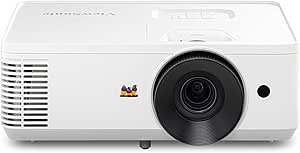 | Best for Ambient-Light Viewing | Resolution: 1920 × 1080p Full HD | Brightness: 4,000 ANSI lumens | Throw ratio: 1.4–1.6 | VIEW LATEST PRICE | See Our Full Breakdown |
| Epson Home Cinema 1100 3-Chip 3LCD 1080p Home Theater Projector |  | Best 1080p Pick for Color Accuracy | Resolution: 1080p | Brightness: 3,400 lumens | Projection technology: 3-chip 3LCD | VIEW LATEST PRICE | See Our Full Breakdown |
| TMY Native 1080P Mini Portable Projector with 80-Inch Screen and Bluetooth |  | Best Starter Bundle for Movie Nights | Native resolution: 1280 × 720 | Maximum supported display resolution: 1920 × 1080 | Display type: LCD | VIEW LATEST PRICE | See Our Full Breakdown |
| Official Licensed Google TV HAPPRUN Native 1080P Bluetooth Projector |  | Best for Built-In Streaming | Resolution: Native 1080p; supports 4K | Brightness: 400 ANSI lumens | Speaker: Built-in 5W speaker | VIEW LATEST PRICE | See Our Full Breakdown |
| Epson Home Cinema 980 3-Chip 3LCD 1080p Movie Projector |  | Best for Bright Rooms | Resolution: 1080p | Brightness: 4,000 lumens | Projection technology: 3LCD | VIEW LATEST PRICE | See Our Full Breakdown |
| Mini Projector with Wi-Fi and Bluetooth, Built-in Apps, 1080P HD, 4K Compatible |  | Best for Flexible Placement | Resolution: Native 1080p; 4K compatible | Brightness: 300 ANSI lumens | Wireless connectivity: Wi-Fi 6, Bluetooth 5.3 | VIEW LATEST PRICE | See Our Full Breakdown |
| Optoma HD146X 1080P Full HD Home Theater Projector |  | Best for Simple 1080p Gaming | Resolution: 1080p Full HD | Gaming feature: Game display mode | Color: Vibrant color display, as described | VIEW LATEST PRICE | See Our Full Breakdown |
| home theater projector | Brightness | Resolution |
|---|---|---|
| Smart Outdoor Projector with 4 | 600 ANSI lumens | — |
| Aurzen Roku TV D1R Smart Porta | — | 1080p Full HD |
| HAPPRUN Native 1080P Bluetooth | 300 ANSI lumens | — |
| ViewSonic LS740HD 1080P Laser | 5,500 ANSI lumens | 1920 × 1080p |
| ViewSonic PX700HDH 1080p Proje | 3,700 ANSI lumens | 1920 × 1080p |
| Smart 4K Projector with WiFi | 550 lumens | — |
| Epson Home Cinema 3800 4K PRO- | 3,000 lumens | 4K PRO-UHD |
| VIDAA X9 PRO 4K Outdoor Projec | 920 ANSI lumens | — |
| ViewSonic PA503HD 4000 Lumens | 4,000 ANSI lumens | 1920 × 1080p Full HD |
| Epson Home Cinema 1100 3-Chip | 3,400 lumens | 1080p |
| TMY Native 1080P Mini Portable | — | — |
| Official Licensed Google TV HA | 400 ANSI lumens | Native 1080p; supports 4K |
| Epson Home Cinema 980 3-Chip 3 | 4,000 lumens | 1080p |
| Mini Projector with Wi-Fi and | 300 ANSI lumens | Native 1080p; 4K compatible |
| Optoma HD146X 1080P Full HD Ho | — | 1080p Full HD |
More Details on Our Top Picks
Smart Outdoor Projector with 4K Support, WiFi & Bluetooth, Dual Speakers, Auto Focus, Compatible with YouTube & Prime Video
The P62 Pro suits movie nights where a built-in streaming setup matters more than native 4K detail. Its 1080p native resolution accepts 4K content, while HDR10 and 600 ANSI lumens offer a feature set aimed at dim rooms and nighttime outdoor viewing. Built-in Prime Video and YouTube mean fewer add-on devices than the HAPPRUN H1, which requires a separate streamer. Auto focus and keystone correction also simplify setup when the projector moves between locations.
The tradeoff is that 4K support does not make the displayed image native 4K, and 600 ANSI lumens is a poor match for daylight or bright living rooms. Its dual 10W speakers reduce the need for immediate audio add-ons, but outdoor use still calls for a stable power source, and no carrying case is included. I’d choose the brighter ViewSonic LS740HD for ambient-light viewing, but this is the more convenient pick for dark-room streaming.
Pros:- Built-in Prime Video and YouTube reduce the need for an external streaming device
- Auto focus and keystone correction help speed up setup
- Wi-Fi 6, Bluetooth 5.2, two HDMI ports, and two USB ports offer flexible connections
- Dual 10W speakers provide more onboard audio than the Aurzen Roku TV D1R’s dual 5W speakers
Cons:- Displays at native 1080p rather than native 4K resolution
- 600 ANSI lumens is best suited to dark viewing conditions
- No carrying case is included, and outdoor use requires a stable power source
Best for: Buyers who want a self-contained projector for evening movie nights and streaming without attaching a separate media player
Not ideal for: People who need native 4K detail, daytime outdoor viewing, or a projector that can run away from a stable power source
- Native resolution:1080p
- 4K support:Yes; display resolution remains native 1080p
- Brightness:600 ANSI lumens
- HDR:HDR10
- Speakers:Dual 10W Dolby Hi-Fi
- Connectivity:2× HDMI, 2× USB, Wi-Fi 6, Bluetooth 5.2
- Setup:Auto focus and keystone correction
- Zoom:50–100%
Our verdict“Choose the P62 Pro for convenient built-in streaming in dark rooms, but skip it if native 4K or bright-room performance is a priority.”
Aurzen Roku TV D1R Smart Portable Outdoor Projector with WiFi and Bluetooth
The Aurzen Roku TV D1R is the straightforward choice for buyers who want familiar streaming menus built into a portable projector. Its 1080p Full HD image, auto focus, and keystone correction make it easier to get a watchable setup than the more manual HAPPRUN H1, which lacks built-in streaming apps and automatic focusing. Roku access to more than 500 channels is the main distinction: it can keep movie night simple without relying on a separate streaming stick.
That convenience comes with limits. The supplied specs do not state a brightness figure, so I wouldn’t make it my pick for a room with substantial ambient light; the ViewSonic LS740HD is better suited to that job with its stated 5,500 ANSI lumens. The Aurzen’s dual 5W speakers are modest, and fan noise may distract viewers sitting close by. Its stated AC power supply also makes it less independent outdoors than a battery-powered device would be.
Pros:- Built-in Roku provides access to streaming channels without a separate player
- Auto focus and keystone correction reduce manual setup work
- Supports Wi-Fi on 2.4G and 5G bands and Bluetooth 5.2
- Compatible with Apple TV, AirPlay, Android devices, and major voice assistants
Cons:- Brightness is not specified in the supplied product data, making bright-room suitability hard to judge
- Dual 5W speakers may call for external audio in larger rooms
- Fan noise can be noticeable during operation
Best for: Viewers who want a portable 1080p projector with Roku streaming and automatic setup for evening indoor or outdoor use
Not ideal for: Buyers who need verified high brightness for a lit room, stronger onboard sound, or quiet operation near the projector
- Resolution:1080p Full HD
- Screen size:60–150 inches
- Speakers:Dual 5W
- Connectivity:Wi-Fi 2.4G/5G, Bluetooth 5.2
- Streaming:Built-in Roku platform
- Device compatibility:Apple TV, AirPlay, and Android devices
- Voice control:Apple HomeKit, Siri, Alexa, and Google Assistant
- Power supply:100–240V AC, 50/60Hz
Our verdict“Pick the Aurzen for built-in Roku convenience and easy setup, not for a bright-room theater or silent viewing.”
HAPPRUN Native 1080P Bluetooth Projector
The HAPPRUN H1 is a practical match for buyers who already own a streaming stick, laptop, or game console and want a compact projector centered on native 1080p playback. Unlike the P62 Pro and Aurzen Roku TV D1R, it does not offer built-in streaming apps, so the simpler hardware comes with an extra-device requirement. Its HDMI, USB, and Bluetooth connections make it flexible for common home entertainment sources, while desktop, tripod, and ceiling mounting give it more placement choices than a fixed-use design.
The headline 200-inch maximum image is less useful in practice if the room is bright: at 300 ANSI lumens, this model is better suited to a darkened space and a more modest screen. Bluetooth handles audio connections, but it does not cast video, so it cannot replace a wired or dedicated streaming connection. Compared with the much brighter ViewSonic LS740HD, the H1 is easier to move but far less appropriate for ambient-light viewing.
Pros:- Native 1920 × 1080 resolution for Full HD content
- Portable design with desktop, tripod, and ceiling mounting options
- HDMI, USB, 3.5mm audio, and Bluetooth 5.3 support
- Listed maximum image size of 200 inches for suitable dark-room setups
Cons:- 300 ANSI lumens limits use to dark or very dim rooms
- Streaming apps require a separate device
- Bluetooth supports audio, not video casting
Best for: Movie and gaming fans who already have an HDMI source and want a portable native-1080p projector for dark rooms
Not ideal for: Viewers seeking built-in streaming, bright-room performance, or wireless video casting from a phone
- Native resolution:1920 × 1080
- Display type:LCD
- Brightness:300 ANSI lumens
- Contrast ratio:10,000:1
- Maximum image size:200 inches
- Maximum throw distance:7 meters
- Connectivity:3.5mm jack, Bluetooth 5.3, HDMI, IR, USB
- Mounting options:Desktop, tripod, and ceiling mount
Our verdict“Choose the HAPPRUN H1 if you already have a playback device and want portable native 1080p for dark-room viewing.”
ViewSonic LS740HD 1080P Laser Projector, 5500 Lumens, Full HD Home Theater
The ViewSonic LS740HD stands apart from the portable models here by prioritizing high brightness and fixed-room flexibility over built-in entertainment features. Its 5,500 ANSI lumens make it the lineup’s strongest fit for living rooms with ambient light, while the laser phosphor light source avoids the lamp-replacement cycle associated with traditional lamp projectors. A 1.3x optical zoom and horizontal/vertical keystone adjustment provide more placement leeway than the ViewSonic PX700HDH, whose stated zoom is 1.1x and correction is vertical.
This is still a 1080p projector, not a native 4K upgrade, and its maximum screen size is listed as 150 inches. Its size and setup options point toward a planned installation rather than an easy-to-carry outdoor movie machine like the HAPPRUN H1. I’d favor the LS740HD when image visibility in a brighter space is the priority, but its complex setup and lack of listed built-in streaming mean it may require more planning and external devices.
Pros:- 5,500 ANSI lumens better suit rooms with ambient light than the portable models listed
- Laser phosphor light source is designed for maintenance-free operation
- 1.3x optical zoom and horizontal/vertical keystone adjustment ease placement
- Supports 360-degree and portrait projection modes
Cons:- Large form factor is less suited to frequent transport
- Setup may be more involved than the auto-focus portable models
- 1080p resolution does not provide native 4K detail
Best for: Home theater buyers setting up a fixed 1080p screen in a room where ambient light makes low-brightness portable models unsuitable
Not ideal for: People who want a lightweight outdoor projector, built-in streaming apps, or native 4K resolution
- Resolution:1920 × 1080p
- Brightness:5,500 ANSI lumens
- Light source:Laser phosphor
- Throw ratio:1.1–1.5
- Maximum screen size:150 inches
- Optical zoom:1.3x
- Keystone adjustment:Horizontal and vertical
- Projection modes:360-degree and portrait
Our verdict“Choose the LS740HD for a bright, planned 1080p installation, and skip it if portability or built-in streaming matters more.”
ViewSonic PX700HDH 1080p Projector with 3700 Lumens and Dual HDMI
The ViewSonic PX700HDH is the middle ground for buyers who want a conventional 1080p home theater projector with more brightness than portable picks, but do not need the LS740HD’s 5,500 ANSI lumens or laser light source. Its stated 3,700 ANSI lumens can help preserve a usable image with some ambient light, and dual HDMI makes it easier to leave two sources connected, such as a streaming player and game console. The 1.1x optical zoom and vertical keystone correction also provide some installation flexibility.
Compared with the LS740HD, this model offers less brightness, a narrower correction range, and a lamp lifespan listed at up to 20,000 hours rather than the other model’s maintenance-free laser approach. The product data gives a projection size of 80–150 inches, so I would not rely on the description’s larger-screen claim beyond that range. It also has no listed built-in streaming platform, making it a better fit for a dedicated source-based setup than a grab-and-go movie night.
Pros:- 3,700 ANSI lumens offer more brightness than the 300-lumen HAPPRUN H1
- Dual HDMI supports multiple connected video sources
- 1.1x optical zoom and vertical keystone correction help with placement
- Specified projection range of 80–150 inches suits many home theater setups
Cons:- Lamp lifespan is listed at up to 20,000 hours, unlike the LS740HD’s maintenance-free laser source
- Keystone correction is vertical only
- No built-in streaming platform is listed
Best for: Home theater buyers who want a 1080p projector for an 80–150-inch screen and need multiple HDMI sources connected
Not ideal for: People seeking native 4K, laser light-source longevity, or wide horizontal and vertical placement correction
- Resolution:1920 × 1080p
- Brightness:3,700 ANSI lumens
- Contrast ratio:22,000:1
- Projection size:80–150 inches
- Throw ratio:1.5–1.6
- Inputs:HDMI, USB, Mini USB
- Lamp lifespan:Up to 20,000 hours
- Zoom and correction:1.1x optical zoom; vertical keystone correction
Our verdict“Pick the PX700HDH for a source-based 1080p theater with dual HDMI, but choose the LS740HD for greater brightness and laser operation.”
Smart 4K Projector with WiFi, Bluetooth, AI Auto Focus, HDR10, Dolby Audio, and Built-in Apps
This model is the easiest fit for a streaming-first home theater: VIDAA OS provides more than 1,200 apps, while voice control and AirPlay reduce the need to attach extra devices. Auto focus and keystone correction also make it simpler to move between rooms than the more installation-focused Epson Home Cinema 3800. Its 4K support needs a qualification, though: the native resolution is 1080p, so it accepts 4K content rather than displaying it at native 4K detail. At 550 lumens, it is best reserved for a darkened room; the brighter VIDAA X9 PRO and Epson models are safer picks when some ambient light is unavoidable. Dolby Audio adds convenience, but a dedicated sound system may still suit a permanent theater better.
Pros:- VIDAA OS includes access to more than 1,200 apps
- Auto focus and keystone correction simplify placement
- AirPlay and voice control support convenient content sharing
- Dolby Audio provides built-in sound without requiring an immediate external speaker
Cons:- Native 1080p resolution does not show 4K content at native 4K detail
- 550-lumen brightness favors dark rooms over spaces with ambient light
- The listed 75-watt power draw and desktop form factor may be less appealing for frequent portable use
Best for: Viewers who want a self-contained streaming projector for dark rooms, occasional room-to-room use, and straightforward setup.
Not ideal for: Buyers seeking native 4K detail or a projector for daytime and bright-room viewing; its native resolution is 1080p and its stated brightness is 550 lumens.
- Native resolution:1920 × 1080
- Maximum resolution:3840 × 2160 pixels
- Brightness:550 lumens
- Projection size:Up to 300 inches
- Throw distance:4.5–16.4 feet
- Connectivity:HDMI, Bluetooth 5.4, Wi-Fi 6, 3.5 mm audio
- Control:App, remote, and voice
- Audio:Dolby Audio
Our verdict“Choose this for convenient built-in streaming in a dark room, but pick the brighter VIDAA X9 PRO or Epson Home Cinema 3800 for more demanding image conditions.”
Epson Home Cinema 3800 4K PRO-UHD 3-Chip 3LCD Projector with HDR Technology
For a fixed movie room, the Epson Home Cinema 3800 puts image quality ahead of portability and built-in streaming. Its 3,000-lumen output and 3-chip 3LCD design suit larger screens and give it more headroom for ambient light than the 550-lumen Smart 4K Projector. The precision glass lens, focus controls, and axis shift adjustment also help with placement in a planned installation, where avoiding awkward projector positioning matters. Its 4K PRO-UHD processing and 10-bit HDR support are aimed at detailed, colorful viewing, while active 3D adds another use for compatible content. The tradeoff is a larger, less grab-and-go chassis, and its dual 10 W speakers are a convenience rather than a substitute for a dedicated theater sound system. It also lacks the built-in app emphasis of the VIDAA models.
Pros:- 3,000-lumen brightness supports larger images and some ambient light
- 3-chip 3LCD technology and 10-bit HDR support target rich color and detail
- Glass lens with focus and axis shift adjustment aids fixed installation
- Active 3D support adds compatibility beyond standard movie viewing
Cons:- Large form factor takes more space and is not suited to frequent relocation
- Dual 10 W speakers may fall short in a large theater room
- No built-in streaming platform is listed, so a separate source may be needed
Best for: Movie fans setting up a dedicated, larger-screen theater who value brightness, lens placement flexibility, and 3LCD color.
Not ideal for: Renters or casual viewers who need a compact projector with built-in streaming apps and simple room-to-room setup.
- Resolution:4K PRO-UHD
- Brightness:3,000 lumens
- Contrast ratio:100,000:1
- HDR:Full 10-bit HDR
- HDMI:18 Gbps HDMI 2.0
- Speakers:Dual 10 W stereo
- Lens:Precision glass lens with focus and axis shift adjustment
- 3D support:Active 3D
Our verdict“Pick the Epson 3800 for a planned theater where brightness and lens flexibility matter more than portability or built-in apps.”
VIDAA X9 PRO 4K Outdoor Projector with Smart TV Features, HDR10, Dolby Audio, and Auto Focus
The VIDAA X9 PRO is the more outdoor-oriented smart pick in this group, pairing 920 ANSI lumens with a VIDAA streaming platform and AI-assisted setup. That extra stated brightness gives it an advantage over the 550-lumen Smart 4K Projector when twilight or nearby lighting is still present, though it is not a substitute for a bright-room projector such as the ViewSonic PA503HD with its 4,000 ANSI lumens. Resolution is another distinction: the X9 PRO is native 1080p with 4K decoding, not native 4K. Its 2×20 W Dolby Audio speakers, HDMI ARC, and AirPlay 2 make it easier to build a simple outdoor setup without many add-ons. The tradeoff is bulk: despite its outdoor positioning, it may be cumbersome to carry often, and a suitable screen or smooth projection surface is still needed.
Pros:- 920 ANSI lumens exceed the listed brightness of the 550-lumen Smart 4K Projector
- VIDAA OS supports popular streaming apps and more than 1,000 live channels
- AI focus, keystone correction, obstacle avoidance, and screen fit simplify setup
- 2×20 W Dolby Audio speakers and HDMI ARC support a fuller entertainment setup
Cons:- Native resolution is 1080p, with 4K decoding rather than native 4K display
- Bulk may make frequent carrying to outdoor locations inconvenient
- Needs a compatible screen or suitable wall for a clean, consistent image
Best for: Households that host outdoor movie nights and want built-in streaming, stronger onboard audio, and automatic image setup.
Not ideal for: Buyers who need true native 4K, a lightweight projector for frequent transport, or clear images in substantial daylight.
- Native resolution:1080p
- 4K support:4K decoding
- Brightness:920 ANSI lumens
- HDR:HDR10
- Speakers:2 × 20 W Dolby Audio certified
- Connectivity:Wi-Fi 6, Bluetooth 5.4, HDMI ARC and CEC, USB, 3.5 mm audio
- Smart OS:VIDAA OS
- Auto setup:AI auto focus, 6D keystone correction, obstacle avoidance, and screen fit
- Compatibility:Apple AirPlay 2 and HomeKit
Our verdict“Choose the X9 PRO for flexible outdoor viewing with built-in apps and strong onboard audio, but not for native 4K or daylight use.”
ViewSonic PA503HD 4000 Lumens 1080p Full HD DLP Projector
The ViewSonic PA503HD is the brightness-first choice here. Its 4,000 ANSI lumens make it better suited than the VIDAA X9 PRO or either low-brightness smart projector when the room cannot be fully darkened. That advantage matters for sports, casual viewing, or a multipurpose room, though its 1080p resolution does not offer the 4K PRO-UHD processing of the Epson Home Cinema 3800. The 1.4–1.6 throw ratio and 1.1× optical zoom give some placement flexibility, while vertical auto-keystone can help square the image during setup. Its stated projection range tops out at 150 inches, below the 300-inch claim for the Smart 4K model. This is a more display-focused option than an all-in-one streaming projector: app support and detailed audio capabilities are not specified, so external sources and sound may be part of the plan.
Pros:- 4,000 ANSI lumens provide the highest stated brightness among these five models
- Full HD 1080p resolution suits large-screen sports and general video viewing
- Vertical auto-keystone and 1.1× optical zoom help with basic placement adjustments
- Two HDMI ports allow connection of more than one video source
Cons:- Full HD resolution lacks the 4K processing features of the Epson Home Cinema 3800
- Smart apps and built-in audio capabilities are not specified
- Projection size is listed up to 150 inches, below some smart models’ stated maximums
Best for: Viewers using a multipurpose room with ambient light who prioritize a bright 1080p image over built-in streaming features.
Not ideal for: Buyers seeking 4K playback, integrated smart apps, or a compact projector with specified home-theater audio.
- Resolution:1920 × 1080p Full HD
- Brightness:4,000 ANSI lumens
- Throw ratio:1.4–1.6
- Projection size:80–150 inches
- Connectivity:2 HDMI ports and USB-A
- Keystone correction:Vertical auto-keystone
- Zoom:1.1× optical zoom
Our verdict“Choose the PA503HD for a bright, flexible 1080p setup in a room with ambient light, and look elsewhere for built-in apps or 4K-focused viewing.”
Epson Home Cinema 1100 3-Chip 3LCD 1080p Home Theater Projector
The Epson Home Cinema 1100 is a sensible step toward a traditional home theater for buyers who want 1080p and 3LCD color without moving to the 4K-oriented Epson 3800. At 3,400 lumens, it has substantially more stated brightness than the 550-lumen Smart 4K Projector, making it a better match for rooms that are not fully dark. Its three-chip 3LCD design is aimed at accurate color, while AirPlay and Miracast provide wireless ways to send content from compatible devices. The listed connectivity is simple—two HDMI ports and USB—so it can suit a straightforward setup, but the product details do not specify built-in speakers or a smart TV platform. Compared with the ViewSonic PA503HD, its stated brightness is lower, though it brings Epson 3LCD color technology and wireless streaming to the mix.
Pros:- 3-chip 3LCD technology is designed for accurate color
- 3,400-lumen brightness is suitable for varied home viewing conditions
- AirPlay and Miracast support wireless streaming from compatible devices
- Two HDMI ports provide connections for multiple video sources
Cons:- 1080p resolution does not provide the 4K processing offered by the Epson Home Cinema 3800
- Built-in speakers and audio capabilities are not specified
- Listed connectivity is less extensive than the VIDAA X9 PRO’s smart and audio connections
Best for: Buyers building a straightforward 1080p movie setup who value 3LCD color and wireless streaming in a room with some controllable ambient light.
Not ideal for: Viewers who require native 4K, documented built-in audio, or maximum brightness for a room that stays well lit.
- Resolution:1080p
- Brightness:3,400 lumens
- Projection technology:3-chip 3LCD
- HDMI:2 HDMI ports
- USB:USB port
- Wireless streaming:AirPlay and Miracast
Our verdict“Pick the Home Cinema 1100 for color-focused 1080p viewing and wireless sharing, but choose the PA503HD for higher stated brightness or the Epson 3800 for 4K-oriented use.”
TMY Native 1080P Mini Portable Projector with 80-Inch Screen and Bluetooth
The TMY is the most ready-to-set-up option here: its included 80-inch foldable screen saves you from sourcing a separate display, while HDMI, USB, and Bluetooth cover common playback and audio needs. That makes it a more practical pick for casual indoor or backyard viewing than the Epson Home Cinema 980, which is much brighter but doesn’t include a screen and is less portable. There is an important resolution distinction: the listed native resolution is 1280 × 720, while 1920 × 1080 is the maximum supported input, so Full HD sources are not shown at native 1080p detail. Its portable format and broad stated projection range suit occasional movie nights, but the listed specs provide no brightness figure to guide daytime use. Phone mirroring can also run into app restrictions, and phone adapters are not included.
Pros:- Includes an 80-inch foldable screen for a simpler starter setup.
- Portable design suits moving between indoor and outdoor viewing spots.
- HDMI, USB, Bluetooth, and a 3.5 mm jack offer several connection options.
- Supports projection sizes from 32 to 220 inches.
Cons:- Native 1280 × 720 resolution is below the native 1080p resolution some buyers may expect from the product title.
- No brightness figure is provided, making it difficult to judge performance in lit rooms.
- Phone adapters are not included, and some streaming apps restrict screen mirroring.
Best for: First-time projector buyers who want a portable setup with a screen included for evening movies at home or outdoors.
Not ideal for: Viewers who require native 1080p sharpness, dependable streaming-app mirroring, or a projector for rooms with substantial ambient light.
- Native resolution:1280 × 720
- Maximum supported display resolution:1920 × 1080
- Display type:LCD
- Projection size:32–220 inches
- Projection distance:1.5–6 m
- Contrast ratio:10,000:1
- Lamp lifetime:10,000 hours
- Connectivity:HDMI, USB, Bluetooth, 3.5 mm jack
- Aspect ratio:16:9
Our verdict“Choose the TMY for an easy-to-carry movie-night bundle, but skip it if native 1080p detail or well-documented brightness matters most.”
Official Licensed Google TV HAPPRUN Native 1080P Bluetooth Projector
For a buyer who wants apps on the projector itself, this HAPPRUN’s built-in Google TV is its clearest advantage: it can reduce dependence on a separate streaming stick or laptop. That gives it a more self-contained setup than the TMY, which relies on connected devices and does not list built-in apps. The HAPPRUN also specifies native 1080p, unlike the TMY’s listed 720p native resolution. Its 400 ANSI lumens point to a better fit for a darkened room than for daytime viewing with lights on, and the compact body makes it easier to relocate than the brighter, more room-oriented Epson Home Cinema 980. A built-in 5W speaker helps with quick setup, though it is not a replacement for a dedicated home theater sound system. The supplied details don’t clarify battery life, so portable use still assumes access to power.
Pros:- Built-in Google TV provides direct access to streaming apps.
- Native 1080p resolution offers a clear Full HD picture.
- Wi-Fi 6 and Bluetooth 5.2 support wireless connections.
- Compact design and ceiling, desktop, or tripod installation options provide setup flexibility.
Cons:- 400 ANSI lumens may be insufficient in a bright room.
- Battery life is not specified, limiting confidence for use away from an outlet.
- The built-in 5W speaker may not provide the fuller sound expected for a dedicated theater setup.
Best for: Viewers who want a compact native-1080p projector with built-in Google TV for streaming in a dim room.
Not ideal for: Daytime viewers who need strong performance in bright rooms, or buyers seeking a self-powered projector with clearly specified battery life.
- Resolution:Native 1080p; supports 4K
- Brightness:400 ANSI lumens
- Speaker:Built-in 5W speaker
- Wireless connectivity:Wi-Fi 6, Bluetooth 5.2
- Maximum stated screen size:Up to 300 inches
- Installation methods:Ceiling, desktop, tripod
Our verdict“Pick this HAPPRUN for convenient built-in streaming and native 1080p in a darkened room, not for bright daytime projection.”
Epson Home Cinema 980 3-Chip 3LCD 1080p Movie Projector
The Epson Home Cinema 980 earns its place for buyers whose main problem is ambient light, not portability. Its stated 4,000 lumens are a substantial advantage over the 400-lumen HAPPRUN, making it the more suitable choice for sports or movies when a room cannot be fully darkened. The 3LCD design and focus on color accuracy also suit viewers who value vivid Full HD images. Unlike the Google TV HAPPRUN, though, this Epson does not list built-in streaming apps, so a streaming stick or other source may be part of the setup. Its two HDMI ports make it easier to leave more than one source connected, and the built-in speaker offers basic playback without extra equipment. The tradeoffs are its less portable form, reliance on external audio for a stronger theater experience, and a resolution ceiling of 1080p.
Pros:- Stated 4,000-lumen brightness suits rooms that cannot be fully darkened.
- 3LCD technology and stated color accuracy support vivid 1080p viewing.
- Two HDMI ports allow multiple video sources to stay connected.
- Built-in speaker supports basic viewing without a separate audio device.
Cons:- Limited to 1080p resolution.
- Less suited to frequent transport than compact portable models such as the HAPPRUN.
- External audio is needed for a more substantial home theater sound setup.
Best for: Households that watch sports and movies in a room with some ambient light and want a bright, native-1080p image.
Not ideal for: Frequent travelers, buyers who want built-in streaming apps, or viewers seeking 4K-resolution projection.
- Resolution:1080p
- Brightness:4,000 lumens
- Projection technology:3LCD
- HDMI ports:2
- Other connectivity:USB
- Built-in speaker:Yes
Our verdict“Choose the Epson Home Cinema 980 when room brightness matters more than portability, built-in apps, or 4K resolution.”
Mini Projector with Wi-Fi and Bluetooth, Built-in Apps, 1080P HD, 4K Compatible
This mini projector is the flexible-placement pick: electric focus and 210° rotation give buyers more freedom to aim the image than the listed installation options on the Google TV HAPPRUN. Built-in streaming apps and Wi-Fi 6 also support a lighter setup without a separate streaming device, while Bluetooth 5.3 can connect audio equipment. Its native 1080p resolution is a stronger detail specification than the TMY’s native 720p, but its 300 ANSI lumens call for a darkened room; the Epson Home Cinema 980 is the clearer choice when ambient light is hard to control. The stated 50–200-inch image range is broad, though a larger image should not be mistaken for a brighter one. Screen mirroring requires network setup, and Bluetooth is for audio rather than sending video from a phone.
Pros:- Electric focus makes image adjustment more convenient.
- 210° rotation supports a wider range of placement and projection angles.
- Built-in apps and Wi-Fi 6 can reduce the need for an external streaming device.
- Native 1080p resolution and a stated 50–200-inch image range suit flexible home setups.
Cons:- 300 ANSI lumens are better suited to darkened rooms than bright spaces.
- Screen mirroring requires network setup.
- Bluetooth supports audio devices, not video streaming from a smartphone.
Best for: Renters and bedroom viewers who need a compact projector that can be aimed in varied positions and stream without a separate player.
Not ideal for: People who watch in bright rooms or want simple phone-to-projector video sharing without network configuration.
- Resolution:Native 1080p; 4K compatible
- Brightness:300 ANSI lumens
- Wireless connectivity:Wi-Fi 6, Bluetooth 5.3
- Screen size:50–200 inches
- Focus:Electric focus
- Rotation:210°
- Other connectivity:HDMI, USB, audio
- Warranty:3 years
Our verdict“Choose this mini model for adaptable placement and built-in apps in a dark room, but favor the Epson 980 for brighter viewing spaces.”
Optoma HD146X 1080P Full HD Home Theater Projector
The Optoma HD146X is the most straightforward choice in this batch for buyers who want a dedicated Full HD theater projector with a stated game display mode. That gaming focus gives it a more purpose-built role than the app-oriented HAPPRUN or the flexible-aiming mini projector, both of which emphasize portable convenience. The 1080p resolution and vibrant color description make it a fit for movie and game viewing, while the product information also highlights easy installation. The tradeoff is how little detail is provided here: brightness, connectivity, audio, and physical dimensions are not specified, so it is harder to compare room suitability or plan a complete setup than with the Epson Home Cinema 980. I would choose it for a simple Full HD gaming-and-movie setup only after checking that its connections and placement needs match the room.
Pros:- 1080p Full HD resolution suits standard high-definition movie and game sources.
- Game display mode gives it a distinct gaming-focused use.
- Vibrant color is highlighted as a strength.
- Described as easy to install and set up.
Cons:- Brightness is not provided, so room-light performance cannot be compared confidently with the Epson Home Cinema 980.
- Connectivity details are unavailable, leaving source compatibility unclear.
- Size information is not provided, which makes placement planning more difficult.
Best for: Buyers seeking a dedicated 1080p projector for movies and gaming who can verify the connection and installation details for their setup.
Not ideal for: Shoppers who need confirmed brightness, a specific set of ports, built-in streaming, or detailed size information before choosing.
- Resolution:1080p Full HD
- Gaming feature:Game display mode
- Color:Vibrant color display, as described
- Installation:Described as easy to install
Our verdict“Consider the Optoma HD146X for a dedicated 1080p gaming and movie setup, but confirm its brightness and ports before choosing it over the better-documented Epson 980.”
How We Picked
I ranked these home theater projectors by how well their stated features suit real viewing setups: a fixed, darkened movie room; a brighter multipurpose room; or occasional portable and outdoor use. I gave more weight to the imaging and light-source details that speak directly to home cinema, including resolution, stated brightness, display technology, and HDR support, than to broad claims such as 4K compatibility or smart features by themselves.
I also compared setup and source flexibility, including auto focus, built-in streaming platforms, wireless connections, and HDMI inputs, while accounting for the tradeoffs these features bring. The Epson Home Cinema 3800 ranks first for its home-theater-oriented 3LCD and 4K PRO-UHD combination; the ViewSonic LS740HD follows for buyers who put brightness and laser operation ahead of 4K processing. Models with fewer specified theater-focused details rank lower, even when their portable design or integrated apps may make them more convenient. Product descriptions do not provide every detail a buyer may need, so I avoid treating missing specifications as proof of performance.
Factors to Consider When Choosing Home Theater Projectors
Before choosing a model, I’d match the projector to the room and the way you watch—not just the resolution printed on the box. These decisions affect whether a projector is easy to place, whether its image suits your screen, and whether built-in features will actually simplify movie night.
Match Brightness to the Room
Room light changes how vivid a projected image appears, so a projector for daytime sports in a multipurpose room has a different job from one used after dark. A high brightness figure can help in a brighter space, but it does not by itself guarantee strong contrast or cinematic color. For movie viewing, controlling light with curtains or choosing a smaller screen can improve perceived image quality without changing projectors. A common mistake is to buy for a sunlit room based only on a headline lumen figure and then expect the same picture quality as a dark theater. If you cannot darken the room, prioritize brightness and accept that black levels and image impact may differ from a dedicated setup. If you can control the light, give more weight to the overall image system than to brightness alone.
Separate Native Resolution from Compatibility Claims
Projector listings may distinguish between a panel’s native resolution and the higher-resolution signal it can accept. Those are not the same thing: compatibility lets a source connect, but it does not establish that the projector displays every source pixel natively. For a large screen or a close seating position, sharper detail can matter more than it does in a smaller casual setup. Buyers focused on films should check how the manufacturer describes the imaging system and processing, rather than relying on a “4K compatible” label. A 1080p model may still be a sensible choice if the screen is modest or the budget is better spent on room darkening and sound. Compare the full specification language before treating two resolution claims as equivalent.
Plan Placement Before Buying
Projector placement determines screen size, focus, and whether the unit can sit where your room allows. Measure the distance from the planned shelf or mount to the screen, then check the manufacturer’s projection range and lens features for that position. Auto focus can reduce setup effort, especially for portable models, but it does not solve every alignment problem. Digital correction may make a picture fit quickly, yet it can alter the image rather than replace suitable physical placement. A frequent buying error is picking a projector first and discovering that the room cannot produce the desired screen size from the available throw distance. Confirm the room layout before choosing between a fixed installation model and a compact projector designed to move around.
Choose Between Built-In Streaming and External Sources
Integrated Roku TV, Google TV, or other built-in apps can reduce the number of devices and cables in a casual setup. Their convenience may appeal to renters, outdoor viewers, or anyone who wants to start streaming with fewer steps. A separate streaming device can be easier to replace or update, and it may offer a more familiar interface than a projector’s built-in system. Wireless audio and Bluetooth can also help with flexible placement, though buyers should check how the projector handles sound and whether an external speaker setup is preferable for a theater. Do not assume that an app list settles compatibility with every service or playback format. Decide whether simplicity, upgrade flexibility, or a dedicated home-theater source matters most to your routine.
Consider Light Source, Upkeep, and Ownership
Traditional lamp, LED, and laser designs can differ in maintenance needs and expected operating life, so check the manufacturer’s specifications for the exact model. A laser light source can be appealing for a fixed installation where reduced lamp-related upkeep matters, while a portable design may be chosen more for mobility than long-term theater use. Replacement components, ventilation, and access to the projector all affect ownership after setup. Buyers sometimes focus on initial specifications and overlook where the unit will sit or how easily it can be serviced. For a ceiling-mounted projector, think through cable routing and access before installation; for a portable one, consider how often it will be packed and moved. Pay more for a feature only when it addresses a real use pattern, not simply because it sounds more advanced.
Treat Audio and Portability as Separate Priorities
Built-in speakers can be enough for an occasional outdoor screening or a spare-room setup, but a dedicated theater often benefits from separate audio. Bluetooth may help connect a speaker, yet buyers should check for practical connection options and possible audio delay with their sources. A compact projector is easier to move and store, while a larger installation-oriented unit may better fit a permanent screen and viewing position. Those priorities rarely line up perfectly: portability can mean compromises in brightness, placement options, or the number of theater-focused specifications disclosed. If the projector will stay in one room, choose around the screen and sound system rather than portability alone. If it will travel, keep setup speed and transport convenience near the top of the list.
Frequently Asked Questions
Is 4K worth choosing over 1080p for a home theater?
It depends on screen size, seating distance, and how much detail you want to see. The Epson Home Cinema 3800 is the clearest fit in this group for buyers seeking 4K PRO-UHD processing, while the Epson Home Cinema 1100, Home Cinema 980, and several ViewSonic models focus on 1080p. A large screen and closer seating make resolution differences more relevant; a smaller image or greater viewing distance can make a 1080p projector a practical choice. Check whether a listing describes native resolution or signal compatibility, since those claims do not mean the same thing. If you are unsure, prioritize the room and screen you actually plan to use rather than buying on resolution wording alone.
Can a home theater projector work well in a room that is not fully dark?
Yes, but ambient light reduces perceived contrast and can make dark scenes look washed out. The ViewSonic LS740HD and the ViewSonic PA503HD are among the brightness-oriented choices in this roundup, while a controlled-light room makes it easier to appreciate a theater-focused image. Closing curtains, reducing nearby lamps, or using a smaller image can help without replacing the projector. A bright specification does not guarantee that a projector will preserve deep blacks in a lit room. If daytime viewing is a regular need, treat brightness as a priority and set realistic expectations for cinematic contrast.
Should I choose a projector with built-in streaming apps?
Built-in apps can make setup simpler, especially on portable models such as the Roku TV and Google TV HAPPRUN options. They are useful when you want fewer boxes and cables, but the platform may not offer the same flexibility or update path as a separate streaming device. For a permanent theater, a dedicated source can be easier to manage alongside an AV receiver and other equipment. Check the services you use and the projector’s connectivity before assuming an app label covers your needs. If you already own a streaming device, built-in apps may be a convenience rather than a deciding feature.
What should I check before mounting a projector on the ceiling?
Measure the projector-to-screen distance and confirm that the model can produce your intended image size from that location. Review the manufacturer’s placement guidance, mounting orientation, ventilation needs, and available image adjustment features before drilling or routing cables. Auto focus can simplify setup, but it does not guarantee that a projector will align with a screen from every mount position. Plan access for maintenance and leave room for airflow around the unit. A temporary placement test can help reveal seating, screen, and cable issues before you commit to a permanent installation.
Are portable outdoor projectors a good choice for a dedicated movie room?
They can serve a small or flexible movie setup, especially when built-in streaming and quick focus are useful, but portability alone does not make a projector the strongest theater choice. The outdoor-oriented smart models in this roundup emphasize convenience, while the Epson Home Cinema 3800 and fixed-installation ViewSonic models are more directly aimed at planned home viewing. Check the stated image specifications, inputs, and room placement needs rather than assuming a portable unit will cover every theater requirement. You may also need an external screen and speaker for a more convincing movie setup. Choose portable if you will move the projector often; choose an installation-focused model if it will stay in a dedicated room.
Conclusion
For a dedicated home theater, I’d choose the Epson Home Cinema 3800 as the best overall, with its 3LCD design and 4K PRO-UHD processing. The ViewSonic LS740HD is my pick for brightness-focused installations, while the Epson Home Cinema 1100 is a more straightforward 1080p value-oriented option for buyers who do not need 4K processing. For beginners who want integrated streaming and a simpler portable setup, compare the Roku TV D1R and Google TV HAPPRUN based on which platform better suits your viewing habits. Buyers prioritizing outdoor use or easy relocation should focus on the smart portable models, while those planning a fixed theater should favor models with clearer home-cinema imaging and placement details. Match the projector to your room, screen, and source setup before settling on a feature list.
Evergreen bestsellers Picks

Ninja DualZone Smart Air Fryer, 10 Qt, 6-in-1, DZ950

TCL 85 Designer Series QD-Mini LED TV (Model 85A400U) with Google Smart TV

Philips 4400 Series Fully Automatic Espresso Machine with LatteGo Milk System
As an affiliate, we earn on qualifying purchases.