

For most home offices, I’d start with the Logitech MX Mechanical: its quiet tactile switches and work-focused layout make it the strongest all-around fit. The ProtoArc K310 Pro is a better match for people who want a familiar full-size layout, while the AULA F75 Pro saves desk space with a compact mechanical design. The main tradeoffs are typing noise, layout size, and whether you want a true mechanical keyboard or a membrane model with wireless convenience. I ranked these picks around everyday work usability, not gaming features alone. Read on for the full comparison and guidance by desk setup and typing style.

Get business pricing on your home office setup
- Business-only prices and quantity discounts
- Tax-exempt purchasing
- Multiple users, one account, clear invoices
Complete the kit


Key Takeaways
- The Logitech MX Mechanical leads for office use because its quiet tactile switches and work-oriented design put typing comfort ahead of gaming-focused extras.
- Full-size layouts and compact boards solve different desk problems: the ProtoArc K310 Pro and AULA S99 variants retain number pads, while the AULA F75 Pro frees up more mouse space.
- Not every wireless option here is mechanical. The AULA S99 Pro V2 and S99 variants are membrane keyboards, so buyers should check the switch type rather than relying on the product name or gaming styling.
- Quiet switches matter more in shared rooms than RGB lighting. The SOLAKAKA KI99 Pro’s silent-switch focus suits noise-sensitive work better than a keyboard chosen mainly for lighting effects.
- The AULA lineup covers several distinct needs, not one interchangeable choice: the F75 Pro and F99 are mechanical options, while the S99 models prioritize a number pad and membrane typing.
| Logitech MX Mechanical Wireless Illuminated Keyboard, Tactile Quiet, Graphite |  | Best Overall for a Quiet, Polished Home Office | Layout: QWERTY, 104 keys | Switch type: Tactile Quiet | Connectivity: Bluetooth Low Energy or Logi Bolt receiver | VIEW LATEST PRICE | See Our Full Breakdown |
| AULA S99 Pro V2 Wireless Membrane Gaming Keyboard |  | Best for Quiet Typing on a Tight Budget | Layout: 99 keys, 97% compact | Key type: Silent membrane | Connection modes: Bluetooth 5.0, 2.4 GHz wireless, USB wired | VIEW LATEST PRICE | See Our Full Breakdown |
| AULA F75 Pro 75% Wireless Mechanical Keyboard with Knob |  | Best Compact Mechanical Pick for Customizers | Layout: 75%, 81 keys, QWERTZ | Switches: Pre-lubricated linear LEOBOG Reaper | Hot-swappable: Supports 3-pin and 5-pin switches | VIEW LATEST PRICE | See Our Full Breakdown |
| Redragon K671KS Wireless Mechanical Gaming Keyboard |  | Best for Multi-Device Setup and Switch Swapping | Number of keys: 81 | Keyboard layout: QWERTY | Switch type: Linear, Cherry MX Red | VIEW LATEST PRICE | See Our Full Breakdown |
| ProtoArc K310 Pro Backlit Wireless Mechanical Keyboard |  | Best Full-Size Pick with a Number Pad | Number of keys: 108 | Layout: QWERTY, full-size | Switch type: Quiet linear red | VIEW LATEST PRICE | See Our Full Breakdown |
| SOLAKAKA KI99 Pro Wireless Mechanical Keyboard with Silent Switches |  | Best for Quiet Mechanical Typing | Layout: 96%, 96 keys | Switches: Silent linear | Connectivity: Bluetooth 5.0, 2.4 GHz wireless, USB-C | VIEW LATEST PRICE | See Our Full Breakdown |
| AULA S99 99-Key Wireless RGB Membrane Gaming Keyboard with Number Pad, Pink |  | Best for Membrane-Key Buyers | Key count: 99 | Keyboard type: Membrane | Connectivity: Bluetooth 5.0, 2.4 GHz wireless, USB wired | VIEW LATEST PRICE | See Our Full Breakdown |
| AULA S99 Wireless 99-Key Keyboard with Number Pad |  | Best for Multi-Device Membrane Setups | Layout: 96% compact layout with numeric keypad | Key count: 99 | Keyboard type: Membrane | VIEW LATEST PRICE | See Our Full Breakdown |
| AULA F99 Tri-Mode Wireless Mechanical Keyboard | 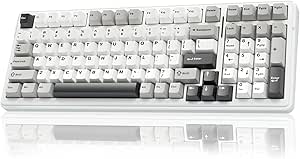 | Best for Multi-Device Mechanical Setups | Layout: 96%, 99 keys; AZERTY | Switches: Pre-lubed linear | Connectivity: Bluetooth 5.0, 2.4 GHz wireless, USB-C | VIEW LATEST PRICE | See Our Full Breakdown |
| wireless mechanical keyboards for home office | Connectivity | Layout | Backlighting |
|---|---|---|---|
| Logitech MX Mechanical Wireles | Bluetooth Low Energy or Logi Bolt receiver | QWERTY, 104 keys | — |
| AULA S99 Pro V2 Wireless Membr | — | 99 keys, 97% compact | RGB, 16.8 million colors, 15 lighting effects |
| AULA F75 Pro 75% Wireless Mech | Bluetooth 5.0, 2.4 GHz wireless, USB-C | 75%, 81 keys, QWERTZ | — |
| Redragon K671KS Wireless Mecha | USB-C, Bluetooth 3.0/5.0, 2.4 GHz wireless | — | RGB, 16 preset effects |
| ProtoArc K310 Pro Backlit Wire | Bluetooth, 2.4 GHz USB receiver | QWERTY, full-size | Single color, 10 effects |
| SOLAKAKA KI99 Pro Wireless Mec | Bluetooth 5.0, 2.4 GHz wireless, USB-C | 96%, 96 keys | RGB, 16.8 million colors |
| AULA S99 99-Key Wireless RGB M | Bluetooth 5.0, 2.4 GHz wireless, USB wired | — | RGB with 16 preset effects |
| AULA S99 Wireless 99-Key Keybo | Bluetooth 5.0, 2.4 GHz wireless, USB-C wired | 96% compact layout with numeric keypad | — |
| AULA F99 Tri-Mode Wireless Mec | Bluetooth 5.0, 2.4 GHz wireless, USB-C | 96%, 99 keys; AZERTY | — |
More Details on Our Top Picks
Logitech MX Mechanical Wireless Illuminated Keyboard, Tactile Quiet, Graphite
The Logitech MX Mechanical is my strongest fit for a home office where typing feel, lower noise, and daily device switching matter more than gaming-style customization. Its low-profile tactile quiet switches give feedback without the sharper sound of many mechanical boards, while automatic backlighting helps when desk lighting changes. It pairs with three devices over Bluetooth or a Logi Bolt receiver, which is more office-focused than the AULA F75 Pro’s five-device capacity but simpler for someone moving between a work computer, tablet, and phone.
The tradeoff is a full-size footprint and fewer enthusiast options: it is not hot-swappable, and some customization depends on Logi Options+ software. Battery life also varies widely with backlighting—up to 15 days lit, or up to 10 months with it off. I’d choose it over the Redragon K671KS for its clearer cross-platform support and quieter office-oriented design, not for maximum tinkering.
Pros:- Tactile Quiet switches provide typing feedback with reduced noise for shared rooms
- Automatic backlighting responds to ambient light and hand proximity
- Pairs with up to three devices and lists broad operating-system compatibility
- USB-C charging and long stated battery life with backlighting disabled
Cons:- Full-size dimensions take up more desk space than the 75% AULA F75 Pro
- Switches are not listed as hot-swappable, limiting hardware customization
- Some customization requires Logi Options+; Bluetooth may complicate macOS startup password entry with FileVault enabled
Best for: Home-office professionals who want a full-size layout, subdued tactile typing, and easy switching among a computer and mobile devices
Not ideal for: Switch enthusiasts who want hot-swappable hardware, or workers with very limited desk space
- Layout:QWERTY, 104 keys
- Switch type:Tactile Quiet
- Connectivity:Bluetooth Low Energy or Logi Bolt receiver
- Device pairing:Up to 3 devices
- Battery life:Up to 15 days with backlighting; up to 10 months with backlighting off
- Charging:USB-C
- Dimensions:1.02 × 17.08 × 5.18 in
- Compatibility:Windows, macOS, Linux, Chrome OS, iOS, iPadOS, Android
Our verdict“Choose the MX Mechanical if you want a quiet, low-profile full-size board for a multi-device office and do not need switch swapping.”
AULA S99 Pro V2 Wireless Membrane Gaming Keyboard
The AULA S99 Pro V2 suits a home office that needs a number pad and quiet keys but does not require a mechanical switch feel. Its silent membrane keys are a better neighbor-friendly choice than the linear mechanical switches in the Redragon K671KS, and its compact 99-key layout keeps the number pad while trimming some width compared with a conventional full-size board. Bluetooth, 2.4 GHz wireless, and USB wired modes give it more connection flexibility than a single-mode office keyboard.
The tradeoff is the category itself: this is a membrane keyboard, not a mechanical keyboard, so buyers seeking distinct switch feedback should look at the Logitech MX Mechanical or AULA F75 Pro instead. RGB effects and a TFT status screen add information and personalization, though they may be less useful than a quieter, simpler desk setup. The listing also advises cleaning the surface before use because it may feel oily.
Pros:- Quiet membrane keys are suited to shared rooms and call-heavy workdays
- 99-key layout retains a number pad in a more compact footprint
- Bluetooth, 2.4 GHz wireless, and USB wired modes offer flexible connections
- TFT screen and RGB lighting show status and provide customization
Cons:- Membrane construction does not deliver the switch feel expected from a mechanical keyboard
- RGB effects and gaming-oriented styling may be unnecessary for a restrained office setup
- Product information notes the surface may feel oily and recommends cleaning it before use
Best for: Shared-workspace users who need a number pad, quieter keystrokes, and wireless or wired connection options without insisting on mechanical switches
Not ideal for: Mechanical-keyboard buyers who want switch-based tactile feedback, hot-swapping, or a straightforward office-only design
- Layout:99 keys, 97% compact
- Key type:Silent membrane
- Connection modes:Bluetooth 5.0, 2.4 GHz wireless, USB wired
- Backlighting:RGB, 16.8 million colors, 15 lighting effects
- Battery capacity:4000 mAh
- Display:TFT screen for battery, connection, lighting, and Num Lock status
- Adjustable stand:Three height levels
- Compatible devices:Gaming console, laptop, PC, smartphone
Our verdict“Pick the S99 Pro V2 if quiet typing and a compact number pad matter more than a true mechanical switch experience.”
AULA F75 Pro 75% Wireless Mechanical Keyboard with Knob
The AULA F75 Pro is my compact pick for home-office users who want mechanical switches and room to customize them. Its 75% layout keeps arrow keys while freeing desk space, and hot-swap support for 3-pin and 5-pin switches lets owners change the typing character without soldering. That gives it more upgrade flexibility than the Logitech MX Mechanical, while Bluetooth, 2.4 GHz, and USB-C connections support up to five devices—more than the Logitech’s three.
There are meaningful compromises for office use. The listed layout is QWERTZ, so buyers accustomed to QWERTY may find the key arrangement inconvenient. Its pre-lubricated linear switches are not described as quiet, making it a less suitable shared-room choice than the MX Mechanical’s Tactile Quiet switches. RGB lighting and a multifunction knob add control, but the water-repellent claim is not full protection against spills. I’d choose this for desk-space savings and switch experimentation, not for the most subdued work setup.
Pros:- 75% layout retains arrow keys while taking less desk space than a full-size board
- Hot-swap support accepts 3-pin and 5-pin switches without soldering
- Bluetooth, 2.4 GHz, and USB-C support connection to up to five devices
- Multifunction knob and RGB lighting provide configurable controls
Cons:- QWERTZ layout may disrupt typing habits for users accustomed to QWERTY
- Linear switches may be less suitable for a quiet shared office than the Logitech MX Mechanical
- Water-repellent protection should not be treated as full spill resistance
Best for: Home-office enthusiasts who want a compact board with arrow keys, multi-device wireless connections, and the option to change switches
Not ideal for: QWERTY typists who need their familiar layout, or people who need quiet switches and stronger spill protection
- Layout:75%, 81 keys, QWERTZ
- Switches:Pre-lubricated linear LEOBOG Reaper
- Hot-swappable:Supports 3-pin and 5-pin switches
- Connectivity:Bluetooth 5.0, 2.4 GHz wireless, USB-C
- Device support:Up to 5 devices
- Battery:4000 mAh, rechargeable
- Keycaps:Side-printed PBT
- Water resistance:Water repellent
Our verdict“Choose the F75 Pro if compact dimensions and switch customization matter more to you than a quiet, familiar QWERTY layout.”
Redragon K671KS Wireless Mechanical Gaming Keyboard
The Redragon K671KS makes sense for a home office shared with a gaming or personal setup: it offers USB-C wired, Bluetooth, and 2.4 GHz connections, with switching for up to five devices. Its 81-key QWERTY layout keeps the desk footprint down, and hot-swappable linear switches plus included spare switches make basic customization more approachable than on the Logitech MX Mechanical. Double-shot PBT keycaps and a metal panel also give it a more enthusiast-oriented build than the AULA S99 Pro V2 membrane board.
That flexibility comes with uncertainty. The product data lists Windows compatibility only, which leaves support for other systems unclear, and it provides no battery-life figure—a concern for anyone planning to rely on wireless connections throughout a workweek. The linear switches are also a less office-quiet choice than Logitech’s Tactile Quiet option. I’d rank it below the Logitech for predictable office use, but above a basic board for buyers who want one keyboard across several devices and enjoy customization.
Pros:- USB-C, Bluetooth, and 2.4 GHz modes support flexible wired and wireless use
- Can switch among up to five devices
- Hot-swappable linear switches and included spare switches support customization
- Double-shot PBT keycaps and a metal panel suit a more durable-feeling setup
Cons:- Listed operating-system compatibility is limited to Windows, leaving other systems unclear
- Battery life is not specified in the product data
- Linear switches may make more typing noise than the Logitech MX Mechanical’s Tactile Quiet switches
Best for: Windows users who want a compact mechanical keyboard for work and play, with several connection modes and replaceable switches
Not ideal for: Mac or Linux users needing confirmed compatibility, and wireless-first workers who want a stated battery-life estimate
- Number of keys:81
- Keyboard layout:QWERTY
- Switch type:Linear, Cherry MX Red
- Connectivity:USB-C, Bluetooth 3.0/5.0, 2.4 GHz wireless
- Device capacity:Up to 5 devices
- Keycaps:Double-injection PBT
- Backlighting:RGB, 16 preset effects
- Compatible operating system:Windows
Our verdict“Pick the K671KS for a Windows-centered desk that needs multi-device links and switch swapping, but skip it if battery predictability or cross-platform support is a priority.”
ProtoArc K310 Pro Backlit Wireless Mechanical Keyboard
The ProtoArc K310 Pro is aimed at home-office users who regularly enter figures and want a full-size layout without giving up wireless device switching. Its 108 keys and number pad are more practical for spreadsheets than the 81-key AULA F75 Pro or Redragon K671KS, while Bluetooth and a 2.4 GHz receiver connect it to up to three devices. Quiet linear red switches, adjustable single-color backlighting, and an aluminum top case make it a more office-minded full-size option than the more gaming-styled Redragon.
The size is the obvious cost: its listed 17.64-inch width needs more desk room than compact boards. Macro setup also has restrictions, including a requirement for a 2.4 GHz USB connection; the listing says it is not detected through a multi-port hub and does not support Safari for macro customization. The 150-day standby claim is not a typical active-use estimate, so I would not treat it as a direct comparison with daily battery-life figures.
Pros:- Full-size 108-key layout with number pad suits frequent data entry
- Quiet linear red switches are suited to office typing
- Bluetooth and 2.4 GHz receiver support pairing with up to three devices
- Aluminum top case, adjustable backlighting, and USB-C charging
Cons:- Full-size width takes more desk space than the 75% AULA F75 Pro
- Macro customization requires a 2.4 GHz USB connection and has listed hub and Safari limitations
- Standby time is specified, but an active-use battery-life estimate is not provided
Best for: Spreadsheet-heavy home-office workers who need a full number pad, quiet linear typing, and connections to a computer plus mobile devices
Not ideal for: Small-desk users, people who want hot-swappable switches, or buyers who need unrestricted macro setup through a hub or Safari
- Number of keys:108
- Layout:QWERTY, full-size
- Switch type:Quiet linear red
- Connectivity:Bluetooth, 2.4 GHz USB receiver
- Device pairing:Up to 3 devices
- Backlighting:Single color, 10 effects
- Materials:Aluminum top case and plate
- Standby time:Up to 150 days after 6–8 hours of charging
Our verdict“Choose the K310 Pro if you need a quiet full-size board for number-heavy work and have room for its wider layout.”
SOLAKAKA KI99 Pro Wireless Mechanical Keyboard with Silent Switches
The SOLAKAKA KI99 Pro is the strongest fit here for a home office where keyboard noise matters but a membrane feel is not appealing. Its silent linear switches, gasket structure, and noise-reducing layers are designed to soften typing sound, while the 96% layout keeps a number pad without taking up as much room as a full-size board. Compared with the AULA F99, it offers a larger stated battery capacity and the same useful tri-mode connection choice, though the F99 supports up to five paired devices. Hot-swappable sockets let owners change compatible switches later; RGB, macros, and key settings require driver software, which adds setup work. Its plastic enclosure is less premium in feel than the PBT keycaps might suggest, and the compact layout may take adjustment.
Pros:- Silent linear switches and layered gasket construction are designed to reduce typing noise
- Bluetooth, 2.4 GHz wireless, and USB-C support flexible desk and device connections
- Hot-swappable sockets accept compatible 3-pin and 5-pin switches
- 96% layout retains a number pad while saving space
Cons:- The 96% arrangement may require adjustment for users accustomed to full-size spacing
- Key, macro, and lighting customization requires driver software
- Plastic enclosure may feel less substantial than the PBT keycaps
Best for: Home-office typists who want a quieter mechanical board with a number pad and are comfortable configuring features through software
Not ideal for: Buyers who need a familiar full-size layout, a premium-feeling enclosure, or simple customization without driver software
- Layout:96%, 96 keys
- Switches:Silent linear
- Connectivity:Bluetooth 5.0, 2.4 GHz wireless, USB-C
- Battery:10,000 mAh
- Hot-swappable:Yes; supports 3-pin and 5-pin switches
- Keycaps:PBT
- Backlighting:RGB, 16.8 million colors
- Compatibility:Windows and macOS
Our verdict“Choose the KI99 Pro if quieter mechanical typing and a compact number pad matter more than a familiar full-size layout or software-free customization.”
AULA S99 99-Key Wireless RGB Membrane Gaming Keyboard with Number Pad, Pink
The AULA S99 in pink is a practical pick for someone who values wireless flexibility and a number pad but does not require mechanical switches. Bluetooth, 2.4 GHz, and USB wired modes make it easy to share between a work computer and other devices, while its three programmable keys and macro support can put repeated actions within reach. The foldable two-stage stand also offers more tilt adjustment than the supplied details for the mechanical SOLAKAKA KI99 Pro. The key distinction is feel: this is a membrane keyboard, not a mechanical alternative, and it cannot be hot-swapped. That makes it less suitable for buyers seeking a replaceable-switch board or a distinctly mechanical typing response. Its pink finish and gaming-style RGB may also be less discreet in a conventional office setup.
Pros:- Bluetooth, 2.4 GHz wireless, and USB wired modes cover varied desk setups
- Number pad and 99-key layout suit spreadsheet and data-entry work
- Three programmable keys and macro customization support repeat tasks
- Two-stage foldable stand allows adjustable typing tilt
Cons:- Membrane construction does not provide a mechanical switch feel
- Switches are not hot-swappable
- Pink color and RGB effects may not suit a restrained office aesthetic
Best for: Home-office users who prefer membrane keys, want a number pad and wireless device options, and like a pink finish
Not ideal for: Mechanical-keyboard buyers who want hot-swappable switches, mechanical key feel, or understated office styling
- Key count:99
- Keyboard type:Membrane
- Connectivity:Bluetooth 5.0, 2.4 GHz wireless, USB wired
- Backlighting:RGB with 16 preset effects
- Programmable keys:M1, M2, M3; macro customization
- Stand:Foldable, two-stage kickstand
- Compatibility:Windows, Mac, Android, iOS
- Hot-swappable:No
Our verdict“Pick this S99 if you want a pink, feature-rich membrane keyboard with a number pad rather than a mechanical typing experience.”
AULA S99 Wireless 99-Key Keyboard with Number Pad
For a desk shared across several computers or mobile devices, the AULA S99 has a clear advantage: it can pair with up to five devices, alongside 2.4 GHz wireless and USB-C wired connections. Its compact 96% layout keeps a numeric keypad, and full-key macro support plus three shortcut keys can help streamline repetitive office tasks. This is the more flexible pairing option than the pink AULA S99 in this batch, whose supplied specifications do not state five-device support. But both are membrane boards, so neither meets the needs of someone specifically shopping for mechanical switches. The S99 also lacks hot-swapping, limiting later switch changes, and its RGB effects and programmable features may be unnecessary for buyers seeking a plain, low-complexity office keyboard.
Pros:- Pairs with up to five devices and also offers 2.4 GHz and USB-C connections
- Compact 96% layout retains a numeric keypad
- Full-key macro support and three shortcut keys can speed up repetitive tasks
- Foldable two-stage stand offers adjustable tilt
Cons:- Membrane key construction does not deliver mechanical switch feel
- No hot-swappable switches for later customization
- RGB and macro features may add complexity for buyers who want basic typing
Best for: People who switch among several computers, tablets, and phones and want a compact membrane keyboard with a number pad
Not ideal for: Buyers seeking mechanical switches, switch customization, or a simple office keyboard without macros and RGB features
- Layout:96% compact layout with numeric keypad
- Key count:99
- Keyboard type:Membrane
- Connectivity:Bluetooth 5.0, 2.4 GHz wireless, USB-C wired
- Multi-device support:Up to 5 devices
- Lighting:RGB with 16 preset effects
- Programmable keys:Full-key macro support and M1/M2/M3 shortcut keys
- Compatibility:Windows, Mac, Android, iOS
Our verdict“Choose this S99 for multi-device convenience and a number pad, but skip it if mechanical switches are a requirement.”
AULA F99 Tri-Mode Wireless Mechanical Keyboard
The AULA F99 combines a compact number-pad layout with mechanical switches and connections for wireless or wired use, making it a strong match for a home office that serves several devices. It pairs with up to five devices, while hot-swappable sockets allow compatible 3-pin or 5-pin switches to be replaced without soldering. Its gasket construction, sound-dampening layers, and pre-lubed linear switches are intended to give typing a softer, less sharp character than a basic mechanical board. Compared with the SOLAKAKA KI99 Pro, the F99 lists five-device pairing but has a smaller 8,000 mAh battery. The main purchasing hurdle is its AZERTY layout, which may not suit buyers expecting another key arrangement. Water-repellent design also should not be treated as waterproof protection.
Pros:- Bluetooth, 2.4 GHz wireless, and USB-C support wired and wireless desk setups
- Pairs with up to five devices
- Hot-swappable sockets support compatible 3-pin and 5-pin switches
- Gasket construction, sound-dampening layers, and PBT keycaps add useful typing-focused features
Cons:- AZERTY layout may be unsuitable for buyers accustomed to another arrangement
- 8,000 mAh battery capacity is lower than the KI99 Pro’s stated 10,000 mAh
- Water-repellent does not mean waterproof
Best for: AZERTY typists who want a hot-swappable mechanical keyboard with a number pad and frequent switching between several devices
Not ideal for: Buyers who need a QWERTY layout, Windows-and-macOS compatibility confirmed in the supplied specs, or full waterproof protection
- Layout:96%, 99 keys; AZERTY
- Switches:Pre-lubed linear
- Connectivity:Bluetooth 5.0, 2.4 GHz wireless, USB-C
- Multi-device support:Up to 5 devices
- Hot-swappable:Yes; supports 3-pin and 5-pin switches
- Keycaps:Double-shot PBT
- Battery:8,000 mAh rechargeable
- Water resistance:Water-repellent
Our verdict“The F99 is a good fit for AZERTY users who want a customizable mechanical board for a multi-device home office, but layout preference should decide the purchase.”

How We Picked
I ranked these keyboards for the demands of a home office: sustained typing comfort, noise, useful layout, wireless flexibility, build and setup practicality. A model’s number pad, compact footprint, quiet-switch focus, and connection options matter because they affect daily work more than gaming-oriented lighting or styling. I also distinguished mechanical boards from membrane models so the ranking does not treat different typing experiences as equivalent.
The Logitech MX Mechanical ranks first for its office-centered quiet tactile approach. The ProtoArc K310 Pro and AULA F75 Pro follow for buyers whose priorities split between a full-size layout and a smaller footprint. The remaining models rank by how well their specific strengths fit work needs, with clear deductions when membrane switches, gaming-first emphasis, or less office-focused features make them a less direct choice. This order reflects fit for home-office work, not a claim that one layout or switch type suits everyone.
| wireless mechanical keyboards for home office | Connectivity | Backlighting |
|---|---|---|
| Logitech MX Mechanical Wireles | Bluetooth Low Energy or Logi Bolt receiver | — |
| AULA S99 Pro V2 Wireless Membr | — | RGB, 16.8 million colors, 15 lighting effects |
| AULA F75 Pro 75% Wireless Mech | Bluetooth 5.0, 2.4 GHz wireless, USB-C | — |
| Redragon K671KS Wireless Mecha | USB-C, Bluetooth 3.0/5.0, 2.4 GHz wireless | RGB, 16 preset effects |
| ProtoArc K310 Pro Backlit Wire | Bluetooth, 2.4 GHz USB receiver | Single color, 10 effects |
| SOLAKAKA KI99 Pro Wireless Mec | Bluetooth 5.0, 2.4 GHz wireless, USB-C | RGB, 16.8 million colors |
| AULA S99 99-Key Wireless RGB M | Bluetooth 5.0, 2.4 GHz wireless, USB wired | RGB with 16 preset effects |
| AULA S99 Wireless 99-Key Keybo | Bluetooth 5.0, 2.4 GHz wireless, USB-C wired | — |
| AULA F99 Tri-Mode Wireless Mec | Bluetooth 5.0, 2.4 GHz wireless, USB-C | — |
Factors to Consider When Choosing Wireless Mechanical Keyboards For Home Offices
Choosing a keyboard for a home office is less about chasing the longest feature list and more about matching the board to your work habits, room, and desk. These factors can help you avoid paying for features that do little for your daily typing.
Choose Mechanical or Membrane by Typing Feel
A mechanical keyboard uses individual switches beneath its keys, while a membrane model relies on a different, generally softer-feeling construction. The distinction affects key response and typing character, but it does not automatically make one option better for every office. If you type for long stretches, try to identify the kind of feedback you prefer rather than buying based on the word “mechanical” alone. Membrane boards can make sense when a familiar, less specialized typing feel matters more than switch customization or a distinct mechanical response. Check the product’s stated switch type carefully: the S99 models in this roundup are membrane, despite their gaming-oriented presentation. Buying the wrong type can be more frustrating than choosing a board with fewer extra features.
Balance Noise Against Tactile Feedback
Noise is a room-level issue: a keyboard that sounds acceptable to its user may still carry through a shared workspace or call microphone. Silent switches can reduce that concern, while quiet tactile switches aim to preserve a noticeable key response without making noise the main event. A soft desk mat may limit some desk vibration, but it will not change the sound produced by the switch itself. If you regularly take calls near other people, prioritize a quiet switch design over RGB or gaming effects. If you work alone and prefer more audible feedback, you have more flexibility. Remember that typing speed and force also affect sound, so switch labels are a guide rather than a guarantee of silence.
Match the Layout to Your Actual Work
A number pad is useful for spreadsheets, accounting, and frequent numeric entry, but it takes up desk width even when it is rarely used. Compact layouts can bring the mouse closer and leave more room for notebooks or a second device. Before choosing, note whether you rely on navigation keys, function keys, or a dedicated number row during your normal workday. Some smaller layouts place keys differently or require a function layer for commands you use often. That learning cost may be worthwhile for a tight desk, but it can slow familiar workflows at first. Pick the smallest layout that still keeps your common tasks comfortable.
Treat Wireless Modes and Battery Needs as Practical Details
Wireless convenience depends on how you connect, how often you switch devices, and whether a cable can remain available as a fallback. Tri-mode designs can offer more connection choices, but extra modes are only useful when they fit your computer and device habits. Check the connection methods and compatibility details for your setup instead of assuming that “wireless” means effortless pairing with every machine. Backlighting can also affect how often a keyboard needs charging, so consider whether illuminated keys are genuinely useful in your room. For a stationary desk, charging access may matter more than maximum portability. Keep a charging cable within reach if downtime would interrupt work.
Pay for Work-Relevant Features, Not Gaming Styling
Gaming-oriented keyboards may include lighting, visual effects, or controls that do not improve office typing. Those features can still be worthwhile if you use the same keyboard for gaming after work, but they should not distract from switch feel, layout, or noise. A knob or extra control can help with volume and other frequent adjustments, yet it adds little if you rarely touch it. Before paying for extras, list the tasks you want the keyboard to make easier. Compare that list with the features you will use every day, not the features that look impressive in a product description. For a work-only setup, comfort and predictable access to common keys usually deserve priority.
Check the Desk Setup Before Choosing a Full-Size Board
Keyboard width affects more than available desk space: it can change how far your mouse sits from your body and how your arms rest during long sessions. Measure the usable area with your monitor stand, mouse, and frequently used accessories in place. A full-size board is not automatically a poor ergonomic choice, especially if numeric entry is central to your job, but it should fit without forcing an awkward mouse position. Compact boards can improve spacing, though they may sacrifice dedicated keys or a number pad. If you switch between tasks, consider whether rearranging your desk is realistic or whether the keyboard needs to work well in a fixed layout. A simple measurement can prevent a feature-rich board from becoming a daily space problem.
Frequently Asked Questions
Are the AULA S99 keyboards mechanical?
No. The AULA S99 Pro V2 and the two AULA S99 variants listed here are membrane keyboards, while the F75 Pro and F99 are presented as mechanical models. That difference affects the typing feel, so buyers seeking individual mechanical switches should not treat the S99 name or gaming styling as proof of a mechanical design. The S99 boards may still appeal if you want a wireless keyboard with a number pad and prefer a membrane experience. Check the exact model listing before ordering, since similar names in this lineup refer to different keyboard types.
Which layout makes the most sense for spreadsheet work?
A full-size board with a dedicated number pad is usually the more direct choice when you enter figures throughout the day. The ProtoArc K310 Pro and AULA S99 models retain that keypad, so you do not need to reach for a separate accessory. If you only enter numbers occasionally, a compact board can reclaim desk space without changing your main typing workflow much. Consider how often you use navigation keys too, since compact layouts may place some commands behind a function layer. Your actual work pattern matters more than the keyboard’s listed key count.
Can a quiet keyboard still feel tactile?
Yes. Quiet tactile designs aim to provide a discernible response without the louder sound associated with some switches, though “quiet” does not mean silent in every room or for every typist. The Logitech MX Mechanical is the office-oriented choice here for quiet tactile typing, while the SOLAKAKA KI99 Pro puts stronger emphasis on silent switches. If sound during calls is your main concern, switch design should be only one part of the decision: typing force, desk resonance, and microphone placement also affect what others hear. A softer typing style can further reduce noise regardless of model.
Is a compact keyboard a good idea if I switch between work and gaming?
It can be, particularly if a smaller footprint gives you more room to move a mouse during games and keeps the desk less crowded for work. The AULA F75 Pro offers a compact mechanical direction in this roundup, while the F99 provides a different wireless mechanical option for buyers comparing layouts. Before choosing compact, check whether the missing dedicated keys would slow your work or require frequent function-layer shortcuts. A larger board may be more convenient if you rely on a number pad or prefer every key to have a dedicated position. The best compromise depends on which activity shapes your desk most often.
When should I choose a tri-mode wireless keyboard?
A tri-mode model makes sense when its connection choices match the devices you actually use, such as a work computer and another device you switch to regularly. It is less compelling if the keyboard will stay paired to one desktop and you do not need alternate connection methods. Confirm the exact supported connection types and your computer’s compatibility before buying; the phrase “tri-mode” by itself does not say whether it will work with your setup. Also think about charging and whether you need a wired fallback during a long workday. A simpler wireless configuration can be easier to manage when your desk routine is straightforward.
Conclusion
For the best overall home-office fit, I’d choose the Logitech MX Mechanical for its quiet tactile approach and work-first design. The best value direction is the AULA F75 Pro if a compact mechanical layout suits your desk, while the ProtoArc K310 Pro is a better fit when you want a full-size board. For a premium, office-focused choice, the Logitech is again the clearest pick; buyers should choose it for its work-friendly traits rather than gaming extras. Beginners who want a familiar number pad and membrane typing can start with an AULA S99 model, while people seeking a more specifically quiet mechanical option should compare the SOLAKAKA KI99 Pro. If desk width is the main constraint, favor the F75 Pro; if numeric entry dominates your day, choose a full-size model instead.