
TL;DR

Get business pricing on your home office setup
- Business-only prices and quantity discounts
- Tax-exempt purchasing
- Multiple users, one account, clear invoices
Proper chair fit makes a huge difference. Adjust your seat height so your feet rest flat, set seat depth to support your thighs without pressure behind the knees, and choose armrests that keep your shoulders relaxed. These small tweaks can prevent pain and keep you comfortable all day.
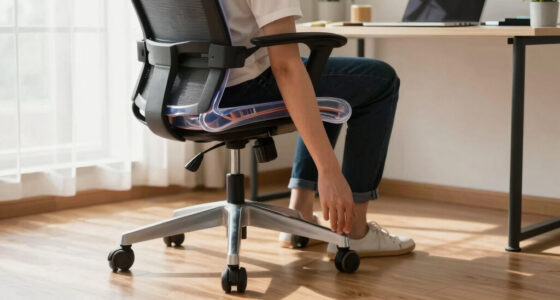
Adjust your seat height so your feet are flat and thighs are parallel to the ground.
Set the seat depth so there’s 2-4 inches of space behind your knees for comfort and circulation.
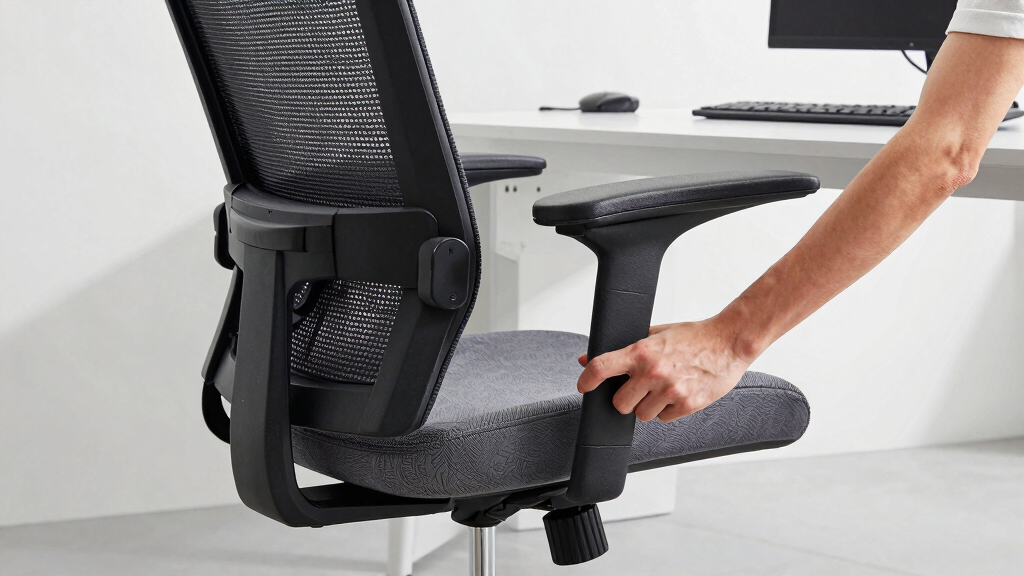
Use adjustable armrests to keep your shoulders relaxed and elbows close to your body.
Modern ergonomic chairs often include electronic controls and dynamic options to fit your needs.
A properly fitted chair reduces pain and boosts productivity, making it worth the investment.
How to Set Your Chair’s Seat Height for Perfect Comfort
Seat height is the foundation of good ergonomics. It’s simple: your feet should be flat on the floor, with thighs parallel to the ground. When your chair is too high, your legs dangle, cutting off circulation and leading to discomfort or numbness over time. Too low, and your knees may press into the desk or be elevated unnaturally, causing strain and possible joint pain.
Choosing the correct seat height isn’t just about comfort—it affects your posture and circulation. Proper height ensures your hips are open and your spine aligns naturally, reducing fatigue. An adjustable chair allows you to find this sweet spot; if your feet don’t reach, a footrest can help maintain proper leg positioning. For example, a user who lowered her chair to 17 inches and added a footrest found relief from lower back pain, illustrating how proper height supports overall health and comfort.
As an affiliate, we earn on qualifying purchases.
Getting the Seat Depth Right: Support Without Pressure
Seat depth is about more than just fitting your legs—it’s about the quality of support and circulation it provides. When the seat is too deep, it pushes against the back of your knees, which can restrict blood flow and cause numbness or swelling during long periods of sitting. This pressure can also lead to discomfort in your lower legs and hips, increasing fatigue and reducing focus.
Conversely, a seat that’s too shallow fails to support your thighs adequately, which can cause you to slouch or shift constantly, leading to poor posture and lower back strain. The ideal seat depth balances these concerns: leaving about 2-4 inches of space between the back of your knees and the edge of the seat. This gap supports proper blood flow, encourages good posture, and prevents pressure points. For instance, taller users with longer legs often need to adjust the seat to its maximum depth setting to ensure full thigh support without impeding circulation. This adjustment helps maintain comfort and reduces fatigue, especially during extended work sessions. Recognizing this tradeoff—support versus circulation—is key to choosing a seat depth that promotes both comfort and health.
seat height and depth adjustable chair
As an affiliate, we earn on qualifying purchases.
As an affiliate, we earn on qualifying purchases.
Armrests That Support Your Shoulders and Elbows
Armrests should serve as a gentle cradle for your forearms, helping to reduce shoulder tension and prevent slouching. Properly adjusted armrests keep your elbows close to your sides and at about a 90-degree angle, which minimizes strain on your shoulders and neck. If armrests are too high, they can elevate your shoulders, leading to muscle tension; too low, and your arms may hang unsupported, causing fatigue and poor posture.
Adjustable armrests give you the flexibility to find this balance. When set correctly, they support your arms without forcing your shoulders upward or outward, allowing your upper body to relax. For example, a remote worker with a small desk found that lowering her armrests prevented shoulder tightening, enabling her to work longer without discomfort. Think of armrests as a support system—they shouldn’t just be there; they should be positioned to promote a natural, relaxed posture that prevents strain and enhances comfort during long hours at your desk.
ergonomic office chair with armrests
As an affiliate, we earn on qualifying purchases.
As an affiliate, we earn on qualifying purchases.
Latest Trends in Ergonomic Chair Design You Should Know
Chairs now come with electronic controls for precise adjustments—no more fiddling with knobs and levers. Some models use 3D body scanning or AI to recommend personalized settings. Eco-friendly materials like recycled plastics and breathable fabrics are also becoming standard.
Plus, dynamic seating options, such as sit-stand desks and balance ball chairs, encourage movement. These innovations help break up long hours of sitting, reducing stiffness and fatigue. Think of it like having a smart, adaptable seat that grows with your needs.
Why Getting Your Chair Fit Matters for Your Health
Proper fit isn’t just about comfort; it impacts your health. An ergonomic chair that fits your body can cut back on lower back pain, neck tension, and shoulder strain. According to research, poor seating can increase discomfort by 60% and lead to chronic issues over time.
When your chair aligns with your body, you sit more naturally, reducing muscle fatigue and promoting good posture. It’s like giving your body a break during long work hours. The right fit is an investment in your well-being, not just your desk setup.
Quick Guide: How to Check If Your Chair Fits You Properly
- Sit back fully in your chair, feet flat on the floor.
- Adjust seat height so your knees are at a 90-degree angle or slightly lower.
- Slide forward or back to find a seat depth that supports your thighs comfortably, with 2-4 inches between knees and seat edge.
- Set armrests so your shoulders stay relaxed and elbows are close to your sides at about 90 degrees.
- Take a moment to notice if your back feels supported and your body feels balanced.
Can You Fix a Bad Fit? Yes, Here’s How
If your chair isn’t adjustable, you can still improve comfort with accessories. Use cushions to support your lower back or a footrest to lift your feet. For armrest issues, padded pads can help if the arms are too high or low.
But investing in an adjustable chair is the best move. It lets you fine-tune your setup as your body or tasks change. A simple upgrade can prevent discomfort from turning into chronic pain.
Frequently Asked Questions
How do I know if my chair fits me properly?
Check if your feet are flat on the floor, your thighs are parallel, and your arms rest comfortably at desk height. If your posture feels natural and pain-free, your chair fits well.What features should I look for in an adjustable ergonomic chair?
Prioritize seat height, seat depth, lumbar support, and adjustable armrests. These features allow you to customize your setup for maximum comfort.Can I improve a non-ergonomic chair?
Yes, with accessories like cushions, footrests, and armrest pads. But for long-term comfort, investing in an adjustable ergonomic chair is best.How often should I revisit my chair’s fit?
Adjust your chair whenever your work tasks or posture change. Regularly check to ensure your setup remains supportive during long hours.Are there specific tips for different body types?
Yes. Taller users benefit from higher seat heights and deeper seats, while shorter users need lower settings and smaller seats. Adjust accordingly for comfort and support.Conclusion
A chair that fits your body isn’t a luxury — it’s a health essential. Spend a few minutes tuning your seat height, depth, and armrests. Your body will thank you with less pain and more focus. Remember, the right fit is the foundation of a healthier, more comfortable workday.Evergreen bestsellers Picks
bestsellers
As an affiliate, we earn on qualifying purchases.