

Choosing and properly adjusting an ergonomic office chair improves comfort, reduces strain, and boosts productivity during long hours at a desk. This guide provides clear, step-by-step instructions on selecting the right chair, adjusting it correctly, and maintaining proper posture. It is designed for anyone working at a desk—whether at home or in an office—seeking to prevent discomfort and enhance focus. Expect to spend about 30 to 45 minutes completing these steps, including setup and adjustments.

Get business pricing on your home office setup
- Business-only prices and quantity discounts
- Tax-exempt purchasing
- Multiple users, one account, clear invoices

Marsail Ergonomic Office Chair with Adjustable Lumbar Support and Mesh Back

Office Chair Ergonomic Desk Chair with 330 lbs Capacity, High Back, Adjustable Headrest and Flip-up Armrests, Black
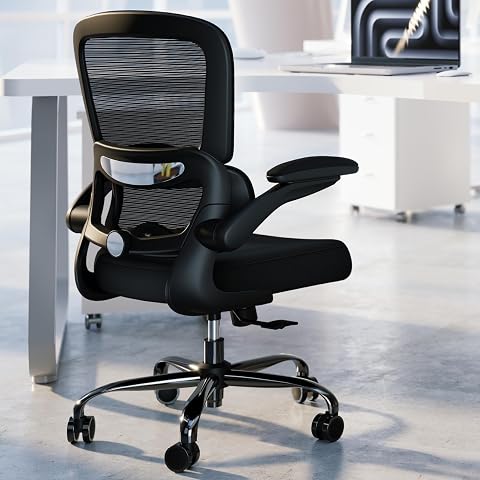
TRALT Office Chair – Ergonomic Mesh Desk Chair with Adjustable Lumbar Support, Breathable Backrest, 360° Casters, Black
Difficulty: Beginner | Time: 30-45 minutes
What You’ll Need
Tools & Materials:
- Measuring tape (optional)
- User manual of the chair (if available)
Knowledge:
- Basic understanding of ergonomic principles
- Ability to follow step-by-step instructions
Have your workspace ready, including your desk, computer, and any existing chairs for comparison. If purchasing a new chair, consider trying different models in person for fit before buying. Ensure your floor or mat is stable if adjusting height frequently.
Marsail Ergonomic Office Chair with Adjustable Lumbar Support and Mesh Back
<p>The <strong>Marsail Ergonomic Office Chair</strong> stands out for its comprehensive adjustability, including a fully adjustable headrest, recline from 90° to 120°, and lumbar support that moves forward/backward and up/down. Its mesh back promotes excellent airflow, ideal for warm environments or long sitting periods. Compared with the Office Chair Ergonomic Desk Chair, Marsail offers more customization options, but its assembly process can be more complex due to multiple adjustment points. The high-density foam seat remains supportive over long hours, and the flexible armrests add to its ergonomic versatility. However, it is priced higher and offers limited color choices, which may be a consideration for budget-conscious buyers or those seeking aesthetic variety.</p>
Pros:
- Fully adjustable headrest, recline, and armrests
- Breathable mesh back enhances airflow
- Supports up to 330 lbs, suitable for heavy users
- Flexible armrest positioning for personalized comfort
Cons:
- Complex assembly with multiple adjustments
- Higher price point compared to simpler models
- Limited color options
Best for: Those who prioritize maximum customization and airflow for long hours of sitting.
Not ideal for: Users seeking a straightforward setup or a lower-cost option.
Bottom line: The Marsail chair offers exceptional adjustability and breathability, making it ideal for users who want tailored ergonomic support, despite its higher cost and assembly complexity.
“The Marsail chair offers exceptional adjustability and breathability, making it ideal for users who want tailored ergonomic support, despite its higher cost and assembly complexity.”
Office Chair Ergonomic Desk Chair with 330 lbs Capacity, High Back, Adjustable Headrest and Flip-up Armrests, Black
<p>This <strong>Office Chair Ergonomic Desk Chair</strong> is designed for long hours with a scientific S-shaped spine curve and adjustable features, including height, headrest, lumbar support, and tilt. Its breathable mesh backrest and high elastic cushion make it suitable for both home and office environments. It supports up to 330 lbs, and the recline range from 90° to 135° encourages relaxation during breaks. Assembly can be somewhat time-consuming, requiring some patience and attention to detail, but detailed instructions are included. Compared to the Marsail, this chair emphasizes support and recline flexibility, making it well-suited for users who switch between sitting upright and reclining. Its limited color options might be a drawback for aesthetic customization.</p>
Pros:
- Supports up to 330 lbs with durable construction
- Adjustable seat height, headrest, lumbar support, and tilt
- Reclines from 90° to 135°, suitable for relaxation
- Breathable mesh back and high elastic cushion for comfort
Cons:
- Assembly may be time-consuming
- Limited color options (mainly black)
Best for: Users who need a versatile chair with strong support and recline features for extended use.
Not ideal for: Those looking for an ultra-simple, quick-to-assemble chair or aesthetic variety.
Bottom line: This chair offers a compelling balance of support and flexibility, making it ideal for users who value adjustability and recline for long work sessions.
“This chair offers a compelling balance of support and flexibility, making it ideal for users who value adjustability and recline for long work sessions.”
TRALT Office Chair – Ergonomic Mesh Desk Chair with Adjustable Lumbar Support, Breathable Backrest, 360° Casters, Black
<p>The <strong>TRALT Office Chair</strong> combines durability with straightforward setup, perfect for those who want a reliable ergonomic chair without fuss. It features a high-resilience molded foam seat, adjustable lumbar support, and a breathable mesh backrest that promotes cooling during long hours. Its heavy-duty nylon base with metal core and certified gas cylinder ensure support for up to 330 lbs, matching the other models in weight capacity. The chair’s quick <em>15-minute assembly</em> and clear instructions make it accessible for most users. However, it lacks a headrest, which could be a drawback for users who prefer neck support. Its simple black aesthetic suits various office styles, but those seeking extensive adjustability or aesthetic customization may find it limiting.</p>
Pros:
- Adjustable lumbar support relieves lower back pressure
- Breathable mesh backrest keeps you cool
- Durable metal-reinforced base supports up to 330 lbs
- Easy to assemble in about 15 minutes
Cons:
- No headrest included
- Limited color options (black only)
- Less adjustable compared to premium models
Best for: Those prioritizing durability, quick assembly, and straightforward ergonomic support.
Not ideal for: Users who want a headrest or highly adjustable armrests.
Bottom line: The TRALT chair offers a durable, easy-to-assemble solution for users seeking reliable ergonomic support, though it lacks some adjustability features of higher-end options.
“The TRALT chair offers a durable, easy-to-assemble solution for users seeking reliable ergonomic support, though it lacks some adjustability features of higher-end options.”
As an Amazon Associate we earn from qualifying purchases.
Before You Start
Ensure your workspace is organized and free of clutter. Have a mirror or a second person available to help check your posture if needed. If you’re adjusting a new or existing chair, sit in it for a few minutes first to identify initial comfort levels and areas of discomfort.
Step-by-Step Instructions
Step 1: Assess Your Body and Workspace
Measure your height and the length of your legs to determine the appropriate chair height and lumbar support needs. Sit in your current chair and note discomfort or areas where support is lacking. Check your desk height to ensure your arms can rest comfortably at a 90-degree angle when typing.
Tip: Use a mirror or ask a colleague to observe your sitting posture for accurate assessment.
Check: You can sit with your feet flat on the floor, knees at a 90-degree angle, and your forearms resting comfortably on the desk or keyboard.
Step 2: Select an Appropriate Ergonomic Chair
Choose a chair with adjustable height, lumbar support, seat depth, and armrests. Confirm that the seat height can be adjusted to align your knees at a 90-degree angle and your feet flat on the floor. Check that the lumbar support can be positioned to fit the natural curve of your lower back.
Tip: Test multiple chairs if possible, and prioritize adjustable features over fixed ones for personalized fit.
Check: You can adjust the chair so that your hips are slightly higher than your knees, and the lumbar support fits snugly into your lower back when seated.
Step 3: Adjust the Seat Height
Raise or lower the chair until your feet are flat on the floor and your thighs are parallel to the ground. Your knees should be at approximately a 90-degree angle, with your hips slightly higher than your knees. Use the height adjustment lever or dial to set this position, and ensure the chair locks securely.
Tip: If your feet don’t reach the floor, use a footrest to maintain proper leg positioning.
Check: Your thighs are parallel to the floor, and your knees are at a 90-degree angle with feet flat on the ground.
Step 4: Set the Lumbar Support
Adjust the lumbar support to align with the curve of your lower back. If the chair has adjustable lumbar depth or height, move it until it comfortably supports your lumbar region without pushing too hard or feeling too loose. Sit upright and verify that the support maintains the natural inward curve of your lower back.
Tip: Use your hand to feel if the support is snug but not causing pressure or discomfort.
Check: You feel supported in your lower back, with no slouching or excessive pressure.
Step 5: Adjust the Seat Depth
If your chair allows seat depth adjustment, move the seat forward or backward so that there is about a 2-3 inch gap between the back of your knees and the front of the seat. This prevents pressure on your thighs and promotes good circulation.
Tip: Test this by sitting and checking for comfort; your lower back should touch the backrest naturally.
Check: You can sit comfortably with your back fully supported and a finger’s width of space behind your knees.
Step 6: Configure Armrests
Set the armrests so that your shoulders are relaxed and your elbows rest at roughly a 90-degree angle. Adjust the height so your forearms are parallel to the floor, and if possible, set the width so your arms are close to your sides without feeling cramped.
Tip: Remove or lower armrests if they interfere with desk clearance or restrict movement.
Check: Your arms rest comfortably at your sides, with shoulders relaxed and elbows at a 90-degree angle.
Step 7: Adjust the Backrest Tilt and Tension
Set the backrest tilt to a slight recline, around 100 to 110 degrees, for better support. Use the tension control knob to adjust resistance so that leaning back is smooth and controlled without feeling too stiff or too loose.
Tip: Test by leaning back gently; the backrest should support your weight without feeling unstable.
Check: You can lean back comfortably while maintaining support, and the backrest stays in position without wobbling.
Step 8: Ensure Proper Posture and Final Check
Sit upright with your back fully supported, feet flat, thighs parallel to the ground, and arms resting comfortably. Check that your monitor is at eye level, and your keyboard and mouse are positioned so your wrists are straight.
Tip: Use a mirror or ask someone to observe your posture for accuracy.
Check: Your entire sitting position is ergonomic: supported, relaxed, and aligned.
Common Mistakes to Avoid
- Raising the chair too high, causing your feet to dangle. — Adjust the seat height so your feet rest flat on the floor or footrest.
- Ignoring lumbar support, leading to slouching. — Ensure lumbar support fits snugly into your lower back and maintains the natural curve.
- Setting armrests too high or low, causing shoulder strain. — Adjust armrests to keep shoulders relaxed and elbows at 90 degrees.
- Reclining the backrest too far, reducing support. — Set backrest tilt to a slight recline that supports your natural sitting posture.
Troubleshooting
Problem: Your feet don’t reach the floor even after adjustment.
Solution: Use an under-desk footrest to maintain proper leg positioning.
Problem: Lumbar support causes discomfort or doesn’t fit.
Solution: Adjust the support’s position or add a small cushion to customize fit.
Problem: Backrest feels unstable or wobbly.
Solution: Check and tighten all adjustment levers and locking mechanisms.
Problem: Armrests interfere with desk or cause shoulder tension.
Solution: Remove or lower armrests or adjust their position for clearance and comfort.
What Success Looks Like
When properly adjusted, your chair supports a natural sitting posture: feet flat on the floor, knees at 90 degrees, lower back supported, shoulders relaxed, and arms resting comfortably. You can work for extended periods without discomfort or strain, and your monitor is at eye level.
Next Steps
Regularly check and readjust your chair as needed, especially if your workspace setup changes. Incorporate stretches and posture breaks to maintain comfort. Consider ergonomic accessories like monitor risers or footrests for added support. Replace or upgrade your chair if discomfort persists despite adjustments.
Frequently Asked Questions
How often should I adjust my ergonomic chair?
Adjust your chair whenever your comfort or posture feels off, or at least once every few months to accommodate changes in your workspace or body.
Can I use an ergonomic chair if I have back problems?
Yes, but consult with a healthcare professional to ensure the chair’s support features suit your specific needs and to get personalized recommendations.
Is an expensive chair always better for ergonomics?
Not necessarily. Focus on adjustable features and proper fit rather than price alone. A well-adjusted, correctly fitted mid-range chair can be more ergonomic than a costly but poorly adjusted one.
How do I maintain my ergonomic chair?
Clean the fabric and components regularly, tighten loose screws or levers, and replace worn-out parts to keep the chair functioning correctly and supporting your posture.