TL;DR

Get your home office setup delivered free — and shop member deals
- Fast, free delivery on millions of items
- Access to Prime Big Deal Days deals on October 6–7
- Prime Video, Amazon Music and more included
VESA mounts are standardized patterns that ensure compatibility with monitor arms and wall mounts. Always verify your monitor’s VESA pattern and weight capacity to avoid safety issues and get the most ergonomic setup.
Always verify your monitor’s VESA pattern and weight limit before buying a mount.
Most monitors use 75x75mm or 100x100mm patterns; larger screens need bigger patterns and sturdier mounts.
Modern VESA mounts now support larger, curved, and heavier monitors with improved adjustability.
Proper installation and matching the mount’s weight capacity are essential for safety.
Choosing a good-quality, adjustable arm can turn a cluttered desk into an ergonomic workspace.
What exactly is a VESA mount? It’s more than just a hole pattern.
VESA (Video Electronics Standards Association) sets the standard for mounting hole patterns on monitors and TVs. These patterns are the mounting points that connect your monitor to an arm or wall bracket. The most common are 75x75mm and 100x100mm, but larger sizes like 200x200mm exist for bigger screens.
Think of VESA as a universal handshake—if your monitor has the right holes, it can connect to a variety of mounts. Without VESA, you’d be stuck with proprietary stands or less flexible options.
Understanding these patterns is crucial because they determine compatibility and stability. A mismatch can lead to a loose connection, risking damage or falls. Moreover, larger VESA patterns often indicate support for bigger, heavier monitors, but they also require sturdier mounts. Choosing the right pattern ensures your setup is both safe and functional, especially as monitors grow larger and heavier.
As an affiliate, we earn on qualifying purchases.
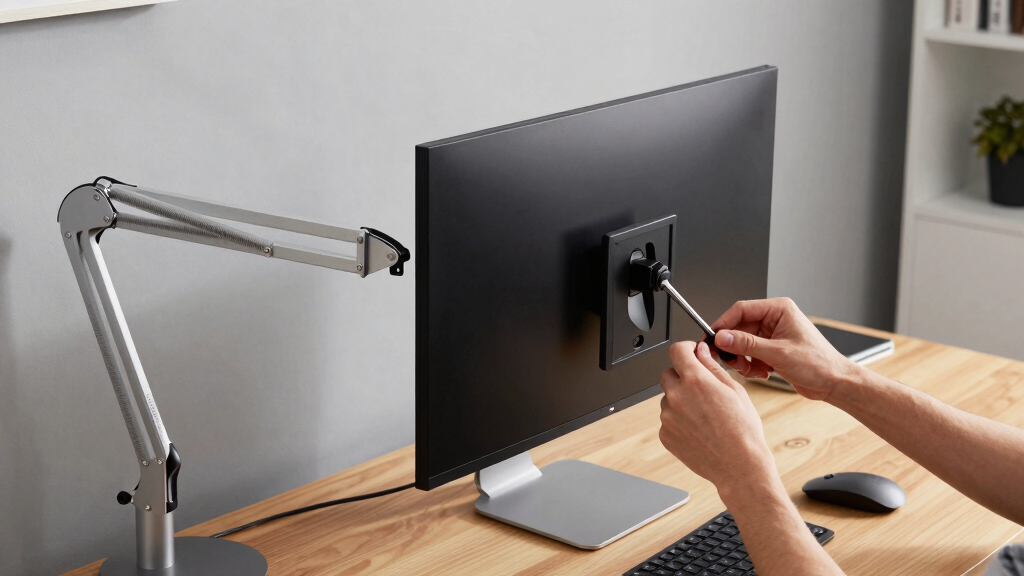
How do I know if my monitor can be mounted? Check the back first.
Look at the back of your monitor or in the manual to find the VESA pattern and weight limit. For example, a 27-inch monitor might have a 100x100mm pattern and weigh 4kg. If your mount supports 100x100mm and up to 8kg, you’re good to go.
Understanding these specifications isn’t just about compatibility—it’s about safety and performance. Mounting a heavier monitor on a mount that’s not rated for that weight can cause sagging, instability, or even falling, which could damage your equipment or cause injury. Curved or ultra-thin monitors sometimes skip VESA holes, which limits mounting options or demands special adapters. Always double-check these details before making a purchase to avoid costly mistakes or unsafe setups.
Creating a checklist—measure your monitor’s VESA pattern, note its weight, and compare these to the mount’s specifications—can prevent mismatches. This proactive step helps ensure your setup is secure, safe, and ergonomically sound, avoiding the risks of instability or damage caused by incompatible hardware.
ergonomic monitor arm with VESA compatibility
As an affiliate, we earn on qualifying purchases.
As an affiliate, we earn on qualifying purchases.
What types of VESA mounts are out there? Here’s what fits your needs.
- Wall Mounts: Attach directly to the wall, freeing up desk space. They often offer a fixed position, which is ideal for minimalist setups, but limit adjustability. Choosing a wall mount means your monitor will stay in one place, so if you need flexibility for different tasks or ergonomic adjustments, it might not be the best choice.
- Desk Clamps: Clamp onto your desk edge for quick installation and easy repositioning. They provide a good balance between stability and flexibility, but the clamping mechanism can sometimes interfere with desk aesthetics or interfere with other equipment. Consider the thickness of your desk to ensure compatibility.
- Grommet Mounts: Pass through a hole in your desk for a sturdy, clean look. These are suitable if your desk has a grommet hole and you want a clutter-free workspace. They often provide more stability than clamps and are ideal for heavier monitors, but require a compatible desk setup.
- Monitor Arms: Offer maximum flexibility with height, tilt, swivel, and rotation adjustments. They are often the best choice for ergonomic comfort, especially when you switch between sitting and standing or use multiple monitors. However, they tend to be more expensive and require careful consideration of weight capacity and VESA compatibility to ensure safety and durability.
Choosing the right type depends on your workspace constraints, aesthetic preferences, and ergonomic needs. For example, if you prioritize adjustability and comfort, a monitor arm is often the best choice. If space is limited, a wall mount or clamp can keep your desk clear. Evaluating these options against your daily workflow will help you make a practical, long-term investment in your workspace ergonomics.
heavy-duty VESA wall mount for monitors
As an affiliate, we earn on qualifying purchases.
As an affiliate, we earn on qualifying purchases.
Is your monitor arm strong enough? Confirm weight and size first.
Check the maximum weight your mount can hold—often listed in the specs. For example, a popular arm might support up to 8kg (17.6 lbs). Exceeding this can cause sagging, uneven positioning, or even tipping over, risking damage or injury. Consider not just the weight but also the size and shape of your monitor; larger, curved monitors with bigger VESA patterns require sturdier mounts to prevent wobbling or instability.
For instance, a 32-inch ultrawide monitor with a 200x200mm VESA pattern might weigh over 10kg, demanding a mount rated for at least that capacity. If the mount isn’t rated for this weight, it can lead to dangerous instability or damage to your equipment. Always choose a mount with a significant safety margin—support at least 20-30% more weight than your monitor weighs. This extra buffer accounts for dynamic loads, wear over time, and ensures the mount remains stable under typical use, reducing the risk of accidents or damage.
adjustable monitor arm for large screens
As an affiliate, we earn on qualifying purchases.
As an affiliate, we earn on qualifying purchases.
How do recent trends improve your monitor setup?
Today’s VESA mounts feature more degrees of movement—tilt, swivel, height adjustment—allowing you to customize your viewing position for comfort and reduced strain. These enhancements mean users can fine-tune their workspace to fit their ergonomic needs, reducing neck and eye strain over long periods. Many include cable management channels, which help keep your workspace tidy and reduce cable clutter, minimizing tripping hazards and improving aesthetics. Sleek, minimalist designs also integrate seamlessly with modern workspaces, making setups look professional and organized.
Manufacturers are supporting larger, heavier, and curved monitors with higher load capacities and bigger VESA patterns, enabling users to mount bigger screens securely. This trend reflects the growing need for immersive, multi-monitor setups suited for productivity, gaming, or creative work. The ability to safely support these larger displays opens up new possibilities for workspace customization and efficiency.
Emerging innovations like motorized mounts—which allow you to adjust your monitor position at the push of a button—are pushing the boundaries of workspace ergonomics. These features, while still niche, promise a future where workspace adjustments become effortless, helping users work smarter and more comfortably. Such advancements can significantly reduce physical strain and increase productivity by making ergonomic positioning effortless and precise.
Frequently Asked Questions
How do I measure my VESA pattern?
Use a ruler or tape measure to find the distance between the mounting holes on the back of your monitor, both horizontally and vertically. Match these measurements to common patterns like 75x75mm or 100x100mm.Can I switch my monitor to a VESA mount later?
Yes, if your monitor has VESA-compatible holes. Check the manual or back panel for mounting points, and ensure your new mount supports your monitor’s size and weight.Are VESA mounts safe for large, curved monitors?
Absolutely, but only if the mount supports the size and weight of your monitor. Larger screens often need sturdier, higher-capacity mounts with larger VESA patterns.What if my monitor doesn’t have VESA holes?
You might need an adapter or special mounting solution. Some curved or ultra-thin monitors lack VESA compatibility, so check with the manufacturer or consider alternative mounting options.Conclusion
Understanding VESA standards isn’t just tech jargon. It’s the key to a flexible, safe, and comfortable monitor setup. When you pick the right mount, you create a workspace that adapts to your needs—no compromises. So, measure, verify, and enjoy the freedom of a monitor that truly holds your screen securely and comfortably.Halloween Picks
halloween
As an affiliate, we earn on qualifying purchases.