
TL;DR

Get business pricing on your home office setup
- Business-only prices and quantity discounts
- Tax-exempt purchasing
- Multiple users, one account, clear invoices
Maintaining a neutral wrist position through correct keyboard and mouse placement minimizes strain and prevents injuries. Using adjustable setups, ergonomic accessories, and taking regular breaks enhances long-term comfort.
If you’re spending hours at your computer, your wrists can take a real beating. The way you position your keyboard and mouse isn’t just about comfort — it’s about avoiding pain and injury that can linger for years. The neutral wrist rule is simple in theory but game-changing in practice. It’s about aligning your wrists naturally, so they stay straight and relaxed. This guide cuts through the clutter to show you exactly how to set up your workspace for healthy wrists and sustained productivity.
Whether you’re working at a desk, on a laptop, or in a makeshift setup, these tips will help you tweak your position. Because when your wrists are in the right place, your whole body feels better. And that means fewer aches, fewer breaks, and more focus on what matters.
Maintaining a straight, neutral wrist is fundamental to preventing pain and injury.
Adjusting your desk, chair, and equipment to align your wrists with your forearms makes a big difference.
Using ergonomic accessories like wrist rests can support proper positioning if used correctly.
Regular microbreaks and posture variation are key parts of a healthy wrist routine.
Every workspace is unique; customize your setup to fit your body’s needs.
What is the neutral wrist position, and why does it matter?
The neutral wrist position means your wrists are straight, aligned with your forearms, not bent up, down, or sideways. Imagine your wrists resting comfortably on a flat surface, with no awkward angles. This position minimizes tension on your tendons and nerves, reducing the risk of repetitive strain injuries like carpal tunnel syndrome. Ergonomic research shows that maintaining this alignment can significantly lower discomfort and injury risk over time, allowing you to work longer without pain.
When your wrists are not neutral—say, bent upward or sideways—you’re placing unnecessary strain on tendons, nerves, and blood vessels. Over extended periods, this strain accumulates, leading to inflammation, nerve compression, or chronic pain. The body’s tissues are sensitive to sustained awkward positions, which can cause micro-tears or inflammation. By keeping your wrists in a neutral position, you reduce these micro-injuries, promoting better circulation and nerve function. This isn’t just about comfort; it’s about preventing long-term damage that can impair your ability to work or perform daily tasks.
Thus, understanding and maintaining the neutral wrist position is fundamental. It acts as a preventative measure, decreasing the likelihood of serious conditions like repetitive strain injuries, and enhances overall ergonomic health. The tradeoff is that achieving perfect neutrality might require some adjustments in your workspace, but the health benefits far outweigh the inconvenience.
Products Worth Considering

EGO Power+ Cordless Pole Saw with LED Cut Line Indicator, 56V 2.5Ah Battery and Charger (PS1001)

EGO POWER+ Cordless Electric Leaf Blower 530 CFM with Battery (LB5302)

EGO Power+ 3-Gallon Compact Cordless Wet/Dry Vacuum, 85 CFM (WDV0300)
As an affiliate, we earn on qualifying purchases.
How to position your keyboard for a neutral wrist that feels natural
- Adjust your chair and desk height so your elbows are close to your body, bent at about 90-100 degrees. This ensures your shoulders are relaxed and your arms are in a comfortable position, reducing shoulder and neck tension that can indirectly affect wrist posture.
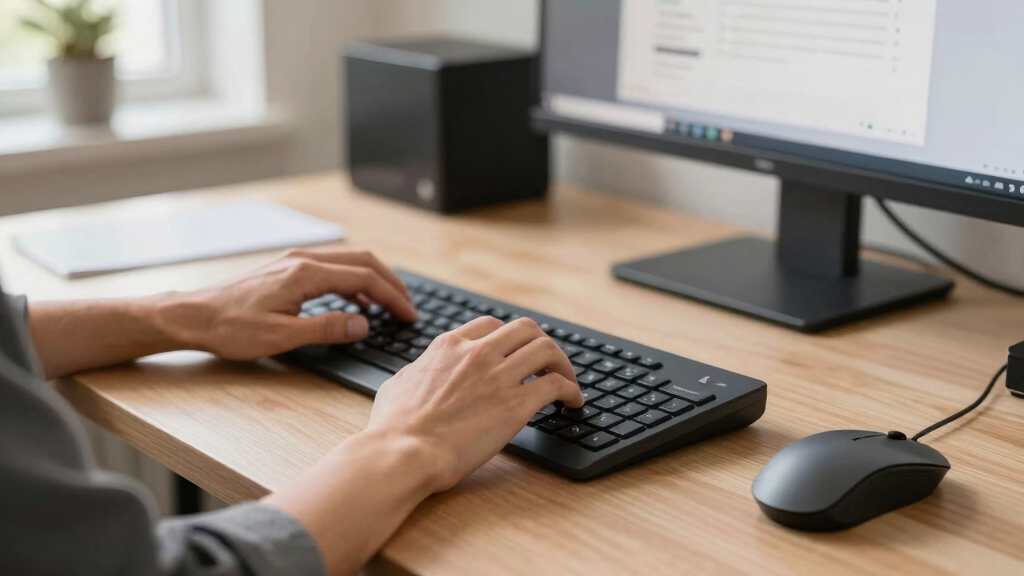
- Place your keyboard directly in front of you, at a height where your forearms are parallel to the floor. This positioning prevents your wrists from bending upward or downward during typing, which can cause strain and fatigue over time.
- Keep your wrists straight, not bent up or down, while typing. This may require adjusting the tilt of your keyboard or using an ergonomic keyboard with a negative tilt feature. The goal is to maintain a straight, relaxed line from your forearm through your wrist to your hand, which minimizes tension and prevents micro-injuries.
- Use a slight tilt if it helps keep wrists neutral, but avoid excessive angles. A gentle tilt can align your wrists more naturally, especially if your keyboard is flat or slightly inclined. The tradeoff is that too much tilt can cause your wrists to bend unnaturally, so moderation is key.
- Consider a wrist rest, but only as a gentle support — avoid elevating or depressing your wrists excessively. Proper use of a wrist rest can provide a cue to keep your wrists in a neutral position, but improper placement or reliance can lead to poor posture or discomfort.
Imagine your forearms, wrists, and hands forming a straight, even line, like stacking blocks perfectly. This alignment reduces strain, distributes pressure evenly, and keeps you comfortable during prolonged typing sessions. If your workspace setup causes your wrists to bend or twist, it’s worth making adjustments—such as raising or lowering your desk, repositioning your keyboard, or trying ergonomic accessories—to achieve this neutral alignment.
Positioning your mouse to stay in the neutral zone — easy tips
The mouse should sit close to your keyboard, at the same height, so you don’t reach or stretch. Keep your wrist straight as you move it, avoiding bending sideways or upward. Use a vertical or contoured mouse if you notice discomfort, as these shapes naturally promote a neutral wrist stance. Proper placement minimizes the need for your wrist to twist or bend repeatedly, which can cause soreness and fatigue over time.
For example, if you’re right-handed, position the mouse within a thumb’s reach, roughly in line with your keyboard’s edge. This keeps your arm and wrist in a relaxed, neutral position during use. When you pick up or move the mouse, do so with your whole arm rather than just your wrist, which reduces strain. If you find yourself reaching or stretching to access the mouse, it indicates your workspace isn’t optimized—either the mouse needs to come closer or your desk height needs adjustment. Prioritizing a natural, relaxed position prevents repetitive strain injuries and improves overall comfort.
Additionally, consider ergonomic mice designed to support a neutral wrist posture. These devices often have a vertical or thumb-up design that reduces wrist twisting and promotes a more natural grip. The key is to choose a mouse that fits your hand comfortably and encourages movement from your arm rather than your wrist, thereby distributing effort and reducing localized stress.
Frequently Asked Questions
How do I know if my wrists are in a neutral position?
Your wrists are neutral when they are straight, aligned with your forearms, and not bent up, down, or sideways. A quick check is to look for a straight line from your forearm through your wrist to your hand while typing or using the mouse.Can I use a regular desk and still maintain neutral wrists?
Yes, but you may need to make adjustments like elevating your keyboard and mouse, or using ergonomic accessories. The key is to keep your forearms parallel to the floor and wrists straight, regardless of your setup.What if I feel discomfort even with proper setup?
Discomfort can stem from other issues like repetitive motions or underlying health conditions. If pain persists, consider consulting an ergonomic specialist or healthcare professional for personalized advice.How often should I change my position during the day?
Aim to change posture or take a microbreak every 20-30 minutes. Gentle wrist stretches and brief movement can help keep your muscles relaxed and prevent strain.Are ergonomic keyboards and mice worth it?
They can significantly help maintain neutral wrist positions, especially for long hours of work. While not mandatory, many find they reduce discomfort and fatigue over time, making them a worthwhile investment.Conclusion
Keeping your wrists in the neutral position isn’t just about comfort — it’s about protecting your long-term health. Small adjustments to your workspace, combined with good habits, can make a world of difference. Remember: your wrists are your workhorses. Treat them well, and they’ll serve you for years to come.
Next time you sit down, picture a perfectly aligned, relaxed posture. That simple focus can transform hours of work into a more comfortable, injury-free experience.