TL;DR

Get business pricing on your home office setup
- Business-only prices and quantity discounts
- Tax-exempt purchasing
- Multiple users, one account, clear invoices
Spooky ambient lighting for media rooms uses dim, indirect color and selective shadow to create a cinematic mood without competing with the screen. Start with a hidden LED strip behind the display, add one restrained accent if needed, and save brighter steady lighting for walking, cleaning, and everyday use.
A horror movie can lose its spell when a bright lamp floats in the corner of your screen. The fix isn’t to plunge your room into total darkness; it’s to create spooky ambient lighting for media rooms that sets a mood while keeping the picture clear and the path to the sofa visible.
You can get that effect with ordinary dimmable lights, a hidden LED strip, and a little patience. This guide shows you how to choose colors, avoid glare, layer light, and set up useful scenes for films, games, and everyday use. You’ll also see where smart features help—and when one simple bulb is plenty.
Hide LED strips behind the screen or furniture so you see a soft glow rather than exposed diodes.
Begin with dim violet, blue, red, or green accents; raise brightness only if the light stays in the background.
Layer a screen backlight with one restrained shelf or corner accent instead of lighting every surface.
Test placement from your actual viewing seats and check glossy screens and furniture for reflections.
Save a brighter, steady scene for walking and cleaning, and avoid rapid flashing effects.
Start with hidden light so the screen stays in charge
Spooky ambient lighting for media rooms works best when you notice the glow before you notice the fixture. Hide light sources behind the screen, furniture, or shelving, then keep them dim enough that the display remains the brightest point in the room. That balance matters because your eyes naturally shift toward bright areas; if an exposed bulb or bright wall competes with the screen, the movie’s shadows feel less rich and your attention keeps leaving the picture.
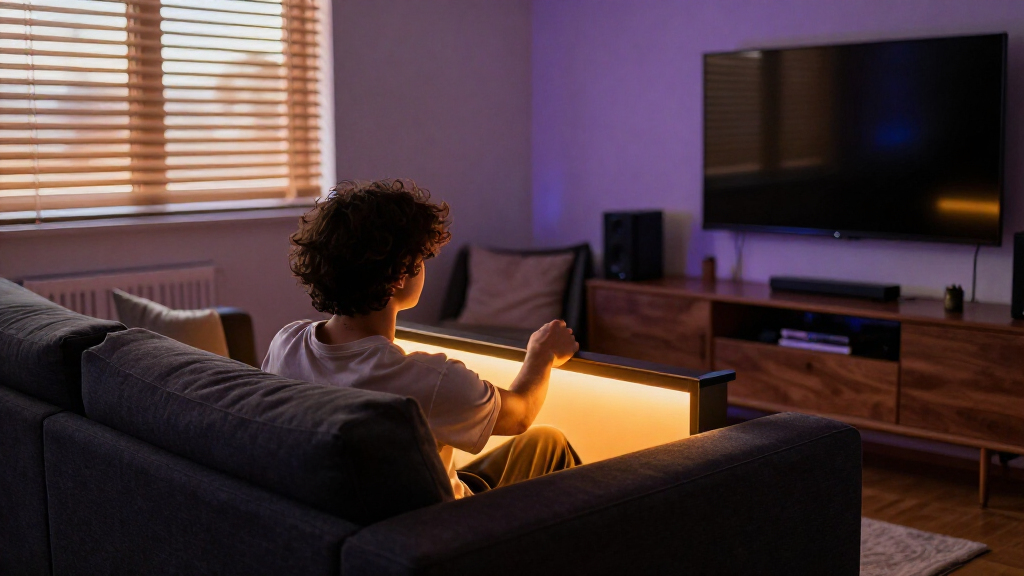
Start with an LED strip attached to the back of your television or monitor, where it casts a soft halo onto the wall. If your screen sits on a stand, a small strip behind the console can work too. For example, a renter with a television against a pale gray wall might use a low violet backlight; the color spreads softly across the wall instead of shining straight into the room. A pale wall will reflect more of that glow, while a dark or textured surface may absorb it, so the same brightness can look quite different from one room to another.
Before you attach anything permanently, test the setup from every seat. Glossy screens and polished coffee tables can catch even a small lamp’s reflection, and a light that seems invisible while you’re standing may glare from the end of the sofa. Move the strip or rotate an accent lamp until the reflection disappears. This is also a useful brightness check: if the glow draws your eye away from the display during a dark scene, dim it rather than adding more light elsewhere.
Think of indirect light as a quiet frame around the picture, not another picture competing for attention. Once that frame feels comfortable, one carefully placed accent can add the shadows that make the room feel mysterious.
Products Worth Considering

Greenworks 24V 5-Tool Combo Kit with 4.0Ah and 2.0Ah Batteries, USB-C Power Bank, and 65W Charger

WORX 20V Cordless Oscillating Multi-Tool WX698L

EGO POWER+ LB6151 Cordless Leaf Blower with 2.5Ah Battery and Charger
As an affiliate, we earn on qualifying purchases.
Pick a color that gives the room the mood you want
Choose one main color for the room’s mood, and use stronger colors as small accents rather than bathing every surface in them. Violet can feel uncanny, blue can suggest a cold night, red can add tension, and green can give a scene an eerie, otherworldly cast. These are impressions, not fixed rules: wall paint, furniture, and the movie’s own palette all affect how a color reads. A single main hue gives the room a deliberate atmosphere; several equally strong colors can make the lighting feel busy and flatten the shadows that create suspense.
A useful rule: try the color at low brightness first. A deep red LED behind the screen may set the mood, while the same red at full output can tint the whole room and make the picture feel less natural. Strong colored light also changes how nearby surfaces and skin tones appear, which may be immersive for a stylized game but tiring during a long film. If you’re watching a dark thriller with a friend, compare a dim violet scene with a saturated green one from your regular seats. The gentler option often feels more cinematic because it leaves space for the screen’s own colors.
RGB lights mix red, green, and blue to create color; RGBW lights add a dedicated white LED. Their color and white-light appearance can vary, so a product description won’t tell you exactly how a bulb will look against your walls. A dedicated white channel can be useful when you want a more practical white scene, but it doesn’t guarantee that the color tones will suit every room. Test the bulb in the actual lamp and room before buying several.
For a flexible setup, save a few scenes: muted violet for a horror film, warm white for chatting, and brighter neutral light for finding a dropped remote or tidying up. Separate presets make the tradeoff easy: the movie setting can prioritize atmosphere, while the everyday setting restores more natural-looking light and visibility. The shift between scenes can change the room’s feel without making your lighting a permanent theme park.
Layer two or three lights for a more cinematic room
Layered lighting combines a soft background glow with one or two smaller accents, leaving some areas of the room in shadow. That selective darkness gives spooky lighting its shape: your eye has both a few illuminated surfaces to register and darker areas to suggest depth. If every wall, shelf, and corner glows at the same intensity, the room can feel flat rather than mysterious, and the combined brightness may pull attention away from the screen.
Build the effect in a simple order. Use a hidden strip behind the display as your base, then add a dim uplight near a corner or a soft glow under a shelf. For instance, a student’s small media room might have a blue backlight behind the screen and a very low violet bulb aimed at the ceiling. The ceiling bounce softens the second light, so it adds depth without putting a bright source in the viewer’s line of sight. In a smaller room, though, even that accent may be too much; dim it or skip it if the base glow already defines the space.
- Set the background: Add a dim, indirect light behind the screen or furniture. This establishes a low-level frame without lighting the whole room.
- Choose one accent: Aim a low uplight toward a wall or add a subtle shelf glow. The accent should reveal a little depth, not become a competing focal point.
- Watch from your seat: Check for glare, reflections, and light that competes with the picture. Viewers experience the setup from the sofa, not from the spot where the fixture was installed.
- Save a practical scene: Keep a brighter, steady setting for moving around and cleaning. A mood setting and a useful room light serve different purposes, so one does not need to do both jobs.
Take time between each step. One additional light may give you the shadow you want; a third may only make the room busier. The aim is a few deliberate accents, not a colored wash over every surface. If adding a light makes the room brighter but not more dimensional, remove it or lower its output rather than assuming more layers will improve the effect.
Choose smart controls only if they make movie night easier
Simple dimming and saved scenes usually matter more than elaborate automation. A color bulb or LED strip you can reliably dim may be all you need to switch from ordinary room use to spooky movie lighting. Smart systems add convenience, but they can also bring setup work, compatibility limits, or extra hardware. The practical test is whether the control reduces friction: if you can reach a comfortable scene quickly, you are more likely to use it; if setup is cumbersome, the feature may stay unused.
Before choosing a system, check how it connects and what it needs to run. Some lights work directly with a phone or voice assistant; others need a separate hub. Screen- or audio-reactive systems may use a camera, a media integration, or additional hardware, and their setup effort and response time vary. Reactive lighting can make games feel more connected to the action, but changing colors can also compete with a film’s carefully controlled dark scenes. If a system requires several steps every time you start a film, a basic saved preset may suit you better.
Imagine you already own a color bulb in a shaded floor lamp. If it dims reliably and can return to a saved color, use it for a first experiment before buying new gear. You might find that a warm setting works for conversation and a dim violet setting works for films; no syncing feature required. Starting with what you own also lets you learn which brightness and color you actually enjoy before paying for more elaborate controls.
Moving color effects can look playful, especially while gaming, but fast changes can distract from a movie. In a shared room, choose slow, restrained movement and keep a steady-light option available. Avoid rapid strobing: flashing effects can feel uncomfortable and may pose risks for people with photosensitive conditions. A static preset is less dramatic, but it is easier on the eyes and more predictable for everyone watching.
Keep pathways visible while the rest of the room goes dark
A useful spooky setup still lets you move safely. Keep the movie scene dim and atmospheric, but preserve a separate steady setting bright enough to show steps, cables, and the route to the door. A very dark room can make ordinary obstacles hard to distinguish, especially when someone’s eyes have adjusted to the screen. A separate practical scene lets you retain the film mood during playback without treating darkness as the only way to create atmosphere.
Check floor-level hazards before movie night. Secure loose cables along the wall, keep hot fixtures away from fabric, and make sure a low lamp or step light doesn’t shine into anyone’s eyes. For example, if a power strip runs beside the sofa, don’t hide it under a loose rug; route and secure the cable where people won’t catch a foot on it. This matters even when the light is dim: a decorative glow can make a cable harder to notice rather than making the floor safer.
Try switching between two saved scenes from your usual seat: a low-color movie setting and a brighter neutral setting for cleaning or getting up. Walk the room in the brighter setting before guests arrive, and check that shelves, steps, and furniture edges are easy to spot. If someone needs to cross the room mid-film, a gentle, steady path light is more useful than a flashing effect. The goal is enough light to reveal the route without shining directly at viewers or washing out the screen.
For a dramatic room that remains practical, let the screen and indirect accents carry the atmosphere while a separate control gives you useful light at a touch. The best scene isn’t the darkest one; it’s the one that keeps the room comfortable and usable.
Test your setup before you stick anything in place
Testing from the viewing seats is the fastest way to catch distracting glare, awkward color, and reflections before you commit to a placement. Light output, color quality, and dimming behavior vary, so a product’s advertised settings can’t predict exactly how it will look in your room. Testing first also helps avoid buying extra strips or bulbs to solve a problem that may actually be about placement or brightness.
Temporarily position your LED strip or lamp, turn on the display, and sit where you normally watch. Check the screen for reflections and look at shiny furniture, framed glass, and the wall behind the display. If your screen is glossy, a side lamp that seems subtle when the screen is off may become a bright streak during a dark scene. Check more than one seat if the room is shared; a placement that works for the main chair can glare for someone sitting off to the side.
Test with more than one kind of content. A dim horror scene shows whether the light competes with shadows; a bright game menu reveals whether a colored glow tints the room too heavily. If you can still focus on the screen and the light feels like a background detail, you’re close. Lower the brightness if your eye keeps drifting to the wall. These checks expose different tradeoffs: a setting that supports a dark film may look too saturated during a bright game, so saved scenes can be more useful than searching for one setting that suits every use.
Keep your first setup modest: one dimmable strip or one colored bulb. A person with a small living-room media corner may find that a single hidden strip is enough to give the space a mysterious mood. Add another accent only if the room still feels visually flat after that first test. This gradual approach makes it easier to tell which light actually improves the room, instead of adding fixtures whose effects overlap.
Frequently Asked Questions
What colors work best for spooky media room lighting?
Violet, blue, red, and green are popular mood colors, but there’s no single right choice. Start with a dim accent and see how it looks against your wall color and screen; a low violet glow, for example, may feel atmospheric without tinting the whole room.
Will colored lighting affect the picture?
It can change how the room and screen appear if it reflects on the display or shines brightly enough to compete with the image. Place lights indirectly, then check for reflections from each viewing seat before fixing the lights in place.
Where should I put an LED strip?
Common spots include the back of a screen, under a shelf, or behind a media console. Hide the strip itself and test the result with the screen on; a placement that looks tidy from across the room may still cause glare from the sofa.
Do I need lights that sync with films or games?
No. A dimmable color bulb or LED strip can create a strong mood with a saved scene. Sync features add automation, but systems differ in setup, compatibility, and hardware needs, so check what they require before choosing one.
How do I keep the room usable when the lights are dim?
Save a separate brighter, steady scene for walking, finding items, and cleaning. Secure loose cables, keep steps visible, and avoid lights that shine into viewers’ eyes or use rapid flashes.
Conclusion
Start with one hidden, dimmable light behind your screen, then watch a scene from your usual seat before adding anything else. A second accent can add depth, but it shouldn’t compete with the film or hide the path across the room.
Keep one brighter, steady setting ready for everything outside the movie. When the screen glows softly and the corners hold just enough shadow, your room can feel mysterious without making you feel lost in it.