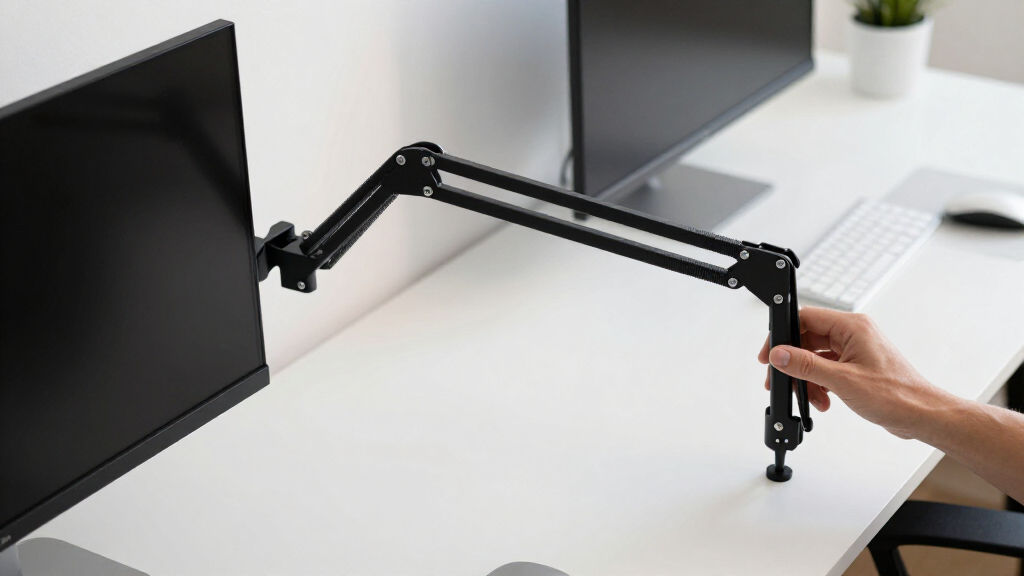

Choosing the right adjustable monitor arm can significantly enhance your workspace efficiency and comfort. The best models balance ease of movement, stability, and build quality, ensuring your screens stay in place while allowing flexible positioning. The HUANUO FlowLift™ Dual Monitor Stand stands out as the overall top pick for its full-motion flexibility and sturdy clamp options. For those seeking a more budget-friendly yet reliable choice, the MountUp Single Monitor Desk Mount offers great value with solid adjustability. Meanwhile, the FlexiSpot Premium Aluminum Mount provides a premium build for larger, heavier screens. Keep reading to see how these options compare and find the best fit for your productivity needs.

Get business pricing on your home office setup
- Business-only prices and quantity discounts
- Tax-exempt purchasing
- Multiple users, one account, clear invoices
Complete the kit


Key Takeaways
- Flexibility in movement and tilt features is key to customizing your workspace efficiently.
- Build quality and weight capacity greatly influence stability and durability for long-term use.
- Dual monitor setups often require more robust arms with greater reach and adjustability.
- Budget options can deliver good value but may sacrifice some smoothness or build quality.
- Compatibility with different mounting options (clamp vs. grommet) affects ease of installation and workspace setup.


More Details on Our Top Picks
HUANUO FlowLift™ Dual Monitor Stand, Fully Adjustable Gaming Monitor Desk Mount for 13–32″ Computer Screens, Full Motion VESA 75×75/100×100 with C-Clamp & Grommet Base, Each Arm Holds 4.4 to 19.8 lbs
This dual monitor mount stands out for its comprehensive adjustability, sturdy dual C-clamp base, and cable management, making it ideal for users who need to maximize desk space and ergonomic flexibility. Compared to the MountUp Single Monitor Desk Mount, it offers wider compatibility for dual screens but requires a larger desk surface and more complex setup. Its full motion capabilities—tilt, swivel, and rotation—support diverse work and gaming positions, helping reduce neck strain during long sessions. The tradeoff is that it’s bulkier and relies on a wooden desk for optimal stability, which may limit use on glass or plastic desktops. Overall, this is perfect for professionals or gamers needing a secure, space-saving dual monitor solution.
Pros:- Supports dual monitors with full motion adjustment for ergonomic flexibility
- Large, stable dual C-clamp and Grommet mounting options
- Built-in cable management for a tidy workspace
Cons:- Requires a sturdy wooden desk for best stability
- Complex installation process and larger footprint
Best for: Gamers and professionals who use dual monitors and prioritize stability and full motion flexibility.
Not ideal for: Users with glass or thin desks that can’t support the dual C-clamp or Grommet mount, or those with limited desk space.
- Monitor Size Range:13-32 inches
- Max Load per arm:19.8 lbs
- Mounting Options:C-Clamp & Grommet
- Tilt Range:+85°/-50°
- Swivel Range:±90°
- Rotation:360°
- Desk Thickness:0.59-3.54 inches
- Material:Steel and Aluminum
Our verdict“This pick is best suited for users who need a robust dual monitor setup with maximum adjustability and space efficiency.”
Extra Long Arm Monitor Mount for Monitors up to 32 inches and 19.8 lbs
This monitor mount’s standout feature is its extended arm length—up to 27.76 inches—which provides significant reach and height adjustment, making it ideal for taller users or those with large desktop setups. Unlike the HUANUO FlowLift™ Pro, which is more compact and suited for standard desks, this model supports a wider range of monitor sizes with a focus on increased reach. Its sturdy metal construction and cable management contribute to a clean, organized workspace. However, its weight and size demand a very sturdy desk, and assembly can be more complex for users unfamiliar with mounting hardware. It’s best for users who need maximum arm extension and height flexibility for optimal ergonomics.
Pros:- Extended arm length for increased reach and height adjustment
- Supports monitor sizes up to 32 inches with VESA compatibility
- Adjustable tilt, swivel, and rotation for ergonomic positioning
Cons:- Heavy construction requiring sturdy desk support
- Assembly may be challenging for some users
Best for: Tall users or those with large, spacious desks seeking extended reach for monitors.
Not ideal for: Users with small desks or lighter work setups, as its weight may strain less sturdy surfaces.
- Maximum Screen Size:32 inches
- Minimum Screen Size:13 inches
- Weight Capacity:19.8 lbs
- Arm Length:27.76 inches
- VESA Compatibility:75x75mm, 100x100mm
- Tilt Range:+85°/-45°
- Swivel Range:±90°
- Rotation:360°
Our verdict“Ideal for taller users needing extra reach, but less suitable for small or delicate desk environments.”
MountUp Single Monitor Desk Mount for 17-32 inch Screens, Height Adjustable Full Motion Arm with Clamp/Grommet Base, Supports 4.4-17.6 lbs, Black
The MountUp Single Monitor Desk Mount is a versatile choice for users with monitors between 17 and 32 inches, offering full motion tilt, swivel, and rotation to optimize ergonomic comfort. Its robust steel construction ensures stability, and the dual mounting options—clamp or grommet—allow for flexible desk compatibility. Compared with the Acer Single Monitor Mount, it provides similar adjustability but at a potentially lower price point. A tradeoff is that heavier monitors require manual tension adjustments, which can be tricky for some users. Its size and bulk may also be less ideal for small desks, but overall, it provides reliable performance for everyday productivity.
Pros:- Supports a wide range of monitor sizes with full motion
- Sturdy steel construction for durability
- Flexible mounting options and cable management
Cons:- Requires manual tension tuning for heavier screens
- May be too bulky for limited desk space
Best for: Users with mid-sized monitors seeking full motion flexibility on a budget.
Not ideal for: Small desk users or those with heavier monitors needing frequent tension adjustments.
- Maximum Screen Size:32 inches
- Weight Capacity:17.6 lbs
- Tilt Range:-45°/+90°
- Swivel Range:±180°
- Rotation:360°
- Extension Length:Up to 19.6 inches
- Desk Thickness:0.39-4.53 inches
- Material:Steel
Our verdict“A practical choice for budget-conscious users needing ergonomic movement for mid-sized monitors.”
HUANUO FlowLift™ Pro Monitor Arm for 13–32″ Screens, Fully-Adjustable with Tilt/Swivel/Rotation, Tool-Free VESA Mount, C-Clamp/Grommet Base, Max Load 19.8 lbs
The HUANUO FlowLift™ Pro offers precise, tool-free VESA mounting and a full range of motion—tilt, swivel, and rotation—making it well-suited for demanding professional or gaming setups. Its durable aluminum construction ensures stability and long-term support for monitors up to 32 inches and 19.8 lbs. Unlike the Extra Long Arm Monitor Mount, which emphasizes reach, this model focuses on quick, effortless adjustments in a compact form. It’s less ideal for irregular or very thin desks, as its stability depends on proper mounting and desk compatibility. This arm makes a strong case for users who prioritize quick ergonomic adjustments and a sleek, tool-free setup.
Pros:- Tool-free VESA mount for quick setup
- Full motion tilt, swivel, and rotation
- Durable aluminum construction supports up to 32 inches and 19.8 lbs
Cons:- Designed mainly for standard wood desks, less stable on glass or thin surfaces
- Potential difficulty with irregular desk edges
Best for: Professionals and gamers needing flexible, quick adjustments in a professional-looking setup.
Not ideal for: Users with unconventional desk shapes or very thin surfaces that cannot support the clamp/grommet setup.
- Screen Size Range:13-32 inches
- Max Load:19.8 lbs
- Tilt Range:±85°
- Swivel Range:±90°
- Rotation:360°
- Desk Thickness:0.59-3.54 inches
- Material:Aluminum
Our verdict“Best suited for users wanting swift ergonomic adjustments and a sleek, professional appearance.”
Acer Single Monitor Mount, Fully Adjustable Monitor Arm for 17-34″ Screens
The Acer Single Monitor Mount supports a broad range of screens from 17 to 34 inches, making it an excellent choice for users with larger or ultrawide monitors. Its full motion capabilities—including tilt, swivel, and rotation—offer superior ergonomic customization, similar to the HUANUO FlowLift™ Pro. Its sturdy pneumatic spring core simplifies height adjustments, providing a smooth experience, though tension tuning may be necessary after installation. It’s less ideal for desks with double shelves or curved edges, as mounting stability can be compromised. This mount excels for those needing a flexible, high-capacity arm with wide compatibility and easy adjustment.
Pros:- Supports large, wide monitors up to 34 inches
- Full motion tilt, swivel, and rotation for ergonomic positioning
- Pneumatic spring for smooth height adjustments
Cons:- Tension adjustment needed after setup
- Less suitable for curved or double-shelf desks
Best for: Users with larger monitors or ultrawide screens seeking versatile motion and easy height adjustment.
Not ideal for: Small desks or setups with complex surface shapes that interfere with clamp or grommet mounting.
- Screen Size Compatibility:17-34 inches
- Weight Capacity:Up to 19.8 lbs
- Tilt Range:-60° to +90°
- Swivel Range:±90°
- Rotation:360°
- Maximum Height Adjustment:18.1 inches
- Mounting Options:C-clamp & Grommet
Our verdict“Ideal for users with larger displays who need flexible and effortless ergonomic adjustments.”
HUANUO FlowLift™ Single Monitor Mount, 13 to 32 Inch Adjustable VESA Arm with Clamp and Grommet Base
The HUANUO FlowLift™ stands out for its broad monitor size support and full adjustability, making it a versatile choice for various workspaces. Compared to the WALI Dual Monitor Stand, it offers greater flexibility for individual monitors, but it supports only a single screen. Its full tilt, swivel, and rotation capabilities enable ergonomic positioning, which is essential for prolonged use. The quick setup—taking just a few minutes—adds to its appeal, though the Grommet mount can be less stable on some desk materials, and the table thickness requirements limit compatibility. This model suits those who want a reliable, adaptable monitor arm without complex installation. The sturdy build tested for over 20,000 motions ensures durability, yet it demands specific desk thickness and material for optimal support.
Pros:- Supports a wide range of monitor sizes and weights
- Full adjustability for ergonomic positioning
- Quick and straightforward installation
Cons:- Table must meet specific thickness and material criteria
- Grommet mount may be less stable on certain desk surfaces
Best for: Individuals needing a flexible, ergonomic single-monitor solution on various desk types.
Not ideal for: Users with glass desktops or those mounting on non-standard tables, due to stability concerns with the grommet mount.
- Monitor Size Range:13-32 inches
- Weight Capacity:4.4-19.8 lbs
- VESA Compatibility:75x75mm & 100x100mm
- Tilt Range:-50° to +85°
- Swivel:±90°
- Rotation:360°
Our verdict“This is an excellent pick for users seeking a highly adjustable, versatile single monitor arm with quick setup and broad compatibility.”
HUANUO 17-32 Inch Dual Monitor Stand with Adjustable Tilt, Swivel, Rotate, and VESA Compatibility
The HUANUO Dual Monitor Stand offers a robust setup for dual screens ranging from 17 to 32 inches, making it ideal for multitasking environments. It surpasses the WALI Dual Monitor Stand in height extension with a 17-inch arm, providing more flexibility for eye-level positioning. Its full-motion capabilities—tilt, swivel, and rotation—support ergonomic comfort, while cable management helps maintain a tidy workspace. However, it’s limited to monitors with VESA mounting holes and isn’t suitable for glass desks, which could restrict placement options. This stand is perfect for professionals managing multiple screens but isn’t designed for very large or heavy monitors exceeding 19.8 lbs. Its sturdy support and ease of installation make it a solid choice for busy workstations, though users with non-VESA monitors should look elsewhere.
Pros:- Supports two monitors up to 32 inches and 19.8 lbs each
- Full motion for ergonomic positioning
- Includes cable management for a tidy workspace
Cons:- Requires monitors with VESA mounting holes
- Not suitable for glass desks
Best for: Professionals and multitaskers who need reliable support for two monitors on a variety of desks.
Not ideal for: Users with non-VESA compatible monitors or glass desks, due to mounting and stability limitations.
- Supported Monitor Size:17-32 inches
- Maximum Monitor Weight:19.8 lbs
- VESA Compatibility:75x75mm, 100x100mm
- Extension Height:17 inches
- Tilt:90°
- Swivel:180°
Our verdict“This dual monitor stand is ideal for users seeking full motion flexibility and organized workspace support for two screens.”
HUANUO Vertical Dual Monitor Mount for 17-32 Inch Screens with Height Adjustment and Clamps
The HUANUO Vertical Dual Monitor Mount excels at saving desk space while supporting two screens from 17 to 32 inches. Its vertical stacking design is ideal for small or cluttered work areas, offering full tilt, swivel, and rotation adjustments for ergonomic comfort. Compared to horizontal dual mounts like the WALI Dual Monitor Stand, this setup minimizes horizontal footprint but may limit placement flexibility. Its sturdy clamp or grommet base ensures stability, yet clamps may not fit thicker desks over 3.14 inches, and assembly can be more involved. This mount is perfect for space-conscious users who want dual screens but have limited desk real estate, though heavier monitors or non-standard desk thicknesses could pose compatibility issues.
Pros:- Supports a wide range of monitor sizes (17-32 inches)
- Vertical stacking saves valuable desk space
- Fully adjustable tilt, swivel, and rotation
Cons:- Clamp may not fit thicker desks
- Assembly can be complex for some users
Best for: Users with limited desk space who want to maximize vertical monitor placement without sacrificing ergonomic adjustability.
Not ideal for: Those with very thick desks or heavier monitors exceeding 17.6 lbs per arm, due to clamp and weight limits.
- Maximum Supported Screen Size:32 inches
- Maximum Supported Screen Size:17 inches (minimum)
- Weight Capacity per Monitor:17.6 lbs
- Tilt Angle:45°
- Mounting Type:Clamp or Grommet
Our verdict“This mount is best for space-constrained setups needing dual screens with full ergonomic flexibility in a vertical arrangement.”
Mount Pro Single Long Monitor Arm, 13 to 32 inch Adjustable Desk Mount with Tilt, Swivel, Rotation, Holds up to 19.8 lbs
The Mount Pro Single Long Monitor Arm offers an impressive extension of up to 27.76 inches, making it suitable for deep desks or users who need more space between monitor and workspace. Its taller pole and full motion—tilt, swivel, and rotation—allow for precise ergonomic positioning, especially for larger monitors up to 32 inches and 19.8 lbs. Unlike shorter arms like the HUANUO FlowLift, this model prioritizes reach, which can be a double-edged sword: more workspace but potentially more desk space consumed. The arm requires proper assembly and stable mounting, and its extended reach might be cumbersome in smaller setups. This pick suits users with ample desk space and multi-monitor configurations that demand deeper reach, but it may be less ideal for those with limited room or heavier monitors exceeding 19.8 lbs.
Pros:- Extended reach of up to 27.76 inches
- Supports monitors up to 32 inches and 19.8 lbs
- Full tilt, swivel, and rotation for ergonomic customization
Cons:- Requires ample desk space for extension
- Assembly and installation can be more involved
Best for: Professionals with large desks or multi-monitor setups needing extra reach and flexible positioning.
Not ideal for: Users with small desks or those mounting very heavy monitors over 19.8 lbs, due to space and weight limits.
- Max Monitor Size:32 inches
- Weight Capacity:19.8 lbs
- Extension Length:27.76 inches
- Tilt Range:+85°/-45°
- Mounting Options:Clamp, Grommet
Our verdict“This arm is well-suited for users seeking maximum reach and flexibility for larger monitors on spacious desks.”
WALI Dual Monitor Stand for 13-32 inch Screens, Adjustable Dual Monitor Arms, VESA 75×75/100x100mm, Black
The WALI Dual Monitor Stand offers a cost-effective solution for organizing two screens up to 32 inches, supporting ergonomic adjustments with full motion capabilities. Compared to premium options like the HUANUO Dual Stand, it provides a straightforward installation process and solid support at a lower price point, though it may lack some advanced cable management features. Its full tilt, swivel, and rotation support ergonomic positioning, but it’s primarily suitable for wooden desks and may struggle with very large or heavy monitors, given its maximum weight limit of 22 lbs per arm. This stand is ideal for budget-conscious users who need reliable dual support without the bells and whistles, but those with non-standard desks or very heavy monitors should evaluate compatibility carefully.
Pros:- Supports monitors up to 32 inches and 22 lbs
- Full motion for ergonomic comfort
- Easy to install with versatile mounting options
Cons:- Recommended mainly for wooden desks
- Limited advanced cable management features
Best for: Budget-minded users needing reliable dual monitor support with full motion adjustments.
Not ideal for: Users with very thick desks or monitors exceeding 22 lbs per arm, or those requiring premium cable management features.
- Compatibility:13-32 inch screens
- Max Load Capacity:22 lbs per arm
- VESA Pattern:75x75mm, 100x100mm
- Height Adjustment:Up to 17.3 inches
- Swivel Range:+90°/-90°
Our verdict“This dual monitor arm delivers dependable support and full motion at an accessible price point, perfect for budget-conscious setups.”
ErGear Dual Monitor Arm for 13–32″ Screens, Fully Adjustable VESA Mount
This ErGear dual monitor arm stands out for its broad compatibility, supporting monitors from 13 to 32 inches and up to 19.8 lbs, making it a flexible choice for multi-screen setups. Compared with the HUANUO TitanLift, it offers easy tool-free VESA mounting and a tidy cable management system, though it’s somewhat limited to desks without crossbeams and smaller monitor weights. Its independent adjustments for height, tilt, swivel, and rotation allow precise ergonomic positioning, vital for reducing strain during long work sessions. Although its maximum extension and height are generous, it’s best suited for wooden desks with sufficient thickness, as it might not fit or be stable on other surfaces. Overall, this model suits users who want adaptable dual-monitor support with straightforward setup and cable organization, but it’s less ideal for those with unconventional desks or very large monitors outside the supported range.
Pros:- Supports a wide range of monitor sizes and weights
- Easy, tool-free VESA mounting ensures quick setup
- Flexible adjustments for ergonomic positioning
- Effective cable management keeps workspace tidy
Cons:- Recommended only for wooden desks without crossbeams underneath
- Limited to monitors within specified size and weight limits
Best for: Professionals with dual monitors seeking flexible positioning and easy installation on standard desks
Not ideal for: Users with desks featuring crossbeams or very thick surfaces; those with monitors exceeding 32 inches or 19.8 lbs
- Compatibility:13–32 inch monitors
- Max Load:19.8 lbs
- VESA Patterns:75x75mm, 100x100mm
- Height Adjustment:up to 17.5 inches
- Extension:up to 18.1 inches
- Tilt:+80°/-50°
- Swivel:±90°
- Rotation:360°
- Clamp Range:Desk thickness 0.39″ to 2.56″ (clamp), 0.39″ to 2.95″ (grommet)
Our verdict“This dual arm is ideal for users who need versatile, adjustable support for multiple monitors on standard desks, prioritizing ease of setup and cable management.”
FlexiSpot Premium Aluminum Monitor Desk Mount, Supports Up to 26.46 lbs, Fits Monitors Up to 39 Inches, Fully Adjustable with C-Clamp & Grommet Base, Black
The FlexiSpot premium arm is built from high-strength aluminum and supports sizable monitors up to 39 inches and 26.46 lbs, making it a top choice for users working with large displays. Compared with the HUANUO TitanLift, its robust construction offers enhanced stability, especially for heavier screens, though it’s bulkier and requires a sturdy, spacious desk surface for optimal stability. Its full range of adjustments—height, tilt, swivel, and rotation—ensures ergonomic comfort, critical for long hours. Installation is straightforward with both C-clamp and grommet options, and the 10-year warranty adds confidence in durability. However, its size may be unwieldy for smaller desks, and some users might prefer gas spring arms for even smoother motion. This model is perfect for professionals who prioritize stability and size support in a premium build, but less so for those with limited workspace or lighter monitor needs.
Pros:- Supports large monitors up to 39 inches and 26.46 lbs
- Full ergonomic adjustments for personalized positioning
- Easy installation with two mounting options
- Backed by a 10-year support warranty
Cons:- May be too large for small or cluttered desks
- Requires sturdy desk surface for stability
- Some users might prefer gas spring motion for smoother adjustments
Best for: Designers or programmers using large, heavy monitors who need maximum stability and durability
Not ideal for: Small desks or users seeking a lightweight, compact arm; those with monitors under 20 inches or very limited space
- Weight Capacity:26.46 lbs
- Max Screen Size:39 inches
- Max Height:20.1 inches
- Extension Reach:23.5 inches
- Material:High-strength aluminum
- Base Types:C-Clamp & Grommet
- Cable Management:Yes
- Tension Adjustment:Tool-free
- Warranty:10 years
Our verdict“This premium aluminum arm is best suited for professionals who need reliable support for large, heavy monitors with maximum stability and durability.”
WALI Heavy Duty Single Monitor Arm for 17-49 Inch Screens, Up to 33 lbs, Adjustable Desk Mount, Black
The WALI heavy-duty arm supports very large monitors, from 17 up to 49 inches and weights up to 33 lbs, making it a versatile option for large screen users. It offers full motion adjustments—height, tilt, swivel, and rotation—that promote ergonomic positioning. Compared to the HUANUO TitanLift, it provides a more robust support for oversized screens but might feel bulkier and heavier to move. Its two mounting options—clamp or grommet—offer flexibility, though it’s best suited for sturdy wooden desks without crossbeams, similar to other heavy-duty models. Cable management is integrated, helping to keep the workspace neat. The tradeoff is that it may be overkill for smaller monitors or less demanding setups, and verification of VESA compatibility is recommended before purchasing. This arm suits users with large, heavy monitors needing maximum stability and full motion flexibility, though it’s less ideal for compact or lightweight setups.
Pros:- Supports monitors up to 49 inches and 33 lbs
- Full motion adjustment for ergonomic comfort
- Two mounting options for flexibility
- Cable management for a tidy workspace
Cons:- May be bulky and heavier to reposition
- Requires sturdy, unobstructed desks for best stability
- Check VESA compatibility for specific monitors
Best for: Video editors or engineers working with large, heavy monitors who need maximum support and stability
Not ideal for: Small desks with limited space or users with lighter, smaller monitors under 17 inches
- Screen Size Compatibility:17-49 inches
- Max Load Capacity:33 lbs
- Tilt:+75°/-75°
- Swivel:+90°/-90°
- Rotation:360°
- Extension:21.14 inches
- Height Adjustment:up to 20.79 inches
Our verdict“This heavy-duty arm is ideal for users with large, weighty monitors needing maximum stability and full motion capabilities.”
HUANUO Dual Monitor Stand for 13″–40″ Monitors with USB and Height Adjustment
This HUANUO dual monitor stand offers a flexible setup supporting screens from 13 to 40 inches, each weighing up to 26.4 lbs. Its standout feature is the built-in USB ports, adding a functional edge for connecting peripherals. Compared with the ErGear dual arm, it provides additional USB connectivity, which benefits busy workstations. Its full motion adjustments—height, tilt, swivel, and rotation—allow precise ergonomic positioning, crucial for reducing fatigue. The stand’s compatibility with both clamp and grommet mounting makes it adaptable to various desk types, though installation can be slightly complex for some users. Its maximum supported screen size of 32 inches might limit those with larger monitors, while arm extension could be restrictive for very large desks. Overall, this stand suits users seeking dual support with integrated USB ports for a more connected workspace, but it may fall short for those with very large or heavy monitors outside its weight capacity.
Pros:- Supports dual monitors up to 40 inches and 26.4 lbs each
- Includes built-in USB ports for easy device connection
- Full motion adjustments for ergonomic comfort
- Flexible mounting options with clamp and grommet
Cons:- Installation can be complex for some users
- Maximum supported screen size is 32 inches despite supporting larger dimensions
- Arm extension may be limited for very large desks
Best for: Office workers or developers who need dual monitors with easy access to USB ports and adjustable positioning
Not ideal for: Users with single large monitors over 40 inches or desks with limited space for full extension
- Mounting Type:C Clamp / Grommet
- Maximum Supported Screen Size:32 inches
- Supports Weight per Arm:26.4 lbs
- Arm Height Adjustment:up to 21.1 inches
- Extension Length:up to 25.59 inches
- Material:Aluminum
- Cable Management:Yes
- USB Ports:2 ports with 5.25 ft cable
Our verdict“This dual stand is well-suited for users who want adjustable dual monitors with added USB connectivity for a streamlined workspace.”
HUANUO TitanLift Heavy Duty Monitor Arm for Screens up to 49″
The HUANUO TitanLift supports monitors up to 49 inches and 44 lbs, making it a prime choice for ultrawide or large professional displays. Its full adjustability—tilt, swivel, rotation, and height—ensures optimal ergonomic positioning, particularly important for demanding, large screens. Compared with the FlexiSpot, the TitanLift offers a more rugged aluminum build tested for durability, but it requires a compatible desk without cross beams or panels underneath for proper installation. Its extension of up to 22.5 inches provides ample reach, and its 19.6-inch height adjustment allows for comfortable viewing angles. The tradeoffs include the need for specific desk configurations and the VESA compatibility requirement. This model is best for users with sizable, heavy monitors who prioritize stability and full motion, but it’s less suitable for smaller, lighter screens or restrictive desk setups.
Pros:- Supports monitors up to 49 inches and 44 lbs
- Full ergonomic adjustments for precise positioning
- Durable aluminum construction with rigorous testing
- Easy quick-install setup with cable management
Cons:- Requires specific desk materials and thicknesses for installation
- Limited to monitors with VESA mounting holes
- Not compatible with desks featuring cross beams or panels underneath
Best for: Video editors, designers, or engineers with large, heavy ultrawide monitors needing maximum support and adjustability
Not ideal for: Users with limited desk space or those with smaller, lightweight monitors under 17 inches
- Screen size range:17 to 49 inches
- Maximum weight capacity:44 lbs
- Tilt:+50° to -50°
- Swivel:180°
- Rotation:360°
- Extension:Up to 22.5 inches
- Height adjustment:up to 19.6 inches
Our verdict“This heavy-duty arm is perfect for users with large, weighty monitors who need maximum stability and full range of motion for professional use.”
How We Picked
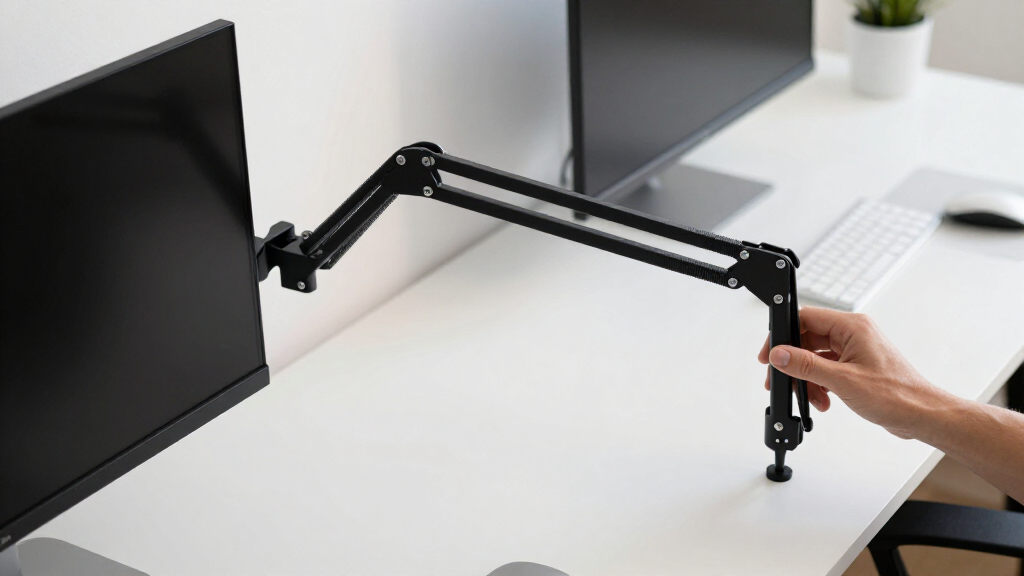
The products in this roundup were selected based on criteria that matter most for enhancing productivity: smoothness and range of motion, build quality and stability, compatibility with various monitor sizes and weights, ease of installation and adjustments, and overall value. We prioritized models that offer reliable performance across these factors, examining user feedback and specifications. The ranking reflects a balance between affordability, versatility, and premium features, ensuring there’s a suitable option for different workspace needs and budgets.Factors to Consider When Choosing Adjustable Monitor Arms For Productivity
When choosing an adjustable monitor arm for productivity, it’s important to consider factors that influence usability and long-term performance. The right arm should allow easy movement, support your monitor’s weight, and fit seamlessly into your workspace. Beyond features, understanding broader tradeoffs helps you avoid common pitfalls, like choosing an arm that’s too limited in motion or incompatible with your desk setup.Adjustability and Range of Motion
Look for arms that offer at least tilt, swivel, and rotation, enabling you to customize your monitor position for optimal comfort. A wider range of movement can reduce neck strain and improve workflow. However, more complex adjustability often comes with increased cost or potential for looseness over time, so balance your needs with quality construction.
Build Quality and Load Capacity
Sturdy materials like aluminum or steel ensure your monitor remains stable during adjustments. Check the maximum weight supported; larger screens or heavier models require higher capacity arms. Cheaper plastic models may save money upfront but tend to wear out faster, leading to frustration and added replacement costs later.
Mounting Options and Compatibility
Decide between clamp and grommet mounts based on your desk setup. Clamps are easier to install and remove but may not fit all desk edges, while grommet mounts require a hole, offering a cleaner look. Confirm that your monitor’s VESA pattern matches the arm’s compatibility to avoid fit issues.
Ease of Installation and Adjustment
Choose models that feature straightforward installation procedures and minimal tools. Smooth adjustment mechanisms, like gas springs or friction joints, make repositioning effortless and reduce the risk of sudden movements that could damage your monitor or desk.
Budget and Long-Term Value
While budget options can be appealing, they often lack durability or smooth operation. Investing a bit more often results in better stability and longevity, especially if you rely heavily on your setup. Consider how frequently you’ll adjust your monitor and whether the features justify the price.
Frequently Asked Questions
Can I use an adjustable monitor arm with a curved monitor?
Yes, most adjustable monitor arms are compatible with curved monitors as long as the VESA pattern matches and the weight capacity is sufficient. Curved screens can sometimes be bulkier, so ensure the arm’s reach and load capacity align with your monitor’s specifications. Proper mounting can help maintain stability and prevent sagging or wobbling, especially with larger, heavier models.
How much weight should my monitor arm support for large screens?
For larger monitors, particularly those over 27 inches, look for arms rated to support at least 22 pounds or more. Heavier screens require sturdier arms with higher load capacities to avoid sagging or instability. Always double-check the weight specifications against your monitor to ensure safe and reliable mounting.
Is a grommet mount better than a clamp for adjustable monitor arms?
Both mounting options have their advantages. Grommet mounts typically offer a cleaner look and more flexibility in positioning, but require a drilled hole in your desk. Clamps are easier to install and remove but may have limited compatibility with certain desk edges or thicknesses. The choice depends on your desk setup and preference for permanence or flexibility.
What features should I prioritize for a dual monitor setup?
For dual setups, prioritize arms with a wide adjustable range and high load capacity to support two screens securely. Look for models with independent adjustment for each arm, allowing you to position monitors at different heights and angles. Stability becomes even more critical here, so choose sturdy materials and reliable mounting options.
Do I need a special desk or mounting bracket for heavy-duty monitor arms?
Heavy-duty monitor arms often require a desk capable of supporting the load, especially if mounted via a clamp. Ensure your desk is sturdy enough to handle the weight and movement, and consider a reinforced or thicker surface if necessary. For very heavy or wide monitors, grommet mounts with reinforced desks may offer better stability and safety.
Conclusion
For most users seeking an all-around productive setup, the HUANUO FlowLift™ Dual Monitor Stand offers excellent flexibility and stability. Beginners or those on a budget should consider the MountUp Single Monitor Desk Mount for straightforward, reliable performance. Professionals with larger or heavier screens will benefit from the FlexiSpot Premium Aluminum Mount designed to support bigger workloads. For those prioritizing premium build quality and long-term durability, the HUANUO TitanLift Heavy Duty Monitor Arm provides unmatched strength. Matching your choice to your specific monitor size, workspace constraints, and adjustment needs will ensure optimal productivity and comfort.Halloween Picks

Spirit Halloween 54-Inch Sitting Scarecrow Animatronic

Spirit Halloween Scary Sitting Scarecrow Animatronic, 4 ft 6 in

HOPOCO Halloween Pumpkin Fog Machine with 12 LED Colors and 4 Light Modes
As an affiliate, we earn on qualifying purchases.