Dual monitor stands for home offices can free up desk space, improve screen positioning, or add useful storage, depending on the style you choose. My best overall pick is the ErGear Dual Monitor Stand for 17–33-Inch Screens for its broad screen-size range and flexible desk-mount format. The VIVO AeroPoise stands out for shoppers seeking an arm-style setup, while the Gianotter riser suits people who want drawers and pen storage instead of movable arms. The main tradeoff is between adjustability and a simpler, freestanding surface that needs no clamp or grommet mount. Read on for the full breakdown, selection criteria, and advice on matching a stand to your desk and monitors.

Get business pricing on your home office setup
- Business-only prices and quantity discounts
- Tax-exempt purchasing
- Multiple users, one account, clear invoices
Complete the kit


Key Takeaways
Desk-mounted arms lead this roundup for adjustability: the ErGear 17–33-inch model is my overall pick, while VIVO AeroPoise and EVEO offer alternatives for shoppers focused on arm-style positioning.
Screen compatibility is not just about diagonal size: the listed ranges vary from 13–27 inches to 17–33 inches, and buyers still need to check each monitor’s weight and VESA mounting pattern.
Freestanding risers serve a different purpose from arms: the Gianotter and OPNICE models add drawers and pen holders, while the BONTEC provides a wooden storage-riser format.
Clamp-free installation narrows the field: WALI’s freestanding stand and the three risers avoid the desk-edge attachment used by many arm mounts, but they take up surface area.
Heavy monitors call for closer capacity checks: monTEK and the VIVO stand rated for 22 pounds per monitor speak to a different load need than compact-screen options such as the 13–27-inch models.
| ErGear Dual Monitor Stand for 17–33-Inch Screens |  | Best Overall for Flexible Desk Setups | Screen compatibility: 17–33 inches; product details also list 32 inches | Weight capacity: 4.4–22 lbs per arm | VESA compatibility: 75×75 mm and 100×100 mm | VIEW LATEST PRICE | See Our Full Breakdown |
| VIVO Dual Monitor Desk Stand for 13–27-Inch Screens |  | Best for Beginners | Screen compatibility: Two monitors, 13–27 inches | Weight capacity: Up to 22 lbs per screen | VESA compatibility: 75×75 mm and 100×100 mm | VIEW LATEST PRICE | See Our Full Breakdown |
| VIVO AeroPoise Dual Monitor Stand for 17–32-Inch Screens |  | Best for Spring-Arm Adjustability | Screen compatibility: 17–32 inches | Weight capacity: 4.4–19.8 lbs per monitor | VESA compatibility: 75×75 mm and 100×100 mm | VIEW LATEST PRICE | See Our Full Breakdown |
| VIVO Dual Monitor Desk Stand for 13–32-Inch Screens, 22 lbs per Monitor | 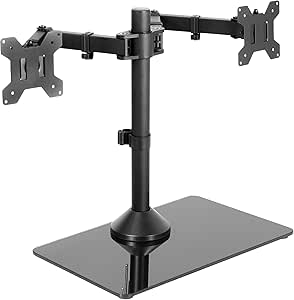 | Best Freestanding Pick for Larger Screens | Screen compatibility: 13–32 inches | Weight capacity: Up to 22 lbs per monitor | VESA compatibility: 75×75 mm and 100×100 mm | VIEW LATEST PRICE | See Our Full Breakdown |
| MOUNTUP Dual Monitor Desk Mount for 17–32 Inch Screens |  | Best for Cable-Conscious Setups | Screen compatibility: 17–32 inches | Weight capacity: 4.4–17.6 lbs per monitor | VESA compatibility: 75×75 mm and 100×100 mm | VIEW LATEST PRICE | See Our Full Breakdown |
| monTEK Heavy-Duty Dual Monitor Stand for 17–32-Inch Screens |  | Best for Heavier, Larger Monitors | Supported screen size: 17–32 inches | Weight capacity: 22 lbs per arm | VESA compatibility: 75×75mm and 100×100mm | VIEW LATEST PRICE | See Our Full Breakdown |
| WALI Freestanding Dual Monitor Stand for 13–27-Inch Screens |  | Best Freestanding Pick | Screen compatibility: 13–27 inches | Weight capacity: 22 lbs per arm | VESA patterns: 75×75mm and 100×100mm | VIEW LATEST PRICE | See Our Full Breakdown |
| ErGear Dual Monitor Desk Mount for 13–32-Inch Screens |  | Best for Flexible Desk Installation | Compatible screen size: 13–32 inches | Screen capacity: 2 monitors | Weight capacity: 17.6 lb per arm | VIEW LATEST PRICE | See Our Full Breakdown |
| VIVO Dual Monitor Desk Mount for 13–30 Inch Screens |  | Best for Straightforward Installation | Supported screen size: 13–30 inches | Screen capacity: 2 monitors | Weight capacity: 22 lbs per monitor | VIEW LATEST PRICE | See Our Full Breakdown |
| Gianotter Dual Monitor Stand Riser with Drawer and 2 Pen Holders |  | Best for Desk Organization | Material: Metal | Finish: Powder coated | Dimensions: 40.6 × 9.3 × 4.3 inches | VIEW LATEST PRICE | See Our Full Breakdown |
| EVEO Premium Dual Monitor Arm for 14–32-Inch Screens |  | Best for Flexible Desk Mounting | Screen size compatibility: 14–32 inches | VESA compatibility: 75×75 mm and 100×100 mm | Rotation: 360° | VIEW LATEST PRICE | See Our Full Breakdown |
| BONTEC Adjustable Wooden Dual Monitor Stand Riser with Storage, White |  | Best for Wide Desks and Storage | Material: Wood | Color: White | Adjustable length: 31.5–42.5 inches | VIEW LATEST PRICE | See Our Full Breakdown |
| MOUNT PRO Dual Monitor Stand for 13–27-Inch Screens |  | Best Freestanding Adjustable Stand | Compatible screen size: 13–27 inches | Weight capacity: 17.6 lb per arm | VESA compatibility: 75×75 mm and 100×100 mm | VIEW LATEST PRICE | See Our Full Breakdown |
| OPNICE Dual Monitor Stand Riser with Drawer and Pen Holders, Black |  | Best for Ready-to-Use Desk Storage | Material: Alloy steel and plastic | Finish: Powder coated | Dimensions: 10 × 3.62 × 16.06 inches | VIEW LATEST PRICE | See Our Full Breakdown |
| HUANUO FlowLift Dual Monitor Desk Mount |  | Best for Broad Screen Compatibility | Screen size compatibility: 13–32 inches | Weight capacity: 4.4–19.8 lb per arm | VESA compatibility: 75×75 mm and 100×100 mm | VIEW LATEST PRICE | See Our Full Breakdown |
| dual monitor stands for home office | Weight capacity | VESA compatibility |
|---|---|---|
| ErGear Dual Monitor Stand for | 4.4–22 lbs per arm | 75×75 mm and 100×100 mm |
| VIVO Dual Monitor Desk Stand f | Up to 22 lbs per screen | 75×75 mm and 100×100 mm |
| VIVO AeroPoise Dual Monitor St | 4.4–19.8 lbs per monitor | 75×75 mm and 100×100 mm |
| VIVO Dual Monitor Desk Stand f | Up to 22 lbs per monitor | 75×75 mm and 100×100 mm |
| MOUNTUP Dual Monitor Desk Moun | 4.4–17.6 lbs per monitor | 75×75 mm and 100×100 mm |
| monTEK Heavy-Duty Dual Monitor | 22 lbs per arm | 75×75mm and 100×100mm |
| WALI Freestanding Dual Monitor | 22 lbs per arm | — |
| ErGear Dual Monitor Desk Mount | 17.6 lb per arm | 75×75mm or 100×100mm |
| VIVO Dual Monitor Desk Mount f | 22 lbs per monitor | 75×75mm and 100×100mm |
| Gianotter Dual Monitor Stand R | — | — |
| EVEO Premium Dual Monitor Arm | — | 75×75 mm and 100×100 mm |
| BONTEC Adjustable Wooden Dual | — | — |
| MOUNT PRO Dual Monitor Stand f | 17.6 lb per arm | 75×75 mm and 100×100 mm |
| OPNICE Dual Monitor Stand Rise | — | — |
| HUANUO FlowLift Dual Monitor D | 4.4–19.8 lb per arm | 75×75 mm and 100×100 mm |
More Details on Our Top Picks
ErGear Dual Monitor Stand for 17–33-Inch Screens
I’d put the ErGear EGDS15B first for a home office that needs broad monitor compatibility and more positioning range than a fixed stand. Its arms support screens from 4.4 to 22 pounds each and adjust for height, reach, tilt, swivel, and rotation, so it can suit mixed-size displays and changing work postures. The 17.5-inch extension and matching maximum height give it more reach than the MOUNTUP MU0005, while the C-clamp and grommet options make it adaptable to different desk layouts.
The tradeoff is that it needs VESA-compatible monitors and the manufacturer recommends a wooden desk. Unlike the freestanding VIVO STAND-V002F, it also requires a secure desk-edge installation, so it is not the pick for a desk that cannot accept a clamp or grommet mount.
Pros:- Supports a wide range of monitor sizes and weights, up to 22 pounds per arm.
- Adjusts for tilt, swivel, rotation, height, and extension.
- Offers both C-clamp and grommet mounting.
- Cycle-tested for 20,000 adjustments.
Cons:- Requires monitors with 75×75 mm or 100×100 mm VESA holes.
- The manufacturer recommends installation on a wooden desk.
Best for: Home-office users with two VESA-compatible monitors of different sizes who want substantial reach and both clamp and grommet installation options.
Not ideal for: People with non-VESA monitors or desks unsuitable for a clamp or grommet installation, especially non-wood surfaces where the manufacturer’s recommendation is not met.
- Screen compatibility:17–33 inches; product details also list 32 inches
- Weight capacity:4.4–22 lbs per arm
- VESA compatibility:75×75 mm and 100×100 mm
- Mounting:C-clamp or grommet
- Tilt:+90° to −35°
- Swivel and rotation:±90° swivel; 360° rotation
- Maximum height and extension:17.5 inches each
- Material and weight:Steel; 8.9 lbs
Our verdict“Choose the ErGear if you want wide monitor support and extensive positioning on a desk that can take a secure mount.”
VIVO Dual Monitor Desk Stand for 13–27-Inch Screens
For a first dual-monitor setup, I’d favor the VIVO STAND-V002F if avoiding desk installation matters more than freeing every inch of desktop. Its freestanding, padded steel base sits on the desk, while detachable VESA plates make attaching the monitors less cumbersome. Tilt, swivel, rotation, and height adjustment provide useful ways to align a pair of screens without moving to a clamp-mounted arm system.
Compared with the clamp-mounted VIVO AeroPoise STAND-V002O, this model is easier to relocate and does not need a desk edge or grommet hole. That convenience comes with a 13 × 10.5-inch footprint, and the base may feel less stable if the displays are extended far forward or backward. Its 13–27-inch limit also makes the glass-base VIVO STAND-V002FG a better fit for larger screens.
Pros:- Freestanding setup avoids clamp or grommet installation.
- Supports up to 22 lbs per screen.
- Detachable VESA plates simplify monitor attachment.
- Padded base and cable clips support a tidier desk setup.
Cons:- The wide base occupies a significant area of the desk.
- Stability may suffer if monitors are extended too far forward or backward.
Best for: First-time dual-monitor users with two VESA-compatible screens up to 27 inches who want a stand that rests on the desk rather than attaching to it.
Not ideal for: Owners of larger monitors or small desks where a 13 × 10.5-inch base would take up too much workspace.
- Screen compatibility:Two monitors, 13–27 inches
- Weight capacity:Up to 22 lbs per screen
- VESA compatibility:75×75 mm and 100×100 mm
- Mounting type:Freestanding tabletop
- Movement:Tilt, swivel, rotation, and height adjustment
- Base dimensions:13 × 10.5 inches
- Material and weight:Alloy steel; 4.5 lbs
- Warranty:3 years
Our verdict“Pick this VIVO for a straightforward, movable dual-screen setup when your desk has room for its broad base.”
VIVO AeroPoise Dual Monitor Stand for 17–32-Inch Screens
The VIVO AeroPoise STAND-V002O suits home offices where screens need frequent repositioning. Its mechanical spring arms provide tilt, swivel, and full rotation, and the mount accepts most flat or curved monitors from 17 to 32 inches within its weight range. Compared with the freestanding VIVO STAND-V002FG, the AeroPoise uses a desk-mounted C-clamp, leaving the surface under the stand open rather than placing a broad base there.
That space-saving arrangement is less forgiving of desk placement: the arms extend past the desk edge, so the layout needs room behind or beside the work surface. It includes the C-clamp, while the grommet mount is optional. Unlike the ErGear EGDS15B, its stated capacity tops out at 19.8 pounds per screen, which rules it out for some heavier displays.
Pros:- Spring arms allow tilt, swivel, and 360° rotation.
- Fits a range of flat and curved 17–32-inch monitors.
- C-clamp installation avoids a large freestanding base.
- Assembly hardware and step-by-step instructions are included.
Cons:- The arms extend past the desk edge, which can constrain placement.
- Grommet mounting requires an optional mount.
- Weight capacity is lower than the ErGear EGDS15B at 19.8 lbs per screen.
Best for: Home workers with two 17–32-inch VESA monitors who want adjustable spring arms and an uncluttered desktop under the mount.
Not ideal for: People who cannot accommodate arms extending beyond the desk edge, or whose monitors weigh more than 19.8 pounds each.
- Screen compatibility:17–32 inches
- Weight capacity:4.4–19.8 lbs per monitor
- VESA compatibility:75×75 mm and 100×100 mm
- Mounting:C-clamp included; optional grommet mount
- Tilt:+90° to −90°
- Swivel and rotation:180° swivel; 360° rotation
- Desk thickness:C-clamp up to 3.1 inches; grommet up to 1.9 inches
- Material and warranty:Alloy steel; 3 years
Our verdict“Choose the AeroPoise if you want spring-arm positioning and can accommodate its desk-edge clamp and outward-reaching arms.”
VIVO Dual Monitor Desk Stand for 13–32-Inch Screens, 22 lbs per Monitor
If a clamp-mounted arm is not workable in your home office, the VIVO STAND-V002FG offers a freestanding route that accommodates screens up to 32 inches and 22 pounds each. Its tempered-glass base supports a steel pole and adjustable arms, with tilt, swivel, rotation, and height changes for portrait or landscape positioning. Compared with the smaller VIVO STAND-V002F, it accepts larger monitors; compared with the clamp-mounted AeroPoise, it avoids attaching hardware to the desk.
The cost of that flexibility is desk footprint: the base measures 15.2 × 10.2 inches, larger than the other freestanding VIVO’s base. It can also become unstable when screens are pushed too far forward or backward unless bolted down. VESA mounting holes are required, so this is not a universal fit for every monitor.
Pros:- Supports two monitors up to 32 inches and 22 lbs each.
- Adjustable arms support tilt, swivel, rotation, and height changes.
- Allows portrait and landscape monitor orientations.
- Padded tempered-glass base rests on the desk without a clamp.
Cons:- The 15.2 × 10.2-inch base takes up substantial desk space.
- Can become unstable with far-forward or far-backward monitor placement unless bolted down.
- Requires 75×75 mm or 100×100 mm VESA mounting holes.
Best for: Home-office users with larger VESA-compatible monitors who need a freestanding stand and want portrait-or-landscape positioning.
Not ideal for: People with limited desk depth, non-VESA monitors, or a setup that calls for frequently extending screens far forward or backward without bolting down the stand.
- Screen compatibility:13–32 inches
- Weight capacity:Up to 22 lbs per monitor
- VESA compatibility:75×75 mm and 100×100 mm
- Mounting type:Freestanding tabletop
- Base dimensions:15.2 × 10.2 inches
- Movement:Tilt +90° to −90°; 360° swivel and rotation
- Materials:Tempered glass base, steel pole and arms
- Warranty:3 years
Our verdict“Choose this stand for larger monitors when you need freestanding installation and have desk space for its base.”
MOUNTUP Dual Monitor Desk Mount for 17–32 Inch Screens
The MOUNTUP MU0005 is a practical choice for a two-screen home office where cable routing and adjustable positioning matter. Its pneumatic arms support tilt, swivel, rotation, height adjustment, and built-in cable management, while a C-clamp or grommet base gives it more installation flexibility than the freestanding VIVO STAND-V002F. It fits flat and curved monitors from 17 to 32 inches, provided each screen weighs between 4.4 and 17.6 pounds.
That weight ceiling is the key compromise: the ErGear EGDS15B supports up to 22 pounds per arm, making it a safer match for heavier displays. The MOUNTUP also calls for proper tension adjustment to balance its pneumatic arms, and its C-clamp only fits desks 0.39–2.76 inches thick. I’d choose it for lighter screens and cable tidiness, not maximum load capacity.
Pros:- Pneumatic arms adjust for tilt, swivel, rotation, and height.
- Supports flat and curved screens from 17 to 32 inches.
- Cable management helps keep leads organized.
- Offers C-clamp and grommet installation options.
Cons:- The 17.6-pound-per-monitor limit is lower than the ErGear EGDS15B’s 22-pound capacity.
- Pneumatic tension needs adjustment to suit monitor weight.
- C-clamp fits desks only 0.39–2.76 inches thick.
Best for: Home-office users with two lighter 17–32-inch flat or curved monitors who want adjustable arms and integrated cable routing.
Not ideal for: Owners of monitors over 17.6 pounds each or desks outside the listed C-clamp thickness range who cannot use a grommet mount.
- Screen compatibility:17–32 inches
- Weight capacity:4.4–17.6 lbs per monitor
- VESA compatibility:75×75 mm and 100×100 mm
- Movement:135° tilt, 180° swivel, 360° rotation
- Arm extension:17.3 inches
- Height adjustment:9.4 inches
- Mounting:C-clamp or grommet; C-clamp fits 0.39–2.76-inch desks
- Material and warranty:Aluminum; 2 years
Our verdict“Pick the MOUNTUP if your monitors fall within its lighter weight range and cable management is a priority.”
monTEK Heavy-Duty Dual Monitor Stand for 17–32-Inch Screens
The monTEK MA1006PXLBK is a strong fit for a home office with two larger displays or monitors that approach the weight limits of lighter arms: it supports up to 32 inches and 22 pounds per arm. Tilt, swivel, and rotation let you arrange screens for a shared workspace or switch one to portrait. Unlike the freestanding WALI MF002, this mount attaches to the desk with a C-clamp or grommet, leaving the desktop base area clear. That tradeoff calls for a compatible desk edge or grommet opening, and its screens need VESA 75×75mm or 100×100mm mounting holes. Compared with the ErGear EGCM1, it offers more weight capacity per arm, while the ErGear reaches the same maximum screen size and lists specific desk-thickness ranges. I’d choose monTEK when monitor support takes priority over avoiding desk-mounted hardware.
Pros:- Supports monitors up to 32 inches and 22 pounds per arm
- Tilt, swivel, and rotation allow flexible screen positioning
- Offers both C-clamp and grommet mounting
- Steel construction and anti-slip pads support a stable setup
Cons:- Requires a compatible desk-edge clamp point or grommet opening
- Monitors must use 75×75mm or 100×100mm VESA patterns
- The one-year warranty is shorter than the WALI MF002’s listed 10-year warranty
Best for: Home-office users with two VESA-compatible monitors up to 32 inches, especially heavier screens, who have a desk suitable for clamp or grommet mounting.
Not ideal for: Renters or desk owners who cannot clamp or drill through their work surface, and buyers whose monitors lack compatible VESA holes.
- Supported screen size:17–32 inches
- Weight capacity:22 lbs per arm
- VESA compatibility:75×75mm and 100×100mm
- Movement:Articulating arms with tilt, swivel, and rotation
- Maximum tilt angle:45 degrees
- Mounting options:C-clamp or grommet
- Material:Alloy steel
- Warranty:1 year
Our verdict“Choose the monTEK if your home office needs two larger, heavier screens on adjustable arms and your desk can accept a clamp or grommet mount.”
WALI Freestanding Dual Monitor Stand for 13–27-Inch Screens
The WALI MF002 suits home offices where clamping to the desk is not practical: its freestanding V-base supports two monitors without a desk-edge clamp or grommet mount. That makes it easier to place on a desk that should not be altered, though the base still occupies surface area. It handles screens up to 27 inches and 22 pounds each, with tilt, swivel, and full rotation for repositioning or portrait orientation. The monTEK MA1006PXLBK accommodates screens up to 32 inches and uses a desk mount, so it is the better fit for larger displays or users trying to keep the base area clear. WALI adds built-in cable guides and a 10-year warranty, but its 27-inch screen limit may rule it out for some dual-display setups.
Pros:- Freestanding design avoids desk-edge clamping and grommet installation
- Supports two monitors up to 22 pounds each
- Tilt, swivel, and 360-degree rotation provide flexible positioning
- Built-in cable guides and a 10-year warranty
Cons:- Limited to monitors up to 27 inches
- The V-base occupies space on the desktop
- Requires compatible 75×75mm or 100×100mm VESA mounting holes
Best for: Home-office workers who need dual-screen adjustability on a desk where clamp or grommet installation is unwanted or unavailable.
Not ideal for: People with monitors larger than 27 inches or a crowded desktop where a freestanding base would take up useful work area.
- Screen compatibility:13–27 inches
- Weight capacity:22 lbs per arm
- VESA patterns:75×75mm and 100×100mm
- Stand type:Freestanding tabletop mount with V-base
- Pole height:16 inches
- Movement:±90° tilt, swivel, and 360° rotation
- Item weight:3.37 kg
- Warranty:10 years
Our verdict“Pick the WALI MF002 if avoiding desk-mounted hardware matters more than supporting screens above 27 inches or keeping the whole desktop clear.”
ErGear Dual Monitor Desk Mount for 13–32-Inch Screens
The ErGear EGCM1 balances broad screen-size coverage with a choice of C-clamp or grommet mounting, which helps when a home-office desk layout favors one attachment style over the other. Its arms support two 13–32-inch monitors up to 17.6 pounds each, and tilt, swivel, and 360-degree rotation make it easier to tailor screen angles to a workstation. The stated clamp and grommet thickness ranges are useful for checking desk fit before buying. Compared with the monTEK MA1006PXLBK, ErGear accommodates smaller screens but has a lower per-arm weight limit; monTEK is the stronger match for heavier displays. ErGear also specifies that installation guidance recommends a wooden table, so it is not the pick I’d choose for a fragile or unsuitable desktop.
Pros:- Fits screens from 13 to 32 inches
- Provides both C-clamp and grommet installation options
- Offers swivel, tilt, and 360-degree rotation
- Cable management clips help route wires along the mount
Cons:- Weight capacity is lower than the monTEK MA1006PXLBK at 17.6 pounds per arm
- Requires compatible 75×75mm or 100×100mm VESA holes
- Installation guidance recommends a wooden table
Best for: Home-office users with VESA-compatible monitors weighing no more than 17.6 pounds each who want clamp or grommet installation and defined desk-thickness limits.
Not ideal for: Owners of heavier monitors or desks that are not suitable for the recommended wooden-table installation.
- Compatible screen size:13–32 inches
- Screen capacity:2 monitors
- Weight capacity:17.6 lb per arm
- VESA compatibility:75×75mm or 100×100mm
- Swivel:±90°
- Tilt:±45°
- Rotation:360°
- Mounting options:C-clamp or grommet
- Clamp table thickness:0.39–3 inches
Our verdict“Choose the ErGear EGCM1 for a versatile 13–32-inch setup when your monitors fit its weight limit and your desk suits clamp or grommet installation.”
VIVO Dual Monitor Desk Mount for 13–30 Inch Screens
The VIVO STAND-V002 stands out for practical setup details that matter when fitting a dual-arm mount into a home office: detachable VESA plates simplify attaching monitors, and buyers can choose a C-clamp or grommet mount. It supports two screens up to 30 inches and 22 pounds each, with height adjustment, tilt, swivel, and 360-degree rotation for portrait or landscape positioning. Its 3-year warranty is longer than the monTEK MA1006PXLBK‘s one-year coverage, while monTEK supports screens up to 32 inches. The VIVO’s 30-inch limit is a reasonable compromise for many workstations, but it may not suit larger displays. Clamp installation also has a stated desk-thickness ceiling of 3.25 inches, so check the desktop before choosing that setup.
Pros:- Supports two monitors up to 22 pounds each
- Detachable VESA plates can simplify monitor installation
- Tilt, swivel, rotation, and height adjustment support flexible positioning
- Includes cable clips, two mounting options, and a 3-year warranty
Cons:- Screen-size limit is 30 inches, below the monTEK and ErGear mounts’ 32-inch limits
- Requires compatible 75×75mm or 100×100mm VESA mounting holes
- C-clamp installation is limited to desks no thicker than 3.25 inches
Best for: Home-office users with two monitors up to 30 inches who want detachable VESA plates, multiple positioning adjustments, and a choice of desk-mounting method.
Not ideal for: People using monitors larger than 30 inches or desks thicker than 3.25 inches when planning to use the C-clamp.
- Supported screen size:13–30 inches
- Screen capacity:2 monitors
- Weight capacity:22 lbs per monitor
- VESA compatibility:75×75mm and 100×100mm
- Movement:Tilt, swivel, rotation, and articulation
- Tilt range:+90° to -90°
- Mounting options:C-clamp or grommet
- Maximum desk thickness:3.25 inches
- Warranty:3 years
Our verdict“Choose the VIVO STAND-V002 if you want a versatile dual mount with detachable VESA plates and your monitors are no larger than 30 inches.”
Gianotter Dual Monitor Stand Riser with Drawer and 2 Pen Holders
The Gianotter monitor riser is the lineup’s desk-organization choice, not an adjustable-arm mount: its 40.6-inch-wide platform raises monitors while leaving room beneath for a keyboard, mouse, or other supplies. A drawer and two magnetic pen holders add storage without assembly, making it a different kind of home-office solution from the clamp-mounted VIVO STAND-V002 or freestanding WALI MF002. The tradeoff is less flexibility: the supplied details do not list monitor weight capacity, supported screen sizes, VESA compatibility, or arm movement. Its listed dimensions may also take up too much width on a compact desk. I’d choose this riser for a fixed side-by-side layout and a preference for built-in storage, not for frequent screen repositioning.
Pros:- Raises monitors while leaving storage space underneath
- Includes a drawer and two magnetic pen holders
- Requires no assembly
- Powder-coated metal construction
Cons:- Listed 40.6-inch width may not fit smaller home-office desks
- Does not provide articulated arms for tilt, swivel, or rotation
- Product details do not specify monitor size, weight, or VESA compatibility
Best for: Home-office users with enough desk width for a 40.6-inch riser who want a raised monitor platform and built-in storage for small supplies.
Not ideal for: People who need articulated arms, frequent monitor repositioning, or published monitor size and weight compatibility before buying.
- Material:Metal
- Finish:Powder coated
- Dimensions:40.6 × 9.3 × 4.3 inches
- Storage:Drawer and 2 magnetic pen holders
- Assembly:No assembly required
- Number of levels:1
- Weight:3.08 kg
- Color:Black
Our verdict“Pick the Gianotter if desk storage and a raised, fixed monitor platform matter more to your home office than articulated adjustment or documented monitor limits.”
EVEO Premium Dual Monitor Arm for 14–32-Inch Screens
The EVEO Premium Dual Monitor Arm is a practical choice for home offices that need movable screens and a clear desktop. Its clamp and grommet installation options give it an advantage over the tabletop MOUNT PRO PR1009 when a desk has a suitable edge or cable hole and floor space is limited. The arm supports 14–32-inch displays and offers full rotation plus broad swivel, making it easier to angle screens for side-by-side work or occasional collaboration. The tradeoff is that compatibility depends on both a 75×75 or 100×100 mm VESA pattern and a desk that falls within the specified thickness limits. Unlike a riser, it does not add built-in storage, and buyers should check monitor mounting points before choosing it.
Pros:- Supports two monitors while keeping the desk surface clear beneath them
- 360° rotation and ±90° swivel allow flexible screen positioning
- Offers both desk-clamp and grommet installation
- Includes a 2-year manufacturer warranty
Cons:- Requires compatible VESA mounting patterns on both monitors
- Desk thickness must fit the selected mounting method
- Does not provide the storage compartments offered by the BONTEC riser
Best for: Home-office users with VESA-compatible monitors who want to reclaim desk space and need either clamp or grommet installation.
Not ideal for: People whose monitors lack 75×75 or 100×100 mm VESA mounting points, or whose desk falls outside the clamp or grommet thickness limits.
- Screen size compatibility:14–32 inches
- VESA compatibility:75×75 mm and 100×100 mm
- Rotation:360°
- Swivel:+90° to −90°
- Desk clamp thickness:0.39–1.97 inches
- Grommet mount thickness:0.39–1.56 inches
- Warranty:2 years
Our verdict“Choose the EVEO if you want adjustable, desk-mounted screens and your monitors and desk meet its mounting requirements.”
BONTEC Adjustable Wooden Dual Monitor Stand Riser with Storage, White
The BONTEC wooden riser suits a home office where the main goal is to spread two screens across a broad desk and gather small accessories in one place. Its width adjusts from 31.5 to 42.5 inches, while swivel side shelves can be set straight, angled, or toward a corner. That makes it more adaptable to desk layouts than the fixed-width OPNICE riser. Three open compartments, a phone slot, and a cable opening also give everyday items a home. The tradeoff is height: this is a single-level platform, not an articulated mount, so it cannot raise each screen independently or pull them closer for fine positioning. Buyers seeking ergonomic adjustment should look at an arm such as the MOUNT PRO instead.
Pros:- Adjustable width accommodates different desk layouts
- Swivel side shelves support straight, angled, and corner arrangements
- Three compartments, a phone slot, and a cable opening help organize accessories
- Non-slip pads support stability and help protect the desk
Cons:- Single-level design does not offer height adjustment
- Takes up a broad footprint when extended
- Does not provide the independent screen movement available from the MOUNT PRO stand
Best for: Home-office workers with a wide desk who want adjustable riser width, organized accessory storage, and flexible shelf positioning.
Not ideal for: Users who need substantial screen-height adjustment, independent monitor positioning, or a compact stand for a narrow desk.
- Material:Wood
- Color:White
- Adjustable length:31.5–42.5 inches
- Load capacity:44 lb
- Weight:3.3 kg
- Storage compartments:3
- Assembly time:About 2 minutes
Our verdict“Pick the BONTEC if you want a wide, storage-focused riser rather than adjustable monitor arms.”
MOUNT PRO Dual Monitor Stand for 13–27-Inch Screens
The MOUNT PRO PR1009 is the more adjustable choice for a home-office desk that cannot accept a clamp or grommet mount. Its tabletop base supports two monitors, with height adjustment up to 18.1 inches plus tilt, swivel, and rotation. That gives it a clear ergonomic advantage over the fixed-height BONTEC and OPNICE risers, while avoiding desk-edge installation. The 13–27-inch screen range is narrower than the HUANUO FlowLift’s 13–32-inch range, so this pick fits standard-size displays better than larger panels. Its key caveat is balance: the supplied guidance calls for mounting both monitors together and keeping the arms balanced to reduce tipping risk. It also occupies tabletop space that clamp-mounted options leave open.
Pros:- Freestanding tabletop installation avoids a desk clamp or grommet
- Height adjusts up to 18.1 inches, with tilt, swivel, and 360° rotation
- Supports common 75×75 mm and 100×100 mm VESA patterns
- Includes cable clips and a phone groove
Cons:- Screen compatibility tops out at 27 inches, below the HUANUO FlowLift’s 32-inch limit
- The tabletop base uses desk surface area
- Both monitors should be mounted together and kept balanced to reduce tipping risk
Best for: Home-office users with two 13–27-inch VESA monitors who want adjustable positioning but cannot or do not want to clamp a mount to the desk.
Not ideal for: Owners of monitors larger than 27 inches, substantially mismatched monitor weights, or desks with little spare surface area for a tabletop base.
- Compatible screen size:13–27 inches
- Weight capacity:17.6 lb per arm
- VESA compatibility:75×75 mm and 100×100 mm
- Height adjustment:Up to 18.1 inches
- Tilt:−90° to +70°
- Swivel:−90° to +90°
- Mounting type:Tabletop
- Material:Alloy steel and aluminum
Our verdict“Choose the MOUNT PRO if you need adjustable dual screens on a desk that cannot take a clamp or grommet mount.”
OPNICE Dual Monitor Stand Riser with Drawer and Pen Holders, Black
The OPNICE riser is a straightforward fit for a home office where modest screen elevation and quick-access storage matter more than arm movement. It raises screens by 3.78 inches, with a drawer, two hanging pen holders, and open space below for a keyboard or files. Unlike the BONTEC riser, it arrives ready to use and does not ask buyers to assemble it; unlike the MOUNT PRO, it has no adjustable arms or independent screen positioning. Its extendable width reaches 39 inches, but the usable two-monitor arrangement still depends on the monitors and desk dimensions. The fixed, single-level height limits ergonomic fine-tuning, so this is best treated as an organizing platform rather than a substitute for a fully adjustable mount.
Pros:- Ready to use without installation
- Raises screens by 3.78 inches
- Drawer and two hanging pen holders keep small supplies accessible
- Space underneath can hold a keyboard, mouse, or files
Cons:- Single-level design does not allow height adjustment
- Two-monitor fit depends on monitor and desk dimensions
- Provides less screen-position flexibility than the adjustable MOUNT PRO
Best for: Home-office users who want a ready-to-use riser with a drawer and pen storage, and whose monitors fit its available width.
Not ideal for: People who need individually adjustable screen height or angle, or who have large monitors and a narrow desk.
- Material:Alloy steel and plastic
- Finish:Powder coated
- Dimensions:10 × 3.62 × 16.06 inches
- Riser height:3.78 inches
- Maximum width:39 inches
- Storage:Drawer and 2 pen holders
- Installation:No installation required
Our verdict“Choose the OPNICE if you want a simple, no-install riser with built-in storage and do not need adjustable arms.”
HUANUO FlowLift Dual Monitor Desk Mount
The HUANUO FlowLift is the strongest match here for a home office pairing larger displays with a conventional wooden desk. It accepts compatible 13–32-inch monitors weighing 4.4–19.8 lb per arm and offers tilt, swivel, and full rotation. Compared with the EVEO, its stated screen range starts smaller and reaches the same upper size, while its listed weight limits give buyers another check before mounting. The C-clamp and grommet options suit different desk setups, and cable management helps keep the workspace tidier. The main limitation is desk compatibility: it is specified for wooden desks, and crossbeams or panels can block installation. Its mount-based design also lacks the accessory storage of the BONTEC riser.
Pros:- Supports compatible screens from 13 to 32 inches
- Weight range of 4.4–19.8 lb per arm helps define monitor fit
- Tilt, swivel, and 360° rotation allow flexible positioning
- Includes C-clamp and grommet installation options plus cable management
Cons:- Not recommended for plastic or glass desks
- Desk crossbeams or panels can interfere with installation
- Does not offer the built-in storage found on the BONTEC riser
Best for: Home-office users with compatible VESA monitors across a broad size range who have a suitable wooden desk and want adjustable, desk-mounted screens.
Not ideal for: People with plastic or glass desks, obstructing desk crossbeams or panels, incompatible VESA patterns, or monitors outside the stated weight range.
- Screen size compatibility:13–32 inches
- Weight capacity:4.4–19.8 lb per arm
- VESA compatibility:75×75 mm and 100×100 mm
- Tilt:+85°/−50°
- Swivel:±90°
- Rotation:360°
- Maximum height:15.75 inches
- Desk compatibility:Wooden desks, 0.59–3.54 inches thick
- Warranty:5 years
Our verdict“Pick the FlowLift if your monitors fit its size and weight limits and your wooden desk clears the clamp or grommet hardware.”
How We Picked
I ranked these stands around the choices that matter in a home office: monitor-size and weight compatibility, desk attachment, range of positioning, footprint, and practical extras. I treated screen-size labels as a starting point, not a guarantee; buyers should verify each monitor’s weight and VESA pattern against the product’s full specifications. The lineup includes both arm mounts and risers, so I judged them by how well each format serves its intended use rather than treating storage and articulation as interchangeable features.
The order favors useful flexibility for a typical two-screen workspace, followed by options that make a clearer case for a specific need. That puts the broad-range ErGear arm first, while the VIVO AeroPoise, heavier-duty models, and other desk mounts offer distinct alternatives. Freestanding stands and risers rank lower for shoppers seeking adjustable arms, but remain strong candidates for people who want simpler placement, no desk-edge clamp, or built-in storage. I also accounted for likely tradeoffs: mounts need a compatible desk edge or grommet point, while risers occupy more of the desktop and provide less independent screen movement.
Factors to Consider When Choosing Dual Monitor Stands For Home Offices
Before choosing a stand, decide whether you need to move each screen or simply raise both displays. That decision shapes the fit, installation, and desk-space tradeoffs more than a small difference in listed screen range.
Choose Between Arms and Risers
Monitor arms attach to the desk and let you reposition screens, which helps when you change posture or share a workspace. Risers hold monitors on a fixed platform and may add storage, but they generally do not offer the same independent articulation. A common mistake is buying a riser for a setup that needs frequent screen movement, or choosing an arm when the real need is simply to lift the displays and clear a little space beneath them. Arms also require a suitable attachment point, while risers need enough uninterrupted desktop width and depth. Pick the format based on how often your layout changes, not on the number of adjustment claims alone.
Check Monitor Weight and VESA Fit
Screen diagonal is only one compatibility check. Two monitors of the same size can have different weights, and an arm must support each display within its stated per-screen limit. Confirm the VESA hole pattern on the back of both monitors and compare it with the mount’s supported patterns before ordering. If a screen lacks VESA holes, check whether an adapter is available and compatible rather than assuming the stand will attach. Leave some capacity margin if your monitors are near the limit, especially when adding accessories that attach to the display. These checks prevent a stand that technically matches the screen size from being a poor fit in practice.
Match the Mount to Your Desk
Desk construction can rule out a mount even when the monitor specifications fit. Clamp arms need an accessible, sturdy edge and enough clearance beneath it; grommet mounts need a suitable hole in the desktop. Measure the edge thickness and check for crossbars, drawers, cable trays, or wall proximity that could interfere with installation or movement. Glass, hollow-core, and unusually thin desks may need extra care or may not suit a clamp at all. A freestanding stand avoids desk-edge hardware, but shifts the space cost onto the desktop surface. Check your desk before buying so installation constraints do not decide the matter after delivery.
Plan the Screen Layout Before Buying
Two monitors do not always sit neatly side by side. Their bezels, stands, curvature, and viewing angles affect whether they align flat, angle inward, or need different heights. Measure the combined width of the displays and leave room for speakers, lighting, or a laptop if those share the desk. A center-mounted arm may suit a symmetrical pair, while a riser can provide a broad, stable platform for screens that stay in one position. Consider whether you want portrait orientation, frequent angle changes, or a gap between displays; these needs favor different mounting arrangements. Sketching the intended layout before ordering can reveal reach and clearance issues that screen-size labels miss.
Decide How Much Adjustment You Will Use
More movement is useful only when you need it. Independent positioning can help when one screen is used for calls and the other for focused work, but a fixed setup may be simpler if both displays stay put. Think about how often you shift between sitting and standing, rotate a screen, or move the monitors out of the way. Check the mount’s stated movement and adjustment method rather than assuming every arm offers the same range. Also account for the extra space arms may need behind or beside the desk as they move. Buyers who rarely adjust their screens may get more daily value from a straightforward riser with storage.
Weigh Storage Against Clear Desk Space
Built-in drawers and pen holders can tidy small items, but they add structure that remains on the desktop. A riser can create a useful shelf beneath the screens, although the space may not fit larger devices or accessories. Arm mounts reclaim the area occupied by individual monitor bases, yet they do not automatically provide an organized place for stationery or cables. List what you want off the desk—keyboard, notebook, charger, or office supplies—and measure those items before choosing a storage-focused design. Avoid paying for compartments you will not use, especially if your main goal is a lighter, more open work surface.
Frequently Asked Questions
Can one dual monitor stand support two screens with different sizes?
Often, but both screens must meet the stand’s individual size, weight, and VESA requirements. Check each monitor separately rather than comparing only the larger screen with the stand’s advertised maximum. A large difference in screen dimensions can also make side-by-side alignment awkward, even when the mount supports both. If the screens have different weights, confirm that each arm or mounting point can carry its assigned display. The stand’s advertised range does not guarantee that every mixed-size pair will sit comfortably together.
Should I choose a clamp mount or a freestanding dual stand?
Choose a clamp mount if your desk has a sturdy, accessible edge and you want the monitors held above the work surface with adjustable arms. Choose a freestanding stand if you cannot attach hardware to the desk or prefer a setup that can be repositioned without removing a clamp. Freestanding models still occupy desktop area, so measure the base or riser footprint against your available space. Desk materials and construction matter: a weak edge may not be a good clamp location. The right choice depends on the desk as much as on the monitors.
Do I need to buy a dual monitor stand with more capacity than my screens weigh?
A stand should meet or exceed the weight of each monitor, including any accessories that attach directly to it. Some flexibility beyond the exact weight can be useful, but the manufacturer’s stated limit remains the controlling figure. Do not rely on screen size as a substitute for weight, since larger-looking displays can vary in construction and mass. Check the capacity per arm rather than a combined figure that might be divided unevenly. If either monitor is close to the stated maximum, compare models with a higher per-screen limit.
Will a monitor riser create more usable space than an arm mount?
It depends on what you count as usable space. A riser can create a shelf underneath the screens for a keyboard or small supplies, but its platform takes up desk depth and width. An arm mount removes the monitors’ original bases from the desktop and can leave more open surface, though the clamp and arm still need clearance. Risers with drawers add storage but may make that area less open than a plain platform. Measure both the stand footprint and the items you want to store before deciding which layout gives your home office more practical room.
What should I verify before installing a dual monitor arm on my desk?
Check the desk thickness, edge shape, material, and underside clearance against the mount’s installation requirements. Look for drawers, support rails, cable trays, or a wall that could block the clamp or limit arm movement. Confirm that both monitors have compatible VESA holes and fall within the mount’s size and weight limits. Plan cable length and routing as well, since moving arms can pull on short display or power cables. If the desktop is glass, hollow, or especially thin, check the maker’s guidance before attaching a clamp.
Conclusion
For most home offices seeking adjustable arms and a broad screen-size range, I recommend the ErGear Dual Monitor Stand for 17–33-Inch Screens as the best overall choice. The best value depends on fit: the compact VIVO 13–27-inch stand suits smaller compatible displays, while the best premium-style alternative for shoppers prioritizing arm positioning is the EVEO Premium Dual Monitor Arm. For beginners who want a simpler, clamp-free setup, I’d start with the WALI freestanding stand; buyers who want storage should compare the Gianotter, OPNICE, and BONTEC risers instead. If your monitors are heavier, look closely at the monTEK and the VIVO model rated for 22 pounds per monitor, and verify exact limits before choosing. The best match is the one that fits your screens and desk while supporting the way you actually work.