
If you’re hunting Prime Day monitor deals for home offices, the hardest part isn’t finding a discount — it’s figuring out which panel actually fits a workday. My top pick is the Dell S2725QS 27-inch 4K IPS monitor, which delivers the sharpest text rendering and screen real estate for spreadsheets, documents, and multitasking. For smaller budgets or desks, the Dell SE2426H offers a fast 144Hz IPS panel at 24 inches without wasted features, while the Sansui 23.8-inch Eye Care model covers the basics for the lowest possible spend. The main tradeoff in this category is between resolution and refresh rate: 4K helps your eyes over long work sessions, while high refresh rates matter mostly for side gaming. Panel type matters too — several budget deals use VA panels with great contrast but muted colors. Keep reading for the full breakdown of all 15 monitors and which deal deserves your cart.

Get business pricing on your home office setup
- Business-only prices and quantity discounts
- Tax-exempt purchasing
- Multiple users, one account, clear invoices
Complete the kit


Key Takeaways
- amazon.com/dp/B0DZ54SVWG?tag=timerik-20&ascsubtag=dc-1091160″ target=”_blank” rel=”nofollow sponsored noopener”>amazon.com/dp/B0G49SZ24N?tag=timerik-20&ascsubtag=dc-1091160″ target=”_blank” rel=”nofollow sponsored noopener”>Dell dominates the mid-range: three of its models (S2725QS, S2725DSM, SE2426H) earned top spots because of consistent IPS color quality, three-year warranty support, and sensible stands — weaknesses that plague cheaper brands.
- Resolution matters more than refresh rate for office work: the 4K Dell S2725QS and QHD Dell S2725DSM rendered sharper text than every 1080p option, while 120–144Hz panels only helped scrolling smoothness, not productivity.
- The sub-$100 tier (Sansui, Sceptre E225W, Acer KB220Q, MSI MP225, Philips 221V8LB) is crowded with VA panels — fine for contrast, but color accuracy and viewing angles fall behind the similarly affordable LG 24U411A IPS.
- Two monitors in this lineup are easy to overpay for: the Amazon Basics 27-inch runs at only 75Hz with dated inputs, and the Samsung S30B’s 32-inch size comes at 1080p, so pixels are visibly coarse at typical desk distances.
- Built-in speakers were a real differentiator for cluttered home-office desks — Dell‘s S2425HSM and S2725DSM and the Sceptre 22-inch offer them, letting you skip external speakers or a headset for video calls.
| Dell 24 Plus Monitor S2425HSM – 23.8-inch FHD 144Hz, Ash White |  | Best Overall | Screen size: 23.8 inches | Resolution: 1920 x 1080 (FHD) | Refresh rate: 144Hz | VIEW LATEST PRICE | See Our Full Breakdown |
| Sceptre E248W-19203R 24-Inch 1080p LED Monitor |  | Best Value for Everyday Productivity | Screen size: 24 inches | Resolution: 1080p | Refresh rate: Up to 100 Hz | VIEW LATEST PRICE | See Our Full Breakdown |
| SANSUI 23.8-Inch FHD Eye Care Monitor |  | Best Budget Second Screen | Screen size: 23.8 inches | Resolution: 1920 x 1080 (FHD) | Refresh rate: 75 Hz | VIEW LATEST PRICE | See Our Full Breakdown |
| Philips 24-Inch Full HD Monitor, 100Hz VA, 241V8LB |  | Best for Reading and Eye Comfort | Screen size: 23.8 inches | Resolution: 1920 x 1080 (Full HD) | Panel type: VA LCD | VIEW LATEST PRICE | See Our Full Breakdown |
| Sceptre 22-Inch FHD 1080p Gaming Monitor, 144Hz (E225W-FW144) |  | Best Compact Work-and-Play Pick | Screen size: 22 inches | Resolution: 1920 x 1080 (FHD) | Refresh rate: 144 Hz | VIEW LATEST PRICE | See Our Full Breakdown |
| Dell 27 Plus QHD Monitor S2725DSM, 27-inch, 144Hz, Ash White |  | Best for a Flexible Home Office | Screen size: 27 inches | Resolution: 2560 × 1440 (QHD) | Refresh rate: 144Hz | VIEW LATEST PRICE | See Our Full Breakdown |
| Amazon Basics 23.8-inch 1080P Computer Monitor, 120Hz, HDMI, DP, VGA, VESA Compatible |  | Best for a Multi-Monitor Setup | Screen size: 23.8 inches | Resolution: 1920 × 1080 (FHD) | Panel type: IPS | VIEW LATEST PRICE | See Our Full Breakdown |
| MSI PRO MP225 E12VL 21.45-Inch Full HD Monitor, 120Hz, Adaptive-Sync |  | Best Compact Pick | Screen size: 21.45 inches | Resolution: 1920 × 1080 (Full HD) | Panel type: VA | VIEW LATEST PRICE | See Our Full Breakdown |
| Dell S2725QS 27-inch 4K UHD IPS Monitor, 120Hz, AMD FreeSync Premium |  | Best for 4K Detail | Screen size: 27 inches | Resolution: 4K UHD | Panel type: IPS | VIEW LATEST PRICE | See Our Full Breakdown |
| Dell SE2426H 24-inch FHD IPS Monitor (1920 × 1080, 144Hz, AMD FreeSync) |  | Best for Smooth Full HD Use | Screen size: 23.8 inches | Resolution: 1920 × 1080 (FHD) | Panel type: IPS | VIEW LATEST PRICE | See Our Full Breakdown |
| Acer KB220Q H2bi 21.5″ FHD Office Monitor |  | Best for Multi-Monitor Arrays | Screen Size: 21.5 inches | Resolution: 1920×1080 (Full HD) | Refresh Rate: 100Hz | VIEW LATEST PRICE | See Our Full Breakdown |
| LG 24U411A-B 24-inch Full HD IPS Monitor, 120Hz, HDR10 |  | Best All-Rounder for Work-Plus-Play | Screen Size: 23.8 inches | Resolution: 1920 x 1080 (Full HD) | Panel Type: IPS | VIEW LATEST PRICE | See Our Full Breakdown |
| Samsung 32-Inch S30B Flat FHD Monitor |  | Best Big-Screen Value | Screen Size: 32 inches | Resolution: 1920 x 1080 (FHD) | Refresh Rate: 75 Hz | VIEW LATEST PRICE | See Our Full Breakdown |
| Philips 221V8LB 22 Inch Computer Monitor | 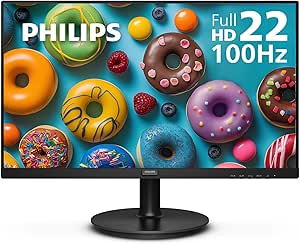 | Best Secondary Screen | Screen Size: 21.5 inches (22-inch class) | Resolution: 1920×1080 (Full HD) | Panel Type: VA | VIEW LATEST PRICE | See Our Full Breakdown |
| Amazon Basics 27″ IPS Monitor, Full HD 1080P, 75 Hz |  | Best No-Frugals Workhorse | Screen Size: 27 inches | Resolution: 1920×1080 (Full HD) | Refresh Rate: 75 Hz | VIEW LATEST PRICE | See Our Full Breakdown |
| Prime Day monitor deals for home office | Screen size | Resolution | Refresh rate | Panel type |
|---|---|---|---|---|
| Dell 24 Plus Monitor S2425HSM | 23.8 inches | 1920 x 1080 (FHD) | 144Hz | — |
| Sceptre E248W-19203R 24-Inch 1 | 24 inches | 1080p | Up to 100 Hz | — |
| SANSUI 23.8-Inch FHD Eye Care | 23.8 inches | 1920 x 1080 (FHD) | 75 Hz | — |
| Philips 24-Inch Full HD Monito | 23.8 inches | 1920 x 1080 (Full HD) | 100Hz | VA LCD |
| Sceptre 22-Inch FHD 1080p Gami | 22 inches | 1920 x 1080 (FHD) | 144 Hz | — |
| Dell 27 Plus QHD Monitor S2725 | 27 inches | 2560 × 1440 (QHD) | 144Hz | — |
| Amazon Basics 23.8-inch 1080P | 23.8 inches | 1920 × 1080 (FHD) | 120Hz | IPS |
| MSI PRO MP225 E12VL 21.45-Inch | 21.45 inches | 1920 × 1080 (Full HD) | 120Hz | VA |
| Dell S2725QS 27-inch 4K UHD IP | 27 inches | 4K UHD | 120Hz | IPS |
| Dell SE2426H 24-inch FHD IPS M | 23.8 inches | 1920 × 1080 (FHD) | 144Hz | IPS |
| Acer KB220Q H2bi 21.5" FHD Off | 21.5 inches | 1920×1080 (Full HD) | 100Hz | — |
| LG 24U411A-B 24-inch Full HD I | 23.8 inches | 1920 x 1080 (Full HD) | 120Hz | IPS |
| Samsung 32-Inch S30B Flat FHD | 32 inches | 1920 x 1080 (FHD) | 75 Hz | — |
| Philips 221V8LB 22 Inch Comput | 21.5 inches (22-inch class) | 1920×1080 (Full HD) | 100 Hz | VA |
| Amazon Basics 27" IPS Monitor | 27 inches | 1920×1080 (Full HD) | 75 Hz | IPS |
More Details on Our Top Picks
Dell 24 Plus Monitor S2425HSM – 23.8-inch FHD 144Hz, Ash White
The Dell 24 Plus earns the top spot because it simply refuses to make compromises on the things a home office demands every day. The full ergonomic stand — height, tilt, pivot, and swivel — puts it ahead of every tilt-only budget option here, and the TÜV 4-star eye comfort certification means long spreadsheet sessions are gentler than on the Sceptre E248W-19203R, which only offers basic blue light reduction. Its 144Hz refresh rate with FreeSync also covers after-hours gaming better than the 75 Hz SANSUI or the 100 Hz Philips 241V8LB.
The tradeoff is that resolution stays at Full HD, so if your work involves detailed photo editing, the Dell 27 Plus QHD elsewhere in this roundup is the better upgrade path. And with only two HDMI ports, USB-C laptop users will need an adapter. Still, for the widest range of home-office buyers, this is the safest all-around pick.
Pros:- Full ergonomic stand with height, tilt, pivot, and swivel adjustability
- 144Hz refresh rate with AMD FreeSync for tear-free work and gaming
- TÜV 4-star certified eye comfort with reduced blue light
- Built-in dual 3W speakers eliminate desk clutter
Cons:- Full HD resolution only — no QHD or 4K option at this size
- Native response time is 8ms (1ms figure is MPRT only)
- No USB-C connectivity
Best for: Remote workers who spend full days at a desk and want ergonomics, smooth motion, and eye comfort in one monitor
Not ideal for: Laptop users relying on USB-C docking, or creatives who need QHD-or-higher resolution for detail work
- Screen size:23.8 inches
- Resolution:1920 x 1080 (FHD)
- Refresh rate:144Hz
- Brightness:300 nits
- Ports:2 x HDMI
- Speakers:2 x 3W
- Eye comfort:TÜV 4-star certified
- Stand adjustability:Height, tilt, pivot, swivel
Our verdict“If you want one monitor that handles eight-hour workdays, video calls, and weekend gaming without complaint, this is the one to buy.”
Sceptre E248W-19203R 24-Inch 1080p LED Monitor
This Sceptre stands out for the connect-and-go simplicity that most home offices actually need. With two HDMI ports plus VGA, you can keep a work laptop and a desktop plugged in simultaneously — something the single-HDMI Sceptre E225W-FW144 can’t manage — and the built-in speakers and headphone jack mean you can join calls without buying external audio, a convenience the SANSUI 23.8-inch skips entirely.
The 99% sRGB coverage is the real differentiator at this end of the price ladder, giving presentations and images noticeably more accurate color than typical budget panels. The compromise is motion: its 100 Hz ceiling trails the Dell 24 Plus’s 144Hz, so it’s a work-first screen rather than a hybrid. There’s also no height adjustment, only a fixed stand, so plan on VESA mounting if ergonomics matter.
Pros:- 99% sRGB color coverage for accurate everyday visuals
- Two HDMI ports plus VGA for multi-device setups
- Built-in speakers, audio in, and headphone jack
- Blue light reduction for longer work sessions
Cons:- 1080p resolution limits screen real estate for multitasking
- Fixed stand with no height or pivot adjustment
Best for: Budget-conscious remote workers who juggle multiple devices and want usable speakers and decent color out of the box
Not ideal for: Gamers or anyone who wants high refresh rates and an adjustable stand without buying a mount
- Screen size:24 inches
- Resolution:1080p
- Refresh rate:Up to 100 Hz
- Color gamut:99% sRGB
- Ports:2 x HDMI, 1 x VGA
- Audio:Built-in speakers, audio in, headphone jack
- Mounting pattern:100 x 100 mm
Our verdict“A practical, well-connected workhorse that covers the basics — audio, color, inputs — that cheaper monitors leave out.”
SANSUI 23.8-Inch FHD Eye Care Monitor
The SANSUI makes the list as the cheapest sensible way to add screen real estate — a vertical side monitor for Slack and email, or a starter display for a spare desk. Its matte finish is the standout practical touch, handling window glare far better than the glossy Philips 241V8LB in a bright home office, and the 75 x 75 mm VESA mount makes dual-monitor arm setups easy since the screen itself is light.
Where it falls short is everything beyond basics. There are no speakers and no headphone jack, so the Sceptre E248W-19203R is clearly the better sole monitor if audio matters, and connectivity stops at one HDMI and VGA. The 75 Hz refresh rate is fine for documents but noticeably less fluid than the 100 Hz-plus options here. Think of it as a supporting player, not the lead.
Pros:- Matte anti-glare finish works well in bright rooms
- VESA mount compatibility for monitor arms
- FreeSync support and 75 Hz for smoother-than-basic motion
- Wide 178-degree viewing angle
Cons:- No speakers or headphone jack
- Connectivity limited to one HDMI and VGA
Best for: Anyone building a dual-monitor setup who needs an affordable, glare-resistant secondary display
Not ideal for: Buyers wanting a single do-everything monitor — no speakers, one HDMI port, and a 75 Hz ceiling make it feel limited fast
- Screen size:23.8 inches
- Resolution:1920 x 1080 (FHD)
- Refresh rate:75 Hz
- Screen finish:Matte
- Ports:HDMI 1.4, VGA
- Viewing angle:178 degrees
- VESA mount:75 x 75 mm
Our verdict“A smart, low-risk pick for a second screen or backup monitor, as long as it isn’t your only one.”
Philips 24-Inch Full HD Monitor, 100Hz VA, 241V8LB
If your workday is dominated by documents and long stretches of text, the Philips 241V8LB is the pick built for exactly that. Its EasyRead mode is unique in this lineup — no other monitor here offers a paper-like reading profile — and pairing LowBlue Mode with flicker-free technology targets the two biggest causes of screen fatigue. The VA panel’s 3000:1 contrast also makes text punchier than the IPS-style Dell 24 Plus, whose 1500:1 ratio renders blacks as softer grays.
The catches: a glossy finish that reflects lamp and window light (the matte SANSUI handles glare better), and motion that tops out at 100Hz. Compared with the Sceptre E225W-FW144’s 144Hz and 1ms response, this is firmly a work screen, not a hybrid gaming one. Placement matters — sit it away from windows and it rewards you.
Pros:- EasyRead mode for comfortable long-form document work
- LowBlue Mode plus flicker-free technology
- High 3000:1 contrast for crisp text and deep blacks
- 100Hz refresh rate with Adaptive-Sync
Cons:- Glossy screen finish reflects ambient light
- Full HD resolution limits detail compared to QHD alternatives
Best for: Writers, researchers, and admin workers who spend hours in documents and prioritize low eye strain over gaming performance
Not ideal for: Bright, window-facing desks where the glossy screen will reflect everything — and gamers who want 144Hz-plus motion
- Screen size:23.8 inches
- Resolution:1920 x 1080 (Full HD)
- Panel type:VA LCD
- Refresh rate:100Hz
- Contrast ratio:3000:1
- Viewing angle:178 degrees
- Sync technology:Adaptive-Sync
Our verdict“The most reading-friendly monitor in this batch, ideal for text-heavy workdays in a controlled lighting setup.”
Sceptre 22-Inch FHD 1080p Gaming Monitor, 144Hz (E225W-FW144)
This 22-inch Sceptre proves small screens can move fast. The 144Hz refresh rate with a true 1ms response time beats even the Dell 24 Plus on paper for gaming fluidity — Dell’s native response is 8ms — making this the better pick if after-hours shooters matter more than daytime screen size. Its near bezel-free design is also the strongest argument for buying two: side by side, they read almost as one continuous workspace, something the thicker-bordered budget options can’t match.
The compromises are real, though. A single HDMI port means swapping cables if you run both a laptop and console, unlike the dual-HDMI Sceptre E248W-19203R, and 22 inches feels tight for split-screen spreadsheet work. The 170-degree viewing angle is also the narrowest here. As a dedicated gaming-adjacent desk screen or a compact dual-setup building block, though, it punches above its size.
Pros:- 144Hz refresh rate with a true 1ms response time
- Near bezel-free design suited to dual-monitor arrangements
- Built-in speakers cut desk clutter
- Blue-Light Shift reduces strain during long sessions
Cons:- Only one HDMI port limits multi-device connectivity
- 22-inch screen feels cramped for heavy multitasking
Best for: Small-desk users and students who want smooth 144Hz motion for evening gaming on a screen that still handles daytime work
Not ideal for: Multitaskers who need room for side-by-side windows, or anyone running more than one HDMI source
- Screen size:22 inches
- Resolution:1920 x 1080 (FHD)
- Refresh rate:144 Hz
- Response time:1 ms
- Ports:1 x HDMI, DisplayPort
- Adaptive sync:FreeSync
- Speakers:Built-in
- Screen finish:Matte
Our verdict“The tidiest way to get genuine gaming speed on a small desk — just accept the tight screen space and lone HDMI port.”
Dell 27 Plus QHD Monitor S2725DSM, 27-inch, 144Hz, Ash White
I’d put the Dell 27 Plus ahead of the smaller Full HD options when a home office needs room for detailed documents, side-by-side windows, and smooth motion. Its 27-inch QHD screen gives text and workspaces more detail than the 23.8-inch Amazon Basics monitor, while 144Hz refresh keeps scrolling and compatible games fluid. The stand adjusts for height, tilt, pivot, and swivel, so I can recommend it to people who change posture or rotate the display for long documents. Built-in speakers and a TÜV-certified low-blue-light display also reduce desk clutter and add comfort features. The tradeoff is that it is less pixel-dense than the Dell S2725QS’s 4K panel, and its 3W speakers are best for everyday audio rather than rich sound. Choose this for a capable all-day setup; skip it if maximum 4K detail is the priority.
Pros:- QHD resolution gives more workspace detail than Full HD alternatives
- 144Hz refresh rate supports smooth scrolling and compatible gaming
- Stand adjusts for height, tilt, pivot, and swivel
- TÜV-certified low-blue-light display and built-in speakers
Cons:- Less detail than the 27-inch Dell S2725QS 4K display
- Dual 3W speakers may not suit music or room-filling audio
Best for: Home-office users who want a sharp QHD workspace, a fully adjustable stand, and smooth motion for occasional gaming
Not ideal for: Buyers who need 4K detail for fine creative work or expect substantial sound from built-in speakers
- Screen size:27 inches
- Resolution:2560 × 1440 (QHD)
- Refresh rate:144Hz
- Response time:1ms MPRT
- Connectivity:HDMI, DisplayPort 1.4
- Adjustability:Height, tilt, pivot, swivel
- Speakers:Dual 3W
- Adaptive sync:AMD FreeSync
Our verdict“Choose the S2725DSM for a flexible QHD work setup with smooth motion, and choose the S2725QS if 4K detail matters more.”
Amazon Basics 23.8-inch 1080P Computer Monitor, 120Hz, HDMI, DP, VGA, VESA Compatible
The Amazon Basics 23.8-inch is the practical pick for a home office built around two screens: its four-sided narrow bezel helps keep the gap between displays visually tidy, and its IPS panel covers 99% sRGB for everyday documents, web work, and media. Compared with the smaller MSI PRO MP225, this monitor gives a little more screen area and adds DisplayPort, VGA, and audio-out alongside HDMI. Its 120Hz refresh rate is a step up from standard office displays for smoother scrolling, though reaching that rate depends on a compatible graphics card, certified cable, and manual setup. Full HD is a sensible fit at this size, but it offers less workspace detail than the QHD Dell 27 Plus. I’d pick it for a matched, adaptable desk arrangement; skip it if you want a single large, high-resolution canvas.
Pros:- Narrow bezels suit side-by-side monitor arrangements
- IPS panel with 99% sRGB coverage for everyday color work
- HDMI, DisplayPort, VGA, and audio-out provide flexible connections
- 120Hz refresh rate with Adaptive Sync
Cons:- Full HD has less workspace detail than the QHD Dell 27 Plus
- 120Hz requires compatible hardware, a certified cable, and manual configuration
- Built-in 2W speakers are limited for sustained listening
Best for: Home-office users assembling a two-screen setup who want IPS color, narrow bezels, and several connection options
Not ideal for: Buyers who need QHD or 4K detail, or who want 120Hz to work without checking graphics and cable compatibility
- Screen size:23.8 inches
- Resolution:1920 × 1080 (FHD)
- Panel type:IPS
- Refresh rate:120Hz
- Color gamut:99% sRGB
- Connectivity:HDMI 1.4, DisplayPort 1.2, VGA, 3.5mm audio-out
- Speakers:Built-in 2W × 2
- Mounting:VESA compatible
Our verdict“Pick this Amazon Basics monitor for a compact multi-screen desk, but look to the Dell 27 Plus for a sharper single-display workspace.”
MSI PRO MP225 E12VL 21.45-Inch Full HD Monitor, 120Hz, Adaptive-Sync
For a shallow desk, a secondary workstation, or a screen used mainly for email and video calls, the MSI PRO MP225 keeps the footprint modest while offering a 120Hz refresh rate and a high-contrast VA panel. Its listed 4000:1 contrast ratio can make dark text and scenes look more distinct than on the IPS Dell SE2426H, whose stated ratio is 1000:1. Flicker Free, Low Blue Light, and Eye-Q Check add practical eye-comfort tools for routine office sessions. The compromise is size: at 21.45 inches, Full HD does not create much room for several windows, and the connection list lacks DisplayPort. The larger Amazon Basics 23.8-inch model is a better fit for broader desk work and offers more inputs. I’d choose MSI when compact dimensions and contrast matter more than workspace area.
Pros:- Compact 21.45-inch format fits smaller desks
- VA panel lists a 4000:1 contrast ratio
- 120Hz refresh rate with Adaptive-Sync
- Flicker Free, Low Blue Light, Eye-Q Check, and VESA mounting
Cons:- Full HD on a compact screen limits usable workspace
- No DisplayPort connection is listed
- Stand adjustment is limited to tilt
Best for: People with a small desk or secondary workstation who value a compact screen, VA contrast, and VESA mounting
Not ideal for: Users who regularly keep multiple windows open or need DisplayPort or a larger working area
- Screen size:21.45 inches
- Resolution:1920 × 1080 (Full HD)
- Panel type:VA
- Refresh rate:120Hz
- Contrast ratio:4000:1
- Connectivity:HDMI 1.4b, VGA
- Adaptive sync:Adaptive-Sync (FreeSync compatible)
- Mounting:VESA 100 × 100 mm
Our verdict“Choose the MSI for a compact, contrast-focused desk, while the Amazon Basics 23.8-inch offers more room and connection flexibility.”
Dell S2725QS 27-inch 4K UHD IPS Monitor, 120Hz, AMD FreeSync Premium
The Dell S2725QS is the resolution-first choice here: its 27-inch 4K IPS panel can show finer text and more detailed images than the QHD Dell 27 Plus, which makes it a stronger fit for dense spreadsheets and high-resolution creative work. It still pairs that detail with a 120Hz refresh rate, FreeSync Premium, 99% sRGB coverage, and ComfortView Plus, so it is not limited to static office tasks. HDR readiness and built-in speakers round out a versatile setup. The main tradeoff is ergonomics: no height-adjustable stand is specified, while the Dell 27 Plus lists height, pivot, swivel, and tilt adjustments. Its 1500:1 contrast ratio also trails the MSI PRO MP225’s stated VA contrast, so dark-room viewing is not its strongest case. I’d choose it when 4K clarity outweighs stand flexibility.
Pros:- 4K resolution offers more fine detail than the QHD Dell 27 Plus
- 120Hz refresh rate with AMD FreeSync Premium
- 99% sRGB coverage and ComfortView Plus blue-light reduction
- HDR readiness and built-in speakers
Cons:- No height-adjustable stand ergonomics are specified
- 1500:1 contrast is lower than the VA MSI PRO MP225’s listed 4000:1
- 4K output may require compatible source hardware and settings
Best for: Spreadsheet-heavy professionals and creators who want a 27-inch 4K workspace with smooth motion and broad sRGB coverage
Not ideal for: Buyers who need a fully adjustable stand or prioritize deep contrast in dark-room viewing
- Screen size:27 inches
- Resolution:4K UHD
- Panel type:IPS
- Refresh rate:120Hz
- Response time:0.03ms
- Color gamut:99% sRGB
- Adaptive sync:AMD FreeSync Premium
- Blue-light feature:ComfortView Plus, ≤35% emission
Our verdict“Choose the S2725QS when 4K detail is your priority, and the Dell 27 Plus when stand adjustment matters more.”
Dell SE2426H 24-inch FHD IPS Monitor (1920 × 1080, 144Hz, AMD FreeSync)
The Dell SE2426H makes sense for a home office where the screen also handles casual gaming and streaming: 144Hz refresh and FreeSync give motion more fluidity than the 120Hz Amazon Basics 23.8-inch, while its IPS panel keeps the picture consistent across wide viewing angles. Its two HDMI ports make it easy to leave more than one device connected, and the TÜV Rheinland 3-Star eye-comfort certification adds a useful long-session feature. I’d place it below the Dell 27 Plus for productivity because it stays at Full HD and its stand only tilts, with no height or pivot adjustment listed. Its 72% color gamut and 1000:1 contrast ratio also make it a less suitable choice for color-critical work or deep blacks. Pick it for a straightforward, fast Full HD screen; skip it if the desk setup needs ergonomic range or richer color coverage.
Pros:- 144Hz refresh rate with AMD FreeSync
- IPS panel with 178° viewing angles
- Two HDMI ports for connecting multiple devices
- TÜV Rheinland 3-Star eye-comfort certification
Cons:- Tilt-only stand lacks height and pivot adjustment
- 72% color gamut is limited for color-critical work
- 1000:1 contrast ratio is lower than the MSI PRO MP225’s listed VA contrast
Best for: Home-office users who also play games or stream and want a fast Full HD IPS screen with two HDMI inputs
Not ideal for: Color-critical creators and people who need height adjustment or more screen workspace than Full HD provides
- Screen size:23.8 inches
- Resolution:1920 × 1080 (FHD)
- Panel type:IPS
- Refresh rate:144Hz
- Response time:8ms (1ms MPRT)
- Brightness:300 nits
- Connectivity:2 × HDMI
- Color gamut:72%
Our verdict“Choose the SE2426H for smooth Full HD gaming and everyday office use, and the Dell 27 Plus for QHD detail and a more adjustable stand.”
Acer KB220Q H2bi 21.5″ FHD Office Monitor
This option stands out for one specific job: lining up two or three side-by-side without bezels chopping up your workspace. The ZeroFrame bezel-less design means the gap between screens nearly disappears, which matters far more than raw screen size when you’re building a trading-station or reference-docs-plus-email layout. Compared with the Philips 221V8LB, which shares the same 21.5-inch footprint and 100Hz refresh, the Acer’s edge is purely that near-invisible frame — the Philips still wins on contrast. The 1ms response and FreeSync support keep scrolling documents and video calls smooth, so motion never becomes a distraction. The tradeoff is straightforward: at this size and 1080p resolution, a single unit feels cramped for serious multitasking. This pick makes the most sense for buyers budgeting for a pair rather than one hero display.
Pros:- Near bezel-less design makes multi-monitor gaps nearly invisible
- 100Hz refresh rate with 1ms response keeps scrolling and video smooth
- FreeSync/Adaptive-Sync eliminates tearing during video playback
- Compact footprint leaves more desk depth free
Cons:- 21.5-inch screen is cramped for heavy multitasking on its own
- 1080p resolution limits detail for creative or technical work
Best for: Home office workers building a two- or three-monitor array on a tight budget
Not ideal for: Anyone wanting a single do-it-all display — 21.5 inches is too small for split-screen work or detailed creative projects
- Screen Size:21.5 inches
- Resolution:1920×1080 (Full HD)
- Refresh Rate:100Hz
- Response Time:1ms
- Aspect Ratio:16:9
- Adaptive-Sync:FreeSync Compatible
- Design:ZeroFrame bezel-less
Our verdict“Buy this if you’re planning a multi-monitor wall and want seamless bezels; skip it as a solo primary display.”
LG 24U411A-B 24-inch Full HD IPS Monitor, 120Hz, HDR10
Of the budget 24-inch options in this roundup, this LG earns the most balanced scorecard. The IPS panel with up to 99% sRGB coverage makes it a better fit than the Samsung S30B or the Philips 221V8LB for anything color-sensitive — presentation decks, photo edits, client-facing video calls. The 120Hz refresh rate is the highest in this batch, and combined with 1ms motion blur reduction, after-hours gaming feels genuinely smooth rather than compromised. LG’s Reader Mode and Flicker Safe are practical additions for full-day desk sessions, something the Amazon Basics 27-inch can’t match. The compromises are real, though: 1080p at this price means you’re giving up sharpness versus QHD options, and the stand tilts only — no height adjustment. This model is better suited to hybrid workers who want one screen for everything rather than specialists.
Pros:- IPS panel with up to 99% sRGB coverage delivers accurate, vivid color
- 120Hz refresh rate is the smoothest in this budget batch
- Reader Mode and Flicker Safe reduce eye fatigue over long sessions
- Slim three-sided bezels suit dual-monitor setups
Cons:- Stand offers tilt adjustment only — no height or swivel
- Full HD resolution is less sharp than QHD competitors in the roundup
Best for: Remote workers who mix documents, video calls, and casual gaming on one screen
Not ideal for: Ergonomics-focused buyers who need height-adjustable stands or pivot — the tilt-only stand forces a monitor-arm workaround
- Screen Size:23.8 inches
- Resolution:1920 x 1080 (Full HD)
- Panel Type:IPS
- Refresh Rate:120Hz
- HDR:HDR10
- Color Gamut:Up to 99% sRGB
- Connectivity:HDMI
Our verdict“The strongest single-pick compromise here if your day blends spreadsheets, calls, and the occasional game.”
Samsung 32-Inch S30B Flat FHD Monitor
If your home office doubles as a media hub, a 32-inch panel changes how you work — documents sit side by side without bezel seams, and post-work streaming feels cinematic. This Samsung is the largest screen in this batch, and its 4000:1 contrast ratio beats both the LG 24U411A-B and the Philips 221V8LB for depth in dark scenes. The tradeoff is the one buyers need to weigh honestly: 1080p stretched across 32 inches means visible pixel density compared with smaller rivals — text stays readable but loses crispness up close. The 75Hz refresh is serviceable but a step behind the 100Hz-plus options here. Eye Saver Mode and Flicker Free make long sessions easier, and having both HDMI and DisplayPort covers older and newer machines alike. Compared with the Amazon Basics 27-inch, you get more screen for similar capability — just accept softer image sharpness.
Pros:- 32-inch canvas enables true side-by-side document workflows
- 4000:1 contrast ratio delivers deep blacks for movies and media
- Eye Saver Mode and Flicker Free support long viewing sessions
- Both HDMI and DisplayPort inputs included
Cons:- 1080p resolution across 32 inches looks soft at typical desk distance
- 250 cd/m² brightness struggles in sunlit rooms
Best for: Buyers who prioritize maximum screen real estate for split-screen work and entertainment over pixel density
Not ideal for: Detail-oriented users like photographers or CAD workers — 1080p at 32 inches produces noticeably soft text and images
- Screen Size:32 inches
- Resolution:1920 x 1080 (FHD)
- Refresh Rate:75 Hz
- Contrast Ratio:4000:1
- Brightness:250 cd/m²
- Adaptive Sync:AMD FreeSync
- Ports:HDMI, DisplayPort
Our verdict“The pick when raw screen size matters more than sharpness — ideal for split-screen desk work and streaming, not fine detail.”
Philips 221V8LB 22 Inch Computer Monitor
Every serious home office setup eventually needs a second display for chat windows, reference material, or a monitoring dashboard — and this is where the Philips earns its place. Its VA panel with 3000:1 contrast outclasses the Acer KB220Q‘s image depth on identical tasks, and its VESA mount support means it can attach to an arm and float beside a primary monitor, which the Acer lineup here doesn’t emphasize. The 100Hz refresh with Adaptive-Sync keeps it fluid enough that it never feels like the cheap sibling in a pairing. LowBlue Mode and flicker-free tech matter more on a secondary screen than people expect, since it’s often the one angled toward your peripheral vision. The glossy finish is the genuine weak point — near a window, reflections become a real problem, unlike the matte options elsewhere in this roundup.
Pros:- High-contrast VA panel produces deep blacks and punchy text
- 100Hz with Adaptive-Sync delivers smooth secondary-screen performance
- VESA mount compatibility enables flexible arm placement
- LowBlue Mode and flicker-free tech reduce fatigue over long days
Cons:- Glossy screen finish creates glare in well-lit rooms
- 1080p on 21.5 inches limits usefulness as a primary workstation display
Best for: Anyone adding a VESA-mounted side monitor for chat, email, or reference documents
Not ideal for: Bright, window-lit offices — the glossy screen finish throws distracting reflections
- Screen Size:21.5 inches (22-inch class)
- Resolution:1920×1080 (Full HD)
- Panel Type:VA
- Refresh Rate:100 Hz
- Contrast Ratio:3000:1
- Viewing Angle:178 degrees
- VESA Mount:Yes
Our verdict“A strong second-screen pick with better contrast and mounting flexibility than its direct rivals — provided your desk isn’t flooded with light.”
Amazon Basics 27″ IPS Monitor, Full HD 1080P, 75 Hz
This pick makes the most sense for buyers who want a big, dependable screen with zero accessory purchases — it arrives with an HDMI cable, power cord, built-in speakers, and even VGA for hooking up aging office hardware. The 27-inch IPS panel delivers the wide viewing angles and color consistency that the Samsung S30B’s LCD panel can’t guarantee, which matters if you share your screen during in-person meetings. Compared with the LG 24U411A-B, you trade refresh rate (75Hz versus 120Hz) and HDR for extra diagonal inches — a fair swap for pure office work, a poor one for gamers. The VESA 100x100mm mount and Energy Star certification round out a practical, unglamorous package. The honest weakness: 1080p at 27 inches pushes pixel density to the edge of comfortable, and the 75Hz ceiling feels dated next to faster options in this lineup.
Pros:- 27-inch IPS panel delivers consistent color across wide viewing angles
- Built-in speakers and included HDMI cable mean nothing extra to buy
- HDMI, DisplayPort, and VGA inputs cover both new and legacy machines
- VESA 100x100mm mount and Energy Star certification add long-term flexibility
Cons:- 1080p resolution at 27 inches produces visibly lower pixel density
- 75Hz refresh rate trails the 100-120Hz options elsewhere in this roundup
Best for: Practical buyers who want a complete plug-and-play package with speakers and legacy VGA support for older PCs
Not ideal for: Gamers or detail-focused creatives — 75Hz and stretched 1080p fall short of faster, sharper rivals here
- Screen Size:27 inches
- Resolution:1920×1080 (Full HD)
- Refresh Rate:75 Hz
- Panel Type:IPS
- Inputs:HDMI, DisplayPort, VGA
- Speakers:Built-in
- VESA Mount:100x100mm
Our verdict“The pragmatic choice for a straightforward, accessory-free office setup — just don’t expect gaming or pixel-density credentials.”

How We Picked
Every monitor here was evaluated as a home-office tool first, which changed the ranking logic considerably. I weighted text clarity (resolution relative to screen size), panel type and viewing angles, ergonomics and stand adjustability, connectivity, and eye-comfort features like flicker-free backlighting far more heavily than gaming specs. Refresh rate still counted — 100Hz plus makes scrolling and cursor movement feel smoother during long sessions — but a 144Hz 1080p panel never outranked a well-built 4K one for desk work.
Warranty support and brand reliability were the tiebreakers, because a home-office monitor failing mid-week is a work stoppage, not an inconvenience. That’s why Dell models cluster near the top despite competing against cheaper panels with flashier spec sheets, and why the ultra-budget options were ranked strictly on whether their compromises (VA panels, fixed stands, shorter warranties) are acceptable at their tier. Speakers, VESA mounting, and hub-style connectivity served as bonus points rather than core criteria.
Factors to Consider When Choosing Prime Day Monitor Deals For Home Offices
A Prime Day discount only feels like a deal until the monitor lands on your desk and the flaws show up during a nine-hour workday. These are the factors that actually separate a smart purchase from a regrettable one.Match Resolution to Screen Size, Not to Your Budget
The single most common mistake in this category is buying a large screen with a low pixel count. A 32-inch 1080p panel like the Samsung S30B has the same number of pixels as a 22-inch monitor stretched across 40% more glass, which means visibly fuzzy text at normal desk distance — a genuine problem when your job involves reading documents all day. A better rule: at 24 inches, 1080p is acceptable; at 27 inches, step up to QHD minimum; and only go 4K if you’ll genuinely use the extra real estate for side-by-side windows. Paying more for pixels at a smaller size usually beats paying the same for a bigger blurry screen. This is also why monitor deals can mislead — a huge percentage-off number often hides a resolution that was dated three years ago. Compare pixels-per-inch, not screen diagonal, when two deals sit at similar prices.
IPS vs. VA Panels for Office Work
Prime Day listings rarely advertise panel type prominently, but it shapes your daily experience more than almost any other spec. VA panels — found in the Philips 241V8LB, Philips 221V8LB, and Sansui offerings — deliver deep contrast, which makes video content look rich, but they suffer from narrower viewing angles and color shift when you lean or sit slightly off-center. IPS panels, which Dell and LG use throughout their lineups here, keep colors stable from any seating position, which matters if you share the screen during calls or move around your workspace. VA panels also tend to have slower pixel response, producing smearing when scrolling dark text on light backgrounds — literally what you do all day in an office. Unless deep contrast for evening movie watching outweighs your work needs, lean IPS. The one exception: budget VA panels under tight budgets are forgivable in a way that full-price VA panels never are.
Refresh Rate: Where Diminishing Returns Kick In
Sales listings love to shout “144Hz!” but office work benefits less from high refresh rates than gaming does. Moving from 60Hz to 100Hz or 120Hz produces a noticeable jump in scroll smoothness and cursor responsiveness, which does reduce eye fatigue over a full workday. Beyond 120Hz, though, the gains for spreadsheets and email are nearly invisible — a 144Hz office monitor like the Dell SE2426H is pleasant, but not productivity-transforming. Where refresh rate does matter for home offices is hybrid use: if the same monitor handles evening gaming, 144Hz becomes a real feature rather than a bullet point. Don’t pay a premium for refresh rate over resolution or panel quality if your workload is document-heavy. The best value zone for pure office use is 100–120Hz, which is exactly where most of the mid-tier picks in this roundup sit.
Stand Adjustability and VESA Mounting
This is the spec buyers discover too late. A monitor that only tilts forces your neck into whatever angle the manufacturer chose, and after a few weeks of full-time remote work, that becomes neck and shoulder pain. Look for height adjustment, swivel, and pivot — the Dell Plus models here offer full ergonomics, while the budget Sansui, Sceptre, and Acer options tilt only. The workaround is VESA mounting compatibility, which nearly every monitor in this lineup supports: a cheap after-market arm adds full adjustability for less than the price difference between budget and mid-tier monitors. If you’re buying a deal-priced monitor specifically because it’s cheap, budget for an arm at the same time. And if you plan a dual-monitor setup, VESA arms are practically mandatory — two factory stands side by side eat your entire desk.
Ports and Speakers: Small Features With Daily Impact
Connectivity determines whether your desk stays clean or becomes a dongle farm. HDMI is universal, but DisplayPort matters if you connect a docking station, and VGA — still included on both Amazon Basics models — signals a design that predates modern laptops. More useful for home offices is whether the monitor can act as a pass-through hub or at least host your laptop’s single cable cleanly. Built-in speakers, included on the Dell S2425HSM, Dell S2725DSM, Sceptre 22-inch, and Amazon Basics 27-inch, are rarely audiophile quality but are perfectly adequate for video calls — and they eliminate one more device from your desk. The mistake to avoid: assuming you’ll upgrade audio and mounts later. Those additions cost more after purchase than they would have baked into a slightly better monitor deal.
Warranty and Brand Support Are Part of the Price
A Prime Day deal on an unknown or thinly supported brand isn’t the same value as the same discount on a major manufacturer. Dell’s monitors in this roundup ship with a strong standard warranty and advance replacement service, meaning a failed panel doesn’t leave you monitor-less for two weeks — a distinction that matters when your office is your home. Budget brands like Sansui and Sceptre typically offer shorter coverage with mail-in service, so the money you save carries real downtime risk. Amazon Basics occupies a middle ground with reasonable returns but a smaller support infrastructure for out-of-warranty issues. My general guidance: for a secondary monitor or a rarely-used workstation, cheap and lightly supported is fine. For your primary daily-work display, treat warranty quality as part of the purchase price, because it effectively is.
Frequently Asked Questions
Is a 4K monitor worth it for office work, or should I save money with 1080p?
For document-heavy work — writing, coding, spreadsheet analysis — 4K is genuinely worth it, and not for the reasons gamers cite. Text rendered at 4K on a 27-inch panel like the Dell S2725QS is dramatically sharper, which reduces eye strain across an eight-hour day in a way that’s hard to appreciate until you switch back. 4K also lets you run effective multi-window layouts on a single screen, replacing the need for a second monitor in many setups. That said, 1080p remains perfectly serviceable at 24 inches and below, where pixel density stays high enough for crisp text. The trap is the middle: 27-inch 1080p monitors like the Amazon Basics 27-inch or Samsung S30B sit in a zone where text softness becomes noticeable. If your budget forces a choice, a sharp 24-inch 1080p beats a soft 27-inch 1080p every time.
Do I need 144Hz for a home office monitor?
No — and this is one of the biggest spec-driven overspends in the category. The jump from 60Hz to 100Hz or 120Hz is where you’ll actually feel a difference, mainly in smoother scrolling and more responsive cursor movement during long sessions. That’s why the 100–120Hz tier (the Philips 241V8LB, LG 24U411A, Amazon Basics 23.8-inch) hits the sweet spot for office value. 144Hz offerings like the Dell SE2426H and Sceptre E225W are nice, but their advantage over 120Hz is nearly imperceptible in email, documents, and browsers. The exception is the hybrid user: if the same screen handles evening gaming, 144Hz becomes a functional feature rather than marketing. Pure office workers should put that money toward a better panel or higher resolution instead.
Can I really use a budget monitor under $100 as my main work display?
You can, as long as you accept specific tradeoffs rather than discovering them later. The budget tier here — Sansui 23.8-inch, Sceptre E225W, Acer KB220Q, MSI MP225 — generally means a VA or basic panel with tilt-only stands, shorter warranties, and weaker color accuracy. For email, documents, and web work, that’s survivable; for photo editing, design, or anything color-sensitive, it isn’t. The most expensive hidden cost is ergonomics: a fixed-height stand on a monitor you use all day can create real neck strain, so plan to add a VESA arm, which nearly all of these support. Also check the return window carefully, because budget-brand support after purchase is thin. My honest framing: a budget monitor is a reasonable primary display for light work and an excellent secondary screen — the mistake is expecting premium-tier longevity from it.
Should I buy one 27-inch 4K monitor or two cheaper 24-inch monitors?
Both work, but they suit different workflows. A single 27-inch 4K display like the Dell S2725QS gives you four quadrants of usable space with perfect alignment, one cable, and no bezel splitting your view — ideal for people who work in large documents or hate visual seams. Two 24-inch 1080p monitors win on flexibility: you can angle one toward a second seat, dedicate one entirely to chat and calls, and total cost is usually lower even with two arms. The practical downsides of dual setups are desk depth (two panels need real estate front-to-back) and window management — some people never adapt to dragging between screens. If you do frequent screen sharing, note that a single 4K monitor shares more cleanly than a dual array. As a rule of thumb: focused deep work favors one big sharp screen; multi-app juggling favors two.
Do monitor speakers replace a headset for video calls?
For audio output, often yes — but you’ll still need a microphone. The built-in speakers on the Dell S2425HSM, Dell S2725DSM, and Sceptre E225W are tuned for voice clarity rather than music, which is exactly right for calls, and they clear a speaker or soundbar off your desk. Their real value shows in hybrid setups: quick calls where you don’t want to put on a headset, or a shared workstation where per-person audio setups don’t make sense. What no monitor here provides is a good microphone — the occasional mic on budget models is usable but echo-prone in untreated rooms. The balanced setup for most home offices is a monitor with speakers plus a modest USB microphone or a headset kept for important calls. Treat built-in speakers as a convenience feature, not a full audio solution, and you won’t be disappointed.
Conclusion
After comparing all 15 monitors, the right pick depends less on specs and more on how you actually work. For the best overall choice, I’d point most home-office buyers to the Dell S2725QS 27-inch 4K — its text clarity, IPS color stability, and warranty support make it the monitor least likely to feel like a compromise a year from now. The Dell S2725DSM at QHD is the smart step-down if 4K exceeds your budget or your laptop can’t drive it well.
For best value, the Dell SE2426H and LG 24U411A deliver the two things that matter most — IPS quality and 120Hz+ smoothness — at prices that undercut the premium tier without the compromises of the ultra-budget models. Beginners and first-time monitor buyers should start with the Dell S2425HSM: its built-in speakers, 144Hz panel, and forgiving setup make it the easiest path from laptop screen to proper workstation.
For tight budgets, the Sansui 23.8-inch Eye Care or Philips 221V8LB cover fundamentals if you accept tilt-only stands and VA color — pair either with a cheap VESA arm and you’ve built a respectable setup for very little. And for specific needs: the Samsung S30B suits anyone wanting maximum screen size for casual, distance-tolerant viewing; the Sceptre E225W fits cramped desks and hybrid gaming; and the Amazon Basics 23.8-inch works as a no-frills second screen. Whatever you choose, buy during the sale window — but buy for your workday, not the discount sticker.
Fall Picks
fall essentials
As an affiliate, we earn on qualifying purchases.