Searching for the best monitor light bars in 2026? The ideal light bar can reduce eye strain, improve screen visibility, and add ambiance with RGB options. The BenQ ScreenBar Pro stands out as the overall top pick thanks to its excellent eye-care features and adjustable design. For those seeking customizable lighting, the Quntis Curved Monitor Light Bar with RGB offers vibrant backlight options, while the YEELIGHT Monitor Light Bar appeals to budget-conscious users. These choices reflect common tradeoffs like brightness control, compatibility, and price. Keep reading for detailed insights on how to pick the right one for your needs.

Get business pricing on your home office setup
- Business-only prices and quantity discounts
- Tax-exempt purchasing
- Multiple users, one account, clear invoices
Complete the kit



Key Takeaways
- Top-tier options like BenQ excel in eye-care technology and build quality, making them ideal for long work sessions.
- RGB backlighting adds ambiance but often comes with higher costs and potentially more complex controls.
- Compatibility with curved and ultrawide monitors influences which light bar fits your setup best.
- Remote control and auto-dimming features improve usability but may increase the price.
- Budget models tend to sacrifice premium features like flicker-free lighting or extensive adjustability.
| BenQ ScreenBar Pro LED Monitor Light Bar (Black) |  | Best Overall for Versatile, Bright, and Automatic Illumination | Light Source Type: LED | Power Source: Corded Electric | Wattage: 5 watts | VIEW LATEST PRICE | See Our Full Breakdown |
| Quntis Curved Monitor Light Bar for 34+ Inch Screens with RGB Backlight and Stepless Dimming |  | Best for Large Curved Monitors with Custom Ambient Lighting | Compatibility: Monitors over 34 inches, curved or flat | Length: Up to 26 inches | Color Temperature: 3000K to 6500K | VIEW LATEST PRICE | See Our Full Breakdown |
| Quntis 15.7-inch Monitor Light Bar with RGB Backlight and Eye Care Features |  | Best for Gaming and Small Workspace Setups | Length: 15.7 inches | Backlight Modes: 24 RGB modes | Brightness Levels: 5 preset levels | VIEW LATEST PRICE | See Our Full Breakdown |
| Onway Curved Monitor Light Bar with Wireless Remote, Auto-Dimming, Camera Mount, Compatible with 27-34″ Screens | 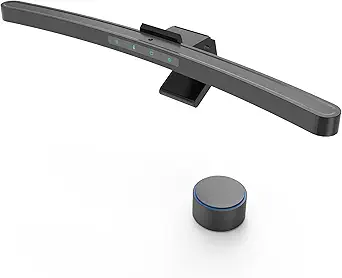 | Best for Versatile Control and Extended Compatibility | Compatibility: 27-34 inch monitors with 1000R/1800R curvature | Color Temperature: 3000K-6500K | Brightness: 275 lumens | VIEW LATEST PRICE | See Our Full Breakdown |
| YEELIGHT Monitor Light Bar for Home Office and Gaming |  | Best Budget-Friendly, Easy-to-Use for General Productivity | Brightness: 250 lumens | Color Temperature Range: 2700K to 6500K | Color Rendering Index: Ra95 | VIEW LATEST PRICE | See Our Full Breakdown |
| Quntis Curved Monitor Light Bar with Soft Backlight, Dual Adjustable Arms for Ultrawide Screens |  | Best for Ultrawide Curved Monitors | Size: 34 inches | Color Temperature: 4 settings | Brightness: Over 1400 lux | VIEW LATEST PRICE | See Our Full Breakdown |
| Quntis Monitor Light Bar with Remote, Eye-Care No Glare Computer Light for Curved and Flat Monitors |  | Best for Versatile Compatibility and Remote Convenience | Light Source: LED | Wattage: 5 Watt-hours | Dimensions: 16.7″D x 0.8″W x 0.8″H | VIEW LATEST PRICE | See Our Full Breakdown |
| BenQ ScreenBar Halo 2 LED Monitor Light Bar with Wireless Controller and Eye-Care Technology |  | Best Premium for Advanced Features | Backlight: Enhanced ambient backlight | Front Light Technology: Asym-Light Technology | Brightness Adjustment: Stepless levels | VIEW LATEST PRICE | See Our Full Breakdown |
| Quntis Computer Monitor Light Bar with Remote, Eye-Care Backlight Desk Lamp for Home Office and Gaming, Gray | 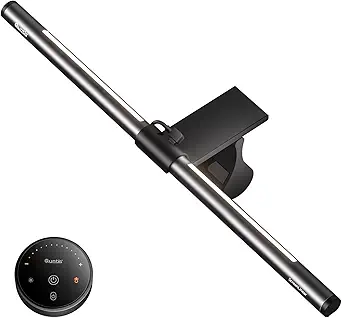 | Best for Home Office and Gaming on a Budget | Light Source: 84 LED beads | Wattage: 5 watts | Dimensions: 15.7″D x 0.78″W x 0.78″H | VIEW LATEST PRICE | See Our Full Breakdown |
More Details on Our Top Picks
BenQ ScreenBar Pro LED Monitor Light Bar (Black)
The BenQ ScreenBar Pro stands out as the most well-rounded choice thanks to its powerful, ultrawide illumination that effectively reduces eye strain across large or curved monitors. Its automatic motion sensor adds convenience, and adjustable color temperature allows for personalized comfort. Compared to the Quntis RGB models, it offers superior brightness and a more professional design suited for work environments, though it requires a USB-C power connection and might be tricky to install on thicker monitors. Its space-saving clamp and high-quality materials make it durable, but the setup can feel complex for some users. This pick makes the most sense for professionals or serious gamers seeking reliable, high-performance lighting without extra clutter.Pros:- Bright, ultrawide illumination reduces eye strain effectively
- Automatic motion sensor for quick on/off operation
- Adjustable brightness and color temperature for personalized comfort
- Compact, space-saving design mounts directly on monitor
Cons:- Requires USB-C power, limiting placement options
- May not fit monitors thicker than 2.56 inches
- Setup can be complex for some users
Best for: Power users who need bright, consistent lighting for long hours or large curved monitors
Not ideal for: Casual users with small monitors who prefer simple, plug-and-play solutions or wireless options
- Light Source Type:LED
- Power Source:Corded Electric
- Wattage:5 watts
- Control Method:Touch
- Compatibility:Monitors 0.17″ – 2.56″ thick, curved 1000-1800R
- Illumination Range:Over 1000lx central, 500lx over 33″x20″ area
Our verdict“This is the best choice for professionals or gamers seeking a high-brightness, feature-rich monitor light with automatic controls.”
Quntis Curved Monitor Light Bar for 34+ Inch Screens with RGB Backlight and Stepless Dimming
The Quntis 34+ Inch RGB Light Bar excels at creating immersive ambiance for expansive curved screens, thanks to its rich RGB backlight modes and stepless dimming up to 1400 lux. Its adjustable length and stable clamp ensure a seamless fit on large monitors, making it ideal for gaming setups or creative workspaces. Compared to the simpler 15.7-inch Quntis model, it offers more customization and a larger coverage area, but it’s limited to monitors over 34 inches and requires a USB-C port, which may be restrictive for some users. The high CRI (RA98) and anti-glare features provide excellent eye comfort. This product is best for users who want vibrant, customizable lighting for big, curved displays.Pros:- Vibrant RGB backlighting with 15 modes for immersive ambiance
- Seamless fit on large curved screens with adjustable length
- High CRI (RA98) for true color rendering
- Stepless brightness adjustment
Cons:- Requires USB-C port, limiting compatibility on some PCs
- Designed exclusively for 34+ inch monitors, excluding smaller setups
- Setup complexity could challenge beginners
Best for: Gamers or content creators with large curved monitors over 34 inches seeking customizable RGB effects
Not ideal for: Users with smaller monitors or limited USB-C ports, as it doesn’t fit or power on smaller setups
- Compatibility:Monitors over 34 inches, curved or flat
- Length:Up to 26 inches
- Color Temperature:3000K to 6500K
- Brightness:Stepless, up to 1400 lux
- RGB Backlight Modes:15 modes
- Power Supply:USB-C
Our verdict“Ideal for users with large curved monitors who prioritize vibrant, customizable ambient lighting.”
Quntis 15.7-inch Monitor Light Bar with RGB Backlight and Eye Care Features
The Quntis 15.7-inch RGB Light Bar offers a compact yet versatile solution for gamers and students, combining immersive RGB backlighting with adjustable task lighting. Its high CRI (95) ensures color accuracy in gaming or work, and the multiple RGB modes enhance ambiance without overwhelming the senses. Compared to larger models, this light fits a wide range of smaller monitors and provides customizable brightness and color temperature, but it’s limited to 15.7 inches and requires a USB connection that can add cable clutter. Its 5 preset brightness levels are adequate for most, but lack finer control. This makes sense for users who want a stylish, multi-functional light on smaller screens with gaming or studying in mind.Pros:- Immersive RGB backlighting enhances gaming and workspace ambiance
- High CRI (95) provides true-to-life color accuracy
- Adjustable brightness and color temperature for personalized settings
- Universal clamp fits a variety of monitor sizes
Cons:- Limited to 15.7-inch monitors, not suitable for large setups
- Requires USB power, potentially causing cable clutter
- Fewer preset brightness levels may be less versatile
Best for: Gamers or students with small to medium monitors seeking immersive RGB lighting
Not ideal for: Users with large monitors or those needing extensive brightness or color control beyond preset levels
- Length:15.7 inches
- Backlight Modes:24 RGB modes
- Brightness Levels:5 preset levels
- Color Temperature:3000K-6500K
- Center Illuminance:900 Lux
- Power Source:USB
Our verdict“Best suited for gamers or students with small to medium monitors who want customizable RGB effects and eye care features.”
Onway Curved Monitor Light Bar with Wireless Remote, Auto-Dimming, Camera Mount, Compatible with 27-34″ Screens
The Onway Curved Monitor Light Bar combines convenience and versatility with its wireless remote control and auto-dimming features, making it suitable for a range of activities from work to gaming. Its 45° optical design minimizes glare, and the included camera mount adds extra functionality. Compared to the BenQ or Quntis larger models, it is easier to operate remotely and offers more flexible control, though it’s limited to 27-34 inch monitors with specific curvature. Its 88 LEDs provide enough brightness for most tasks, but setup can be slightly complex for some. The adjustable color temperature and RGB modes enhance customization, but the need for specific monitor curvature may restrict fit. This product is best for users who prioritize remote control and flexible setup for mid-sized curved screens.Pros:- Wireless remote control for easy, hands-free adjustments
- Auto-dimming and adjustable color temperature improve eye comfort
- Includes camera mount and versatile USB-C cable
- Suitable for a wide range of monitor shapes and sizes
Cons:- Requires specific monitor curvature for optimal fit
- Limited to 27-34 inch monitors, not suitable for larger screens
- Installation complexity may challenge some users
Best for: Professionals or gamers who want remote operation and flexible lighting options for curved monitors
Not ideal for: Users with larger or flat monitors outside the specified size range, or those seeking wireless independence from USB connections
- Compatibility:27-34 inch monitors with 1000R/1800R curvature
- Color Temperature:3000K-6500K
- Brightness:275 lumens
- LED Count:88 LEDs
- Backlight Modes:10 RGB modes
- Control Method:Wireless remote
Our verdict“Ideal for users with curved monitors who want remote control and flexible lighting tailored for mid-sized screens.”
YEELIGHT Monitor Light Bar for Home Office and Gaming
The YEELIGHT Monitor Light Bar offers a straightforward, space-efficient lighting solution with stepless dimming and adjustable color temperature, making it suitable for general use and casual gaming. Its full-metal construction emphasizes durability, and the simple USB power setup makes it easy to install on various monitors. Compared to the feature-rich BenQ or RGB models, it lacks advanced modes or automatic sensors but compensates with ease of use and broad compatibility for monitors up to 1.1 inches thick. Its 250 lumens brightness is enough for typical office tasks, though it might fall short for very large or brightly lit spaces. This is a fitting choice for budget-conscious users who prioritize simplicity and basic eye protection.Pros:- Stepless dimming and adjustable color temperature for personalized lighting
- Durable full-metal design with effective heat dissipation
- Easy to install and compatible with various monitor types
- Affordable price point
Cons:- Limited brightness (250 lumens), less effective in very bright environments
- Requires USB power, which can add cable clutter
- Limited to monitor thickness up to 1.1 inches
Best for: Home office workers or casual gamers seeking reliable, low-cost monitor lighting
Not ideal for: Power users or gamers needing high brightness, advanced customization, or automatic controls
- Brightness:250 lumens
- Color Temperature Range:2700K to 6500K
- Color Rendering Index:Ra95
- LED Beads:78
- Power Source:USB
- Cable Length:1.5 meters
Our verdict“Best for budget-conscious users wanting a simple, reliable light for home or casual use.”
Quntis Curved Monitor Light Bar with Soft Backlight, Dual Adjustable Arms for Ultrawide Screens
This 34-inch arc-shaped light bar is tailored for ultrawide curved screens, offering dual adjustable arms that deliver flexible, focused lighting. Unlike the BenQ ScreenBar Halo 2, which emphasizes premium features like wireless control and ambient backlighting, this model prioritizes coverage and glare reduction for expansive screens. Its independent pivoting arms allow for precise positioning, but setup might require manual adjustments to achieve optimal light distribution. The high CRI of 98 ensures authentic color rendering, making it ideal for photo editing or design work. However, its compatibility is limited to ultrawide curved monitors from 1000R to 3000R, and some users may find setup instructions less clear. Overall, this pick makes the most sense for those with large, curved displays seeking tailored illumination without added tech extras.
Pros:- Adjustable dual light bars for flexible coverage and focused lighting
- Reduces glare and reflections for comfortable viewing
- Space-saving clip design fits various monitor sizes
- High CRI for authentic color reproduction
Cons:- Requires manual adjustment for optimal positioning
- Limited to ultrawide curved monitors (34 inches)
Best for: Owners of ultrawide curved monitors who want customizable, glare-free lighting for detailed work or immersive gaming.
Not ideal for: Users with standard or flat monitors, as the size and shape limit compatibility and coverage.
- Size:34 inches
- Color Temperature:4 settings
- Brightness:Over 1400 lux
- CRI:98
- Power:LED
- Compatibility:1000R–3000R ultrawide curved screens
Our verdict“This monitor light bar is ideal for ultrawide curved monitor owners needing customizable, glare-free illumination with high color fidelity.”
Quntis Monitor Light Bar with Remote, Eye-Care No Glare Computer Light for Curved and Flat Monitors
This Quntis model combines glare-free, flicker-free LED lighting with a remote control, making it a practical choice for a wide range of monitor types, including curved and flat screens. Compared to the BenQ ScreenBar Halo 2, which offers premium wireless control and ambient backlighting, this light bar emphasizes affordability and straightforward functionality. Its adjustable brightness and color temperature help customize lighting for different tasks, but it operates solely on USB power, limiting its brightness for large or very bright setups. Its clamp mount makes it easy to fit various monitor sizes, though it lacks waterproof features, restricting outdoor or wet environment use. Overall, this pick suits users seeking simple, effective eye care that fits any monitor type without extra bells and whistles.
Pros:- Reduces eye strain with glare-free, flicker-free lighting
- Adjustable brightness and color temperature for various tasks
- Space-saving clamp fits different monitor types
- Remote control with memory function for convenience
Cons:- Limited to USB power source, may not be very bright for large setups
- No waterproof feature
Best for: Budget-conscious users who need versatile, glare-free lighting with remote control for work or casual use.
Not ideal for: Those requiring very high brightness levels or waterproof features for outdoor or demanding environments.
- Light Source:LED
- Wattage:5 Watt-hours
- Dimensions:16.7″D x 0.8″W x 0.8″H
- Material:Aluminum
- Mounting Type:Clamp
- Control Method:Remote
Our verdict“This monitor light bar is well-suited for users needing flexible, glare-free lighting across different monitor types on a budget.”
BenQ ScreenBar Halo 2 LED Monitor Light Bar with Wireless Controller and Eye-Care Technology
The BenQ ScreenBar Halo 2 stands out for its sophisticated blend of glare-free illumination, wireless control, and ambient backlighting, making it suitable for professional and gaming setups. Its asymmetrical light technology directs light precisely without disturbing others, and the wireless controller adds convenience for quick adjustments. Unlike the other models, which focus mainly on direct task lighting, the Halo 2 offers an ambient backlight that enhances overall visual comfort, especially in dim environments. However, its premium price could deter casual users, and it requires specific monitor thickness and curvature for optimal fit. This model excels for those who prioritize a high-tech, all-in-one lighting solution that reduces eye fatigue during long hours of work or play.
Pros:- Reduces eye fatigue with glare-free, balanced lighting
- Wireless control for easy adjustments
- Compatible with a wide range of monitor sizes and curves
- Long-lasting LED with high color accuracy
Cons:- Requires monitor with specific thickness and curvature
- Premium price may be high for casual users
Best for: Professionals and gamers seeking an advanced, customizable lighting system with ambient backlighting and wireless controls.
Not ideal for: Budget shoppers or users with monitors outside the specified thickness and curvature range.
- Backlight:Enhanced ambient backlight
- Front Light Technology:Asym-Light Technology
- Brightness Adjustment:Stepless levels
- Color Temperature Range:2700K – 6500K
- Monitor Compatibility:0.17″ – 2.36″ thick, 1000R – 1800R curved
- Lifespan:50,000 hours
Our verdict“Ideal for users who want a feature-rich, high-quality monitor light with ambient lighting and wireless operation, despite the higher cost.”
Quntis Computer Monitor Light Bar with Remote, Eye-Care Backlight Desk Lamp for Home Office and Gaming, Gray
This Quntis light bar offers a straightforward, effective design for reducing glare and eye strain during work or gaming, with stepless dimming, adjustable color temperature, and easy clip mounting for curved monitors. Compared with the more advanced BenQ Halo 2, it focuses on simplicity and affordability, making it a good choice for casual users or those new to monitor lighting. Its 5W power output provides decent illumination but may fall short for large or very bright setups. The remote control makes it easy to tweak settings without cluttering the desk, though it lacks waterproofing and more advanced features. This model is perfect for users seeking a reliable, easy-to-use backlight that enhances visual comfort without extra complexity or cost.
Pros:- Reduces screen glare and eye strain effectively
- Adjustable brightness and color temperature
- Easy to install on curved monitors with secure clip
- Remote control with intuitive touch interface
Cons:- Limited to 5W power output, may not be very bright
- Backlight brightness only, no color temperature change for backlight
Best for: Home office workers or gamers looking for a simple, adjustable backlight within a budget.
Not ideal for: Those requiring very bright lighting or outdoor use, as it’s limited in power and lacks water resistance.
- Light Source:84 LED beads
- Wattage:5 watts
- Dimensions:15.7″D x 0.78″W x 0.78″H
- Weight:1.52 pounds
- Mounting Type:Tabletop
- Control Method:Remote
Our verdict“This backlight bar is best suited for users wanting a simple, affordable solution to improve visual comfort during daily use.”
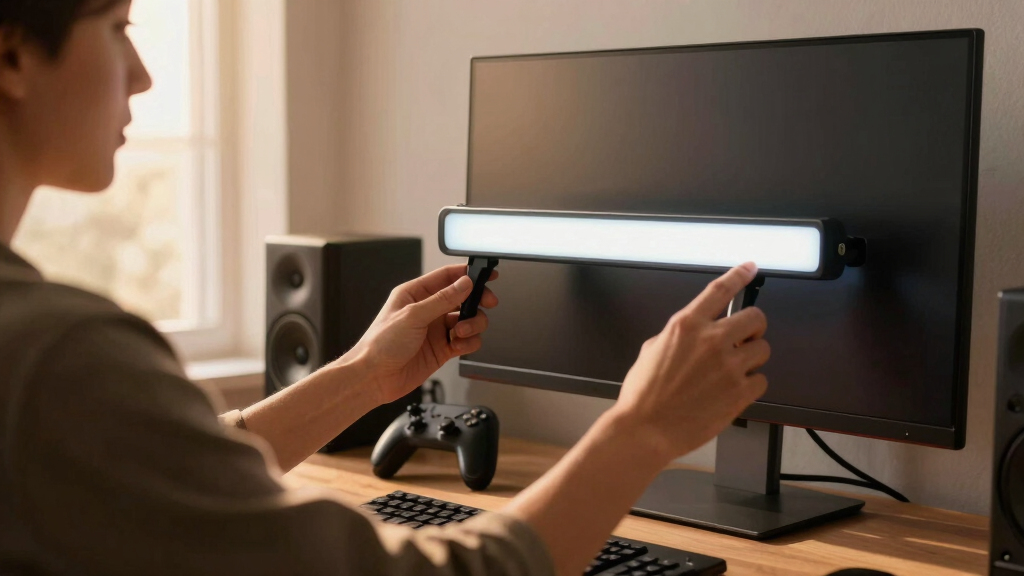
How We Picked
This selection process focused on key factors such as performance, eye-care technology, versatility, build quality, and ease of use. We prioritized products with adjustable brightness, flicker-free lighting, and compatibility with a range of monitor sizes and types. Cost-to-value ratio was also considered, ensuring options suit both budget-conscious buyers and premium users. The ranking reflects a balance between feature set, user experience, and overall durability, helping buyers find options that meet their specific needs without overpaying for unnecessary extras.Factors to Consider When Choosing Best Monitor Light Bars
Choosing the best monitor light bar involves more than just brightness. Consider how the light integrates with your workspace, its compatibility with your monitor size, and the features that improve usability. Understanding these factors helps you avoid common pitfalls like insufficient adjustability or incompatible designs, ensuring your investment enhances comfort and productivity.Brightness and Dimming Options
Look for light bars offering adjustable brightness levels and flicker-free technology. This ensures you can customize lighting to reduce eye strain and avoid headaches during long sessions. Auto-dimming features and remote controls add convenience, especially if your workspace lighting varies throughout the day. Avoid models with limited or non-adjustable brightness, which can lead to inadequate lighting or glare issues.
Compatibility with Monitor Size and Type
Not all light bars fit every monitor. Curved, ultrawide, and standard monitors require different mounting options or sizes. Check product dimensions and mounting mechanisms before buying. A model designed specifically for ultrawide screens, for example, will provide more even illumination without gaps or imbalance. Failing to match the light bar to your monitor can reduce effectiveness and cause clutter.
Eye-Care and Flicker-Free Technology
Eye-care features like flicker-free lighting and blue light reduction are essential for prolonged use. They minimize eye fatigue and are especially beneficial for those working or gaming for hours. Be wary of budget models that claim to be eye-friendly but lack certification or proven technology, which could result in discomfort over time. Prioritize products with reputable eye-care standards.
Design and Ease of Use
Ease of installation and intuitive controls matter. Look for models with simple mounting options and user-friendly controls, whether via remote or onboard buttons. Consider whether the light bar’s design complements your setup aesthetically—sleek, minimal designs tend to blend better. Complex settings or difficult adjustments can diminish the benefits of a well-designed light bar.
Additional Features and Considerations
Features like RGB lighting, Bluetooth connectivity, or smart home integration can enhance usability and ambiance. However, these often come at a higher price. Think about whether you need these extras or if a straightforward, no-frills model suffices. Also, consider power sources—USB-powered models are convenient for most setups, while some may require additional adapters or power strips.
Frequently Asked Questions
Will a monitor light bar work with my curved monitor?
Most monitor light bars are compatible with curved monitors, especially those designed for ultrawide or larger screens. Many models feature adjustable mounting options or flexible arms that adapt to various monitor shapes. However, it’s important to verify the product dimensions and mounting mechanism to ensure a snug fit without blocking the screen or causing glare. Choosing a light bar specifically labeled as compatible with curved screens can simplify this process.
Do I need a light bar if my workspace already has good ambient lighting?
While good ambient lighting helps, a dedicated monitor light bar offers direct illumination that reduces glare and minimizes eye strain. It concentrates light where it’s needed most, without adding unnecessary ambient brightness that can cause reflections on the screen. If you experience eye fatigue despite ambient lighting, a light bar can provide targeted, flicker-free illumination that enhances comfort during long sessions.
Are RGB light bars worth the extra cost?
RGB light bars add aesthetic appeal and customizable ambiance, which can be especially appealing for gaming setups or creative work. However, they tend to be pricier and may include features that aren’t necessary for everyday productivity. If your primary goal is reducing eye strain and improving visibility, a simple, high-quality white light bar might offer better value. Consider your usage priorities before opting for RGB features.
How important is flicker-free technology in a monitor light bar?
Flicker-free technology significantly reduces eye fatigue, especially during extended use. It prevents the flickering that can cause headaches, eye strain, and discomfort over time. For anyone working long hours or sensitive to light flickering, choosing a flicker-free model is a wise investment. Many reputable brands now include this feature as standard, making it easier to find a safe, comfortable option.
Can I install a monitor light bar on a monitor with a thin bezels?
Yes, many monitor light bars are compatible with thin-bezel monitors, especially those with clip-on or magnetic mounts. It’s important to verify the mounting method and ensure it does not interfere with the bezel or screen edge. Some models also come with adjustable arms or extendable brackets that adapt to various monitor designs. Properly installed, these light bars enhance lighting without obstructing your view.
Conclusion
For general office use or long work sessions, the BenQ ScreenBar Pro offers an excellent balance of eye-care tech and adjustable features, making it the best overall pick. Budget-conscious users will appreciate the Quntis 15.7-inch Monitor Light Bar, which provides solid lighting at a lower price point. If you want premium features like RGB and smart controls, the BenQ ScreenBar Halo 2 fits well for those seeking advanced customization. Beginners or those with simple needs should opt for models with straightforward controls, while gamers or creative professionals might prioritize RGB or ambient lighting. Each choice aims to match different priorities, helping you find the ideal monitor light bar for your workspace.
As an affiliate, we earn on qualifying purchases.Halloween Picks

Pumpkin Halloween Fog Machine with 12-Color LED Lights, Bluetooth Speaker, and Remote

MGparty 14.5 ft Halloween Inflatable Walk-In Pumpkin House with LED Lights

Govee Outdoor Halloween Projector Light, 3D Dynamic Visual Holiday Decor