TL;DR
Monitor light bars generally cut glare more effectively because they provide focused, diffuse light without reflections. Desk lamps can also reduce glare if positioned correctly but often require more adjustment. Both options benefit from adjustable brightness and color temperature to enhance comfort.
Imagine spending hours at your desk, eyes tired, head aching from glare bouncing off your screen. It’s a common scene for remote workers and students alike. The right lighting can make a world of difference in reducing eye fatigue and boosting focus.
In this guide, you’ll learn whether a monitor light bar or a desk lamp better cuts glare, how each impacts your workspace, and what features to look for. Because, in the end, good lighting isn’t just about brightness — it’s about comfort and clarity.
Monitor light bars generally provide better glare reduction due to their targeted, diffuse illumination.
Proper placement of both light bars and desk lamps is essential to prevent reflections and eye strain.
Adjustable brightness and color temperature are critical features for creating a comfortable workspace.
Smart lighting options add convenience but still require correct positioning to be effective.
Choosing between a light bar and a desk lamp depends on your workspace size, mobility needs, and aesthetic preference.
Monitor Light Bars vs Desk Lamps: Which Cuts Glare Better?
Good lighting is not simply brighter lighting. It is controlled illumination that reaches your work surface without bouncing off the screen, shining into your eyes, or creating harsh contrast around the monitor.
Reduction in eye strain associated with proper ergonomic lighting.
Focused downward illumination limits reflections on the display.
Placement can turn useful task lighting into a new glare hotspot.
Adjustable brightness and color temperature support daily comfort.
Two ways to light a desk. Two very different glare profiles.
A monitor light bar is engineered around the screen. A desk lamp is designed around flexibility. That difference shapes how reliably each option keeps light away from reflective display surfaces.
| Feature | Monitor Light Bar | Desk Lamp | Glare Impact |
|---|---|---|---|
| Placement | Mounted above or on the monitor | Portable position on the desk | ✓ Light bar advantage |
| Light direction | Focused downward onto the workspace | Multi-directional and angle-dependent | ✓ More predictable |
| Reflection risk | Low when centered and angled correctly | Can reflect directly from the screen | ✗ Lamp needs care |
| Flexibility | Fixed once mounted | Easy to move, rotate and repurpose | ~ Desk lamp advantage |
| Desk space | Uses virtually no work surface | Base and arm occupy desk space | ✓ Light bar advantage |
| Setup effort | Mount, center and fine-tune once | May require frequent repositioning | ~ Depends on habits |
Verdict: a desk lamp can perform well, but a light bar makes correct illumination easier to repeat.
Built for consistency
Relative editorial scores based on placement, direction and workspace impact.
Built for adaptability
Excellent flexibility comes with more responsibility for angle and positioning.
Placement matters more than the logo on the box.
The goal is to illuminate the desk, not the display. Follow this chain, then make small adjustments until reflections disappear and the screen no longer feels dramatically brighter than its surroundings.
Mount or place
Center a light bar above the screen, or place a lamp beside or behind it.
Aim downward
Keep the beam on the keyboard, documents and work surface.
Match brightness
Balance the task light with ambient room conditions.
Tune the tone
Use warm or neutral light for comfortable extended sessions.
Check reflections
View the screen from your normal seat and refine the angle.
Five features that turn illumination into comfort.
Extra features only matter when they give you precise control over the beam, intensity and tone. Prioritize these fundamentals before app integration or decorative effects.
Adjustable brightness
Match output to daylight, room lighting and screen luminance. Too bright can be as uncomfortable as too dim.
Color temperature
Shift between warm, neutral and cool tones as your environment and time of day change.
Flicker-free output
Stable LED illumination helps avoid the subtle visual fatigue associated with poorly controlled flicker.
Easy repositioning
A tilting bar, articulated arm or simple mount makes it easier to eliminate hotspots and reflections.
Energy efficiency
Efficient LEDs reduce power use and heat while supporting long sessions and extended product life.
App or voice control
Quick presets and schedules add convenience, but automation cannot compensate for poor placement.
Consistency or flexibility?
Your workspace size, monitor arrangement, mobility needs and visual preferences determine whether the light bar’s fixed precision outweighs the lamp’s versatility.
Monitor Light Bar
Focused, diffuse coverage with low reflection risk and almost no desk footprint.
Usually pricier and less adaptable when monitor size or workspace layout changes.
Desk Lamp
Portable, adjustable and useful for reading, writing, crafting and other off-screen tasks.
Misalignment can create reflections, uneven illumination and additional desktop clutter.
The comfort chain
Choose for the desk you actually use.
A fixed screen-centered setup favors the light bar. A changing, multi-purpose workstation may benefit more from an adjustable lamp.
Glare-control questions, answered.
The core principle stays simple: direct light toward the work surface, keep it away from your eyes and monitor, and balance it with the room.
Which option reduces glare better?
A monitor light bar generally performs better because it directs diffuse light downward without reflecting from the screen.
Can a desk lamp increase glare?
Yes. A lamp aimed toward the display can create bright reflections. Position it beside or behind the monitor and angle it downward.
Are smart lights worth the cost?
They can be useful for fast adjustments and automation, but correct positioning remains more important than connectivity.
What setting is most comfortable?
Use brightness that complements ambient light and a warm-to-neutral color temperature for long work sessions.
Why Light Placement Matters More Than You Think
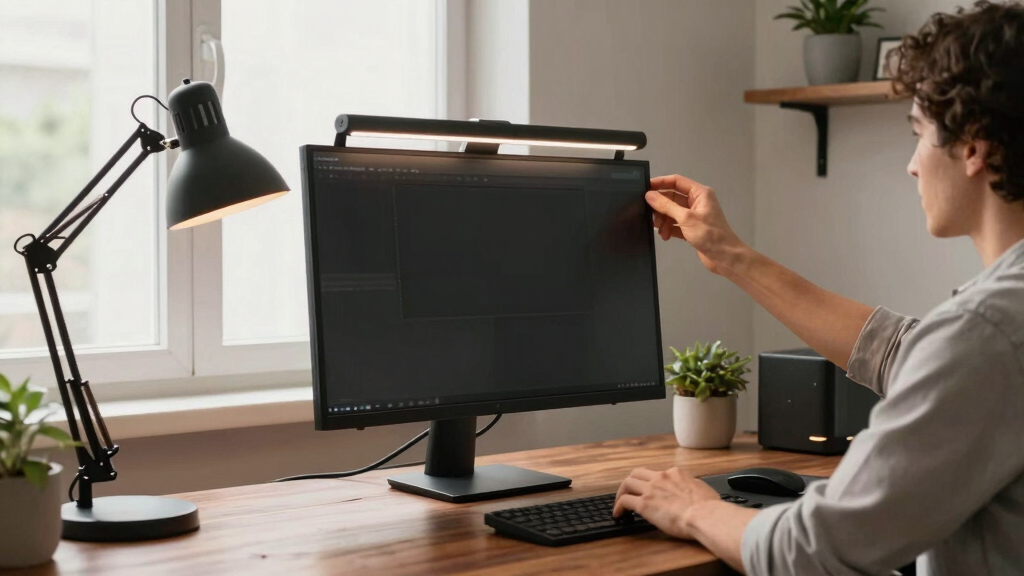
Proper placement of your lighting is key to minimizing glare. An improperly positioned desk lamp can reflect off your screen, creating new glare hotspots. Conversely, a well-mounted monitor light bar directs light onto your workspace without bouncing off your monitor.
For example, I once used a desk lamp that sat behind my monitor, causing annoying reflections. Switching to a light bar mounted directly above made my workspace glow evenly, and my eyes thanked me.
Always aim to position lights so they illuminate your desk, not your screen. Adjust brightness and angle until glare fades away.

Quntis Computer Monitor Lamp, Screen Monitor Light Bar for Eye Caring, USB Reading LED Task Lamp with Auto-Dimming, Dimmable Light Bar, Touch Control, No Glare Space Saving Home Office Desk Lamps
- Blue Light and Flicker-Free: Reduces eye strain with stable lighting
- No Screen Glare: Asymmetrical design prevents reflected glare
- Space Saving Design: Mounts easily on monitor without desk clutter
As an affiliate, we earn on qualifying purchases.
As an affiliate, we earn on qualifying purchases.
How Light Bars and Desk Lamps Differ in Glare Control — A Clear Comparison
| Feature | Monitor Light Bar | Desk Lamp |
|---|---|---|
| Placement | Mounted directly above or on top of monitor | Portable, adjustable on the desk |
| Light Direction | Directed downward, focused on workspace | Adjustable, can shine in multiple directions |
| Glare Control | High—designed to reduce reflections and bounce | Variable—depends on placement and angle |
| Space Efficiency | Saves desk space, sleek look | Occupies desk surface, can clutter |

Motumen Led Desk Lamp for Home Office, Eye-Care Desk Light Clamp, Black
- Bright, Eye-Caring Dual-Head Design: Wide, flicker-free illumination
- Customizable Lighting Settings: 5 color temps and brightness levels
- Memory Function for Last Settings: Remembers preferred lighting setup
As an affiliate, we earn on qualifying purchases.
As an affiliate, we earn on qualifying purchases.
How to Set Up Your Lighting for Maximum Comfort
- Mount your monitor light bar above your screen, centered for even coverage.
- Adjust brightness to match ambient light — not too bright, not too dim.
- Set color temperature to warm or neutral tones to reduce eye strain.
- If using a desk lamp, position it behind or beside your monitor, angled downward.
- Test different angles until glare and reflections disappear.
Remember: your goal is to illuminate your workspace without creating reflections on your screen. It’s about balancing light, not overpowering it.
Quntis Computer Monitor Lamp, Screen Monitor Light Bar for Eye Caring, USB Reading LED Task Lamp with Auto-Dimming, Dimmable Light Bar, Touch Control, No Glare Space Saving Home Office Desk Lamps
- Blue Light and Flicker-Free: Reduces eye strain with stable lighting
- No Screen Glare: Asymmetrical design prevents reflected glare
- Space Saving Design: Mounts easily on monitor without desk clutter
As an affiliate, we earn on qualifying purchases.
As an affiliate, we earn on qualifying purchases.
Will a Smart Light Make Glare Less Annoying?
Smart lighting can adjust brightness and color with a tap or voice command. If you struggle to find the right settings manually, smart lights let you fine-tune the illumination quickly.
For example, I set my smart light to a warm, dim setting during late-night work, cutting glare without waking my partner. It’s a small change that makes a big difference.
Look for flicker-free, adjustable smart lights that can connect with your device or home system for seamless control.

EYOCEAN Desk Lamp with Clamp, 31.5" LED Desk Lamp for Home Office, 24W Gesture Sensing Control Desk Light, Dimmable & Color Temperature, Eye-Caring Office Lamp, Brightest Architect Lamp for Screen
- Double Head & Remote Control: Adjustable angles with wireless remote
- Asymmetrical Optical Design: Reduces glare and eye fatigue
- Memory & Timer Functions: Remembers last settings, includes timer
As an affiliate, we earn on qualifying purchases.
As an affiliate, we earn on qualifying purchases.
Are There Downsides to Each Lighting Style?
Monitor light bars are sleek but can be pricier and less flexible once mounted. If you change your workspace or monitor size, repositioning might be limited. This can be a tradeoff — investing in a fixed setup that provides excellent glare control but reduces flexibility for future adjustments.
Desk lamps offer portability and flexibility but can cause glare if misaligned. Improper placement or overly bright settings can increase eye strain instead of reducing it. Additionally, cluttered desks from multiple lamps can distract and reduce workspace efficiency. The choice involves balancing the convenience of mobility with the need for precise positioning and glare control.
Choosing depends on your workspace size, mobility needs, and aesthetic preferences. Remember, a desk lamp’s flexibility can be a double-edged sword—if not carefully positioned, it might do more harm than good by casting unwanted reflections or creating uneven lighting. Meanwhile, a fixed light bar offers consistency but less adaptability if your setup changes.
What Features Make a Lighting Setup Truly Eye-Friendly?
- Adjustable brightness: Find that perfect level to match your environment.
- Color temperature options: Switch between warm and cool tones.
- Flicker-free operation: Protect your eyes from flickering LEDs, which can cause fatigue over time.
- Easy mount or repositioning: For quick adjustments without hassle, ensuring you can fine-tune the light’s position to minimize reflections and glare.
- Energy efficiency: Save power while staying comfortable, reducing heat and prolonging device lifespan.
These features aren’t just bells and whistles—they’re your tools to cut glare and avoid eye fatigue by allowing precise control over your lighting environment.
Frequently Asked Questions
Which reduces glare better: a monitor light bar or a desk lamp?
A monitor light bar typically cuts glare more effectively because it directs diffuse light onto your workspace without reflections, unlike desk lamps which can cause glare if misaligned.Can a desk lamp cause more glare on my monitor?
Yes, especially if positioned improperly. Light bouncing off your screen creates reflections, increasing eye strain. Proper placement and angle are key to avoiding this problem.What features should I look for in a glare-reducing light?
Seek adjustable brightness and color temperature, flicker-free operation, and easy mounting or repositioning features. These help tailor lighting to your workspace and reduce eye fatigue.Are smart lighting options worth the extra cost?
Smart lights offer quick adjustments and automation, which can be convenient. If you value customizable control and are willing to invest, they can enhance your workspace comfort.How should I position my lighting to avoid glare?
Position lights so they illuminate your desk, not directly at your eyes or screen. Angle adjustable lights downward and keep brightness at a comfortable level to prevent reflections.Conclusion
Good lighting isn’t just about brightness; it’s about creating a space where your eyes can relax and focus. A well-placed monitor light bar often outperforms a desk lamp for glare control, especially when mounted correctly.
Think of your workspace as a sanctuary from glare and strain. Small adjustments—like mounting a light bar or angling a desk lamp—can make all the difference. After all, your eyes deserve clarity and comfort every day.