TL;DR

Get business pricing on your home office setup
- Business-only prices and quantity discounts
- Tax-exempt purchasing
- Multiple users, one account, clear invoices
A wobbling standing desk can be fixed easily by tightening connections, leveling the surface, and adding support. Regular maintenance and smart setup prevent future instability, creating a safer workspace.
Nothing kills focus faster than a wobbly standing desk. You shift your weight, lean in, and suddenly the whole thing wobbles like a boat in choppy water. It’s distracting, frustrating, and can even be unsafe over time. But here’s the good news: most stability issues are simple to fix.
In this guide, you’ll learn concrete steps to identify the cause of wobbling, fix common problems, and prevent future instability. Whether it’s loose bolts or uneven floors, these practical tips will help you turn your shaky setup into a steady workspace you can trust.
Always start by inspecting and tightening every bolt and screw.
Level your desk on the floor before attempting other fixes.
Use simple supports like anti-slip pads or shims to fix minor wobbling.
Consider upgrading to a more stable desk if persistent wobble occurs.
Regular maintenance prevents future instability and improves safety.
How to Stabilize a Wobbly Standing Desk
A shaky standing desk is usually fixable. Start with the simplest causes: loose hardware, uneven flooring, and missing support. A few targeted adjustments can turn a distracting, unsafe setup into a steady workspace you can trust.
Fix the base before blaming the desk.
TL;DR: Tighten, level, support, maintainFind the wobble source before you fix it
Most standing desk wobble comes from one of five places. Inspect joints with a flashlight, press each corner, check the floor, and confirm that all feet touch evenly before adding parts or replacing anything.
Loose hardware
Frame screws, bolts, and lift-column fasteners can loosen through repeated height changes, vibration, and daily pressure.
Uneven floor
Even a slight slope or one low corner can make the desktop rock when weight shifts across the surface.
Weak frame
Lightweight frames without crossbars, wider feet, or reinforced legs often sway more at standing height.
Damaged parts
Warped tops, cracked brackets, stripped threads, or bent feet can keep the desk unstable after normal tightening.
Slippery contact
Smooth flooring, thick mats, or debris under a foot can let the desk slide slightly instead of staying planted.
Poor assembly
Misaligned rails, uneven screw tension, or skipped washers can introduce wobble even in a high-quality desk.
The five-step stabilization workflow
Work from easiest to most structural. This order prevents wasted effort and helps you know when a simple adjustment is enough versus when the desk itself needs reinforcement.
Inspect
Check joints, legs, brackets, tabletop contact points, and visible cracks.
Tighten
Use the right Allen wrench or screwdriver and tighten evenly.
Level
Use a spirit level or phone app, then adjust feet or add shims.
Support
Add anti-slip pads, furniture levelers, braces, or crossbars.
Upgrade
Replace persistent wobble with a wider, reinforced, better-built model.
Which fixes deliver the biggest stability gain?
Tightening hardware often resolves the majority of wobble issues. Leveling and support pads address floor contact, while frame upgrades solve persistent movement caused by lightweight design.
Stability risk rises with height
Standing desks sway more when raised because leverage increases. A desk that feels fine seated can wobble at full height if the base is narrow or the frame is underbuilt.
Choose the right repair for the symptom
Use the table as a quick decision guide. Start with low-cost, reversible fixes, then move toward reinforcements or replacement only when wobble persists.
| Fix | Best For | Cost | DIY Friendly | Stability Gain | When To Skip |
|---|---|---|---|---|---|
| Tighten bolts and screws | Loose frame, clicking joints, side sway | Free | ✓ | High | Threads are stripped or damaged |
| Level adjustable feet | Desk rocks on one corner | Free | ✓ | High | Feet are missing or broken |
| Add shims or pads | Uneven floor, minor sliding | Low | ✓ | Medium | Severe frame flex is present |
| Install braces or crossbars | Lightweight frames and lateral sway | Medium | ~ | High | Desk design blocks attachment |
| Replace the desk | Poor design, damaged parts, chronic wobble | High | ✗ | Maximum | Simple leveling has not been tried |
From symptom to steady workspace
A reliable desk setup connects diagnosis, repair, reinforcement, and maintenance. Miss one link and the wobble often returns.
Why does it wobble after tightening?
The floor may be uneven, a component may be damaged, or the frame may need more support than tightening can provide.
Can I fix it without new parts?
Yes. Tightening bolts, leveling feet, and adding simple shims often solve wobble without buying replacement components.
Is a wider base always better?
Usually. A wider footprint spreads weight more evenly, though material quality and frame design matter just as much.
When should I replace the desk?
Replace it when repairs fail, parts are damaged, or the frame is too light or narrow to stay stable at standing height.
Keep the desk stable over time
Stability is not a one-time fix. Standing desks move, lift, lower, and absorb daily vibration, so a light monthly check prevents the small looseness that becomes a major wobble.
Inspect hardware and tighten fasteners before movement becomes obvious.
Keep debris away from the feet so every contact point sits flat.
Use anti-slip pads under each leg on smooth or polished flooring.
Recheck the desktop after moving furniture or changing floor mats.
Choose adjustable feet, reinforced frames, and wider bases when buying new.
Start by Finding the Exact Cause of Wobbliness
The first step to fixing a wobbly desk is understanding why it’s wobbly. Common culprits include loose hardware, uneven floors, or damaged parts. For example, if your desk wobbles when you press down on one side, it’s likely a loose bolt or uneven leg.
To diagnose, inspect every joint, screw, and bolt. Use a flashlight to check under the desk and make sure no parts are cracked or warped. If you notice unevenness, it’s time to level the surface or adjust the feet.
As an affiliate, we earn on qualifying purchases.
Tighten Every Bolt and Connection — Do This First
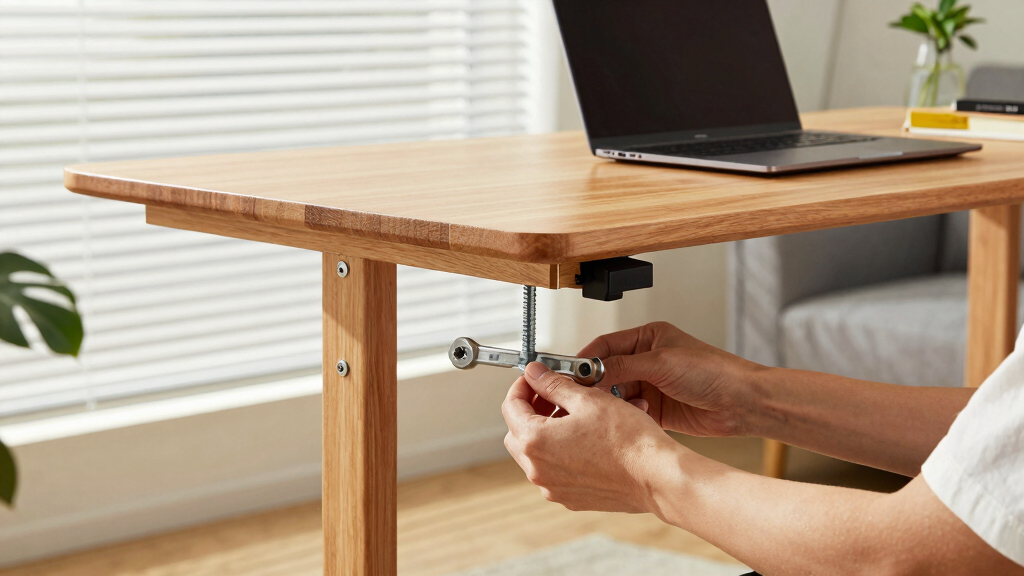
Loose hardware is the number one cause of wobbling. Grab an Allen wrench or screwdriver, and go around the entire frame. Tighten every bolt, screw, and joint. For example, a desk with loose screws in the frame can wobble even if the floor is perfectly level.
Make sure you don’t overtighten and strip threads. If a bolt refuses to tighten, check for damage or consider replacing it. Tightening all connections can often fix 80% of wobbling issues.
As an affiliate, we earn on qualifying purchases.
Level Your Desk for a Rock-Solid Feel
Uneven floors are sneaky. Even a slight tilt can make your desk wobble. Use a spirit level or a smartphone app to check if the top of your desk sits evenly. If it doesn’t, you can fix it with adjustable feet or shims.
For instance, if one corner is 1/8 inch higher, slip a small piece of cardboard or rubber under the shorter leg. For more permanent fixes, consider replacing the feet with adjustable ones or installing a leveling kit. Proper leveling creates a stable base that won’t shift as you work.
As an affiliate, we earn on qualifying purchases.
Add Support and Reinforcements to Boost Stability
If tightening and leveling aren’t enough, you can reinforce your desk with supports. Use furniture levelers, anti-slip pads, or attach crossbars or braces if your desk design allows. For example, adding rubber pads under the legs can reduce wobble caused by slight movement.
Adding support structures is not just about immediate stability; it also affects the long-term durability of your desk. Reinforcements help prevent gradual loosening of joints, which can happen over time due to regular use and vibrations. They distribute weight more evenly, reduce sway, and can compensate for minor manufacturing flaws. Especially with lightweight or inexpensive desks, these reinforcements can be the difference between a wobbling mess and a sturdy workspace.
As an affiliate, we earn on qualifying purchases.
Upgrade or Replace the Desk for Long-Term Stability
If your desk remains unstable despite fixes, it might be time for an upgrade. Look for models with wider bases, reinforced frames, or adjustable feet. For example, some desks come with a 30% wider footprint or built-in stabilization features that prevent wobbling.
Choosing a high-quality desk with a sturdy frame and good materials—like thick steel or reinforced wood—can dramatically improve stability. Sometimes, investing in a better desk saves money and frustration in the long run, as it reduces ongoing maintenance and the risk of future issues.
Quick Tips to Keep Your Desk Stable Over Time
- Check hardware monthly and tighten as needed.
- Place anti-slip pads under each leg.
- Use a level to verify the desk’s position regularly.
- Keep the floor clean and free of debris that can cause unevenness.
- Consider a desk with adjustable feet for future tweaks.
Frequently Asked Questions
Why is my standing desk wobbling even after tightening everything?
It could be due to uneven flooring, damaged parts, or insufficient support. Recheck the hardware, level the desk, and consider adding support if needed.Can I fix a wobbling desk without buying new parts?
Yes. Most issues are resolved with simple fixes like tightening bolts, adding shims, or placing anti-slip pads under the legs.How often should I check my desk’s stability?
Inspect it monthly, especially if you notice wobbling or if the environment changes (like moving furniture or installing new flooring).Is a wider base always better for stability?
Generally, yes. A wider footprint spreads weight more evenly and reduces wobble, but quality materials and good design matter too.When should I replace my desk for better stability?
If repairs don’t fix wobbling or if the desk is poorly designed, investing in a high-quality, reinforced model will save headaches later.Conclusion
Wobbly desks are more common than you think, but fixing them doesn’t require expensive repairs or new furniture. A few minutes of inspection, some tightening, and minor adjustments can turn your shaky setup into a rock-solid workspace.
Remember, stability isn’t just about comfort—it’s about safety and focus. Keep your workspace steady, and your mind will follow suit.
Halloween Picks
halloween
As an affiliate, we earn on qualifying purchases.