TL;DR

Get business pricing on your home office setup
- Business-only prices and quantity discounts
- Tax-exempt purchasing
- Multiple users, one account, clear invoices
Standing desks can reduce fatigue if set up and used properly. Common mistakes like poor ergonomics, lack of movement, and abrupt transitions lead to tiredness. Small adjustments and regular breaks make a big difference.
If you think switching to a standing desk will instantly banish fatigue, think again. Many users find themselves more tired than ever because of simple setup mistakes and bad habits. Standing is not a magic fix—it’s a tool that needs proper use. In this guide, you’ll learn how to avoid the common pitfalls that turn standing into a source of tiredness instead of relief.
By understanding what causes fatigue—poor posture, lack of movement, or sudden transitions—you can make small tweaks that keep you energized. Let’s walk through the biggest mistakes and how to fix them, so your standing desk actually works for you, not against you.
Proper ergonomic setup, especially monitor and desk height, reduces neck and shoulder fatigue.
Incorporate micro-movements and breaks every 30 minutes to keep blood flowing and muscles relaxed.
Supportive footwear and cushioned mats prevent leg fatigue caused by hard floors and poor shoes.
Transition gradually between sitting and standing to avoid sudden strain and dizziness.
Balance standing and sitting—standing for 15-30 minutes at a time, with regular movement, prevents fatigue.
Standing Desk Mistakes That Cause Fatigue Instead of Fixing It
TL;DR: Standing desks can reduce fatigue when they are adjusted, paced, and paired with movement. The trap is treating standing as the cure. Poor monitor height, static posture, hard floors, bad shoes, and abrupt sit-stand transitions can make you feel more tired than before.
Alternate, do not endure.
Recent sit-stand guidance favors changing position every 30-60 minutes instead of standing continuously for long stretches.
15-30 min
Stand in short blocks, add movement, then sit before leg heaviness and posture collapse begin.
Below eye line when standing naturally.
Arms relaxed, wrists straight, shoulders down.
Use micro-movement before stiffness sets in.
Walk, stretch calves, or circle ankles.
The fatigue usually starts with one small setup error.
Standing works best as an adjustable rhythm. These are the common failure points that turn an energizing desk into a slow drain.
Monitor too high or low
Looking down cranes the neck. Looking up lifts the chin. Keep the screen near eye level and the keyboard at relaxed elbow height.
Standing still for hours
Static standing slows circulation and loads the same muscles. Shift weight, stretch, and walk briefly every half hour.
Hard floor, flat shoes
Unsupported feet force your legs and back to compensate. Cushioned mats, arch support, and insoles reduce the energy cost.
Fix the desk in the order your body feels it.
Start with alignment, then circulation, then transition timing. This sequence prevents chasing accessories before the basics are right.
Set screen
Place the monitor close to eye level, slightly below your natural eye line.
Relax arms
Keep elbows around 90 degrees with straight wrists and loose shoulders.
Add support
Use shoes, insoles, mats, or a footrest to distribute pressure.
Move often
Shift, stretch, or walk for 1-2 minutes every 30 minutes.
Rotate
Alternate sitting and standing instead of trying to stand all day.
What fatigue-causing use looks like versus a sustainable setup.
Use this as a quick diagnostic when your legs, neck, shoulders, or lower back start complaining.
| Desk Factor | Fatigue Pattern | Better Pattern | Why It Helps |
|---|---|---|---|
| Monitor height | ✗ Chin tilted or neck craned | ✓ Screen 2-3 inches below eye line | Reduces neck and shoulder muscle strain. |
| Keyboard height | ✗ Shoulders lifted, wrists bent | ✓ Elbows near 90 degrees | Keeps arms relaxed and prevents tension creep. |
| Standing duration | ✗ Long, fixed standing blocks | ~ 15-30 minute standing sessions | Limits leg heaviness and posture fatigue. |
| Movement | ✗ Still posture for hours | ✓ Microbreaks every 30 minutes | Improves circulation and joint comfort. |
| Foot support | ✗ Bare feet or flat shoes on hard floor | ✓ Cushioned mat, supportive shoes, footrest | Distributes load across feet, legs, and hips. |
The best standing desk schedule is a rhythm, not a marathon.
These bars translate the guidance into practical work blocks. The target is enough standing to reset posture without overloading your legs.
Standing all day can be its own ergonomic mistake.
Prolonged standing without breaks can contribute to leg fatigue, back pain, swelling, and circulatory discomfort. The better move is alternating positions, not replacing sitting with another static posture.
How one small habit becomes all-day fatigue.
Follow the chain backward to find the first fix: alignment, movement, support, or pacing.
Poor height
Neck and shoulder tension builds early.
Weak support
Feet and calves absorb too much load.
No breaks
Blood flow slows and joints stiffen.
Low energy
The desk feels like the problem, but the pattern is.
Are You Sitting Too High or Low? How to Find the Perfect Monitor and Desk Height
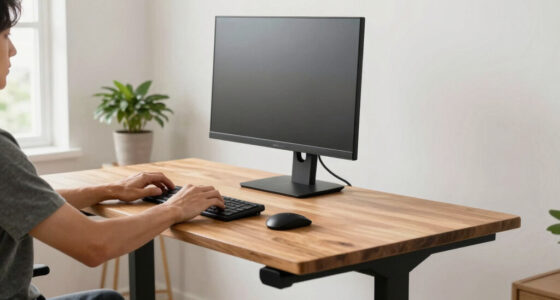
Standing with your monitor too high or too low causes neck strain and quick fatigue. Your screen should be at eye level, about 2-3 inches below your eye line when standing naturally. When your monitor sits too low, you crane your neck forward; too high, and you tilt your chin up.
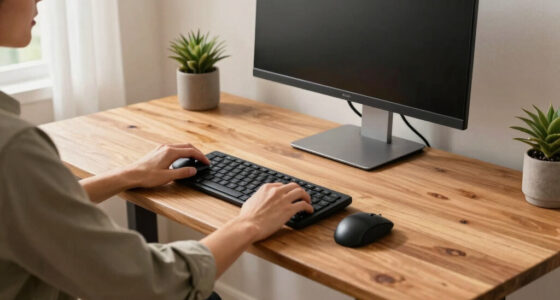
Adjust your desk and monitor height so your arms form a 90-degree angle, wrists straight. For example, if your keyboard is too high, your shoulders tense up. Use monitor arms or adjustable desks to fine-tune your setup. A proper height keeps your neck and shoulders relaxed, reducing tiredness over long hours.
Why does this matter? Maintaining an ergonomic setup minimizes strain on your muscles and joints, which, if ignored, can lead to chronic discomfort and even long-term musculoskeletal issues. The tradeoff is that constantly adjusting your setup can be time-consuming, but investing in a flexible monitor arm or adjustable desk can pay off by preventing fatigue and injury, ultimately boosting your productivity and comfort over time.
ergonomic monitor stand adjustable
As an affiliate, we earn on qualifying purchases.
As an affiliate, we earn on qualifying purchases.
Standing Still for Too Long? Here’s Why Movement Beats Static Posture
Standing for hours without shifting weight or moving around leads to muscle fatigue and aching legs. Static standing reduces blood flow, making your legs feel heavy and sore. Imagine a cashier on their feet all day—by the end, their legs are bananas from standing too long.
The fix? Incorporate micro-movements and breaks. Every 30 minutes, shift your weight, stretch your calves, or walk around for 1-2 minutes. Use a timer or apps that remind you to move. Adding a cushioned anti-fatigue mat also softens the impact and eases fatigue, especially on hard floors.
Why does movement matter? When you stay static, blood circulation slows, increasing the risk of stiffness, swelling, and even varicose veins. Micro-movements stimulate blood flow, delivering oxygen and nutrients to muscles, which helps prevent fatigue and reduces the risk of long-term issues. The tradeoff is that frequent movement might interrupt your workflow, but the benefits of sustained energy and comfort far outweigh the minimal time lost.
As an affiliate, we earn on qualifying purchases.
The Wrong Shoes and Flooring? How Footwear Choices Impact Your Energy
Standing barefoot or in unsupportive shoes on a hard floor can turn your legs into tired, aching blocks. Shoes with poor arch support or a flat sole force your muscles to work harder, draining energy faster. Think of walking on a rocky trail barefoot—your legs tire quickly.
Choose shoes with good arch support and cushioning. If you stand for hours, consider supportive insoles or anti-fatigue mats. These reduce strain, keep your legs comfortable, and prevent fatigue from grinding your bones and muscles into exhaustion.
Why does footwear matter? The right shoes and flooring distribute your body weight evenly, reducing localized stress on muscles and joints. Poor support forces muscles to overcompensate, leading to fatigue and discomfort. Investing in supportive footwear or mats can help maintain muscle efficiency and prevent fatigue, especially during long standing sessions, allowing you to work longer without pain.
ergonomic footrest for standing desk
As an affiliate, we earn on qualifying purchases.
As an affiliate, we earn on qualifying purchases.
Are You Ignoring Movement? Why Microbreaks Are Your Best Friend
Infrequent movement means stiffness, discomfort, and tired muscles. Remaining static for too long causes blood to pool in your legs and stiffens your joints. Imagine your legs as rubber bands—without stretching, they lose elasticity and feel stiff.
Implement microbreaks of 1-2 minutes every 30 minutes. Do simple stretches, ankle circles, or walk around. Use apps or alarms to remind you. These small actions boost circulation and keep fatigue at bay, making standing more sustainable.
Why do microbreaks work? They stimulate blood flow, which delivers oxygen and nutrients to muscles, preventing stiffness and fatigue. Regular movement also helps to reset posture and reduce the risk of repetitive strain injuries. The tradeoff is that microbreaks might slightly interrupt your workflow, but the long-term gains in energy, comfort, and injury prevention are well worth the minor inconvenience.
adjustable sit-stand desk converter
As an affiliate, we earn on qualifying purchases.
As an affiliate, we earn on qualifying purchases.
Switching From Sitting to Standing Too Abruptly? How to Transition Smoothly
Jumping from sitting to standing quickly can cause dizziness, muscle strain, and discomfort. Your body needs time to adjust to the change. Imagine flipping a light switch on—suddenness can be jarring and cause fatigue.
Start with gradual height adjustments—raise your desk in small increments. Take 1-2 minutes to ease into standing, and sit back down slowly. Using height-adjustable desks or risers helps make smooth transitions, so your body adapts comfortably.
Why is gradual transition important? Sudden changes in posture can cause blood pressure fluctuations, dizziness, and muscle tension, increasing fatigue and risk of injury. By easing into standing, you allow your muscles and circulatory system to adjust, reducing discomfort and making standing sustainable. The tradeoff is that it takes a bit more time to switch, but the comfort and safety benefits are substantial.
What About Shoes and Accessories? Gear Up for Comfort and Endurance
Supportive footwear and ergonomic accessories can turn a tiring standing session into a comfortable one. Flat, unsupportive shoes drain your energy quickly. Supportive shoes, cushioned insoles, and footrests help distribute weight evenly and reduce fatigue.
Consider a height-adjustable desk, a footrest, and supportive shoes with arch support. These small investments pay off by keeping your legs energized longer, so fatigue doesn’t creep in after a few hours.
Why does gear matter? Proper footwear and accessories enhance stability and reduce muscular effort, preventing fatigue and discomfort. They also promote better posture and reduce strain on joints. The tradeoff involves some initial cost and adjustment time, but the long-term health and comfort benefits make these investments worthwhile for sustained productivity and well-being.
Can Standing All Day Be Harmful? How to Avoid Overdoing It
Standing all day isn’t a magic cure. Prolonged standing without breaks can cause varicose veins, back pain, and fatigue. The key is balance. Experts recommend standing for no more than 15-30 minutes at a stretch, with regular sitting and movement breaks.
Set timers or use apps to alternate sitting, standing, and moving. Listen to your body—if your legs or back ache, it’s time to sit or stretch. Balance is what keeps fatigue away and maintains your energy.
Why is this balance crucial? Overdoing it can lead to circulatory problems and musculoskeletal strain, undermining the benefits of a standing desk. Striking a balance ensures you reap the benefits of standing without the downsides of excessive strain. The tradeoff involves mindful scheduling, but the payoff is healthier, more energized working sessions.
Frequently Asked Questions
How long should I stand at my desk before taking a break?
Experts recommend standing for about 15-30 minutes every hour. Use timers or apps to remind you, and take a quick walk or stretch to keep fatigue from building up.
What’s the best way to transition from sitting to standing?
Adjust your desk gradually in small increments. Spend 1-2 minutes easing into a standing position, then sit back down slowly. This avoids dizziness and muscle strain.
Are supportive shoes necessary for standing desks?
Yes. Shoes with good arch support and cushioning help reduce leg fatigue, especially on hard floors. If you stand for long periods, consider using supportive insoles or anti-fatigue mats.
Can standing all day cause harm?
Prolonged standing without breaks can cause circulation issues and discomfort. Balance is key—alternate between sitting and standing, with regular movement to stay energized.
What are signs my standing desk setup is causing fatigue?
If you experience persistent neck, back, or leg pain, tingling, or heavy legs, your setup might be off. Adjust your monitor height, footwear, or take more breaks to fix it.
Conclusion
Standing desks only work if you treat them like a tool, not a trap. Small adjustments—like proper height, movement, and support—turn fatigue into comfort. Think of your workspace as a living system, not a static setup.
Next time you stand, remember: it’s about quality, not just quantity. Keep moving, stay supported, and listen to your body. Your energy levels will thank you—and so will your back and legs.
Fall Picks
fall essentials
As an affiliate, we earn on qualifying purchases.