
TL;DR
Assembling a standing desk alone is doable with patience and careful planning. Using the right tools, reading instructions thoroughly, and taking your time prevent wobbles and mishaps. Modern designs and helpful resources make solo setup easier than ever.
Putting together a standing desk on your own might sound daunting — like trying to piece together a puzzle with no picture to guide you. But with the right approach, it becomes a manageable task. You’ll save money, get exactly what you want, and avoid waiting for help.
This guide walks you through practical tips and pitfalls to watch out for. Whether you’re a first-timer or have some DIY experience, you’ll learn how to make your solo assembly safer, faster, and less frustrating.
Preparation and clear workspace are the foundation of a smooth assembly.
Follow instructions step-by-step and use the correct tools to prevent damage and injury.
Tighten all bolts firmly and evenly to avoid wobbling or instability.
Use online resources like videos or AR guides to simplify the process.
Patience and careful handling turn a challenging task into a manageable one.
Start with a Clear Plan and Workspace
Before you even open the box, choose a spacious, flat area free of clutter. Think of it as preparing a clean kitchen counter before cooking. Clear enough room for the desk parts, tools, and your body.
Lay out all the hardware and instructions. Confirm you have everything—missing screws or parts are common causes of delays. This prep saves you from scrambling mid-assembly, which can lead to mistakes or injuries.

Vari ComfortEdge 72×30 Inch Electric Standing Desk – Height Adjustable Large Office Sit Stand VariDesk with Sloped Edge, Memory Presets, 180 LB Capacity + Tool-Free Assembly (Walnut)
- ComfortEdge Wrist Relief: Sloped front edge reduces pressure…
- Dual Motor Height Range: Quiet electric lift system adjusts…
- Office-Grade Build Quality: 1.25 inch thick scratch-resistant laminate…
As an affiliate, we earn on qualifying purchases.
As an affiliate, we earn on qualifying purchases.
Understand Your Desk Components Before You Start
Familiarize yourself with each part — the frame, legs, desktop, and electronic controls if any. Picture assembling a puzzle: knowing what fits where makes the process smoother.
Check for damaged or missing pieces. If anything’s off, contact the manufacturer before you begin. It’s better to pause than to force parts that don’t fit or are broken.

ErGear 48 X 24 Inch Height Adjustable Electric Standing Desk, Black
- Electric Height Adjustable Standing Desk for Comfortable Work…
- Powerful Motor with Memory Presets – Equipped with…
- Exceptional Stability Steel Frame – Built with a…
As an affiliate, we earn on qualifying purchases.
As an affiliate, we earn on qualifying purchases.
Follow a Step-by-Step Process — Don’t Skip Instructions
Many assembly mishaps come from skipping steps or rushing. Always follow the manufacturer’s instructions in order. Think of it like following a recipe: missing a step can ruin the whole dish.
Here’s a typical process:
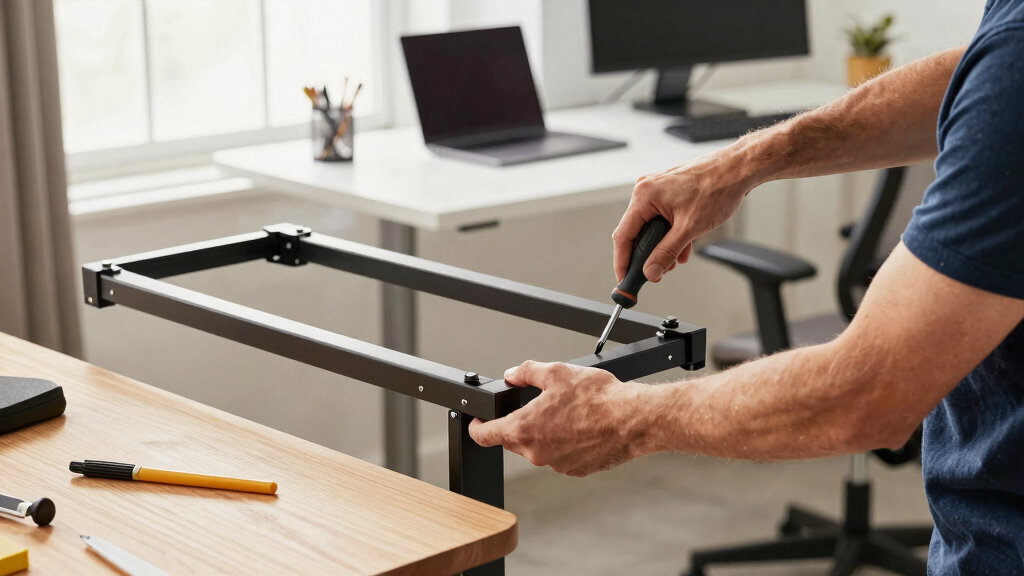
- Assemble the legs and frame first.
- Secure the frame to the desktop.
- Connect electrical components if applicable.
- Test the height adjustment mechanisms.
Use the right tools—most desks come with Allen wrenches, but having a screwdriver or rubber mallet handy helps.

Lift Table Motor, 24V Height Adjustable Desk Motor Kit with 6mm Hexagon Hole, Manual Control DC Electric Lift Motor for Standing Office Desk
- Hexagon Hole Compatibility: Fits 6mm hexagon hole desk frames
- Manual Control Features: Includes preset heights and sedentary reminder
- Quiet and Smooth Operation: Low-noise, jerk-free height adjustments
As an affiliate, we earn on qualifying purchases.
As an affiliate, we earn on qualifying purchases.
Lift and Secure Heavy Parts Safely
Heavy lifting is where most solo assembly pitfalls happen. Always lift with your legs, not your back. Picture yourself as a crane, steady and controlled.
If a part feels too heavy—say, over 20 pounds—get help or use a dolly. Don’t risk dropping or injuring yourself just to save time.
Once in place, tighten all bolts firmly. Loose screws cause wobbles, which can lead to accidents or damage over time.

Decoholic 24 inch Height Adjustable Standing Desk Converter(Black)
- Keyboard and Mouse Riser Size: 23.6 x 13.4 inches
- Adjustable Height Gears: 6 gear levels for customization
- Easy Setup: No installation required
As an affiliate, we earn on qualifying purchases.
As an affiliate, we earn on qualifying purchases.
Test and Adjust for Stability Before Use
After assembly, give your desk a thorough shake. Does it wobble? Are all bolts tight? Think of it as a test drive for a new car. If something feels off, re-tighten or realign.
Place a level on the desktop to check for unevenness—uneven floors or unbalanced parts can cause instability. Adjust as needed before you start working.
Modern Tools and Resources Make Solo Assembly Easier
Today’s desks often feature modular, tool-free designs — perfect for solo setup. Many brands include detailed video tutorials or augmented reality guides to help you visualize each step.
Some desks even arrive partially assembled or with assembly services, reducing your workload. But if you’re going the DIY route, these resources are a game-changer.
Avoid Common Mistakes That Lead to Wobbly or Unsafe Desks
Skipping the instruction reading step is a recipe for disaster. Rushing through assembly often results in loose screws or misaligned parts. Tighten all bolts gradually and evenly—think of tightening a bicycle wheel: go in a criss-cross pattern.
Don’t forget to check the levelness at each stage. An uneven floor or a poorly secured leg can turn your sleek new desk into a wobbly nightmare.
Troubleshooting a Wobbly Desk After Assembly
If your desk wobbles after setup, start by tightening every bolt. Use a torque wrench if you have one, to ensure even tightness. Sometimes, uneven flooring is the culprit. Place shims or pads under legs if needed.
Double-check that all parts are correctly assembled—sometimes a missing screw or misplaced connector causes instability. Understanding why your desk wobbles helps prevent future issues and ensures your workspace remains safe and sturdy. Addressing wobbliness promptly can also extend the lifespan of your desk by avoiding undue stress on joints and components.
Frequently Asked Questions
Is it safe to assemble a standing desk alone?
Yes, it’s safe if you follow safety guidelines. Use proper lifting techniques, work on a stable surface, and don’t rush. For very heavy parts, ask for help to avoid injury.
What tools do I need for assembly?
Most desks come with Allen wrenches, but you might also need a screwdriver, rubber mallet, or small wrench. Having these on hand makes the process smoother.
Can I assemble a standing desk without help?
Many models are designed for solo assembly, especially smaller or lighter desks. For larger or heavier units, assistance reduces the risk of injury or damage.
What are common mistakes to avoid?
Not reading instructions carefully, rushing, skipping steps, or uneven tightening. Also, ignoring stability checks can lead to wobbling or unsafe setups.
How do I fix a wobbly desk after assembly?
Start by tightening all bolts evenly. Check for uneven flooring or misassembled parts. Adding shims under legs can also improve stability.
Conclusion
With patience and attention to detail, you can assemble your standing desk solo without sacrificing safety or stability. Rushing or skipping steps only invites wobbling or damage. Take your time, follow the steps, and enjoy a workspace that’s perfectly suited to your needs.
Think of your desk as the foundation of your productivity — it’s worth building right the first time. Now, roll up your sleeves and make that standing workspace yours.