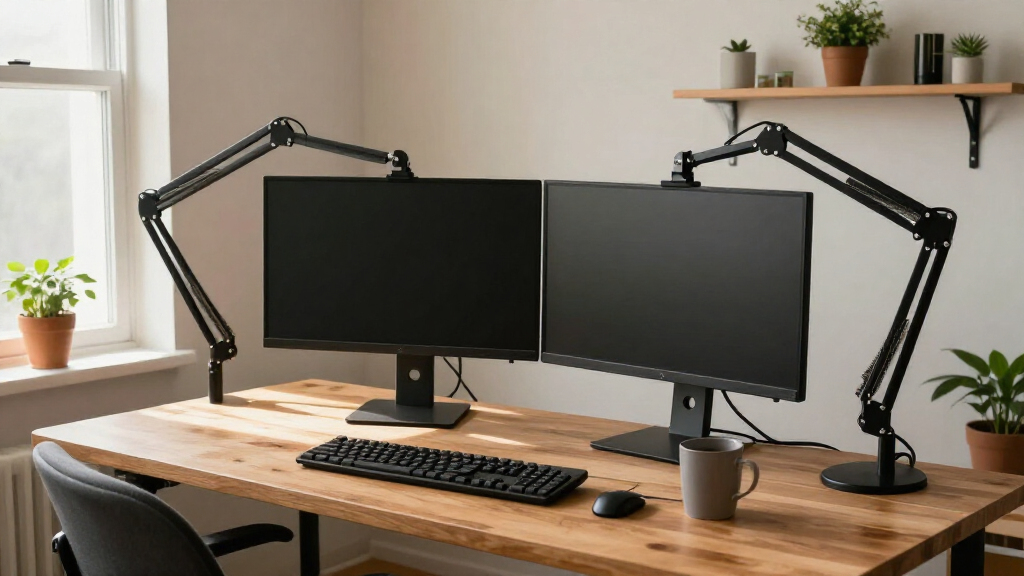
For most home offices, I’d start with the EVEO Premium Dual Monitor Mount as the best overall pick for its gas-spring adjustment and broad 14-to-32-inch screen range. The HUANUO HNDS7 stands out if built-in USB ports and clamp-or-grommet installation suit your setup, while the VIVO Freestanding Dual Monitor Mount is a practical choice when desk-edge clamping is not an option. The main tradeoffs are desk space versus a freestanding base, screen size and weight limits versus flexibility, and easy adjustment versus a simpler fixed setup. I’ve ranked these options by how well their features address everyday home-office needs, not by one feature alone. Read on for the full breakdown, buying advice, and answers to common fit questions.

Get business pricing on your home office setup
- Business-only prices and quantity discounts
- Tax-exempt purchasing
- Multiple users, one account, clear invoices
Complete the kit


Key Takeaways
- EVEO is the strongest all-around starting point: its gas-spring arms and stated 14-to-32-inch range suit varied home-office monitor setups, though buyers still need to check each screen’s weight and VESA pattern.
- Mounting style changes the desk tradeoff: most picks use a desk clamp or grommet mount, while the VIVO Freestanding model avoids attaching to the desk but occupies surface area with its base.
- The HUANUO HNDS7 adds a practical convenience: USB ports and two mounting methods make it distinct, but those extras matter only if their placement and cable reach work for your desk.
- Screen-size ranges are not interchangeable: models capped at 27 or 30 inches may fit a compact pair well, while 32-inch-rated arms offer more headroom but still require a check of weight capacity and desk clearance.
- Not every home office needs gas-spring movement: a simpler desk stand or fixed-style setup can make sense when screens rarely move, while frequent posture changes favor arms with more independent adjustment.
| EVEO Premium Dual Monitor Mount 14″-32” Dual Monitor Arm VESA Bracket Adjustable Height Gas Spring Dual Monitor Stand, Screen Full Motion Dual Monitor Arm-Computer Monitor Stand for 2 Screens – Black |  | Best Overall | Screen size range: 14–32 inches | VESA compatibility: 75×75 mm and 100×100 mm | Movement: Gas-spring height adjustment, 360° rotation, +90° to -90° swivel | VIEW LATEST PRICE | See Our Full Breakdown |
| FLEXISPOT MA1 Dual Monitor Arm, 17–32-Inch Displays, White |  | Best for Thick Desks | Model: MA1 | Screen size: 17–32 inches (title; minimum-size details conflict) | Maximum supported weight: 19.8 lbs per monitor (also listed as 19.84 lbs) | VIEW LATEST PRICE | See Our Full Breakdown |
| VIVO Dual Monitor Desk Mount, Fits 13″ to 30″ Screens, Holds 22 lbs Each |  | Best Value for Heavier Monitors | Model: STAND-V002 | Screen size range: 13–30 inches | Maximum weight: 22 lbs per monitor | VIEW LATEST PRICE | See Our Full Breakdown |
| VIVO Dual Monitor Desk Stand for 13–32-Inch Screens | 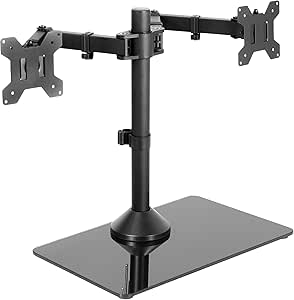 | Best No-Clamp Option | Model: STAND-V002FG | Screen size range: 13–32 inches | Maximum weight: 22 lbs per monitor | VIEW LATEST PRICE | See Our Full Breakdown |
| HUANUO FlowLift Pro Dual Monitor Mount for 13–27-Inch Screens |  | Best for Easy Setup | Model: HNDMA119B-DS | Screen size range: 13–27 inches | Monitor weight capacity: 4.4–15.4 lbs per monitor | VIEW LATEST PRICE | See Our Full Breakdown |
| HUANUO Dual Monitor Desk Mount, White |  | Best White Gas-Spring Pick | Model: HNDS6W-US | Color: White | Screen compatibility: 13–32 inches | VIEW LATEST PRICE | See Our Full Breakdown |
| HUANUO Dual Monitor Stand with USB Ports, Clamp or Grommet Mount, HNDS7 |  | Best for Large, Heavier Monitors | Model: HNDS7 | Material and color: Aluminum, black | Supported screen size: 13–40 inches in description; product details also list a 32-inch maximum | VIEW LATEST PRICE | See Our Full Breakdown |
| Vari Dual Monitor Arm – VESA Monitor Mount w/ 360 Degree Adjustment |  | Best for Compact, Light-Duty Setups | Model: 48003 | Color: Silver | Maximum screen size: 27 inches | VIEW LATEST PRICE | See Our Full Breakdown |
| monTEK Heavy-Duty Dual Monitor Stand for 17–32-Inch Screens |  | Best Steel-Built Mid-Range Fit | Model: MA1006PXLBK | Material and color: Alloy steel, matte black | Supported screen size: 17–32 inches | VIEW LATEST PRICE | See Our Full Breakdown |
| VIVO Freestanding Dual Monitor Mount for 13–27-Inch Screens |  | Best for Desks That Cannot Be Clamped | Model: STAND-V002F | Mounting type: Tabletop freestanding | Screen compatibility: Two monitors, 13–27 inches | VIEW LATEST PRICE | See Our Full Breakdown |
| ErGear Adjustable Dual Monitor Arm for 13–32-Inch Screens |  | Best for Flexible Desk Setups | Screen size compatibility: 13–32 inches | Load capacity: 4.84–19.8 lbs per monitor | VESA compatibility: 75 × 75 mm or 100 × 100 mm | VIEW LATEST PRICE | See Our Full Breakdown |
| HUANUO Dual Monitor Desk Mount for 13–32-Inch Screens |  | Best for Thick Wooden Desks | Screen size compatibility: 13–32 inches | Weight capacity: 4.4–19.8 lbs per arm | VESA compatibility: 75 × 75 mm and 100 × 100 mm | VIEW LATEST PRICE | See Our Full Breakdown |
| HUANUO Dual Monitor Mount for 2 Monitors up to 32 inches, Each Arm Holds Max 22lbs, Dual Monitor Stand with Advanced System, Height-Adjustable/Tilt/Swivel/Rotate, VESA Standard 75mm or 100mm |  | Best for Heavier Monitors | Screen size compatibility: 17–32 inches | Maximum weight capacity: 22 lbs per arm | VESA compatibility: 75 × 75 mm or 100 × 100 mm | VIEW LATEST PRICE | See Our Full Breakdown |
| VIVO AeroPoise Dual Monitor Stand for 17–32-Inch Screens |  | Best for Tool-Free Repositioning | Screen size compatibility: 17–32 inches | Weight capacity: 4.4–19.8 lbs per screen | VESA compatibility: 75 × 75 mm and 100 × 100 mm | VIEW LATEST PRICE | See Our Full Breakdown |
| MOUNTUP Dual Monitor Desk Mount, Height Adjustable, White |  | Best for White Home Offices | Screen size compatibility: 22–32 inches | Weight capacity: 4.4–19.8 lbs per screen | VESA compatibility: 75 × 75 mm and 100 × 100 mm | VIEW LATEST PRICE | See Our Full Breakdown |
| dual monitor arms for home office | VESA compatibility | Model | Warranty | Mounting |
|---|---|---|---|---|
| EVEO Premium Dual Monitor Moun | 75×75 mm and 100×100 mm | — | — | — |
| FLEXISPOT MA1 Dual Monitor Arm | 75×75 mm and 100×100 mm | MA1 | — | — |
| VIVO Dual Monitor Desk Mount | 75×75 mm and 100×100 mm | STAND-V002 | 3 years | — |
| VIVO Dual Monitor Desk Stand f | 75×75 mm and 100×100 mm | STAND-V002FG | 3 years | — |
| HUANUO FlowLift Pro Dual Monit | 75×75 mm and 100×100 mm | HNDMA119B-DS | 5 years | — |
| HUANUO Dual Monitor Desk Mount | 75 × 75 mm or 100 × 100 mm | HNDS6W-US | — | C-clamp or grommet |
| HUANUO Dual Monitor Stand with | 75 × 75 mm or 100 × 100 mm | HNDS7 | — | C-clamp or bolt-through grommet |
| Vari Dual Monitor Arm | 75 × 75 mm or 100 × 100 mm | 48003 | 5 years | Desk clamp |
| monTEK Heavy-Duty Dual Monitor | 75 × 75 mm or 100 × 100 mm | MA1006PXLBK | 1 year | C-clamp or grommet |
| VIVO Freestanding Dual Monitor | 75 × 75 mm or 100 × 100 mm | STAND-V002F | 3 years | — |
| ErGear Adjustable Dual Monitor | 75 × 75 mm or 100 × 100 mm | — | 5 years | C-clamp or optional grommet mount |
| HUANUO Dual Monitor Desk Mount | 75 × 75 mm and 100 × 100 mm | — | 5 years | C-clamp or grommet; wooden desks 0.59–3.54 inches thick |
| HUANUO Dual Monitor Mount for | 75 × 75 mm or 100 × 100 mm | — | — | C-clamp for 0.39–2.56-inch desks or grommet for 0.39–2.17-inch desks |
| VIVO AeroPoise Dual Monitor St | 75 × 75 mm and 100 × 100 mm | — | 3 years | C-clamp for desks up to 3.1 inches; optional grommet mount for desks up to 1.9 inches |
| MOUNTUP Dual Monitor Desk Moun | 75 × 75 mm and 100 × 100 mm | — | — | C-clamp or grommet; desk thickness 0.39–2.76 inches |
More Details on Our Top Picks
The EVEO is the most flexible all-rounder here for a home office pairing two differently sized screens. Its 14–32-inch range, gas-spring height adjustment, and 360-degree rotation make it easier to align displays for mixed work, calls, or portrait reading than the more size-limited HUANUO FlowLift Pro. It also offers both clamp and grommet mounting, so it can suit more desk layouts than the freestanding VIVO STAND-V002FG. The tradeoff is that the supplied information gives no per-arm weight limit or maximum desk thickness, making fit harder to confirm before purchase. Choose it when broad screen-size coverage and movement matter most; skip it if you need a clearly stated load rating for heavier displays.
Pros:- Supports screens from 14 to 32 inches, wider than the HUANUO FlowLift Pro’s stated range.
- Gas-spring arms and full-motion adjustments help align screens to a comfortable viewing position.
- Offers both desk-clamp and grommet mounting.
- Compatible with common 75×75 mm and 100×100 mm VESA patterns.
Cons:- No maximum supported monitor weight is specified in the supplied product details.
- The listed clamp and grommet desk-thickness ranges may exclude some thicker or unusually shaped desks.
- The broad movement range may be unnecessary for buyers who want a simpler, fixed arrangement.
Best for: Home-office users pairing monitors of different sizes who want broad adjustment and a choice of clamp or grommet mounting.
Not ideal for: Owners of heavy monitors or desks with uncertain mounting compatibility who need a published weight limit and exact desk-thickness range.
- Screen size range:14–32 inches
- VESA compatibility:75×75 mm and 100×100 mm
- Movement:Gas-spring height adjustment, 360° rotation, +90° to -90° swivel
- Mounting options:Desk clamp or grommet mount
- Clamp desk thickness:0.39–1.97 inches
- Grommet desk thickness:0.39–1.56 inches
- Material:Alloy steel
- Color:Black
Our verdict“Pick the EVEO for a flexible two-screen home-office setup, provided your monitor weights and desk fit are confirmed before ordering.”
FLEXISPOT MA1 Dual Monitor Arm, 17–32-Inch Displays, White
The FLEXISPOT MA1 stands out for home offices with a thicker desktop: its clamp or grommet base is listed for desks up to 3.94 inches, beyond the VIVO STAND-V002’s 3.25-inch clamp limit. A 19.69-inch reach gives more room to pull screens toward the user or shift them aside, while the white finish can blend into a light-colored workspace. Its 17–32-inch range is less accommodating than the EVEO’s 14–32-inch span, so smaller displays may not be a fit. The supplied details also conflict on minimum screen size and differ slightly on weight capacity, so I would verify both against the exact listing before buying. This is the stronger match for a thick desk, not the clearest choice for spec certainty.
Pros:- Mounting base is specified for desks up to 3.94 inches thick.
- Maximum reach of 19.69 inches offers useful positioning flexibility.
- Gas-spring adjustment supports repositioning without relying on a fixed-height stand.
- White finish provides an alternative to the black mounts in this roundup.
Cons:- The stated minimum screen size conflicts between the title and product details.
- Maximum supported weight is listed as both 19.84 and 19.8 pounds.
- Its stated 17-inch minimum is less flexible than the EVEO’s 14-inch minimum.
Best for: Home-office users with a thick desktop and 17–32-inch VESA monitors who want a long-reach arm in white.
Not ideal for: Buyers with monitors smaller than 17 inches or anyone who needs unambiguous screen-size and load specifications before purchasing.
- Model:MA1
- Screen size:17–32 inches (title; minimum-size details conflict)
- Maximum supported weight:19.8 lbs per monitor (also listed as 19.84 lbs)
- VESA compatibility:75×75 mm and 100×100 mm
- Movement:Tilt, swivel, rotation, articulation, and height adjustment
- Tilt range:-85° to 15°
- Maximum reach:19.69 inches
- Desk mounting:C-clamp or grommet; desks up to 3.94 inches thick
- Color and warranty:White; 5 years
Our verdict“Choose the FLEXISPOT MA1 when a thick desk and long reach are priorities, but confirm the screen and weight limits first.”
VIVO Dual Monitor Desk Mount, Fits 13″ to 30″ Screens, Holds 22 lbs Each
The VIVO STAND-V002 is a practical pick for a home office where monitor weight matters more than a sleek finish. It supports up to 22 pounds per screen and monitors from 13 to 30 inches, giving it a stated load advantage over the FLEXISPOT MA1’s roughly 19.8-pound limit. Its steel construction, detachable VESA plates, and clamp-or-grommet mounting make it a straightforward two-screen workhorse, while cable clips help keep loose leads off the desk. Compared with the VIVO STAND-V002FG, this model clamps to the desk rather than occupying a broad freestanding base. In exchange, setup may take longer, cable routing is basic, and the clamp is limited to desks 3.25 inches thick.
Pros:- Supports up to 22 lbs per monitor, more than the FLEXISPOT MA1’s listed capacity.
- Fits 13–30-inch screens with common 75×75 mm and 100×100 mm VESA patterns.
- Clamp or grommet mounting works with desks up to 3.25 inches thick.
- Steel construction, detachable VESA plates, and cable-management clips support a functional setup.
Cons:- The 30-inch maximum is smaller than the 32-inch limit of the EVEO and VIVO freestanding model.
- Cable management uses clips rather than an integrated routing channel.
- Assembly can take longer than a simpler stand, and the clamp has a desk-thickness limit.
Best for: Home-office workers with two heavier monitors up to 30 inches who prefer a desk-mounted arm and want a stated 22-pound capacity per screen.
Not ideal for: People who need polished, enclosed cable routing, want a no-clamp setup, or have a desk thicker than 3.25 inches.
- Model:STAND-V002
- Screen size range:13–30 inches
- Maximum weight:22 lbs per monitor
- VESA compatibility:75×75 mm and 100×100 mm
- Mounting options:C-clamp or grommet
- Maximum desk thickness:3.25 inches
- Movement:Tilt, swivel, rotation, articulation, and height adjustment
- Material and color:Metal; black
- Warranty:3 years
Our verdict“Choose this VIVO when two monitors need its 22-pound capacity and your desk can accept a clamp or grommet mount.”
VIVO Dual Monitor Desk Stand for 13–32-Inch Screens
For a home office where clamping to the desk is not an option, the VIVO STAND-V002FG offers a freestanding alternative that supports two 13–32-inch screens up to 22 pounds each. Its padded tempered-glass base avoids clamp hardware and desk-edge compatibility questions, unlike the clamp-mounted VIVO STAND-V002. The arms still allow tilt, swivel, rotation, and height adjustment, including portrait orientation for reading or coding. The tradeoff is footprint and leverage: the 15.2 x 10.2-inch base occupies desk space, and pulling screens far forward or backward can affect stability unless the stand is bolted down. It makes the most sense on a sturdy, roomy desk where a clamp-free installation is worth giving up some free surface area.
Pros:- Freestanding base avoids the need for a desk clamp or grommet hole.
- Supports 13–32-inch monitors up to 22 lbs each.
- Adjustable arms allow tilt, swivel, rotation, height changes, and portrait orientation.
- Padded tempered-glass base and steel arms provide a substantial support structure.
Cons:- The 15.2 x 10.2-inch base takes up meaningful desk space.
- Stability can be affected by monitors extended far forward or backward unless the stand is bolted down.
- Unlike the clamp-mounted VIVO STAND-V002, it does not free the desktop beneath a desk-mounted arm.
Best for: Home-office users who cannot clamp or grommet-mount their desk and have enough surface area for a stable freestanding base.
Not ideal for: Owners of small desks or users who frequently extend heavy monitors far forward or backward without bolting the stand down.
- Model:STAND-V002FG
- Screen size range:13–32 inches
- Maximum weight:22 lbs per monitor
- VESA compatibility:75×75 mm and 100×100 mm
- Mounting type:Tabletop, freestanding
- Base:Padded tempered glass, 15.2 x 10.2 inches
- Movement:Tilt +90° to -90°, 360° swivel, 360° rotation, height adjustment
- Materials and color:Steel arms and pole; black
- Warranty:3 years
Our verdict“Pick the VIVO STAND-V002FG if your desk rules out clamps and has room for its base, but avoid it for cramped or highly extended setups.”
HUANUO FlowLift Pro Dual Monitor Mount for 13–27-Inch Screens
The HUANUO FlowLift Pro is aimed at home-office buyers who want setup cues rather than a broad fit range. Its tool-free VESA plates make attaching or removing screens simpler, and a visual tension indicator helps match the arms to monitor weight without guesswork. The 13–27-inch limit and 4.4–15.4-pound capacity per screen are narrower than the VIVO STAND-V002’s 13–30-inch, 22-pound allowance, so this is better suited to lighter displays than large, heavy panels. Its MechaSpring arms provide tilt, swivel, and rotation, while the recommended clamp fit is specifically for wood desks. That focus on guided setup is useful, but buyers with heavier monitors, non-wood desktops, or irregular desk edges should choose a more compatible option.
Pros:- Tool-free VESA plates simplify attaching and detaching monitors.
- Visual tension indicator helps set arm resistance for the monitor weight.
- MechaSpring arms support adjustable positioning with tilt, swivel, and rotation.
- Five-year warranty and stated TÜV Rheinland certification add defined support and testing details.
Cons:- The 15.4-pound per-monitor ceiling is substantially lower than the VIVO STAND-V002’s 22-pound capacity.
- Supports screens only up to 27 inches, less than several alternatives in this roundup.
- Desk compatibility is recommended for wood surfaces, with irregular edges requiring caution.
Best for: First-time home-office mount buyers with two lightweight 13–27-inch monitors and a compatible wood desk who value clear setup aids.
Not ideal for: Users with monitors over 15.4 lbs, screens larger than 27 inches, non-wood desks, or irregular desk edges.
- Model:HNDMA119B-DS
- Screen size range:13–27 inches
- Monitor weight capacity:4.4–15.4 lbs per monitor
- VESA compatibility:75×75 mm and 100×100 mm
- Movement:Tilt, swivel, and rotation
- Desk compatibility:C-clamp recommended for wood desks 0.59–3.54 inches thick
- Setup features:Tool-free VESA plates and visual tension indicator
- Material and item weight:90% professional-grade metal; 9.3 lbs
- Warranty:5 years
Our verdict“Choose the FlowLift Pro for lighter monitors and a guided setup; pick the VIVO STAND-V002 instead if you need more screen or weight capacity.”
HUANUO Dual Monitor Desk Mount, White
For a home office where a black mount would clash with a light desk setup, this white, gas-spring design offers a useful mix of appearance and adjustability. Each arm supports a 13–32-inch display weighing 4.4–19.8 pounds, and height adjustment, tilt, swivel, and rotation make it easier to align screens for a seated workstation. The C-clamp and grommet options also suit more desk layouts than a freestanding stand such as the VIVO STAND-V002F, which needs a broad patch of desktop.
The main tradeoff is capacity: the HUANUO HNDS7 supports heavier displays, so this model is a weaker fit for bulky monitors. Its minimum load limit also matters for lightweight screens, and both monitors need compatible VESA holes. I’d choose it for a coordinated white setup with ordinary-weight displays, not as a heavy-monitor solution.
Pros:- White finish can blend with light desks and accessories.
- Gas-spring arms provide height adjustment as well as tilt, swivel, and rotation.
- Supports displays from 13 to 32 inches within its per-arm weight range.
- Offers both C-clamp and grommet mounting, plus cable routing.
Cons:- The 19.8-pound per-arm ceiling is lower than the HUANUO HNDS7’s stated capacity.
- Each screen must weigh at least 4.4 pounds and have a 75 × 75 mm or 100 × 100 mm VESA pattern.
- Clamp or grommet installation may not suit desks where neither mounting method is possible.
Best for: Home-office users with white or light-colored desks and two VESA-compatible monitors within the stated size and weight range.
Not ideal for: Owners of monitors heavier than 19.8 pounds per arm, very lightweight displays under 4.4 pounds, or screens without compatible VESA holes.
- Model:HNDS6W-US
- Color:White
- Screen compatibility:13–32 inches
- Load capacity:4.4–19.8 lbs per arm
- VESA compatibility:75 × 75 mm or 100 × 100 mm
- Mounting:C-clamp or grommet
- Movement:Height adjustment, tilt, swivel, and rotation
- Maximum tilt:85 degrees
- Material:Alloy steel
Our verdict“Choose this HUANUO if you want a white, adjustable desk-mounted pair for standard-weight VESA monitors, but pick a higher-capacity arm for heavier screens.”
HUANUO Dual Monitor Stand with USB Ports, Clamp or Grommet Mount, HNDS7
The HNDS7 is the lineup’s stronger match for a home office with large or heavier screens: it lists a 26.4-pound capacity per arm, above the HUANUO HNDS6W-US and monTEK MA1006PXLBK. Its long extension and 21.1-inch maximum arm height give users more room to position displays around a deep desk or a split work surface. Two built-in USB ports can also keep frequently used peripherals within reach, while cable management helps reduce clutter.
There is a notable specification conflict: the product description says screens up to 40 inches, but product details give a 32-inch maximum. I’d treat 32 inches as the safer limit unless the manufacturer confirms otherwise. The USB cable is 5.25 feet long, so placement matters, and the stated 26.4-pound capacity does not remove the need for a compatible VESA pattern and suitable desk. This is more capable than the white HUANUO, but also less straightforward to verify.
Pros:- Stated load capacity of 26.4 pounds per arm exceeds the other desk-mounted options in this batch.
- Long extension and height range help with deeper desks and varied screen placement.
- Two USB ports add convenient access for peripherals.
- Supports both C-clamp and bolt-through grommet installation.
Cons:- Screen-size details conflict, listing both 32-inch and 40-inch maximums.
- Grommet mounting requires a hole between 0.39 and 1.97 inches in diameter.
- The 5.25-foot USB cable may constrain where the mount sits relative to a computer or power source.
Best for: Home-office users with heavier VESA monitors who want broad arm reach and convenient built-in USB ports.
Not ideal for: Buyers who need an unambiguous screen-size limit, lack a suitable clamp or grommet mounting point, or want a white mount to match a light setup.
- Model:HNDS7
- Material and color:Aluminum, black
- Supported screen size:13–40 inches in description; product details also list a 32-inch maximum
- Load capacity:26.4 lbs per arm
- VESA compatibility:75 × 75 mm or 100 × 100 mm
- Mounting:C-clamp or bolt-through grommet
- Maximum arm height:21.1 inches
- Maximum arm extension:25.59 inches
- USB ports:2
Our verdict“Pick the HNDS7 for heavier displays and extra reach, but confirm the screen-size limit before pairing it with monitors larger than 32 inches.”
Vari Dual Monitor Arm – VESA Monitor Mount w/ 360 Degree Adjustment
Vari’s dual arm is a restrained choice for a home office using two modest-sized displays: its stated screen limit is 27 inches, with a maximum load of 19.8 pounds and a 12-inch lift above the desk. The tension-assisted arms allow each screen to be repositioned, while the clamp mount keeps the desktop more open than the VIVO STAND-V002F’s 13 × 10.5-inch base. A five-year warranty is another point of distinction among these options.
The compact fit comes with less flexibility for future upgrades. The HNDS7 reaches larger screens and carries more weight, while this Vari model is specified for monitors up to 27 inches; the supplied information also gives conflicting weight figures, mentioning 30.9 pounds in one description and 19.8 pounds in the title. I’d use 19.8 pounds as the conservative per-screen ceiling and verify the exact limit before buying. The clamp also requires a desk no thicker than 1.375 inches, and the listing’s tilt details are inconsistent.
Pros:- Clamp-mounted design avoids the large tabletop footprint of the VIVO STAND-V002F.
- Tension-assisted arms support individual screen repositioning.
- Raises screens up to 12 inches above the desk surface.
- Includes a five-year warranty.
Cons:- The stated 27-inch screen limit rules out larger displays supported by the HUANUO HNDS7.
- Weight information conflicts between the description and title, so the safe capacity is unclear.
- Clamp compatibility is limited to desks up to 1.375 inches thick, and tilt specifications are inconsistent.
Best for: Home-office users with two smaller VESA monitors and a desk thin enough for the clamp, who value an open desktop and a longer stated warranty.
Not ideal for: People with monitors larger than 27 inches, heavier displays, thick desks, or a need for clearly documented movement and load limits.
- Model:48003
- Color:Silver
- Maximum screen size:27 inches
- Stated weight capacity:19.8 lbs in title; description also states 30.9 lbs
- VESA compatibility:75 × 75 mm or 100 × 100 mm
- Mounting:Desk clamp
- Maximum desk thickness:1.375 inches
- Screen lift:Up to 12 inches above the desk
- Warranty:5 years
Our verdict“Choose the Vari for a compact two-screen setup with a thin desk and smaller monitors, but verify the load and tilt limits before purchase.”
monTEK Heavy-Duty Dual Monitor Stand for 17–32-Inch Screens
The monTEK MA1006PXLBK is a practical middle ground for a home office with two larger-than-basic displays. Its 17–32-inch range and 22-pound capacity per arm cover many standard monitors, while the steel construction, anti-slip pads, and cable management address stability and desk tidiness. It supports both C-clamp and grommet mounting, so it can suit different desk layouts without taking up the broad tabletop area needed by the freestanding VIVO STAND-V002F.
Compared with the HUANUO HNDS7, monTEK has a lower stated weight limit and no listed USB ports, making it less suited to heavy screens or a workstation that benefits from built-in connectivity. Its one-year warranty is also shorter than Vari’s five-year coverage. I’d favor this model when the monitors fall within its clear size and weight range and a simple steel arm is the priority; skip it if you want long warranty coverage or a higher load ceiling.
Pros:- Supports screens up to 32 inches and 22 pounds per arm.
- Steel construction and anti-slip pads support a stable desk setup.
- C-clamp and grommet mounting provide two installation choices.
- Articulating arms and cable management help position and organize two screens.
Cons:- The one-year warranty is shorter than the five-year coverage listed for the Vari arm.
- The 22-pound limit is below the HUANUO HNDS7’s stated capacity.
- Requires compatible VESA holes and a desk edge or grommet location suitable for installation.
Best for: Home-office users with two 17–32-inch VESA monitors weighing no more than 22 pounds each who want a steel desk-mounted arm.
Not ideal for: Owners of monitors over 22 pounds per arm, displays under 17 inches, or buyers prioritizing a longer warranty or built-in USB ports.
- Model:MA1006PXLBK
- Material and color:Alloy steel, matte black
- Supported screen size:17–32 inches
- Maximum load:22 lbs per arm
- VESA compatibility:75 × 75 mm or 100 × 100 mm
- Mounting:C-clamp or grommet
- Movement:Tilt, swivel, rotation, extension, and retraction
- Item weight:6.7 lbs
- Warranty:1 year
Our verdict“Choose monTEK for a straightforward steel mount when both monitors fit its 17–32-inch and 22-pound limits.”
VIVO Freestanding Dual Monitor Mount for 13–27-Inch Screens
When a home-office desk cannot accept a clamp or grommet mount, the VIVO STAND-V002F offers a useful alternative: its freestanding padded base sits on the desktop, and the arms support two 13–27-inch monitors weighing up to 22 pounds each. Tilt, swivel, rotation, and height adjustment give the screens room to line up with a seated workstation. Detachable VESA plates and cable clips also make setup and cable routing more manageable.
The cost of avoiding desk-edge installation is a 13 × 10.5-inch footprint and less confidence when the monitors are extended. Unlike the clamp-mounted monTEK, this VIVO needs a clear patch of desk and can become unstable if screens are pulled too far forward or backward unless the stand is bolted down. I’d choose it for a fixed, compact arrangement on a desk where drilling or clamping is not an option, rather than for frequent repositioning or a shallow worksurface.
Pros:- Freestanding installation works where desk-edge clamps or grommet mounts are unsuitable.
- Supports two monitors up to 27 inches and 22 pounds each.
- Padded base helps protect the desk, while cable clips help organize wiring.
- Arms offer tilt, swivel, rotation, and height adjustment.
Cons:- The base occupies 13 × 10.5 inches of usable desktop space.
- Extending screens too far forward or backward can compromise stability unless the stand is bolted down.
- The 27-inch screen limit is lower than the 32-inch limits of the monTEK and HUANUO HNDS7.
Best for: Home-office users who cannot clamp or grommet-mount an arm and have enough clear desktop space for a 13 × 10.5-inch base.
Not ideal for: People with shallow or crowded desks, monitors larger than 27 inches, or a setup that requires frequent extended repositioning without bolting the stand down.
- Model:STAND-V002F
- Mounting type:Tabletop freestanding
- Screen compatibility:Two monitors, 13–27 inches
- Maximum load:22 lbs per screen
- VESA compatibility:75 × 75 mm or 100 × 100 mm
- Base dimensions:13 × 10.5 inches
- Movement:Tilt, swivel, rotation, and height adjustment
- Material:Alloy steel
- Warranty:3 years
Our verdict“Pick the VIVO STAND-V002F when desk mounting is not possible and you can reserve a stable, unobstructed patch of desktop.”
ErGear Adjustable Dual Monitor Arm for 13–32-Inch Screens
The ErGear is a practical fit for a home office where screen placement needs to change between focused work and shared viewing. Its 17.5-inch height adjustment and 18.1-inch reach give each display room to move, while tool-free VESA plates can make attaching compatible screens less fiddly. Compared with the HUANUO HNDS6, it reaches slightly higher and farther, but the HNDS6 accepts thicker wooden desktops. The C-clamp and optional grommet mount give you a choice of attachment, and cable clips help keep cords from trailing across the work surface. The tradeoff is desk compatibility: ErGear recommends a wooden desktop, and an underside crossbeam can block the clamp. Its stated weight and VESA limits also rule out some larger or unusually light monitors.
Pros:- Independent positioning supports different screen heights and angles.
- Tool-free VESA plates simplify attaching compatible monitors.
- C-clamp and optional grommet mounting suit more than one desk layout.
- Cable clips help keep wiring organized behind the screens.
Cons:- The manufacturer recommends installation on a wooden desk.
- An underside crossbeam may prevent the clamp from fitting.
- The minimum supported monitor weight excludes some very light displays.
Best for: Home-office users with two compatible monitors who want generous reach and a choice of clamp or grommet mounting.
Not ideal for: People with glass, plastic, or obstructed desktops, or monitors outside the stated size, weight, and VESA limits.
- Screen size compatibility:13–32 inches
- Load capacity:4.84–19.8 lbs per monitor
- VESA compatibility:75 × 75 mm or 100 × 100 mm
- Maximum height adjustment:17.5 inches
- Maximum extension:18.1 inches
- Tilt:+80° / -50°
- Mounting:C-clamp or optional grommet mount
- Warranty:5 years
Our verdict“Choose the ErGear if you want more reach and height adjustment than the HUANUO HNDS6 offers and your wooden desk can accommodate its mount.”
HUANUO Dual Monitor Desk Mount for 13–32-Inch Screens
The HUANUO HNDS6 earns its place for home offices where a substantial wooden desktop makes mounting options a priority. Its C-clamp fits desks up to 3.54 inches thick, a wider stated range than the ErGear’s clamp, while a grommet mount is also available. Both arms support common 13–32-inch displays and offer tilt, swivel, and portrait rotation, so the arrangement can serve mixed work tasks without taking up the footprint of two freestanding stands. Cable management helps tame wires, though it does not change the underlying installation constraints. The ErGear offers more maximum height and extension; this HUANUO instead has a lower stated minimum monitor weight and broader thick-desk compatibility. Skip it if your desk is glass or plastic, or if an underside panel or crossbeam blocks the mounting hardware.
Pros:- C-clamp accommodates wooden desks up to 3.54 inches thick.
- Supports 13–32-inch monitors with common VESA patterns.
- Tilt, swivel, and rotation allow varied viewing positions.
- Built-in cable management helps reduce desk clutter.
Cons:- Not recommended for plastic or glass desktops.
- Underside panels and crossbeams can interfere with installation.
- Maximum height is lower than the ErGear’s stated adjustment.
Best for: Home-office owners with thick wooden desks who need two adjustable arms and a clamp that accommodates desktops up to 3.54 inches thick.
Not ideal for: People with glass or plastic desks, obstructed undersides, or monitors lighter than 4.4 lbs or heavier than 19.8 lbs.
- Screen size compatibility:13–32 inches
- Weight capacity:4.4–19.8 lbs per arm
- VESA compatibility:75 × 75 mm and 100 × 100 mm
- Maximum height:15.75 inches
- Tilt:+85° / -50°
- Swivel:±90°
- Mounting:C-clamp or grommet; wooden desks 0.59–3.54 inches thick
- Warranty:5 years
Our verdict“Pick the HNDS6 over the ErGear when your wooden desktop is thick and clamp compatibility matters more than extra arm reach.”
HUANUO Dual Monitor Mount for 2 Monitors up to 32 inches, Each Arm Holds Max 22lbs, Dual Monitor Stand with Advanced System, Height-Adjustable/Tilt/Swivel/Rotate, VESA Standard 75mm or 100mm
Among these five mounts, this HUANUO is the clearest choice when each home-office display approaches the weight limits of more typical arms. Its 22-lb-per-arm capacity exceeds the 19.8-lb limits listed for the ErGear, HUANUO HNDS6, VIVO AeroPoise, and MOUNTUP. The stated 17.5-inch rise and extension give you room to bring screens toward your chair or position them higher, while tilt, swivel, and rotation support a flexible two-display layout. That extra capacity is useful only if your monitors need it; for lighter screens, the VIVO’s mechanical spring adjustment or the MOUNTUP’s longer extension may be a better match. This model fits 17–32-inch monitors, not smaller 13-inch displays, and its grommet desk-thickness range tops out at 2.17 inches.
Pros:- Each arm supports up to 22 lbs, more than the other four products in this batch.
- 17.5-inch height adjustment and extension allow flexible screen placement.
- Supports tilt, swivel, and 360-degree rotation.
- C-clamp and grommet mounting are both supported.
Cons:- The 17-inch minimum screen size excludes smaller monitors.
- Grommet mounting is limited to desks up to 2.17 inches thick.
- Its higher weight capacity brings little benefit for lighter monitors.
Best for: Home-office users with two heavier 17–32-inch monitors that exceed the 19.8-lb capacity of the other listed arms.
Not ideal for: People using monitors under 17 inches, lightweight displays that need a lower minimum weight, or desks outside the stated mounting thickness ranges.
- Screen size compatibility:17–32 inches
- Maximum weight capacity:22 lbs per arm
- VESA compatibility:75 × 75 mm or 100 × 100 mm
- Maximum arm extension:17.5 inches
- Maximum height adjustment:17.5 inches
- Tilt:+90° / -35°
- Swivel and rotation:±90° swivel; 360° rotation
- Mounting:C-clamp for 0.39–2.56-inch desks or grommet for 0.39–2.17-inch desks
Our verdict“Choose this HUANUO when your monitors need more than 19.8 lbs of support per arm; for lighter screens, the VIVO or MOUNTUP may better suit your setup.”
VIVO AeroPoise Dual Monitor Stand for 17–32-Inch Screens
The VIVO AeroPoise is a good fit for a home workspace where screens get repositioned often and you want mechanical spring arms that adjust without tools. It supports two 17–32-inch monitors, with tilt, swivel, and rotation for switching between side-by-side work and portrait viewing. Unlike the HUANUO mount with 22-lb arms, the AeroPoise tops out at 19.8 lbs per screen, so it is better suited to standard-weight displays than heavier panels. Its C-clamp supports desks up to 3.1 inches thick; a grommet mount is available, but it is optional. The main layout drawback is physical: the arm backs extend beyond the desk edge, which may be awkward if the desk sits close to a wall. Its three-year warranty is also shorter than the five-year terms listed for both HUANUO options and ErGear.
Pros:- Mechanical spring arms allow tool-free screen repositioning.
- Supports 17–32-inch monitors with common VESA patterns.
- Full tilt, swivel, and rotation help tailor viewing angles.
- C-clamp and optional grommet mounting provide alternative attachment methods.
Cons:- Arm backs extend beyond the rear edge of the desk.
- Grommet mount is optional rather than included.
- Its 19.8-lb limit is below the 22-lb capacity of the HUANUO heavy-monitor model.
Best for: Home-office users who frequently adjust compatible monitors and want spring-assisted positioning without tools.
Not ideal for: People with heavy monitors, desks pushed against a wall, or setups that require the grommet mount to be included.
- Screen size compatibility:17–32 inches
- Weight capacity:4.4–19.8 lbs per screen
- VESA compatibility:75 × 75 mm and 100 × 100 mm
- Tilt:+90° to -90°
- Swivel:180°
- Rotation:360°
- Mounting:C-clamp for desks up to 3.1 inches; optional grommet mount for desks up to 1.9 inches
- Warranty:3 years
Our verdict“Choose the AeroPoise if easy, frequent repositioning matters more than extra weight capacity or a compact fit against a wall.”
MOUNTUP Dual Monitor Desk Mount, Height Adjustable, White
The MOUNTUP stands apart from the black mounts here with a white finish that can better match a light-toned home-office desk and accessories. Its strongest practical advantage is reach: arms extend up to 19.5 inches, farther than the stated maximum for the ErGear and the two HUANUO options in this batch. That makes it useful when you need to pull screens closer or arrange them around a central workspace. It supports 22–32-inch displays, so the ErGear and HUANUO HNDS6 cover smaller monitors that this one will not. Its 16.9-inch height adjustment and 19.8-lb limit are suitable for many common screens, while cable management and clamp-or-grommet mounting help keep the setup tidy. The tradeoff is a narrower screen-size range and a grommet hole requirement to check before installation.
Pros:- White finish suits light-colored desks and home-office furnishings.
- 19.5-inch arm extension is the longest stated reach in this batch.
- Cable management routes wires within the arms.
- Supports both C-clamp and grommet installation.
Cons:- The 22-inch minimum excludes smaller monitors supported by the ErGear and HUANUO HNDS6.
- Each screen must weigh no more than 19.8 lbs.
- Grommet installation requires a hole 0.39–2.36 inches in diameter.
Best for: Home-office users with 22–32-inch monitors who want a white arm, extra forward reach, and cable management.
Not ideal for: People using monitors smaller than 22 inches, screens heavier than 19.8 lbs, or desks without a compatible clamp surface or grommet hole.
- Screen size compatibility:22–32 inches
- Weight capacity:4.4–19.8 lbs per screen
- VESA compatibility:75 × 75 mm and 100 × 100 mm
- Maximum arm extension:19.5 inches
- Maximum height adjustment:16.9 inches
- Tilt:Up to 90° up and 45° down
- Mounting:C-clamp or grommet; desk thickness 0.39–2.76 inches
- Grommet hole diameter:0.39–2.36 inches
Our verdict“Pick the MOUNTUP if your monitors are at least 22 inches and you value a white finish and longer reach over broad size compatibility.”
How We Picked
I compared these 15 options around the problems home-office buyers actually need to solve: whether both monitors fit by size and weight, how the mount attaches to the desk, how much independent positioning it offers, and whether the setup is likely to suit a compact workspace. I also weighed useful distinctions such as a freestanding base, stated screen ranges, integrated USB ports, and compatibility with common VESA patterns. A broad size range alone did not decide a ranking; it has limited value if the monitor weight, desk thickness, or mounting method does not match the buyer’s setup.
The order favors versatility for common home-office use, followed by useful features and ease of matching the arm to a specific desk. EVEO leads as a broadly adaptable gas-spring option; picks with standout conveniences or alternative mounting styles follow for buyers with more specific needs. Models with narrower stated screen ranges, fewer clearly listed differentiators, or a larger footprint trade broad appeal for a more particular fit. Before buying any pick, I recommend checking its current product specifications against both monitors and the desk itself.
Factors to Consider When Choosing Dual Monitor Arms For Home Offices
A dual arm can free up desk space and make two screens easier to position, but the right choice depends on the whole workstation—not just the monitors. I’d check compatibility and desk constraints first, then decide how much movement and convenience you actually need.
Match Each Monitor by Weight, Size, and VESA Pattern
Start with each monitor’s weight without its stand, then compare that figure with the mount’s per-arm limit. A product listing may state a screen-size range, but that alone does not confirm that a particular display is supported. Check whether both monitors use a compatible VESA 75-by-75 mm or 100-by-100 mm mounting pattern, and confirm whether an adapter is needed. Curved, ultrawide, or unusually deep displays can also affect clearance and balance even when their weight is within range. A common mistake is treating a two-screen capacity as permission to load each arm to its maximum without checking the full assembly’s instructions. If the screens differ in size or weight, look for enough independent adjustment to align them comfortably.
Check the Desk Before Choosing a Clamp or Grommet
Measure the desk’s thickness and inspect the underside where a clamp would sit; a rail, apron, cable tray, or drawer can block installation. Grommet mounting can create a sturdy alternative, but it requires a suitable opening and access beneath the desktop. A clamp or grommet arm keeps the working surface relatively clear, while a freestanding stand avoids clamping altogether at the cost of using some desk area. Thin, glass, or delicate desktops may need special care or may not be suitable for a particular mount, so consult the maker’s fit guidance rather than assuming every desk works. If you rent or share a workspace, a freestanding base may be easier to reposition. The best mounting method is the one your desk can safely support, not simply the one that looks tidiest.
Choose Movement for How You Work
Gas-spring arms can make it easier to raise, lower, or reposition screens during the day, which is useful when switching between focused work and video calls. A more basic stand may be enough if both displays stay in one position for long stretches. Consider whether you need each monitor to move independently, rotate into portrait orientation, or tilt to reduce glare. More joints and adjustment points can improve flexibility but also add setup steps and may require tension adjustments to match the screens. Buyers sometimes pay for motion they rarely use or choose a static arrangement that becomes awkward after changing chairs or desk height. Think through your usual tasks and seating position before deciding how much articulation is worth having.
Plan for Screen Layout and Desk Clearance
Two screens need more than enough arm reach: their stands must clear each other, the desk wall, and nearby shelves. Measure the width of the pair and decide whether you want a symmetrical layout, one screen centered with a secondary display off to the side, or a slight inward angle. Larger monitors can collide at their corners when tilted or rotated, even if each one fits the stated size range. Check the arm’s reach and height against your desk depth and sitting posture, especially if the desk sits close to a wall. Leave room for cables to move with the arms rather than pulling tight at the joints. A quick paper or cardboard mock-up of the screen footprints can expose layout problems before installation.
Weigh Convenience Features Against Cable Clutter
Features such as USB ports can reduce the need to reach behind a desktop computer, but their usefulness depends on port type, cable length, and where the connection sits once the arm is installed. Built-in cable guides help route wires along the arms, though they do not replace planning for slack at moving joints. If you use several powered devices, check whether the mount’s ports are data-only or support charging rather than assuming they do both. Extra accessories can add setup complexity and may not help if your computer or dock already provides easy access. For a cleaner workspace, first map the route from each monitor to the computer and power source. Pay for convenience features when they solve a real connection or cable-management problem in your room.
Decide When a More Adaptable Arm Is Worth It
A more adjustable arm earns its place when you change posture often, share a desk, or need to move displays out of the way. If the monitors remain fixed and the desk is spacious, a simpler arrangement may meet the need with fewer adjustments to manage. Think beyond today’s screens: a future monitor upgrade can make a narrow size or weight range restrictive, but buying far beyond your likely needs can add cost and complexity without a clear benefit. Consider whether you may rearrange the room, switch between sitting and standing, or add a laptop beside the displays. For a first dual-arm setup, clear mounting instructions and a compatible desk matter more than a long list of movement claims. Match the level of adjustability to how often your work habits actually change.
Frequently Asked Questions
How do I know whether a dual monitor arm will fit both of my screens?
Check each monitor’s weight without its original stand, its diagonal size, and its VESA mounting pattern, then compare all three with the arm’s specifications. Confirm the stated capacity applies to each arm, not just the pair together. A listed size range is a useful starting point, but it does not replace the weight and VESA checks. If one screen is heavier or larger, check whether the arms can be adjusted independently and whether the display maker permits VESA mounting. When a specification is unclear, verify it with the manufacturer before ordering.
Should I choose a freestanding stand or a clamp-mounted arm for a home-office desk?
A clamp-mounted arm usually frees more usable surface area, provided the desk edge is accessible and its thickness suits the clamp. A grommet mount can work when the desk has a compatible hole and the underside is clear. A freestanding model avoids attaching hardware to the desk, which can help with some shared or temporary workspaces, but its base occupies desk space. Check for glass, thin material, support rails, and cable trays before choosing a clamp. The desk’s construction and available clearance should decide the mounting style.
Are gas-spring arms worth choosing if I rarely move my monitors?
They can be useful if you expect to change monitor height or angle, share the desk, or adjust your seating throughout the day. If both screens will stay in one position, a simpler stand may provide the arrangement you need without paying for movement you will seldom use. Keep in mind that gas-spring tension may need adjustment to match the weight of each screen. A lighter or heavier display than the arm’s setup allows can make positioning difficult. Decide based on how often you will reposition the displays, not on the presence of a gas spring alone.
Can I mount two monitors of different sizes on one dual arm?
Often, but the arm must support each display’s individual weight, dimensions, and VESA pattern. Different-sized screens may sit at different heights or have misaligned bezels, so independent height and tilt adjustment can make the pair easier to arrange. Their corners can also collide when angled inward, especially on a shallow desk. Check the reach and clearance of the arms alongside the monitor specifications. If the displays vary substantially, sketching the intended layout before installation can help reveal fit problems.
What should I measure before ordering a dual monitor arm?
Measure the desk thickness at the intended clamp point and check the underside for rails, drawers, or cable trays that could block the mount. Note the distance from the desk edge to the wall or shelf, since the arms need room to swing. Measure both monitors’ width and depth, and record their weight and VESA pattern. Also plan where power and display cables will run so they have enough slack through the arm’s movement. These checks are more useful than relying on screen-size compatibility alone.
Conclusion
For most home offices, I’d choose the EVEO Premium Dual Monitor Mount as the best overall starting point because its gas-spring adjustment and broad stated screen range suit a variety of setups. The best value depends on your desk and screen fit; compare the straightforward VIVO and HUANUO options against the features you will actually use rather than paying for unused movement. For a premium-oriented pick, I’d look at the Vari Dual Monitor Arm if its 27-inch and per-screen weight limits match your displays and you want a more polished, adjustable setup. The VIVO Freestanding Dual Monitor Mount is my best pick for beginners who cannot or prefer not to clamp an arm to the desk, while the HUANUO HNDS7 is the specific-needs choice for buyers who want USB ports and clamp-or-grommet mounting. Before settling on any model, match the weight, VESA pattern, desk construction, and available clearance to your exact setup.